Source Code
<div class="wrap">
  <div class="code-card">
    <div class="topbar">
      <div class="dots"><span></span><span></span><span></span></div>
      <div class="tabs" id="tabs">
        <button class="tab active" data-idx="0" onclick="switchTab(0)">index.js</button>
        <button class="tab" data-idx="1" onclick="switchTab(1)">styles.css</button>
        <button class="tab" data-idx="2" onclick="switchTab(2)">config.json</button>
      </div>
      <button class="copy-btn" id="copyBtn" onclick="copyCode()">Copy</button>
    </div>
    <div class="code-wrap">
      <div class="line-nums" id="lineNums"></div>
      <pre class="code" id="code"><code id="codeEl"></code></pre>
    </div>
  </div>
</div>
* { box-sizing: border-box; margin: 0; padding: 0; }
body { font-family: system-ui, sans-serif; background: #0a0e1a; min-height: 100vh; display: flex; align-items: center; justify-content: center; padding: 24px; }
.wrap { width: 100%; max-width: 680px; }
.code-card { background: #0f1629; border-radius: 16px; overflow: hidden; box-shadow: 0 20px 60px rgba(0,0,0,0.5); border: 1px solid #1e2744; }
.topbar { display: flex; align-items: center; background: #151d35; padding: 0 14px; height: 44px; gap: 12px; border-bottom: 1px solid #1e2744; }
.dots { display: flex; gap: 6px; flex-shrink: 0; }
.dots span { width: 12px; height: 12px; border-radius: 50%; background: #1e2744; }
.dots span:nth-child(1) { background: #ff5f57; }
.dots span:nth-child(2) { background: #febc2e; }
.dots span:nth-child(3) { background: #28c840; }
.tabs { display: flex; gap: 2px; flex: 1; overflow-x: auto; -ms-overflow-style: none; scrollbar-width: none; }
.tabs::-webkit-scrollbar { display: none; }
.tab { padding: 0 16px; height: 44px; background: none; border: none; border-bottom: 2px solid transparent; color: #64748b; font-size: 13px; font-weight: 600; cursor: pointer; white-space: nowrap; transition: all 0.15s; font-family: inherit; }
.tab.active { color: #a5b4fc; border-bottom-color: #6366f1; }
.tab:hover:not(.active) { color: #94a3b8; }
.copy-btn { background: #1e2744; border: 1px solid #2e3a5c; color: #64748b; font-size: 12px; font-weight: 700; padding: 5px 13px; border-radius: 7px; cursor: pointer; flex-shrink: 0; transition: all 0.15s; font-family: inherit; }
.copy-btn:hover { background: #2e3a5c; color: #94a3b8; }
.code-wrap { display: flex; overflow-x: auto; }
.line-nums { padding: 20px 16px 20px 20px; text-align: right; user-select: none; flex-shrink: 0; }
.line-nums span { display: block; font-family: ui-monospace, 'Cascadia Code', monospace; font-size: 13px; line-height: 1.65; color: #2e3a5c; }
.code { flex: 1; padding: 20px 20px 20px 0; overflow-x: visible; }
code { font-family: ui-monospace, 'Cascadia Code', monospace; font-size: 13px; line-height: 1.65; display: block; white-space: pre; color: #e2e8f0; }
.kw { color: #c084fc; }
.fn { color: #60a5fa; }
.str { color: #34d399; }
.cm { color: #4b5563; font-style: italic; }
.num { color: #f59e0b; }
.prop { color: #f472b6; }
.pun { color: #94a3b8; }var files = [
{
name: 'index.js',
lang: 'js',
content: [
{ t: 'cm', v: '// Fetch user data with retry logic' },
[{ t: 'kw', v: 'async ' },{ t: 'kw', v: 'function ' },{ t: 'fn', v: 'fetchUser' },{ t: 'pun', v: '(id, retries = ' },{ t: 'num', v: '3' },{ t: 'pun', v: ') {' }],
[{ t: 'kw', v: ' for ' },{ t: 'pun', v: '(' },{ t: 'kw', v: 'let ' },{ t: 'v', v: 'i = ' },{ t: 'num', v: '0' },{ t: 'pun', v: '; i < retries; i++) {' }],
[{ t: 'kw', v: ' try ' },{ t: 'pun', v: '{' }],
[{ t: 'kw', v: ' const ' },{ t: 'v', v: 'res = ' },{ t: 'kw', v: 'await ' },{ t: 'fn', v: 'fetch' },{ t: 'pun', v: '(' },{ t: 'str', v: '`/api/users/${id}`' },{ t: 'pun', v: ');' }],
[{ t: 'kw', v: ' if ' },{ t: 'pun', v: '(!res.' },{ t: 'prop', v: 'ok' },{ t: 'pun', v: ') ' },{ t: 'kw', v: 'throw new ' },{ t: 'fn', v: 'Error' },{ t: 'pun', v: '(res.' },{ t: 'prop', v: 'statusText' },{ t: 'pun', v: ');' }],
[{ t: 'kw', v: ' return await ' },{ t: 'v', v: 'res.' },{ t: 'fn', v: 'json' },{ t: 'pun', v: '();' }],
[{ t: 'pun', v: ' } ' },{ t: 'kw', v: 'catch ' },{ t: 'pun', v: '(err) {' }],
[{ t: 'kw', v: ' if ' },{ t: 'pun', v: '(i === retries - ' },{ t: 'num', v: '1' },{ t: 'pun', v: ') ' },{ t: 'kw', v: 'throw ' },{ t: 'v', v: 'err;' }],
{ t: 'pun', v: ' }' },
{ t: 'pun', v: ' }' },
{ t: 'pun', v: '}' },
]
},
{
name: 'styles.css',
lang: 'css',
content: [
{ t: 'cm', v: '/* Card component styles */' },
[{ t: 'prop', v: '.card ' },{ t: 'pun', v: '{' }],
[{ t: 'v', v: ' display: ' },{ t: 'str', v: 'flex' },{ t: 'pun', v: ';' }],
[{ t: 'v', v: ' flex-direction: ' },{ t: 'str', v: 'column' },{ t: 'pun', v: ';' }],
[{ t: 'v', v: ' gap: ' },{ t: 'num', v: '16' },{ t: 'v', v: 'px' },{ t: 'pun', v: ';' }],
[{ t: 'v', v: ' padding: ' },{ t: 'num', v: '24' },{ t: 'v', v: 'px' },{ t: 'pun', v: ';' }],
[{ t: 'v', v: ' border-radius: ' },{ t: 'num', v: '16' },{ t: 'v', v: 'px' },{ t: 'pun', v: ';' }],
[{ t: 'v', v: ' background: ' },{ t: 'str', v: '#ffffff' },{ t: 'pun', v: ';' }],
[{ t: 'v', v: ' box-shadow: ' },{ t: 'num', v: '0 4' },{ t: 'v', v: 'px ' },{ t: 'num', v: '24' },{ t: 'v', v: 'px rgba(' },{ t: 'num', v: '0,0,0,.08' },{ t: 'v', v: ')' },{ t: 'pun', v: ';' }],
{ t: 'pun', v: '}' },
[{ t: 'prop', v: '.card:hover ' },{ t: 'pun', v: '{' }],
[{ t: 'v', v: ' transform: ' },{ t: 'fn', v: 'translateY' },{ t: 'pun', v: '(' },{ t: 'num', v: '-2' },{ t: 'v', v: 'px' },{ t: 'pun', v: ');' }],
{ t: 'pun', v: '}' },
]
},
{
name: 'config.json',
lang: 'json',
content: [
{ t: 'pun', v: '{' },
[{ t: 'str', v: ' "name"' },{ t: 'pun', v: ': ' },{ t: 'str', v: '"my-app"' },{ t: 'pun', v: ',' }],
[{ t: 'str', v: ' "version"' },{ t: 'pun', v: ': ' },{ t: 'str', v: '"2.1.0"' },{ t: 'pun', v: ',' }],
[{ t: 'str', v: ' "scripts"' },{ t: 'pun', v: ': {' }],
[{ t: 'str', v: ' "dev"' },{ t: 'pun', v: ': ' },{ t: 'str', v: '"vite"' },{ t: 'pun', v: ',' }],
[{ t: 'str', v: ' "build"' },{ t: 'pun', v: ': ' },{ t: 'str', v: '"vite build"' },{ t: 'pun', v: ',' }],
[{ t: 'str', v: ' "preview"' },{ t: 'pun', v: ': ' },{ t: 'str', v: '"vite preview"' }],
{ t: 'pun', v: ' },' },
[{ t: 'str', v: ' "dependencies"' },{ t: 'pun', v: ': {' }],
[{ t: 'str', v: ' "react"' },{ t: 'pun', v: ': ' },{ t: 'str', v: '"^18.3.0"' },{ t: 'pun', v: ',' }],
[{ t: 'str', v: ' "react-dom"' },{ t: 'pun', v: ': ' },{ t: 'str', v: '"^18.3.0"' }],
{ t: 'pun', v: ' }' },
{ t: 'pun', v: '}' },
]
}
];
var activeIdx = 0;
function render(idx) {
var file = files[idx];
var lines = file.content;
var lineNums = document.getElementById('lineNums');
var codeEl = document.getElementById('codeEl');
lineNums.innerHTML = lines.map(function(_, i) { return '<span>' + (i + 1) + '</span>'; }).join('');
codeEl.innerHTML = lines.map(function(tokens) {
if (typeof tokens === 'string') return tokens + '\n';
if (Array.isArray(tokens)) {
return tokens.map(function(t) {
if (!t.t || t.t === 'v') return esc(t.v);
return '<span class="' + t.t + '">' + esc(t.v) + '</span>';
}).join('') + '\n';
}
if (tokens.t) return '<span class="' + tokens.t + '">' + esc(tokens.v) + '</span>\n';
return '\n';
}).join('');
}
function esc(s) {
return String(s).replace(/&/g,'&').replace(/</g,'<').replace(/>/g,'>');
}
function switchTab(idx) {
activeIdx = idx;
document.querySelectorAll('.tab').forEach(function(t, i) { t.classList.toggle('active', i === idx); });
document.getElementById('copyBtn').textContent = 'Copy';
render(idx);
}
function copyCode() {
var lines = files[activeIdx].content;
var text = lines.map(function(tokens) {
if (typeof tokens === 'string') return tokens;
if (Array.isArray(tokens)) return tokens.map(function(t) { return t.v; }).join('');
if (tokens.v) return tokens.v;
return '';
}).join('\n');
var btn = document.getElementById('copyBtn');
function done() { btn.textContent = 'Copied!'; setTimeout(function() { btn.textContent = 'Copy'; }, 1800); }
if (navigator.clipboard && navigator.clipboard.writeText) {
navigator.clipboard.writeText(text).then(done).catch(function() { fallbackCopy(text, done); });
} else { fallbackCopy(text, done); }
}
function fallbackCopy(text, cb) {
var ta = document.createElement('textarea');
ta.value = text; ta.style.cssText = 'position:fixed;opacity:0;top:0';
document.body.appendChild(ta); ta.focus(); ta.select();
try { document.execCommand('copy'); cb(); } catch(e) {}
document.body.removeChild(ta);
}
render(0);Learn Coding Visually
Learn to code with interactive, live-preview playgrounds — HTML, CSS, JavaScript, React & more.
 HTML Playground42 lessons · Click-based · Live preview
 CSS PlaygroundLearn CSS with a live editor
 JavaScript Playground60 lessons · DOM · Async · Canvas
 React PlaygroundLearn React with a live code editor
 GSAP PlaygroundLearn GSAP animation interactively
 SVG Playground44 lessons · shapes · paths · animation
 SCSS Playground45 lessons · Sass modules · tokens
 Tailwind PlaygroundLearn Tailwind CSS with a live editor
 Bootstrap 5 Playground50 lessons · live preview
Multi-Tab Code Block with Syntax Highlighting — UI Snippet
Multi-Tab Code Block · Cards · Plain HTML, CSS & JS · Live preview
What's included
Features
About this UI Snippet
Multi-Tab Code Block — File Tabs, Syntax Tokens, Line Numbers & Copy
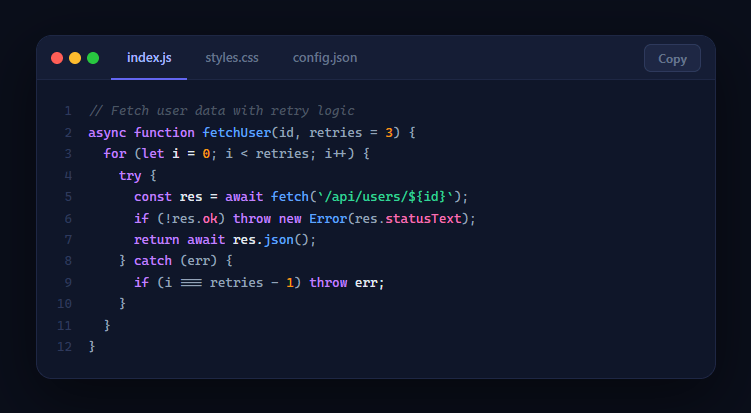
A multi-tab code block is among the most-copied UI patterns in developer documentation, tutorials, and component libraries. Showing multiple related files side by side in a single card (JavaScript, CSS, config) gives readers the full context of a code example without cluttering the page — for a single-file version, see the code block. This snippet provides a complete, dark-themed code viewer with macOS-style traffic-light dots, file-name tabs, token-based syntax highlighting, line numbers, and a copy button — no external libraries required.
Token-based syntax highlighting
Rather than running a regex over the raw source string (which is fragile and order-dependent), each file's content is stored as an array of token objects: { t: 'kw', v: 'const' } for a keyword, { t: 'str', v: '"hello"' } for a string, and so on. The renderer maps over these tokens, wrapping each in a span with the appropriate CSS class. Token types include kw (keyword), fn (function), str (string), num (number), prop (property/selector), cm (comment), and pun (punctuation/operator). This approach is robust, predictable, and trivially extensible with new token types.
Line numbers
The line number column is rendered from the token array length and displayed in a separate container floated left of the code block. User-select: none prevents line numbers from being selected on code copy. The two elements share a horizontal scroll container so the numbers and code always scroll together.
File tabs and active state
switchTab() updates the active tab indicator, clears the copy button label, and calls render() with the new index. The tabs container uses overflow-x: auto with hidden scrollbar so long file lists are scrollable on mobile without overflowing the card.
Copy button
copyCode() reconstructs the plain-text content from the token array by joining all v values, then uses the Clipboard API with an execCommand fallback. The button briefly shows "Copied!" so the user knows the action succeeded.
The macOS aesthetic
The three traffic-light dots in the top-left corner are a widely recognised signal for "this is a code editor or terminal window." They set the visual register immediately, making the code block feel like a real IDE window rather than a styled textarea, which increases perceived code quality and authority in documentation contexts.
Build with AI
Build, Understand, Optimize, and Extend It With AI
Rather than assuming the token-array approach is just "syntax highlighting", paste this snippet's HTML, CSS, and JS into an AI coding assistant like Claude and ask it to explain exactly why storing code as an array of { t, v } token objects avoids the ordering bugs that a regex-based highlighter would hit, and how the render() function distinguishes a plain string line, a token array line, and a single-token line. The same assistant can help optimize it — ask whether reconstructing the entire innerHTML string on every single tab switch is the right approach compared to pre-rendering all three files once and toggling visibility, especially if there were dozens of tabs. It's also useful for extending the component: ask it to add line-highlighting for specific "changed" lines in a diff-style view, support a fourth tokenizeable language by writing a small tokenizer function, or make the copy button copy only a selected range of lines instead of the whole file. Treat the code less like a finished artifact and more like a starting point for a conversation.
Prompt to recreate it
Copy this into your AI assistant of choice to build the effect from scratch, or as a jumping-off point for your own variant:
Build a "multi-tab code block" in plain HTML, CSS, and JavaScript — no syntax-highlighting library, no build step.

Requirements:
- Represent each file's source code as an array where every element is either a plain string (a comment-only or unstyled line), a single token object with a type and value, or an array of token objects representing one line split into multiple styled pieces — not a raw HTML string and not a single regex pass over the whole file.
- Support at least these token types with distinct colors: keyword, function name, string, number, property/selector, comment, and punctuation — and write a single render function that walks the current file's line array and wraps each token in a span with the matching CSS class, correctly handling all three line-shape cases (string, single token, array of tokens).
- HTML-escape every token's raw value before inserting it into the DOM (ampersands, angle brackets) so source code containing HTML-like characters displays correctly instead of being interpreted as markup.
- A row of file-name tabs above the code area; clicking a tab must update the active tab's visual state, reset the copy button's label back to its default, and re-render both the code and a matching line-number column for the newly selected file.
- A copy button that reconstructs the plain, unstyled source text of the currently active file by joining just the value fields of every token (not the rendered HTML with span tags), copies it via the Clipboard API with a textarea-based execCommand fallback for browsers without clipboard API support, and shows a temporary "Copied!" confirmation that reverts after a couple of seconds.
- Style the whole block like a code editor window: macOS-style traffic-light dots, a dark background, and a horizontally scrollable line-numbers-plus-code area for long lines, with line numbers marked non-selectable so they're never included in a text selection.
Want to tighten it up first? Run this prompt through the AI Prompt Studio to score it across 8 quality dimensions, catch anti-patterns, and tune the wording for Claude, ChatGPT, or Gemini before you paste it in.
Step by step
How to Use
- 1Switch filesClick any tab to view a different file. The code, line numbers, and syntax highlighting all update instantly.
- 2Copy the codeClick Copy to copy the plain-text source of the active file to your clipboard. The button briefly confirms with "Copied!".
- 3Add your own filesAppend an object to the files array with name, lang, and content (an array of token arrays). Tokenise your code into kw, fn, str, num, prop, cm, and pun spans.
- 4Swap the contentReplace the sample files array with your own code snippets. Each row in content is one line, expressed as an array of token objects.
- 5Style your themeChange the colour variables in the CSS to match your documentation site's colour palette. The dark default matches most developer docs.
- 6Export for your frameworkClick "React" for a component accepting a files prop with tab state in useState. Click "Vue" for a Vue 3 SFC with reactive activeIdx.
Real-world uses
Common Use Cases
Got questions?
Frequently Asked Questions
Regex-based highlighters apply patterns to a raw string in sequence, and the order matters — a string literal pattern can accidentally match inside a comment, and overlapping matches corrupt the output. Storing the code as a pre-tokenised array where each token has an explicit type gives deterministic output: the renderer just wraps each token in its class. Adding a new language is adding a new tokenisation function, not fighting regex order-of-operations.
copyCode() reconstructs the plain text by mapping over the token array and joining the v (value) fields of every token. This produces the exact source code without any span tags, so the clipboard gets clean, pasteable code. If your token model is different, join the text content of all spans in the code element using textContent instead.
Add a new entry to the files array with a name, a lang, and a content array. Tokenise the source manually (matching the existing token types) or write a small tokeniser function that walks the source string character by character, building token objects as it recognises keywords, strings, numbers, and comments for your target language. For languages not in the existing set, adding a custom token type with a new CSS colour class is trivial.
Accept a files prop (array of {name, content} objects). Keep activeIdx in useState. Render the tab bar from files.map(). The code area maps content[activeIdx] to JSX spans per token type. The copy handler reconstructs plain text from the active file's token array and calls navigator.clipboard.writeText. Use a key prop on the code container matching activeIdx to reset scroll on tab change. For the Tailwind version, click "Tailwind" to get the same markup with utility classes instead of a scoped stylesheet.