
Learn Coding Visually
Learn to code with interactive, live-preview playgrounds — HTML, CSS, JavaScript, React & more.
 HTML Playground42 lessons · Click-based · Live preview
 CSS PlaygroundLearn CSS with a live editor
 JavaScript Playground60 lessons · DOM · Async · Canvas
 React PlaygroundLearn React with a live code editor
 GSAP PlaygroundLearn GSAP animation interactively
 SVG Playground44 lessons · shapes · paths · animation
 SCSS Playground45 lessons · Sass modules · tokens
 Tailwind PlaygroundLearn Tailwind CSS with a live editor
 Bootstrap 5 Playground50 lessons · live preview
AI Streaming Response UI — HTML CSS JS Snippet
AI Streaming Response · Layouts · Plain HTML, CSS & JS · Live preview
What's included
Features
About this UI Snippet
AI Streaming Response — Token-by-Token Text Reveal, Safe HTML Slicing, Blinking Cursor & Stop Button
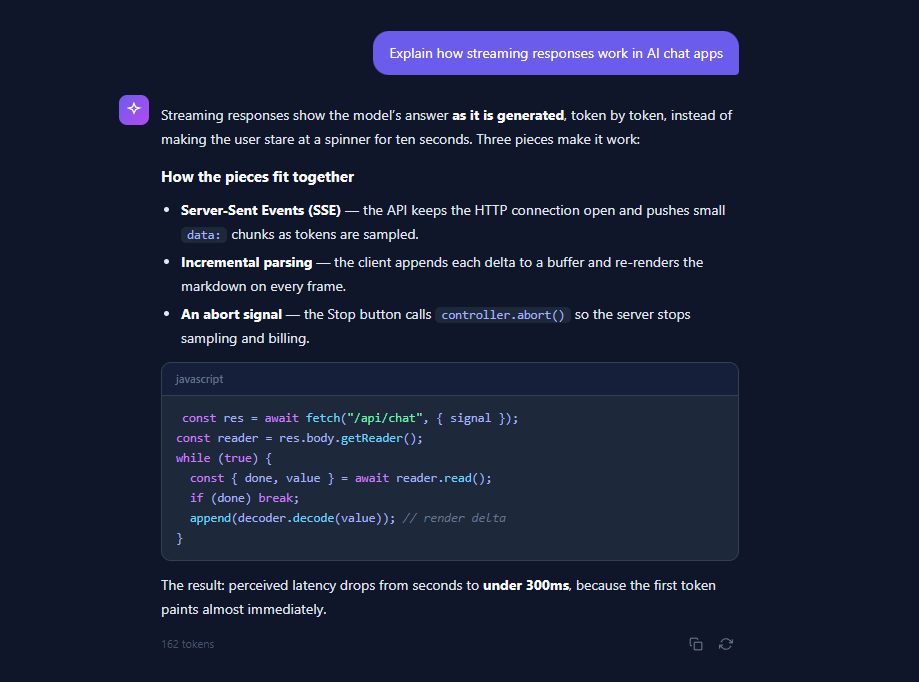
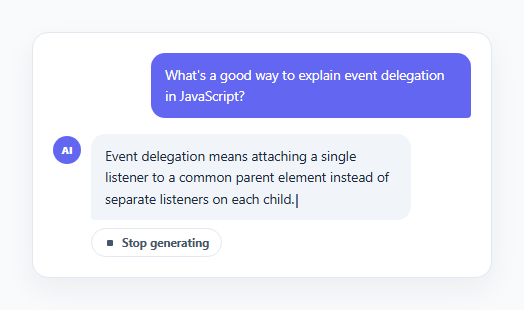
Every AI chat product — ChatGPT, Claude, Gemini, Perplexity — renders answers as a live stream rather than waiting for the full completion. The reason is perceived latency: a full response might take 5–20 seconds to generate, but the first token arrives in a few hundred milliseconds. Streaming that first token to the screen immediately makes the app feel instant. This snippet recreates the complete streaming-response experience in vanilla HTML, CSS, and JavaScript: rich text and code blocks revealed chunk by chunk, a blinking cursor that rides the leading edge of the text, a live token counter, a "Stop generating" button, and copy/regenerate actions that appear when the stream finishes.
How real streaming works: SSE deltas and the read loop
Production AI APIs stream via Server-Sent Events or chunked transfer encoding. The client calls fetch() with an AbortController signal, grabs res.body.getReader(), and loops on reader.read() — each resolved chunk is a small delta of new tokens which gets decoded and appended to a growing buffer. The UI then re-renders the buffer. This snippet simulates that pipeline with a setInterval that reveals 2–6 characters per 45ms tick (mimicking variable token sizes), so the visual behaviour — bursty, slightly irregular text arrival — matches what a real SSE stream looks like. Swapping the simulator for a real stream means replacing one function: the interval callback becomes the body of your reader.read() loop.
The hard problem: revealing HTML without breaking tags
Streaming plain text is trivial — el.textContent = buffer.slice(0, n). Streaming *rich* text is not: if the buffer contains <strong>token</strong> and you slice it at character 4, you inject the broken fragment <str into the DOM. This snippet solves it with a safeSlice() function that walks the source string tracking whether the pointer is inside a tag (between < and >). Only characters outside tags count toward the visible-character budget, and the cut position is always advanced past any half-open tag. The result is that bold text, inline code, and links materialise correctly mid-stream — the same technique production chat UIs use before they graduate to incremental markdown AST parsing.
Block-based rendering: paragraphs, lists, and code
The response is modelled as an ordered array of typed blocks — p, h3, ul, and code — mirroring how a markdown parser tokenises a completion. Paragraphs and headings stream character by character; list items stream one <li> at a time with per-item character reveal; code blocks stream line by line inside a styled .code-block container with a language label header and pre-highlighted syntax spans (.tok-kw for keywords, .tok-str for strings, .tok-fn for function calls, .tok-cm for comments). Line-by-line reveal for code is deliberate: character-level reveal inside syntax-highlighted markup looks glitchy because highlight spans pop in and out.
The cursor, the stop button, and the finished state
The blinking cursor is a single <span class="stream-cursor"> — an 8×15px rounded rectangle animated with steps(2, start) blink keyframes — that is *re-appended* to whichever element is currently receiving text, so it always rides the leading edge without any position math. While streaming, a pill-shaped "Stop generating" button with a red square icon is visible; clicking it calls finish(), which in a real app would also call controller.abort() to cancel the fetch and stop token billing. On finish, the cursor is removed and the footer fades in via an opacity transition, revealing the token count and the copy/regenerate icon buttons — the exact affordance sequence users know from ChatGPT and Claude.
Build with AI
Build, Understand, Optimize, and Extend It With AI
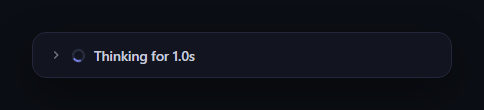
The most instructive part of this snippet is invisible until it breaks: paste the HTML, CSS, and JS into an AI assistant like Claude and ask it to explain what would happen if safeSlice() were replaced with a plain string slice — then ask it to show you the exact frame where "<strong>" gets cut in half. From there, ask it to upgrade the simulator into a real client: have it write the fetch + AbortController + getReader() loop against your actual chat endpoint, parse SSE data: lines, and keep the existing cursor and stop-button behaviour intact. It can also extend the block renderer — ask for a blockquote type, a streaming markdown table, or a collapsible "reasoning" section that streams before the answer like modern thinking models. If you are moving to React, ask it to convert the imperative DOM writes into a ref-based component with requestAnimationFrame batching and explain why per-token setState would tank performance. The snippet is a working scale model of a production streaming UI; an AI assistant is the fastest way to scale it up.
Prompt to recreate it
Copy this into your AI assistant of choice to build the effect from scratch, or as a jumping-off point for your own variant:
Build a ChatGPT-style streaming AI response UI in plain HTML, CSS, and JavaScript that replays a rich-text answer token by token — no frameworks, no API key required.

Requirements:
- Model the response as an ordered array of typed content blocks: paragraphs, a heading, a bulleted list, and a syntax-highlighted code block with a language label header, mirroring how a markdown AST would tokenise a model completion.
- Reveal paragraph and list text a few characters at a time on a fast interval with randomised chunk sizes so arrival feels bursty like real token sampling; reveal code blocks one whole line at a time to avoid highlight flicker.
- Inline HTML such as bold and inline code must stream without ever injecting a truncated tag: implement a tag-aware slice function that tracks whether the cut position is inside markup and only counts visible characters toward the reveal budget.
- A blinking block cursor must always sit at the leading edge of the newest text; achieve this by re-appending a single cursor element to whichever node is currently receiving characters rather than calculating positions.
- While streaming, show a centred pill-shaped "Stop generating" button with a red square icon that immediately finalises the response; explain in a comment where a real implementation would call AbortController.abort() to cancel the fetch and stop token billing.
- Track and display a live token count in tabular figures, and when the stream completes (or is stopped), remove the cursor and fade in a footer row containing the final count plus copy-to-clipboard and regenerate icon buttons — regenerate replays the stream from the start.
- Style it as a dark chat interface: right-aligned user bubble, gradient AI avatar, slate code blocks, and comment the code explaining exactly which function to replace with a real fetch + getReader() SSE consumption loop.
Want to tighten it up first? Run this prompt through the AI Prompt Studio to score it across 8 quality dimensions, catch anti-patterns, and tune the wording for Claude, ChatGPT, or Gemini before you paste it in.
Source Code
<div class="chat-wrap">
  <div class="user-msg">
    <div class="user-bubble">Explain how streaming responses work in AI chat apps</div>
  </div>

  <div class="ai-msg">
    <div class="ai-avatar">
      <svg width="16" height="16" viewBox="0 0 24 24" fill="none" stroke="currentColor" stroke-width="2"><path d="M12 2l2.4 5.6L20 9l-5.6 2.4L12 17l-2.4-5.6L4 9l5.6-1.4z"/></svg>
    </div>
    <div class="ai-body">
      <div class="ai-content" id="ai-content"></div>
      <div class="ai-footer" id="ai-footer">
        <span class="token-count" id="token-count">0 tokens</span>
        <div class="footer-actions" id="footer-actions">
          <button class="icon-btn" id="btn-copy" title="Copy response" aria-label="Copy response">
            <svg width="14" height="14" viewBox="0 0 24 24" fill="none" stroke="currentColor" stroke-width="2"><rect x="9" y="9" width="13" height="13" rx="2"/><path d="M5 15H4a2 2 0 0 1-2-2V4a2 2 0 0 1 2-2h9a2 2 0 0 1 2 2v1"/></svg>
          </button>
          <button class="icon-btn" id="btn-regen" title="Regenerate" aria-label="Regenerate">
            <svg width="14" height="14" viewBox="0 0 24 24" fill="none" stroke="currentColor" stroke-width="2"><path d="M23 4v6h-6M1 20v-6h6"/><path d="M3.5 9a9 9 0 0 1 14.9-3.4L23 10M1 14l4.6 4.4A9 9 0 0 0 20.5 15"/></svg>
          </button>
        </div>
      </div>
    </div>
  </div>

  <div class="stop-row" id="stop-row">
    <button class="stop-btn" id="btn-stop">
      <span class="stop-square"></span> Stop generating
    </button>
  </div>
</div>
* { box-sizing: border-box; margin: 0; padding: 0; }
body { font-family: system-ui, sans-serif; background: #0f172a; min-height: 100vh; display: flex; align-items: center; justify-content: center; padding: 24px; }
.chat-wrap { width: 100%; max-width: 620px; display: flex; flex-direction: column; gap: 20px; }
/* — User message — */
.user-msg { display: flex; justify-content: flex-end; }
.user-bubble {
background: #6366f1; color: #fff;
padding: 11px 16px; border-radius: 16px 16px 4px 16px;
font-size: 14px; line-height: 1.55; max-width: 80%;
}
/* — AI message — */
.ai-msg { display: flex; gap: 12px; align-items: flex-start; }
.ai-avatar {
width: 30px; height: 30px; border-radius: 8px; flex-shrink: 0;
background: linear-gradient(135deg, #6366f1, #a855f7);
display: flex; align-items: center; justify-content: center; color: #fff;
}
.ai-body { flex: 1; min-width: 0; }
.ai-content { font-size: 14px; color: #e2e8f0; line-height: 1.7; min-height: 24px; }
.ai-content h3 { font-size: 15px; color: #f8fafc; margin: 14px 0 6px; }
.ai-content p { margin: 8px 0; }
.ai-content strong { color: #f8fafc; }
.ai-content ul { margin: 8px 0 8px 20px; }
.ai-content li { margin: 4px 0; }
.ai-content code {
background: #1e293b; color: #a5b4fc;
padding: 1px 6px; border-radius: 5px;
font-family: 'SF Mono', Consolas, monospace; font-size: 12.5px;
}
/* Code block */
.ai-content .code-block {
background: #1e293b; border: 1px solid #334155;
border-radius: 10px; margin: 12px 0; overflow: hidden;
}
.ai-content .code-head {
display: flex; justify-content: space-between; align-items: center;
padding: 7px 14px; background: #16203a;
font-size: 11px; color: #64748b; font-weight: 600;
border-bottom: 1px solid #334155;
}
.ai-content .code-block pre {
padding: 12px 14px; overflow-x: auto;
font-family: 'SF Mono', Consolas, monospace; font-size: 12.5px;
line-height: 1.6; color: #cbd5e1;
}
.ai-content .tok-kw { color: #c084fc; }
.ai-content .tok-str { color: #86efac; }
.ai-content .tok-fn { color: #7dd3fc; }
.ai-content .tok-cm { color: #64748b; font-style: italic; }
/* Blinking streaming cursor */
.stream-cursor {
display: inline-block; width: 8px; height: 15px;
background: #a5b4fc; border-radius: 2px;
vertical-align: text-bottom; margin-left: 2px;
animation: blink 0.9s steps(2, start) infinite;
}
@keyframes blink { 50% { opacity: 0; } }
/* — Footer — */
.ai-footer {
display: flex; align-items: center; justify-content: space-between;
margin-top: 10px; opacity: 0; transition: opacity 0.3s;
}
.ai-footer.visible { opacity: 1; }
.token-count { font-size: 11px; color: #475569; font-variant-numeric: tabular-nums; }
.footer-actions { display: flex; gap: 4px; }
.icon-btn {
background: none; border: none; color: #64748b; cursor: pointer;
padding: 6px; border-radius: 7px; display: flex; transition: all 0.15s;
}
.icon-btn:hover { background: #1e293b; color: #e2e8f0; }
.icon-btn.copied { color: #4ade80; }
/* — Stop button — */
.stop-row { display: flex; justify-content: center; height: 36px; }
.stop-btn {
display: none; align-items: center; gap: 8px;
background: #1e293b; color: #cbd5e1;
border: 1px solid #334155; border-radius: 20px;
padding: 8px 18px; font-size: 12.5px; font-weight: 600;
font-family: inherit; cursor: pointer; transition: all 0.15s;
}
.stop-btn:hover { border-color: #6366f1; color: #fff; }
.stop-btn.visible { display: flex; }
.stop-square { width: 9px; height: 9px; background: #f87171; border-radius: 2px; }// The full response, expressed as ordered blocks. In production these arrive
// as server-sent-event deltas; here we replay them locally with the same timing feel.
const RESPONSE = [
{ type: 'p', text: 'Streaming responses show the model\u2019s answer <strong>as it is generated</strong>, token by token, instead of making the user stare at a spinner for ten seconds. Three pieces make it work:' },
{ type: 'h3', text: 'How the pieces fit together' },
{ type: 'ul', items: [
'<strong>Server-Sent Events (SSE)</strong> \u2014 the API keeps the HTTP connection open and pushes small <code>data:</code> chunks as tokens are sampled.',
'<strong>Incremental parsing</strong> \u2014 the client appends each delta to a buffer and re-renders the markdown on every frame.',
'<strong>An abort signal</strong> \u2014 the Stop button calls <code>controller.abort()</code> so the server stops sampling and billing.',
]},
{ type: 'code', lang: 'javascript', lines: [
'<span class="tok-kw">const</span> res = <span class="tok-kw">await</span> <span class="tok-fn">fetch</span>(<span class="tok-str">"/api/chat"</span>, { signal });',
'<span class="tok-kw">const</span> reader = res.body.<span class="tok-fn">getReader</span>();',
'<span class="tok-kw">while</span> (<span class="tok-kw">true</span>) {',
' <span class="tok-kw">const</span> { done, value } = <span class="tok-kw">await</span> reader.<span class="tok-fn">read</span>();',
' <span class="tok-kw">if</span> (done) <span class="tok-kw">break</span>;',
' <span class="tok-fn">append</span>(decoder.<span class="tok-fn">decode</span>(value)); <span class="tok-cm">// render delta</span>',
'}',
]},
{ type: 'p', text: 'The result: perceived latency drops from seconds to <strong>under 300ms</strong>, because the first token paints almost immediately.' },
];
const content = document.getElementById('ai-content');
const footer = document.getElementById('ai-footer');
const tokenEl = document.getElementById('token-count');
const stopBtn = document.getElementById('btn-stop');
let timer = null;
let tokens = 0;
function buildBlock(block) {
if (block.type === 'p') { const el = document.createElement('p'); return { el, text: block.text }; }
if (block.type === 'h3') { const el = document.createElement('h3'); return { el, text: block.text }; }
if (block.type === 'ul') {
const el = document.createElement('ul');
return { el, items: block.items };
}
if (block.type === 'code') {
const el = document.createElement('div');
el.className = 'code-block';
el.innerHTML = '<div class="code-head"><span>' + block.lang + '</span></div><pre><code></code></pre>';
return { el, lines: block.lines, codeEl: el.querySelector('code') };
}
}
// Stream one block at a time; inside a block, reveal a few characters per tick.
// Character-revealing rich HTML safely: we walk the source string and only cut
// at positions outside of tags, so partial markup is never injected.
function safeSlice(html, count) {
let visible = 0, i = 0, inTag = false;
while (i < html.length && visible < count) {
if (html[i] === '<') inTag = true;
if (!inTag) visible++;
if (html[i] === '>') inTag = false;
i++;
}
// never end mid-tag
while (i < html.length && inTag) { if (html[i] === '>') { i++; break; } i++; }
return html.slice(0, i);
}
function stream() {
clearInterval(timer);
content.innerHTML = '';
footer.classList.remove('visible');
stopBtn.classList.add('visible');
tokens = 0;
const cursor = document.createElement('span');
cursor.className = 'stream-cursor';
let bi = 0, ci = 0, li = 0;
let current = null;
timer = setInterval(() => {
if (!current) {
if (bi >= RESPONSE.length) return finish();
current = buildBlock(RESPONSE[bi]);
content.appendChild(current.el);
ci = 0; li = 0;
}
// simulate variable token sizes (2-6 chars per tick)
const chunk = 2 + Math.floor(Math.random() * 5);
tokens++;
tokenEl.textContent = tokens + ' tokens';
if (current.text !== undefined) {
ci += chunk;
current.el.innerHTML = safeSlice(current.text, ci);
current.el.appendChild(cursor);
if (ci >= stripLen(current.text)) { current = null; bi++; }
} else if (current.items) {
if (li >= current.items.length) { current = null; bi++; return; }
let liEl = current.el.children[li];
if (!liEl) { liEl = document.createElement('li'); current.el.appendChild(liEl); ci = 0; }
ci += chunk;
liEl.innerHTML = safeSlice(current.items[li], ci);
liEl.appendChild(cursor);
if (ci >= stripLen(current.items[li])) { li++; ci = 0; }
} else if (current.lines) {
if (li >= current.lines.length) { current = null; bi++; return; }
current.codeEl.innerHTML = current.lines.slice(0, li + 1).join('\n');
li++;
}
}, 45);
}
function stripLen(html) { return html.replace(/<[^>]*>/g, '').length; }
function finish() {
clearInterval(timer);
const c = content.querySelector('.stream-cursor');
if (c) c.remove();
stopBtn.classList.remove('visible');
footer.classList.add('visible');
}
stopBtn.addEventListener('click', finish);
document.getElementById('btn-regen').addEventListener('click', stream);
document.getElementById('btn-copy').addEventListener('click', function() {
navigator.clipboard.writeText(content.innerText).then(() => {
this.classList.add('copied');
setTimeout(() => this.classList.remove('copied'), 1200);
});
});
stream();Step by step
How to Use
- 1Watch the stream and use the controlsThe response begins streaming automatically: paragraphs and list items reveal character by character with the blinking cursor at the leading edge, and the code block reveals line by line. Click "Stop generating" to end the stream early, the copy icon to copy the response text to the clipboard, or the regenerate icon to replay the stream from the start. The token counter increments live as chunks arrive.
- 2Replace the simulator with a real SSE streamDelete the setInterval in stream() and use: const controller = new AbortController(); const res = await fetch("/api/chat", { method: "POST", body: JSON.stringify({ messages }), signal: controller.signal }); const reader = res.body.getReader(); const decoder = new TextDecoder(); while (true) { const { done, value } = await reader.read(); if (done) break; buffer += decoder.decode(value); render(buffer); }. Wire the Stop button to controller.abort().
- 3Edit the response contentThe RESPONSE array in the JS panel defines the blocks: { type: "p", text: "..." } for paragraphs, { type: "h3" } for headings, { type: "ul", items: [...] } for lists, and { type: "code", lang, lines } for code blocks. Inline HTML like <strong> and <code> is allowed in text — safeSlice() guarantees tags are never cut mid-stream. Add your own block types (blockquote, table) by extending buildBlock().
- 4Tune the streaming speed and feelTwo numbers control pacing: the 45 in setInterval(..., 45) is the tick interval, and "2 + Math.floor(Math.random() * 5)" is the characters revealed per tick. Real model output arrives at roughly 30–100 tokens/second; the defaults simulate ~60. For a slower, more deliberate feel use interval 60 with 1–3 chars; for a fast model use interval 30 with 4–8 chars.
- 5Render real markdown instead of pre-built blocksIn production the deltas are raw markdown, not typed blocks. Parse the accumulated buffer on every frame with a streaming-tolerant parser (marked or markdown-it both handle incomplete input gracefully), then set innerHTML through a sanitiser like DOMPurify — never inject unsanitised model output. Debounce parsing to once per animation frame with requestAnimationFrame so long responses stay at 60fps.
- 6Export to your frameworkClick JSX for a React component. Store the visible buffer in a ref (not state) and update the DOM imperatively or via a memoised markdown component — putting every delta through setState re-renders the whole tree hundreds of times per response. Pairs naturally with the AI Chat Interface shell, the AI Thinking Loader for the pre-first-token wait, and the Typing Indicator.
Real-world uses
Common Use Cases
Got questions?
Frequently Asked Questions
Server-side, create an API route that calls the model with streaming enabled and forwards the response body (in Next.js: return new Response(stream) from a route handler — both the OpenAI and Anthropic SDKs expose a .toReadableStream() or event iterator). Client-side, replace the setInterval simulator in stream() with the fetch + getReader() loop shown in the how-to-use section: accumulate decoder.decode(value) into a buffer, parse the SSE "data:" lines to extract each delta's text, append it to the current block, and re-render. Keep the AbortController in scope and call controller.abort() from the Stop button so the server stops generating — otherwise you pay for tokens the user never sees.
Because a naive slice can cut inside an HTML tag. If the buffer is "over <strong>300ms</strong>" and you slice at character 8, you inject "over <st" — the browser then either renders the literal text or silently drops it, and when the next frame completes the tag the DOM flashes. safeSlice() walks the string with an inTag boolean: characters between < and > never count toward the visible budget, and the slice point always advances to the closing > of any tag it lands inside. This gives glitch-free progressive reveal of bold, code, and links. For full markdown streaming in production, the more robust approach is re-parsing the whole buffer each frame with a forgiving parser plus DOMPurify sanitisation.
The naive approach — useState(buffer) updated on every delta — re-renders your component tree 500+ times per response and will drop frames on long answers. Instead, hold the buffer in a useRef and write to the DOM imperatively inside the read loop (contentRef.current.innerHTML = render(buffer)), or batch updates with requestAnimationFrame so React state changes at most 60 times per second: schedule setBuffer(ref.current) in an rAF callback if one is not already pending. Libraries like Vercel's AI SDK (useChat) implement exactly this batching internally, which is why they feel smooth.
Yes. The Tailwind export maps the classes directly: the user bubble is bg-indigo-500 text-white px-4 py-3 rounded-2xl rounded-br, the avatar is bg-gradient-to-br from-indigo-500 to-purple-500, code blocks are bg-slate-800 border border-slate-700 rounded-xl, and the cursor is an inline-block w-2 h-4 bg-indigo-300 animate-pulse span (or keep the custom steps() blink keyframe via a Tailwind plugin for the authentic terminal feel). In Angular, put the stream logic in a service that exposes a Signal<string> buffer, render with [innerHTML] piped through DomSanitizer.bypassSecurityTrustHtml only after DOMPurify, and run the interval outside the zone (NgZone.runOutsideAngular) so change detection is not triggered per token.