Learn Coding Visually
Learn to code with interactive, live-preview playgrounds — HTML, CSS, JavaScript, React & more.
 HTML Playground42 lessons · Click-based · Live preview
 CSS PlaygroundLearn CSS with a live editor
 JavaScript Playground60 lessons · DOM · Async · Canvas
 React PlaygroundLearn React with a live code editor
 GSAP PlaygroundLearn GSAP animation interactively
 SVG Playground44 lessons · shapes · paths · animation
 SCSS Playground45 lessons · Sass modules · tokens
 Tailwind PlaygroundLearn Tailwind CSS with a live editor
 Bootstrap 5 Playground50 lessons · live preview
Clipboard History Stack Widget — Multi-Item Copy History with Pinning
Clipboard History Stack Widget · Misc · Plain HTML, CSS & JS · Live preview
What's included
Features
About this UI Snippet
Clipboard History Stack Widget — Keeping More Than the Last Thing You Copied
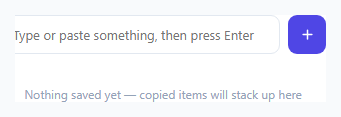
The operating system clipboard holds exactly one item at a time — copy something new, and whatever was there before is gone. This widget solves that limitation for in-app use: it keeps a running, de-duplicated stack of recently entered values, lets a user click any past entry to copy it back to the real system clipboard via the Clipboard API, and supports pinning specific entries so they survive being pushed out once the list fills up.
Writing to the real OS clipboard, not just an internal list
Clicking any history item calls navigator.clipboard.writeText(entry.text) — a real, async browser API call that puts the text on the actual system clipboard, so the user can immediately paste it into any other application, not just somewhere else on this page. The call is wrapped in a try/catch because navigator.clipboard requires a secure context (HTTPS or localhost) and can reject if permission isn't granted — the UI still gives a visual "copied" flash even if the underlying write silently fails, but production code should surface that failure more explicitly if it matters for your use case.
De-duplication moves, rather than doubles, an existing entry
Before adding a new entry, addEntry() filters out any existing item with the exact same text, then unshifts the new one to the front — so re-copying something already in history doesn't create a duplicate row; it simply promotes that entry back to the top of the stack, matching how a real "recently used" list should behave.
Pinned items are protected from the max-size eviction
The stack is capped at MAX_ITEMS (8), and when a new entry pushes the list over that limit, the trimming logic explicitly separates out any pinned items sitting past the cutoff and re-appends them — const pinnedTail = history.slice(MAX_ITEMS).filter((h) => h.pinned) — so a pinned entry never silently disappears just because several newer, unpinned items were added after it. Pinned items are also sorted to the top of the rendered list on every render, independent of insertion order.
Handling paste directly, not just typed Enter
Beyond typing text and pressing Enter, the input also listens for a native paste event and reads the pasted text directly from e.clipboardData, automatically adding it to the history stack — so pasting something into the widget (from an external copy elsewhere) is itself enough to capture it into the running history, matching how a user would expect a "clipboard manager"-style tool to behave.
Build with AI
Build, Understand, Optimize, and Extend It With AI
Ask an AI assistant to explain why navigator.clipboard.writeText() requires a secure context and how that should shape error handling in a real product versus this demo's silent-fail fallback. It's also worth asking for a version that persists history to localStorage across sessions, or one that groups entries by source (typed vs pasted) and supports keyboard-only navigation (arrow keys plus Enter to copy) through the stack.
Prompt to recreate it
Copy this into your AI assistant of choice to build the effect from scratch, or as a jumping-off point for your own variant:
Build a clipboard history widget in HTML, CSS and vanilla JavaScript that keeps a running stack of recently entered or pasted text snippets, with real copy-back functionality — no external libraries.

Requirements:
- A text input where pressing Enter, clicking an "add" button, or pasting directly into the field all add the current text as a new entry to the top of a history list.
- Clicking any entry in the history list must copy its text to the real system clipboard using the Clipboard API (navigator.clipboard.writeText), wrapped in error handling so a failure (e.g. insecure context) doesn't throw.
- Adding an entry whose text already exists in the history must move the existing entry to the top instead of creating a duplicate row.
- Each entry needs a "pin" toggle and a "remove" button; pinned entries must always render above unpinned ones and must be explicitly protected from any max-size eviction logic that trims the oldest entries once the list grows past a configurable limit.
- Show a brief visual confirmation (e.g. a flash animation) when an entry is successfully copied, and correctly replay that animation even on repeated clicks of the same entry.
- Show an empty-state message only when the history list is genuinely empty.
Want to tighten it up first? Run this prompt through the AI Prompt Studio to score it across 8 quality dimensions, catch anti-patterns, and tune the wording for Claude, ChatGPT, or Gemini before you paste it in.
Source Code
<div class="demo">
  <div class="clip-widget">
    <div class="clip-input-row">
      <input type="text" id="clipInput" placeholder="Type or paste something, then press Enter" />
      <button id="clipAddBtn" title="Add to history">
        <svg width="15" height="15" viewBox="0 0 24 24" fill="none" stroke="currentColor" stroke-width="2.4" stroke-linecap="round"><path d="M12 5v14M5 12h14"/></svg>
      </button>
    </div>

    <div class="clip-list" id="clipList">
      <p class="clip-empty" id="clipEmpty">Nothing saved yet — copied items will stack up here</p>
    </div>
  </div>
</div>
* { box-sizing: border-box; margin: 0; padding: 0; }
body { font-family: system-ui, sans-serif; background: #f8fafc; display: flex; align-items: center; justify-content: center; min-height: 100vh; padding: 24px; }
.clip-widget { width: 360px; max-width: 100%; background: #fff; border: 1px solid #e2e8f0; border-radius: 16px; padding: 16px; display: flex; flex-direction: column; gap: 12px; }
.clip-input-row { display: flex; gap: 8px; }
.clip-input-row input { flex: 1; padding: 10px 12px; border: 1.5px solid #e2e8f0; border-radius: 9px; font-size: 13px; font-family: inherit; }
.clip-input-row input:focus-visible { outline: none; border-color: #6366f1; box-shadow: 0 0 0 3px rgba(99,102,241,0.15); }
.clip-input-row button { background: #4f46e5; color: #fff; border: none; width: 38px; border-radius: 9px; cursor: pointer; display: flex; align-items: center; justify-content: center; flex-shrink: 0; }
.clip-input-row button:hover { background: #4338ca; }
.clip-list { display: flex; flex-direction: column; gap: 6px; max-height: 260px; overflow-y: auto; }
.clip-empty { font-size: 12px; color: #94a3b8; text-align: center; padding: 20px 8px; }
.clip-item { display: flex; align-items: center; gap: 10px; background: #f8fafc; border: 1px solid #e2e8f0; border-radius: 10px; padding: 9px 10px; cursor: pointer; transition: background 0.15s, border-color 0.15s; }
.clip-item:hover { background: #eef2ff; border-color: #c7d2fe; }
.clip-item.pinned { border-color: #fbbf24; background: #fffbeb; }
.clip-item-text { flex: 1; font-size: 12.5px; color: #334155; white-space: nowrap; overflow: hidden; text-overflow: ellipsis; }
.clip-item-actions { display: flex; gap: 4px; flex-shrink: 0; }
.clip-item-actions button { background: none; border: none; padding: 4px; cursor: pointer; color: #94a3b8; border-radius: 6px; display: flex; }
.clip-item-actions button:hover { background: #e2e8f0; color: #475569; }
.clip-item-actions .pin-btn.active { color: #d97706; }
.clip-copied-flash { animation: flash 0.5s ease; }
@keyframes flash { 0% { background: #d1fae5; } 100% { background: #f8fafc; } }const input = document.getElementById('clipInput');
const addBtn = document.getElementById('clipAddBtn');
const list = document.getElementById('clipList');
const emptyMsg = document.getElementById('clipEmpty');
const MAX_ITEMS = 8;
let history = []; // { text, pinned }
function render() {
list.querySelectorAll('.clip-item').forEach((el) => el.remove());
emptyMsg.style.display = history.length === 0 ? 'block' : 'none';
// Pinned items stay at top, otherwise most-recent-first order is preserved as-is
const ordered = [...history].sort((a, b) => (b.pinned === a.pinned ? 0 : b.pinned ? 1 : -1));
ordered.forEach((entry) => {
const item = document.createElement('div');
item.className = 'clip-item' + (entry.pinned ? ' pinned' : '');
const text = document.createElement('span');
text.className = 'clip-item-text';
text.textContent = entry.text;
const actions = document.createElement('div');
actions.className = 'clip-item-actions';
const pinBtn = document.createElement('button');
pinBtn.className = 'pin-btn' + (entry.pinned ? ' active' : '');
pinBtn.title = entry.pinned ? 'Unpin' : 'Pin to top';
pinBtn.innerHTML = '<svg width="13" height="13" viewBox="0 0 24 24" fill="currentColor"><path d="M12 2 9 9l-7 1 5 5-1 7 6-4 6 4-1-7 5-5-7-1-3-7Z"/></svg>';
pinBtn.addEventListener('click', (e) => {
e.stopPropagation();
entry.pinned = !entry.pinned;
render();
});
const delBtn = document.createElement('button');
delBtn.title = 'Remove';
delBtn.innerHTML = '<svg width="13" height="13" viewBox="0 0 24 24" fill="none" stroke="currentColor" stroke-width="2.2" stroke-linecap="round"><path d="M6 6l12 12M18 6 6 18"/></svg>';
delBtn.addEventListener('click', (e) => {
e.stopPropagation();
history = history.filter((h) => h !== entry);
render();
});
actions.append(pinBtn, delBtn);
item.append(text, actions);
item.addEventListener('click', async () => {
try {
await navigator.clipboard.writeText(entry.text);
} catch (err) {
// Clipboard API unavailable (e.g. insecure context) — fail silently, UI still flashes
}
item.classList.remove('clip-copied-flash');
void item.offsetWidth;
item.classList.add('clip-copied-flash');
});
list.appendChild(item);
});
}
function addEntry(text) {
const trimmed = text.trim();
if (!trimmed) return;
// De-duplicate: move an existing matching entry to the front instead of adding a copy
history = history.filter((h) => h.text !== trimmed);
history.unshift({ text: trimmed, pinned: false });
if (history.length > MAX_ITEMS) {
// Never evict pinned items when trimming to the max size
const pinnedTail = history.slice(MAX_ITEMS).filter((h) => h.pinned);
history = history.slice(0, MAX_ITEMS).concat(pinnedTail);
}
render();
}
input.addEventListener('keydown', (e) => {
if (e.key === 'Enter') {
addEntry(input.value);
input.value = '';
}
});
addBtn.addEventListener('click', () => {
addEntry(input.value);
input.value = '';
input.focus();
});
input.addEventListener('paste', (e) => {
const pasted = (e.clipboardData || window.clipboardData).getData('text');
if (pasted && input.value === '') {
setTimeout(() => { addEntry(pasted); input.value = ''; }, 0);
}
});
render();Step by step
How to Use
- 1Type text and press Enter, or paste directlyBoth actions add the text as a new entry at the top of the history stack.
- 2Click any history item to re-copy itThis calls the real Clipboard API, writing the text back to your system clipboard for pasting anywhere.
- 3Pin important entriesClick the pin icon on any item to keep it protected from being evicted once the stack reaches its max size.
- 4Adjust the max stack sizeChange the MAX_ITEMS constant in the JS panel to hold more or fewer entries before older ones get trimmed.
- 5Persist history across reloads (optional)Wrap the history array reads/writes with localStorage.getItem/setItem calls if you want the stack to survive a page refresh.
Real-world uses
Common Use Cases
Got questions?
Frequently Asked Questions
Yes — it calls navigator.clipboard.writeText(), the standard browser Clipboard API, which writes to the actual system clipboard so the text can be pasted into any other application, not just elsewhere on the same page.
The write call is wrapped in a try/catch, so the widget won't throw an unhandled error — it still shows the visual copy-confirmation flash, though a production implementation should probably surface an explicit failure message in that case rather than failing silently.
No — addEntry() first removes any existing entry with identical text before adding the new one to the front, so re-copying something already in history just moves it back to the top rather than duplicating it.
No — the max-size trimming logic explicitly excludes pinned items from eviction by re-appending any pinned entries that would otherwise fall past the size cutoff. A pinned item is only removed if the user explicitly clicks its delete button or unpins it first.
Yes — a native paste event listener on the input reads the pasted text directly from the clipboard event and adds it to the history stack automatically, in addition to the normal type-and-press-Enter flow.
Not by default in this snippet — the history array lives only in memory for the current page load. Add localStorage reads/writes around the history array if you need it to survive a reload.