You Might Also Like
Learn Coding Visually
Learn to code with interactive, live-preview playgrounds — HTML, CSS, JavaScript, React & more.
 HTML Playground42 lessons · Click-based · Live preview
 CSS PlaygroundLearn CSS with a live editor
 JavaScript Playground60 lessons · DOM · Async · Canvas
 React PlaygroundLearn React with a live code editor
 GSAP PlaygroundLearn GSAP animation interactively
 SVG Playground44 lessons · shapes · paths · animation
 SCSS Playground45 lessons · Sass modules · tokens
 Tailwind PlaygroundLearn Tailwind CSS with a live editor
 Bootstrap 5 Playground50 lessons · live preview
Code Snippet Tabs — Free HTML CSS JS Install Snippet
Code Snippet Tabs · Layouts · Plain HTML, CSS & JS · Live preview
What's included
Features
About this UI Snippet
Code Snippet Tabs — Package-Manager Command Block with Sliding Ink and Copy
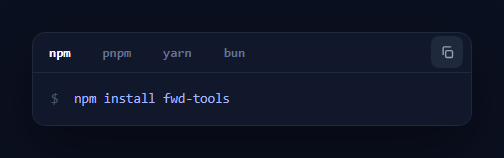
Every library's README and docs page shows the install command, and the polished version offers it for each package manager — npm, pnpm, yarn, bun — behind tabs, with a one-click copy button. This component is that block: a dark terminal-style card with a sliding "ink" underline that animates between tabs, a copy button with success feedback, keyboard navigation, and a monospace command line with a shell prompt. It is built in HTML, CSS, and vanilla JavaScript, and it is the snippet you put at the top of a docs page or component example.
The sliding ink underline
Instead of giving each tab its own static underline, a single .cst-ink element slides beneath the active tab. moveInk() reads the active tab's offsetLeft and offsetWidth and sets the ink's transform: translateX() and width to match. Because both properties are CSS-transitioned, the underline glides and resizes from one tab to the next — the signature animated-tabs effect from Vercel, Stripe, and shadcn/ui docs. Measuring from the live DOM means the ink is always correct regardless of tab label widths (npm and pnpm are different lengths), and a resize listener re-aligns it if the layout reflows.
Swapping the command
The four commands live in a COMMANDS array. Selecting a tab sets the <code> element's textContent to the matching command, toggles the .active class and aria-selected across the tabs, and moves the ink. Using textContent (not innerHTML) means the command is inserted as plain text — safe and correct, with no HTML parsing — which matters when a command could contain characters like & or quotes.
Copy with clipboard fallback
The copy button writes the active command to the clipboard with navigator.clipboard.writeText(), wrapped in a try/catch that falls back to a hidden-textarea document.execCommand('copy') for insecure contexts or sandboxed iframes. On success it adds a .copied class that swaps the copy icon for a green checkmark via pure CSS, and a debounced setTimeout reverts it after 1.7 seconds. Crucially, copy always reads from the COMMANDS array for the current tab, so you copy exactly what is shown — switch to yarn, hit copy, and you get the yarn command.
Keyboard-navigable tablist
The tabs are role="tab" inside a role="tablist", and the active tab carries aria-selected="true". Arrow Left and Arrow Right move the selection (with wrap-around via modulo) and shift focus to the next tab, the keyboard pattern expected of a tablist. Every tab is a real <button>, so the whole control is operable without a mouse.
The terminal aesthetic
The card uses a deep navy background, a monospace font stack (ui-monospace, 'SF Mono', Menlo), a dimmed $ shell prompt that is user-select: none so it is not copied when a user selects the line by hand, and an indigo-tinted command colour. The whole thing reads as a real terminal snippet, which is the visual language developers expect for install instructions.
Customisation
Edit the tab labels and the COMMANDS array together (keep them in the same order). You are not limited to install commands — use it for any set of equivalent snippets (cURL vs fetch vs axios, or SQL dialects). For multi-line code, swap the single <code> for a block and the same select/copy logic applies. Swap the #818cf8 ink and #a5b4fc command colour for your palette, and adjust the ink transition duration to taste.
Build with AI
Build, Understand, Optimize, and Extend It With AI
Rather than assuming the sliding underline is just a CSS transition, paste this snippet's HTML, CSS, and JS into an AI coding assistant like Claude and ask it to explain exactly why moveInk() reads offsetLeft and offsetWidth live from the DOM instead of hardcoding pixel positions per tab, and why that specific approach handles tabs of different label lengths (npm versus pnpm) correctly. The same assistant can help you stress-test it — ask what happens to the ink's position if the window is resized while a tab other than the first is active, and confirm the resize listener actually recomputes from the currently active tab rather than resetting to the first one. It's also a good partner for extending the block: ask it to persist the last-selected package manager in localStorage so returning visitors see their preferred tab, add a fifth tab for a different tool, or generalize the component so COMMANDS could hold multi-line snippets instead of single install commands. Treat the code less like a finished artifact and more like a starting point for a conversation.
Prompt to recreate it
Copy this into your AI assistant of choice to build the effect from scratch, or as a jumping-off point for your own variant:
Build a "package manager install command" tab block with a sliding underline in plain HTML, CSS, and JavaScript — no animation library.

Requirements:
- A row of tab buttons (e.g. npm, pnpm, yarn, bun) inside a proper ARIA tablist (role="tablist" on the container, role="tab" and aria-selected on each button), with a single shared underline element positioned absolutely beneath the tabs rather than each tab having its own border.
- On selecting a tab, measure that specific tab's offsetLeft and offsetWidth directly from the live DOM and set the shared underline's transform (translateX) and width to match those exact values, with both properties CSS-transitioned so the underline visibly glides and resizes between tabs of different label lengths.
- Re-run that same measurement on window resize so the underline stays correctly aligned under the currently active tab if the layout reflows, not just on initial load.
- Store the actual commands in a plain array indexed to match the tab order, and when a tab is selected, set the displayed command via textContent (not innerHTML) so special characters in a command render literally with no HTML parsing risk.
- Support Left and Right arrow key navigation while focus is inside the tablist: pressing an arrow key must move the selection with wrap-around at both ends, update the displayed command and underline, and move keyboard focus to the newly selected tab.
- A copy button that always copies the array entry corresponding to the currently active tab (not scraped text from the page) via the Clipboard API with a hidden-textarea execCommand fallback, swapping its icon to a checkmark for roughly 1.5-2 seconds using a debounced timer that's cleared and restarted on rapid repeated clicks.
- Style a shell-prompt character before the command as non-selectable (so manually selecting the command text with a mouse never includes the prompt).
Want to tighten it up first? Run this prompt through the AI Prompt Studio to score it across 8 quality dimensions, catch anti-patterns, and tune the wording for Claude, ChatGPT, or Gemini before you paste it in.
Step by step
How to Use
- 1Paste the HTML, CSS, and JSA dark command card renders with npm/pnpm/yarn/bun tabs, an ink underline under npm, and a copy button.
- 2Click a package-manager tabThe ink underline slides and resizes to the new tab and the command line updates to that manager's install command.
- 3Use arrow keysFocus a tab and press Left/Right to move between managers with wrap-around; focus follows the selection.
- 4Click copyThe current command is copied to the clipboard and the icon turns into a green checkmark for ~1.7 seconds.
- 5Set your commandsEdit the tab labels and the COMMANDS array (same order) to your package name or any equivalent snippet set.
- 6Theme itSwap the ink and command colours and adjust the ink transition duration to match your docs.
Real-world uses
Common Use Cases
Got questions?
Frequently Asked Questions
moveInk() reads the active tab's offsetWidth and offsetLeft directly from the rendered DOM and sets the ink's width and translateX to match. Because it measures live, the underline fits labels of any length (npm vs pnpm vs yarn) exactly, and a window resize listener re-runs it so the ink stays aligned if the layout changes. Both width and transform are CSS-transitioned, which produces the glide-and-resize effect.
Yes. The copy handler reads COMMANDS[active] — the command for the currently selected tab — rather than scraping the DOM, so it always copies exactly what is shown. Switch to yarn and copy, and you get the yarn command. The async Clipboard API does the copy, with a hidden-textarea execCommand fallback for environments where the Clipboard API is blocked.
Yes. Replace the single <code> line with a multi-line <pre><code> block and set its textContent per tab from the COMMANDS array (each entry can contain newlines). The tab switching, ink animation, keyboard nav, and copy logic are unchanged — only the content area grows. For syntax highlighting, run a highlighter over the code after each select().
The prompt span has user-select: none, so a manual text selection skips it — you select only the command, not the shell prefix. The copy button is even safer because it copies from the COMMANDS array, which never includes the prompt at all. Both paths give you a clean, paste-ready command.
Hold the active index in state and render the command from a COMMANDS array. For the sliding ink, use a ref to the active tab and an effect that, when the index changes, reads its offsetLeft/offsetWidth and sets the ink style — re-run it on resize too. The copy handler copies COMMANDS[active] with the same fallback. Bind .active/aria-selected to index comparisons; the keyboard handler attaches to the tablist's onKeyDown.