

Learn Coding Visually
Learn to code with interactive, live-preview playgrounds — HTML, CSS, JavaScript, React & more.
 HTML Playground42 lessons · Click-based · Live preview
 CSS PlaygroundLearn CSS with a live editor
 JavaScript Playground60 lessons · DOM · Async · Canvas
 React PlaygroundLearn React with a live code editor
 GSAP PlaygroundLearn GSAP animation interactively
 SVG Playground44 lessons · shapes · paths · animation
 SCSS Playground45 lessons · Sass modules · tokens
 Tailwind PlaygroundLearn Tailwind CSS with a live editor
 Bootstrap 5 Playground50 lessons · live preview
Flip Grid Shuffle — Free GSAP Flip Plugin Snippet
Flip Grid Shuffle · Layouts · Plain HTML, CSS & JS · Live preview
What's included
Features
About this UI Snippet
Flip Grid Shuffle — Animate DOM Reorders With GSAP’s Flip Plugin
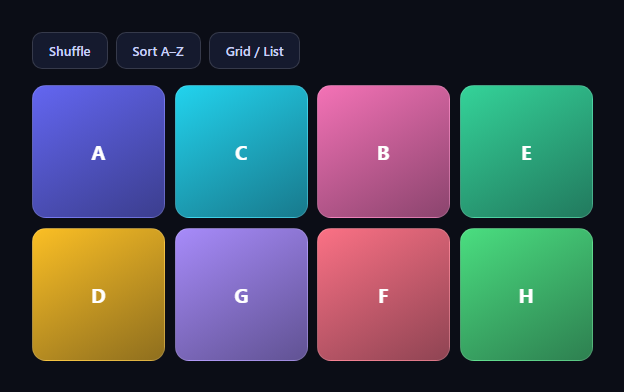
Reordering DOM elements normally teleports them — items snap to their new positions with no continuity, and users lose track of what went where. GSAP's Flip plugin fixes that with the FLIP technique (First, Last, Invert, Play): this snippet shuffles a grid, sorts it alphabetically, and toggles between grid and list layouts, with every item gliding to its new home. The plugin is free on the GSAP CDN since version 3.13.
The three-line FLIP pattern
Every operation runs through one helper: Flip.getState('.fgs-item') records each item's current position and size (First), the callback mutates the DOM instantly — reordering children or toggling a class (Last) — and Flip.from(state, {...}) measures the new layout, transforms every item back to where it *was*, then animates those transforms to zero (Invert, Play). The genius of FLIP is that the browser does the layout math: you never compute a coordinate, you just describe the end state in normal DOM/CSS terms.
Why absolute: true matters during reorders
While items animate between layout slots, they must overlap and cross each other freely. absolute: true temporarily pulls each animating item out of the document flow (position: absolute with its captured coordinates), so mid-flight items don't push their siblings around and CSS grid can't re-wrap the ones still moving. When the animation completes, Flip restores the real layout properties — the DOM ends exactly as if you'd mutated it with no animation at all.
The shuffle is a real Fisher–Yates on live nodes
The shuffle button runs a Fisher–Yates pass directly on grid.children, using insertBefore swaps so the actual DOM order changes — not just visual positions. That's deliberate: because the DOM is the source of truth, the sort button can then read textContent and localeCompare its way to alphabetical order, and any server-rendered or framework-driven re-render will agree with what's on screen.
Grid-to-list is just a class toggle
The layout switch adds .is-list, which changes grid-template-columns to one column, drops the aspect ratio, and reveals each item's label. Flip doesn't care *why* geometry changed — a class flip, a reorder, a container resize mid-capture all animate identically. That's what makes the plugin composable: one withFlip() wrapper serves all three buttons.
Stagger turns simultaneous motion into choreography
stagger: 0.03 offsets each item's start by 30ms in DOM order, so reorders ripple across the grid instead of moving as one rigid mass. With power2.inOut easing, items accelerate out of their old slots and settle into new ones — reading as deliberate rearrangement rather than physics chaos.
What Flip tracks (and what it doesn't)
By default Flip animates position and size. It can also track and animate specific properties via props: 'backgroundColor,borderRadius' in getState if your class toggle changes them — useful when list items restyle. Anything not tracked simply snaps, which is often correct for things like display on the labels here.
Customizing it
Add filtering (set display: none inside the mutation and pass onEnter/onLeave handlers for fade-ins), animate a real product grid, or drive the mutation from data. Related: shared-element expansion in flip card modal, filterable layouts in portfolio filter grid, entrance choreography in scroll reveal grid, and drag-based ordering in drag sort list.
Build with AI
Build, Understand, Optimize, and Extend It With AI
You don't have to reconstruct the FLIP sandwich in your head to see why this works. Paste this snippet's HTML, CSS, and JS into an AI coding assistant like Claude and ask it to explain exactly what Flip.getState('.fgs-item') captures before the mutation runs inside withFlip, and why absolute: true is necessary specifically during the shuffle and sort operations but could be dropped for a pure resize. The same assistant can help optimize it — ask whether calling Flip.getState on the whole '.fgs-item' selector every time is wasteful when only a subset of items actually move, or whether the stagger value should scale with item count instead of staying fixed at 30ms. It's also a great way to extend the pattern: have it add a filter operation that fades items out with onLeave before removing them, drive the shuffle and sort from a real data array instead of live DOM order, or add drag-to-reorder that still runs through the same withFlip wrapper. Treat the code less like a finished artifact and more like a starting point for a conversation.
Prompt to recreate it
Copy this into your AI assistant of choice to build the effect from scratch, or as a jumping-off point for your own variant:
Build a "shuffle, sort, and grid/list toggle" DOM reordering demo in plain HTML, CSS, and JavaScript using GSAP and its Flip plugin (load both from a CDN) — every reorder must animate, nothing may simply teleport.

Requirements:
- A grid of at least eight items rendered with CSS Grid (repeat(4, 1fr) columns), each item showing a letter and a label, each carrying its own accent color via an inline CSS custom property.
- Three buttons: Shuffle, Sort A-Z, and a Grid/List toggle.
- Write a single reusable helper function that takes a "mutate" callback: it must call Flip.getState on all grid items first, then run the mutate callback synchronously (which performs the actual DOM change), then call Flip.from on the captured state with absolute: true, a stagger of roughly 30ms, and an inOut easing, so GSAP animates every item from its old position/size to wherever the mutation left it.
- The Shuffle button's mutate callback must perform a real Fisher-Yates shuffle directly on the live DOM children (using insertBefore or appendChild to physically reorder the nodes), not just a visual reshuffle — the actual DOM order must change so that reading textContent afterward reflects the new order.
- The Sort button's mutate callback must read each item's text content, sort the live DOM nodes alphabetically with localeCompare, and re-append them in that order.
- The toggle button's mutate callback must simply add or remove one CSS class on the grid container that switches grid-template-columns from four columns down to a single column and restyles each item from a square tile to a full-width row — the class alone must drive the entire layout change; Flip must animate the resulting difference in size and position.
- All three operations must reuse the exact same wrapper helper function — do not write separate animation code per button.
Want to tighten it up first? Run this prompt through the AI Prompt Studio to score it across 8 quality dimensions, catch anti-patterns, and tune the wording for Claude, ChatGPT, or Gemini before you paste it in.
Source Code
<div class="fgs-wrap">
  <div class="fgs-bar">
    <button class="fgs-btn" id="fgsShuffle">Shuffle</button>
    <button class="fgs-btn" id="fgsSort">Sort A–Z</button>
    <button class="fgs-btn" id="fgsToggle">Grid / List</button>
  </div>
  <div class="fgs-grid" id="fgsGrid">
    <div class="fgs-item" style="--fc:#6366f1"><b>A</b><span>Aurora</span></div>
    <div class="fgs-item" style="--fc:#22d3ee"><b>C</b><span>Comet</span></div>
    <div class="fgs-item" style="--fc:#f472b6"><b>B</b><span>Borealis</span></div>
    <div class="fgs-item" style="--fc:#34d399"><b>E</b><span>Eclipse</span></div>
    <div class="fgs-item" style="--fc:#fbbf24"><b>D</b><span>Draco</span></div>
    <div class="fgs-item" style="--fc:#a78bfa"><b>G</b><span>Galaxy</span></div>
    <div class="fgs-item" style="--fc:#fb7185"><b>F</b><span>Flare</span></div>
    <div class="fgs-item" style="--fc:#4ade80"><b>H</b><span>Halo</span></div>
  </div>
</div>*{box-sizing:border-box;margin:0;padding:0}
body{font-family:system-ui,-apple-system,sans-serif;background:#0b0d16;color:#fff;min-height:100vh;display:flex;align-items:center;justify-content:center;padding:24px}
.fgs-wrap{width:min(560px,94vw)}
.fgs-bar{display:flex;gap:8px;margin-bottom:16px}
.fgs-btn{padding:9px 16px;border-radius:10px;border:1px solid rgba(255,255,255,.14);background:#151a2e;color:#c9d2f8;font:600 13px system-ui;cursor:pointer;transition:background .2s}
.fgs-btn:hover{background:#1d2440}
.fgs-grid{display:grid;grid-template-columns:repeat(4,1fr);gap:10px}
.fgs-grid.is-list{grid-template-columns:1fr}
.fgs-item{display:flex;align-items:center;justify-content:center;gap:10px;aspect-ratio:1;border-radius:14px;background:linear-gradient(150deg,var(--fc),color-mix(in srgb,var(--fc) 55%,#0b0d16));border:1px solid rgba(255,255,255,.14);font-size:15px;cursor:default;will-change:transform}
.fgs-grid.is-list .fgs-item{aspect-ratio:auto;height:52px;justify-content:flex-start;padding:0 18px}
.fgs-item b{font-size:20px}
.fgs-item span{display:none;opacity:.9;font-weight:600}
.fgs-grid.is-list .fgs-item span{display:inline}gsap.registerPlugin(Flip);
var grid = document.getElementById('fgsGrid');
// The FLIP pattern: capture state → mutate the DOM instantly →
// let Flip animate from the captured state to the new layout.
function withFlip(mutate) {
var state = Flip.getState('.fgs-item');
mutate();
Flip.from(state, {
duration: 0.65,
ease: 'power2.inOut',
stagger: 0.03,
absolute: true
});
}
document.getElementById('fgsShuffle').addEventListener('click', function () {
withFlip(function () {
var items = Array.prototype.slice.call(grid.children);
for (var i = items.length - 1; i > 0; i--) {
var j = Math.floor(Math.random() * (i + 1));
grid.insertBefore(items[j], items[i].nextSibling);
var t = items[i]; items[i] = items[j]; items[j] = t;
}
});
});
document.getElementById('fgsSort').addEventListener('click', function () {
withFlip(function () {
Array.prototype.slice.call(grid.children)
.sort(function (a, b) {
return a.textContent.trim().localeCompare(b.textContent.trim());
})
.forEach(function (el) { grid.appendChild(el); });
});
});
document.getElementById('fgsToggle').addEventListener('click', function () {
withFlip(function () { grid.classList.toggle('is-list'); });
});Step by step
How to Use
- 1Add the GSAP CDNsInclude gsap and the Flip plugin from the CDN panel.
- 2Paste HTML, CSS, and JSAn 8-item gradient grid renders with three controls.
- 3Click ShuffleItems glide to randomized positions with a ripple stagger.
- 4Click Sort A–ZThe grid reorders alphabetically, every move animated.
- 5Toggle Grid / ListItems morph size and position into a single column.
- 6Wire your own dataAny DOM mutation inside withFlip() animates for free.
Real-world uses
Common Use Cases
Got questions?
Frequently Asked Questions
Flip.getState records each item's position and size, your code then mutates the DOM instantly (reorder children, toggle a class), and Flip.from measures the new layout, applies transforms that visually put items back where they were, and animates those transforms to zero. The browser's own layout engine supplies every coordinate — you never calculate positions.
During the animation, Flip temporarily positions items absolutely at their captured coordinates so mid-flight elements can overlap and cross without pushing siblings around or letting the grid re-wrap them. You want it whenever items exchange places in a flowing layout (reorders, filters); for a pure container resize where order is stable you can omit it.
Because the DOM stays the source of truth: after the shuffle, the sort button can localeCompare textContent in actual document order, screen readers see the true sequence, and a framework re-render won't disagree with the pixels. Transform-only shuffles look identical but leave the DOM lying about its own order.
Yes — pass props: 'backgroundColor,borderRadius' (any comma list) to Flip.getState, and Flip will record and tween those properties alongside position and size. Untracked properties simply snap to their new values, which is usually right for discrete changes like the display of the list labels here.
Flip.from accepts onEnter and onLeave callbacks receiving the elements that had no "before" or no "after" state — typically you fade/scale them in or out there while surviving items glide. Set the entering items' final styles in the mutation (e.g. remove display: none) and let onEnter animate their opacity from 0.
Capture state before the framework mutates the DOM, then run Flip.from after the re-render commits — in React that's useLayoutEffect after a state change (capture in the event handler, animate in the effect); Vue's nextTick and Angular's afterNextRender serve the same role. Register the plugin once at module scope and revert a gsap.context on unmount. Tailwind classes drive the layouts perfectly since Flip only reads geometry.