Source Code
<div class="wrap">
  <div class="list-header">
    <h2 class="list-title">Reorder tasks</h2>
    <span class="list-hint">Drag items to reorder</span>
  </div>

  <ul class="sort-list" id="sort-list">
    <li class="sort-item" draggable="true">
      <div class="drag-handle" aria-hidden="true">
        <svg width="14" height="14" viewBox="0 0 24 24" fill="none" stroke="currentColor" stroke-width="2" stroke-linecap="round"><circle cx="9" cy="7" r="1.2" fill="currentColor"/><circle cx="9" cy="12" r="1.2" fill="currentColor"/><circle cx="9" cy="17" r="1.2" fill="currentColor"/><circle cx="15" cy="7" r="1.2" fill="currentColor"/><circle cx="15" cy="12" r="1.2" fill="currentColor"/><circle cx="15" cy="17" r="1.2" fill="currentColor"/></svg>
      </div>
      <div class="item-icon" style="background:rgba(99,102,241,0.12);color:#6366f1">📋</div>
      <div class="item-body">
        <div class="item-title">Design system audit</div>
        <div class="item-meta">Due tomorrow · High priority</div>
      </div>
      <span class="item-badge high">High</span>
    </li>
    <li class="sort-item" draggable="true">
      <div class="drag-handle" aria-hidden="true">
        <svg width="14" height="14" viewBox="0 0 24 24" fill="none" stroke="currentColor" stroke-width="2" stroke-linecap="round"><circle cx="9" cy="7" r="1.2" fill="currentColor"/><circle cx="9" cy="12" r="1.2" fill="currentColor"/><circle cx="9" cy="17" r="1.2" fill="currentColor"/><circle cx="15" cy="7" r="1.2" fill="currentColor"/><circle cx="15" cy="12" r="1.2" fill="currentColor"/><circle cx="15" cy="17" r="1.2" fill="currentColor"/></svg>
      </div>
      <div class="item-icon" style="background:rgba(16,185,129,0.12);color:#10b981">🔧</div>
      <div class="item-body">
        <div class="item-title">Fix API rate limiting</div>
        <div class="item-meta">Due in 3 days · Medium</div>
      </div>
      <span class="item-badge med">Med</span>
    </li>
    <li class="sort-item" draggable="true">
      <div class="drag-handle" aria-hidden="true">
        <svg width="14" height="14" viewBox="0 0 24 24" fill="none" stroke="currentColor" stroke-width="2" stroke-linecap="round"><circle cx="9" cy="7" r="1.2" fill="currentColor"/><circle cx="9" cy="12" r="1.2" fill="currentColor"/><circle cx="9" cy="17" r="1.2" fill="currentColor"/><circle cx="15" cy="7" r="1.2" fill="currentColor"/><circle cx="15" cy="12" r="1.2" fill="currentColor"/><circle cx="15" cy="17" r="1.2" fill="currentColor"/></svg>
      </div>
      <div class="item-icon" style="background:rgba(245,158,11,0.12);color:#f59e0b">📝</div>
      <div class="item-body">
        <div class="item-title">Write release notes</div>
        <div class="item-meta">Due next week · Low</div>
      </div>
      <span class="item-badge low">Low</span>
    </li>
    <li class="sort-item" draggable="true">
      <div class="drag-handle" aria-hidden="true">
        <svg width="14" height="14" viewBox="0 0 24 24" fill="none" stroke="currentColor" stroke-width="2" stroke-linecap="round"><circle cx="9" cy="7" r="1.2" fill="currentColor"/><circle cx="9" cy="12" r="1.2" fill="currentColor"/><circle cx="9" cy="17" r="1.2" fill="currentColor"/><circle cx="15" cy="7" r="1.2" fill="currentColor"/><circle cx="15" cy="12" r="1.2" fill="currentColor"/><circle cx="15" cy="17" r="1.2" fill="currentColor"/></svg>
      </div>
      <div class="item-icon" style="background:rgba(236,72,153,0.12);color:#ec4899">🎨</div>
      <div class="item-body">
        <div class="item-title">Update brand colours</div>
        <div class="item-meta">Due this month · Low</div>
      </div>
      <span class="item-badge low">Low</span>
    </li>
    <li class="sort-item" draggable="true">
      <div class="drag-handle" aria-hidden="true">
        <svg width="14" height="14" viewBox="0 0 24 24" fill="none" stroke="currentColor" stroke-width="2" stroke-linecap="round"><circle cx="9" cy="7" r="1.2" fill="currentColor"/><circle cx="9" cy="12" r="1.2" fill="currentColor"/><circle cx="9" cy="17" r="1.2" fill="currentColor"/><circle cx="15" cy="7" r="1.2" fill="currentColor"/><circle cx="15" cy="12" r="1.2" fill="currentColor"/><circle cx="15" cy="17" r="1.2" fill="currentColor"/></svg>
      </div>
      <div class="item-icon" style="background:rgba(14,165,233,0.12);color:#0ea5e9">🚀</div>
      <div class="item-body">
        <div class="item-title">Deploy v2.1 release</div>
        <div class="item-meta">Due tomorrow · High priority</div>
      </div>
      <span class="item-badge high">High</span>
    </li>
  </ul>

  <div class="order-display" id="order-display"></div>
</div>
* { box-sizing: border-box; margin: 0; padding: 0; }
body { font-family: system-ui, sans-serif; background: #f8fafc; min-height: 100vh; display: flex; align-items: center; justify-content: center; padding: 32px 24px; }
.wrap { width: 100%; max-width: 480px; display: flex; flex-direction: column; gap: 14px; }
.list-header { display: flex; justify-content: space-between; align-items: baseline; }
.list-title { font-size: 16px; font-weight: 800; color: #0f172a; }
.list-hint { font-size: 12px; color: #94a3b8; }
.sort-list { list-style: none; display: flex; flex-direction: column; gap: 6px; }
.sort-item { display: flex; align-items: center; gap: 12px; background: #fff; border: 1.5px solid #e2e8f0; border-radius: 12px; padding: 12px 14px; cursor: default; transition: box-shadow 0.15s, border-color 0.15s, background 0.15s; user-select: none; }
.sort-item.dragging { opacity: 0.5; border-color: #6366f1; box-shadow: 0 4px 20px rgba(99,102,241,0.2); }
.sort-item.drag-over { border-color: #6366f1; background: rgba(99,102,241,0.04); box-shadow: 0 0 0 2px rgba(99,102,241,0.12); }
.drag-handle { color: #cbd5e1; cursor: grab; flex-shrink: 0; display: flex; align-items: center; padding: 2px; border-radius: 4px; transition: color 0.12s; }
.drag-handle:hover { color: #94a3b8; }
.drag-handle:active { cursor: grabbing; }
.item-icon { width: 36px; height: 36px; border-radius: 9px; display: flex; align-items: center; justify-content: center; font-size: 16px; flex-shrink: 0; }
.item-body { flex: 1; min-width: 0; }
.item-title { font-size: 13px; font-weight: 600; color: #0f172a; white-space: nowrap; overflow: hidden; text-overflow: ellipsis; }
.item-meta { font-size: 11px; color: #94a3b8; margin-top: 2px; }
.item-badge { font-size: 10px; font-weight: 700; padding: 2px 8px; border-radius: 20px; flex-shrink: 0; }
.item-badge.high { background: rgba(239,68,68,0.1); color: #dc2626; }
.item-badge.med { background: rgba(245,158,11,0.1); color: #b45309; }
.item-badge.low { background: rgba(100,116,139,0.1); color: #64748b; }
.order-display { font-size: 11px; color: #94a3b8; text-align: center; padding: 6px; min-height: 24px; font-family: monospace; }const list = document.getElementById('sort-list');
let dragSrc = null;
list.querySelectorAll('.sort-item').forEach(addHandlers);
function addHandlers(item) {
item.addEventListener('dragstart', e => {
dragSrc = item;
item.classList.add('dragging');
e.dataTransfer.effectAllowed = 'move';
e.dataTransfer.setData('text/html', item.innerHTML);
});
item.addEventListener('dragend', () => {
item.classList.remove('dragging');
list.querySelectorAll('.sort-item').forEach(i => i.classList.remove('drag-over'));
showOrder();
});
item.addEventListener('dragover', e => {
e.preventDefault();
e.dataTransfer.dropEffect = 'move';
if (item !== dragSrc) {
list.querySelectorAll('.sort-item').forEach(i => i.classList.remove('drag-over'));
item.classList.add('drag-over');
}
});
item.addEventListener('drop', e => {
e.stopPropagation();
if (dragSrc !== item) {
// Insert dragSrc before or after target based on mouse Y position
const rect = item.getBoundingClientRect();
const midY = rect.top + rect.height / 2;
if (e.clientY < midY) {
list.insertBefore(dragSrc, item);
} else {
list.insertBefore(dragSrc, item.nextSibling);
}
}
return false;
});
}
function showOrder() {
const titles = [...list.querySelectorAll('.item-title')].map((el,i) => (i+1)+'. '+el.textContent);
document.getElementById('order-display').textContent = titles.join(' · ');
}
showOrder();Learn Coding Visually
Learn to code with interactive, live-preview playgrounds — HTML, CSS, JavaScript, React & more.
 HTML Playground42 lessons · Click-based · Live preview
 CSS PlaygroundLearn CSS with a live editor
 JavaScript Playground60 lessons · DOM · Async · Canvas
 React PlaygroundLearn React with a live code editor
 GSAP PlaygroundLearn GSAP animation interactively
 SVG Playground44 lessons · shapes · paths · animation
 SCSS Playground45 lessons · Sass modules · tokens
 Tailwind PlaygroundLearn Tailwind CSS with a live editor
 Bootstrap 5 Playground50 lessons · live preview
Drag to Sort List — Free HTML CSS JS Snippet
Drag to Sort List · Layouts · Plain HTML, CSS & JS · Live preview
What's included
Features
About this UI Snippet
Drag to Sort List — HTML5 Drag-and-Drop Reordering, Drop Position by Mouse Y & Order Display
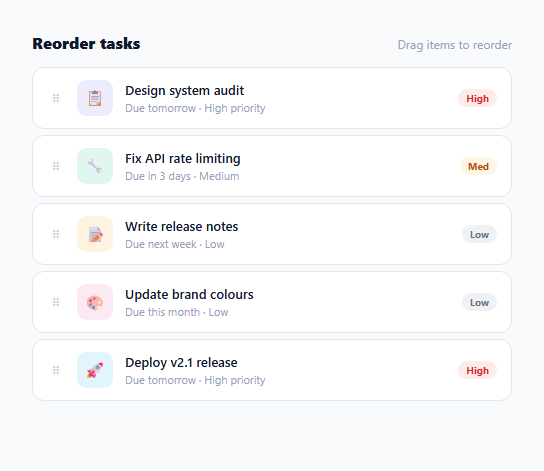
A sortable drag-and-drop list lets users reorder items by dragging — a common pattern in task management apps (the column-based kanban board is the multi-list cousin), priority queues, settings pages, and any interface where order matters to the user. This snippet implements a complete drag-to-sort list using only the HTML5 Drag and Drop API: no SortableJS, no jQuery UI, no library. Drag an item, see an indigo drop-target indicator, and release to reorder — the new order displays below.
The HTML5 Drag and Drop API
Each list item has draggable="true". The dragstart event stores the dragged item in dragSrc and adds .dragging (opacity: 0.5). dragover on each item fires continuously while dragging over it — e.preventDefault() is required to allow the drop. dragend fires when the drag completes (drop or cancel) and cleans up all visual states.
Mouse Y position for drop before/after
The drop handler computes where to insert: const rect = item.getBoundingClientRect(); const midY = rect.top + rect.height / 2. If e.clientY < midY (cursor in the top half), insert before; otherwise insert after. This makes the drop position feel natural — the item appears where the cursor is pointing, not always at the same position relative to the target.
The drag-over indicator
All .drag-over classes are cleared on each dragover event before the new target gets its class. This prevents stale highlights. The .drag-over class adds an indigo border and subtle background tint — a clear visual signal of where the item will drop.
The order display
After each drop, showOrder() reads the current DOM order of .item-title elements and displays a numbered list below the sortable list. In production, read the reordered IDs and POST to your API: const ids = [...items].map(el => el.dataset.id).
Ghost image note
The browser creates a ghost image of the dragged element during drag. For a custom ghost, use e.dataTransfer.setDragImage(customEl, 0, 0) in dragstart. The ghost is automatically cleaned up after dragend.
Touch support
The HTML5 Drag and Drop API does not work on touch screens. For touch support, use the pointer events API: pointerdown records startY, pointermove updates transform: translateY, pointerup calculates the drop position and moves the DOM element.
Serialising the new order
After each drop, serialise the current DOM order to an array of IDs for your API. Add a data-id attribute to each .sort-item: <li class="sort-item" draggable="true" data-id="task-123">. In showOrder() or the dragend handler: const ids = [...list.querySelectorAll(".sort-item")].map(el => el.dataset.id); fetch("/api/reorder", { method: "PATCH", body: JSON.stringify({ ids }) }). This is the standard pattern for persisting sort order to any backend.
Build with AI
Build, Understand, Optimize, and Extend It With AI
Instead of tracing the five drag events yourself, paste this snippet's HTML, CSS, and JS into an AI coding assistant like Claude and ask it to explain exactly why e.preventDefault() inside the dragover handler is required for the drop event to ever fire, and how comparing e.clientY against an item's midpoint (rect.top plus half its height) decides whether insertBefore targets the item itself or its nextSibling. The same assistant can help you optimize it, for instance checking whether clearing every .drag-over class on every single dragover firing across all items is wasteful compared to only touching the previous and current target. It's also useful for extending the list: ask it to make only the drag-handle icon draggable instead of the whole row, add a brief highlight animation on the item that just moved, or wire showOrder() to POST the reordered IDs to a real backend endpoint. Treat the code less like a finished artifact and more like a starting point for a conversation.
Prompt to recreate it
Copy this into your AI assistant of choice to build the effect from scratch, or as a jumping-off point for your own variant:
Build a drag-and-drop reorderable list in plain HTML, CSS, and JavaScript using only the native HTML5 Drag and Drop API — no SortableJS, no other library.

Requirements:
- A list of items, each with the draggable="true" attribute, where dragstart stores a reference to the dragged element in an outer variable and adds a visual dragging class (reduced opacity) to it, and sets dataTransfer.effectAllowed to "move".
- A dragover handler on every item that calls e.preventDefault() (required for the drop event to ever fire) and, only when the hovered item is not the dragged item itself, clears any existing drop-target highlight class from all items before adding it to the currently hovered item, so exactly one item is ever highlighted as the drop target at a time.
- A drop handler that computes the target item's vertical midpoint from its bounding rect, and inserts the dragged element before the target if the drop's clientY is above that midpoint, or after the target (before its nextSibling) if below it, so the drop position feels like it follows the cursor rather than always landing in a fixed spot relative to the target.
- A dragend handler that removes the dragging class from the source item and every drop-target highlight class from the whole list, regardless of whether the drag ended in a successful drop or was cancelled.
- After every successful reorder, read the current DOM order of the list items and update a visible readout showing the new sequence, structured so it would be trivial to instead serialize item IDs and send them to a backend endpoint to persist the order.
Want to tighten it up first? Run this prompt through the AI Prompt Studio to score it across 8 quality dimensions, catch anti-patterns, and tune the wording for Claude, ChatGPT, or Gemini before you paste it in.
Step by step
How to Use
- 1Drag any item by its handle or anywhere on the rowThe dragged item dims to 50% opacity. An indigo border appears on the item where you are hovering. Release to drop — the item inserts before or after the target based on where your cursor is vertically.
- 2See the new order displayed belowAfter each drop, the current order of item titles appears below the list. In production, read the DOM order to get the reordered IDs and sync to your backend.
- 3Add data-id attributes for backend syncAdd data-id="123" to each .sort-item element. After a drop, collect IDs in order: const ids = [...list.querySelectorAll(".sort-item")].map(el => el.dataset.id). POST this array to your API to persist the new order.
- 4Make only the drag handle draggableRemove draggable="true" from the .sort-item. Add it only to the .drag-handle: <div class="drag-handle" draggable="true">. Listen for dragstart on the handle and traverse to the parent li to get the item reference.
- 5Add animation on reorderAdd CSS animation to items after they move: in the drop handler, add item.classList.add("just-moved") and remove it after 300ms. Style .just-moved with a brief background flash: background: rgba(99,102,241,0.1); transition: background 0.3s.
- 6Export in your formatClick "HTML" for a standalone file, "JSX" for a React component with state array reordering, or "Tailwind" for a React + Tailwind CSS version.
Real-world uses
Common Use Cases
Got questions?
Frequently Asked Questions
By default, HTML elements are not valid drop targets — dropping anything on them cancels the drag. Calling e.preventDefault() inside dragover signals to the browser "this element accepts drops". Without it, the dragover event fires but the drop event never fires. This is the single most common reason drag-and-drop implementations fail: missing e.preventDefault() in dragover.
After each drop, collect the current item IDs: const ids = [...list.querySelectorAll(".sort-item")].map(el => el.dataset.id). POST to your API: fetch("/api/reorder", { method: "PATCH", headers: {"Content-Type":"application/json"}, body: JSON.stringify({ ids }) }). On the server, update the order column for each item to match its array index. Return 200 on success. Call this in showOrder() or in a debounced version to avoid too many requests during rapid reordering.
The HTML5 Drag and Drop API does not fire on touch screens. For touch support: listen to touchstart (record initial y), touchmove (translate the item with touch y offset, find the element under touch using document.elementFromPoint()), touchend (insert before/after the element under the final touch point). Alternatively, use the pointer events API: pointerdown, pointermove, pointerup with pointercapture — more reliable across devices. SortableJS handles this automatically if you prefer a library.
Click "JSX" to download. Manage items as an array in useState. On drop, compute the new order: const newItems = [...items]; const src = newItems.splice(dragSrcIndex, 1)[0]; newItems.splice(dropTargetIndex, 0, src); setItems(newItems). Track dragSrcIndex with useRef. Derive drop position (before/after) from the mouse Y vs target midpoint. Render the array to list items with a key prop set to item.id for correct React reconciliation during reorder.