Source Code
<div class="scene">
  <div class="player">
    <div class="album" id="album">
      <div class="vinyl" id="vinyl"></div>
    </div>
    <div class="meta">
      <div class="track-info">
        <div class="track-name">Midnight City</div>
        <div class="artist">M83</div>
      </div>
      <button class="like-btn" id="like" onclick="toggleLike()">
        <svg width="16" height="16" viewBox="0 0 24 24" fill="none" stroke="currentColor" stroke-width="2"><path d="M20.84 4.61a5.5 5.5 0 0 0-7.78 0L12 5.67l-1.06-1.06a5.5 5.5 0 0 0-7.78 7.78l1.06 1.06L12 21.23l7.78-7.78 1.06-1.06a5.5 5.5 0 0 0 0-7.78z"/></svg>
      </button>
    </div>
    <div class="progress-wrap">
      <span class="time" id="cur">1:24</span>
      <div class="progress-track" id="track" onclick="seek(event)">
        <div class="progress-fill" id="fill" style="width:35%">
          <div class="thumb"></div>
        </div>
      </div>
      <span class="time">3:53</span>
    </div>
    <div class="controls">
      <button class="ctrl-btn" title="Shuffle">
        <svg width="16" height="16" viewBox="0 0 24 24" fill="none" stroke="currentColor" stroke-width="2"><polyline points="16 3 21 3 21 8"/><line x1="4" y1="20" x2="21" y2="3"/><polyline points="21 16 21 21 16 21"/><line x1="4" y1="4" x2="9" y2="9"/></svg>
      </button>
      <button class="ctrl-btn prev" onclick="prev()">
        <svg width="20" height="20" viewBox="0 0 24 24" fill="currentColor"><polygon points="19 20 9 12 19 4 19 20"/><line x1="5" y1="19" x2="5" y2="5"/></svg>
      </button>
      <button class="play-btn" id="play" onclick="togglePlay()">
        <svg id="play-icon" width="22" height="22" viewBox="0 0 24 24" fill="currentColor"><polygon points="5 3 19 12 5 21 5 3"/></svg>
      </button>
      <button class="ctrl-btn next" onclick="next()">
        <svg width="20" height="20" viewBox="0 0 24 24" fill="currentColor"><polygon points="5 4 15 12 5 20 5 4"/><line x1="19" y1="5" x2="19" y2="19"/></svg>
      </button>
      <button class="ctrl-btn" title="Repeat">
        <svg width="16" height="16" viewBox="0 0 24 24" fill="none" stroke="currentColor" stroke-width="2"><polyline points="17 1 21 5 17 9"/><path d="M3 11V9a4 4 0 0 1 4-4h14"/><polyline points="7 23 3 19 7 15"/><path d="M21 13v2a4 4 0 0 1-4 4H3"/></svg>
      </button>
    </div>
    <div class="volume-row">
      <svg width="14" height="14" viewBox="0 0 24 24" fill="none" stroke="currentColor" stroke-width="2"><polygon points="11 5 6 9 2 9 2 15 6 15 11 19 11 5"/></svg>
      <input type="range" class="vol-slider" value="70" oninput="setVol(this.value)" />
      <svg width="14" height="14" viewBox="0 0 24 24" fill="none" stroke="currentColor" stroke-width="2"><polygon points="11 5 6 9 2 9 2 15 6 15 11 19 11 5"/><path d="M15.54 8.46a5 5 0 0 1 0 7.07"/><path d="M19.07 4.93a10 10 0 0 1 0 14.14"/></svg>
    </div>
    <audio id="audio" preload="metadata"></audio>
  </div>
</div>
* { box-sizing: border-box; margin: 0; padding: 0; }
body { font-family: system-ui, sans-serif; background: #0f172a; display: flex; align-items: center; justify-content: center; min-height: 100vh; }
.scene { display: flex; align-items: center; justify-content: center; }
.player {
width: 300px; background: #1e293b;
border-radius: 24px; padding: 24px;
box-shadow: 0 30px 80px rgba(0,0,0,0.5);
border: 1px solid rgba(255,255,255,0.07);
display: flex; flex-direction: column; gap: 18px;
}
.album {
width: 100%; aspect-ratio: 1;
border-radius: 16px; overflow: hidden;
background: linear-gradient(135deg, #6366f1, #8b5cf6, #ec4899, #f97316);
background-size: 300% 300%;
animation: albumShift 6s ease infinite;
position: relative; display: flex; align-items: center; justify-content: center;
box-shadow: 0 8px 32px rgba(99,102,241,0.4);
}
@keyframes albumShift { 0%,100%{background-position:0% 50%} 50%{background-position:100% 50%} }
.vinyl {
width: 60px; height: 60px; border-radius: 50%;
background: radial-gradient(circle at 50% 50%, #1e293b 12px, transparent 12px),
repeating-conic-gradient(rgba(255,255,255,0.04) 0deg, rgba(0,0,0,0.08) 10deg);
border: 3px solid rgba(255,255,255,0.1);
animation: spin 4s linear infinite paused;
}
@keyframes spin { to { transform: rotate(360deg); } }
.vinyl.spinning { animation-play-state: running; }
.meta { display: flex; align-items: center; justify-content: space-between; }
.track-name { font-size: 16px; font-weight: 700; color: #f1f5f9; }
.artist { font-size: 13px; color: #64748b; margin-top: 2px; }
.like-btn { background: none; border: none; cursor: pointer; color: #475569; padding: 4px; transition: color 0.15s; }
.like-btn.liked { color: #ef4444; }
.like-btn.liked svg { fill: #ef4444; }
.progress-wrap { display: flex; align-items: center; gap: 8px; }
.time { font-size: 11px; color: #475569; white-space: nowrap; }
.progress-track { flex: 1; height: 4px; background: #334155; border-radius: 4px; cursor: pointer; position: relative; }
.progress-fill { height: 100%; background: linear-gradient(90deg, #6366f1, #8b5cf6); border-radius: 4px; position: relative; transition: width 0.5s linear; }
.thumb { position: absolute; right: -5px; top: 50%; transform: translateY(-50%); width: 10px; height: 10px; border-radius: 50%; background: #fff; box-shadow: 0 0 6px rgba(99,102,241,0.8); }
.controls { display: flex; align-items: center; justify-content: space-between; }
.ctrl-btn { background: none; border: none; cursor: pointer; color: #475569; padding: 6px; border-radius: 8px; transition: color 0.15s, background 0.15s; }
.ctrl-btn:hover { color: #f1f5f9; background: #334155; }
.play-btn {
width: 52px; height: 52px; border-radius: 50%;
background: linear-gradient(135deg, #6366f1, #8b5cf6);
border: none; cursor: pointer; color: #fff;
display: flex; align-items: center; justify-content: center;
box-shadow: 0 4px 20px rgba(99,102,241,0.5);
transition: transform 0.15s, box-shadow 0.15s;
}
.play-btn:hover { transform: scale(1.05); box-shadow: 0 6px 24px rgba(99,102,241,0.7); }
.volume-row { display: flex; align-items: center; gap: 8px; }
.volume-row svg { flex-shrink: 0; color: #475569; }
.vol-slider { flex: 1; -webkit-appearance: none; height: 3px; background: #334155; border-radius: 3px; outline: none; cursor: pointer; accent-color: #6366f1; }const tracks = [
{ name: 'Sunset Drive', artist: 'SoundHelix', src: 'https://www.soundhelix.com/examples/mp3/SoundHelix-Song-1.mp3' },
{ name: 'Night Runner', artist: 'SoundHelix', src: 'https://www.soundhelix.com/examples/mp3/SoundHelix-Song-2.mp3' },
{ name: 'Open Road', artist: 'SoundHelix', src: 'https://www.soundhelix.com/examples/mp3/SoundHelix-Song-3.mp3' },
];
let idx = 0, playing = false;
const audio = document.getElementById('audio');
const vinyl = document.getElementById('vinyl');
const fill = document.getElementById('fill');
const cur = document.getElementById('cur');
function format(sec) {
sec = Math.max(0, Math.floor(sec));
return Math.floor(sec / 60) + ':' + String(sec % 60).padStart(2, '0');
}
function load(i, autoplay) {
idx = i;
const t = tracks[i];
document.querySelector('.track-name').textContent = t.name;
document.querySelector('.artist').textContent = t.artist;
document.querySelectorAll('.time')[1].textContent = '0:00';
fill.style.width = '0%';
cur.textContent = '0:00';
audio.src = t.src;
if (autoplay) { audio.play(); }
}
function togglePlay() {
if (audio.paused) { audio.play(); } else { audio.pause(); }
}
function setPlayingUI(isPlaying) {
playing = isPlaying;
vinyl.classList.toggle('spinning', playing);
document.getElementById('play-icon').innerHTML = playing
? '<rect x="6" y="4" width="4" height="16"/><rect x="14" y="4" width="4" height="16"/>'
: '<polygon points="5 3 19 12 5 21 5 3"/>';
}
audio.addEventListener('play', () => setPlayingUI(true));
audio.addEventListener('pause', () => setPlayingUI(false));
audio.addEventListener('ended', () => next(true));
audio.addEventListener('loadedmetadata', () => {
document.querySelectorAll('.time')[1].textContent = format(audio.duration);
});
audio.addEventListener('timeupdate', () => {
if (!audio.duration) return;
fill.style.width = (audio.currentTime / audio.duration * 100) + '%';
cur.textContent = format(audio.currentTime);
});
function next(autoplay) { load((idx + 1) % tracks.length, autoplay !== undefined ? autoplay : playing); }
function prev() { load((idx - 1 + tracks.length) % tracks.length, playing); }
function seek(e) {
if (!audio.duration) return;
const rect = e.currentTarget.getBoundingClientRect();
const pct = Math.min(1, Math.max(0, (e.clientX - rect.left) / rect.width));
audio.currentTime = pct * audio.duration;
}
function toggleLike() { document.getElementById('like').classList.toggle('liked'); }
function setVol(v) { audio.volume = v / 100; }
setVol(70);
load(0, false);Learn Coding Visually
Learn to code with interactive, live-preview playgrounds — HTML, CSS, JavaScript, React & more.
 HTML Playground42 lessons · Click-based · Live preview
 CSS PlaygroundLearn CSS with a live editor
 JavaScript Playground60 lessons · DOM · Async · Canvas
 React PlaygroundLearn React with a live code editor
 GSAP PlaygroundLearn GSAP animation interactively
 SVG Playground44 lessons · shapes · paths · animation
 SCSS Playground45 lessons · Sass modules · tokens
 Tailwind PlaygroundLearn Tailwind CSS with a live editor
 Bootstrap 5 Playground50 lessons · live preview
Music Player Card — Free HTML CSS JS Snippet
Music Player Card · Cards · Plain HTML, CSS & JS · Live preview
What's included
Features
About this UI Snippet
Music Player Card — Real Audio Playback, Vinyl Spin Animation & Play/Pause State
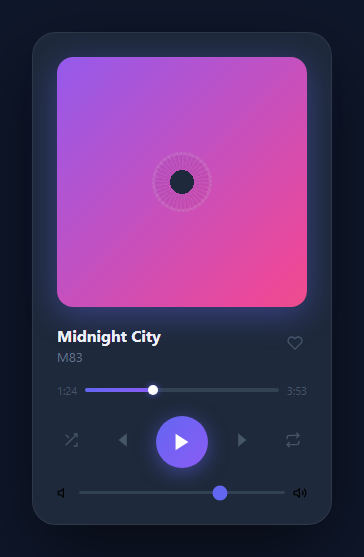
A music player UI card demonstrates several important interactive patterns: a toggle between two states (play/pause), cycling through an array of items (tracks), animated visual feedback (vinyl spin), and a progress bar. These patterns appear in audio players, video players, carousels, and any queue-based interface. This snippet wires a real <audio> element to sample tracks, so play, pause, seek, volume and track duration are all genuine browser playback state rather than a simulation.
The tracks data structure
The tracks array contains objects with name, artist, and src (an MP3 URL). load(i, autoplay) reads these values, updates the DOM with querySelector and textContent, sets audio.src, and optionally starts playback immediately — used when auto-advancing to the next track.
The vinyl spin animation
The vinyl disc uses a CSS @keyframes spin animation: transform: rotate(360deg) at 4s linear infinite. The vinyl starts with animation-play-state: paused. The .spinning class changes it to running. Rather than being toggled from inside togglePlay(), the spin state is driven entirely by the audio element's own play/pause/ended events through a single setPlayingUI() function — so the vinyl, the icon, and the internal playing flag can never drift out of sync with what the browser is actually doing, even when playback stops on its own (buffering, an error, or a track ending).
The play/pause SVG icon swap
document.getElementById('play-icon').innerHTML is set to a pause icon SVG on play and a play icon SVG on pause, inside the same setPlayingUI() function that toggles the vinyl. The inner HTML assignment replaces the entire SVG content, swapping from a triangle (play) to two rectangles (pause), avoiding two separate icon elements that need to be shown and hidden.
Track switching and auto-advance
next() increments idx modulo tracks.length for wraparound, then calls load(idx, autoplay). prev() decrements similarly. Reaching the end of a track fires the audio element's native ended event, which calls next(true) — so auto-advance keeps playing continuously into the next track, and the play/pause icon and vinyl stay correct throughout because they're driven by the same play/pause event listeners regardless of whether the click came from a user or the browser itself.
Real progress, not a timer
The progress bar fill and the elapsed-time label are both written from the audio element's timeupdate event, using audio.currentTime and audio.duration — there's no setInterval anywhere. The total-duration label updates from the loadedmetadata event once the browser knows the real length of the file, which is also why it briefly reads 0:00 right after a track switch.
Click-to-seek and volume
Clicking the progress bar computes a 0–1 fraction from the click's position relative to the bar's own getBoundingClientRect(), then sets audio.currentTime directly — the browser jumps playback to that instant. The volume slider's oninput sets audio.volume to a 0–1 fraction of its 0–100 value, so it's a real, functional control rather than a cosmetic one.
Build with AI
Build, Understand, Optimize, and Extend It With AI
Paste this snippet's HTML, CSS, and JS into an AI coding assistant like Claude and ask it to explain exactly why the vinyl, the play/pause icon, and the playing flag are all updated from a single setPlayingUI() function that's called by the audio element's play/pause/ended events, rather than being toggled directly inside togglePlay() — then have it describe what would visually desync if you set playing = true by hand right before calling audio.play() instead of waiting for the play event to fire. The same assistant can help you extend it: ask it to add a real shuffle mode that randomizes play order instead of just decorating the button, add a repeat-one/repeat-all mode using the ended listener, or build a queue/playlist panel that lists every track with the currently playing one highlighted, using load(i, autoplay) as the single entry point for switching. It's also useful for hardening the player against real-world audio — ask it how to handle a track that fails to load (the audio element's error event) or a browser blocking autoplay before the user has interacted with the page.
Prompt to recreate it
Copy this into your AI assistant of choice to build the effect from scratch, or as a jumping-off point for your own variant:
Build a "music player card" UI in plain HTML, CSS, and JavaScript that plays real audio through a native <audio> element — no Web Audio API, no external player library.

Requirements:
- A card showing a square album-art area with a continuously animated background gradient, a smaller circular "vinyl" disc centered on it that only spins while audio is actually playing (using CSS animation-play-state toggled between paused and running, not by adding/removing the animation itself, so a pause preserves the current rotation angle rather than resetting it).
- Track metadata (name, artist, and a src URL to an MP3 file) driven from an array of track objects; a like/heart button that toggles a filled state independent of playback.
- A hidden <audio> element whose src is set from the current track. A single function drives the vinyl spin state, the play/pause icon, and an internal "playing" flag together, and that function must be called FROM the audio element's own play/pause/ended events — never set state optimistically before calling audio.play()/audio.pause(), so the UI can never desync from what the browser is actually doing (e.g. if playback is blocked or a track fails to load).
- A clickable progress bar with a draggable-looking thumb, driven by the audio element's timeupdate event (not a timer) — the fill width and an elapsed mm:ss label should both be computed from audio.currentTime and audio.duration. Clicking anywhere on the bar must set audio.currentTime based on the click's position relative to the bar's own bounding rect.
- The total-duration label should be read from the audio element's real duration once the loadedmetadata event fires, not hardcoded per track.
- Previous/next buttons that move to another track in the array with wraparound at both ends using modulo arithmetic, loading the new track's src and metadata into the DOM through one shared load(index, autoplay) function that both buttons call.
- When a track ends (the audio element's native "ended" event), automatically load and start playing the next track in the array, so playback continues seamlessly rather than just stopping.
- A volume slider wired to audio.volume (0–1 range, converted from the slider's 0–100 value) so it's a real, functional control.
Want to tighten it up first? Run this prompt through the AI Prompt Studio to score it across 8 quality dimensions, catch anti-patterns, and tune the wording for Claude, ChatGPT, or Gemini before you paste it in.
Step by step
How to Use
- 1Interact with the playerClick play to start real playback and the vinyl spin. Click prev/next to switch tracks — the current one keeps playing through the switch if it was already playing. Drag the volume slider to change the actual audio volume.
- 2Swap in your own tracksIn the JS panel, update the tracks array with your own name, artist, and src (a direct MP3 URL). Duration is read automatically from the file — you don't set it by hand.
- 3Add a like button or shuffleCopy a control button from the .controls row and add an onclick to toggle a .liked class, or call load(Math.floor(Math.random() * tracks.length), playing) for shuffle.
- 4Change the vinyl gradientIn the CSS panel, update the background gradient on .vinyl to change the disc colour.
- 5Host your own audio filesPoint each track's src at your own hosted MP3 (same-origin or a CORS-enabled CDN). No other code changes are required — load(), seek(), and the progress bar all read straight from the audio element.
- 6Export in your formatClick "HTML" for a standalone file, "JSX" for a React component, or "Tailwind" for a React + Tailwind version.
Real-world uses
Common Use Cases
Got questions?
Frequently Asked Questions
It plays real audio through a native <audio> element, using royalty-free SoundHelix sample tracks so the preview works out of the box. Play, pause, seek, volume, and duration are all genuine browser playback state, not a setInterval simulation.
The vinyl has animation-play-state: paused by default. A setPlayingUI() function toggles it to running and swaps the play/pause icon, and it's called from the audio element's own play, pause, and ended event listeners — so the vinyl can never fall out of sync with what the browser is actually doing.
The audio element's native "ended" event fires when a track finishes, which calls next(true) to load and immediately play the following track — real continuous playback, not just a UI reset.
next() sets idx = (idx + 1) % tracks.length for modulo wraparound and calls load(idx, autoplay). load() reads the tracks[i] object, updates the track name/artist/duration display, and sets audio.src to the new track's file.
Add objects to the tracks array in the JS panel: { name: "Song Name", artist: "Artist", src: "https://your-cdn.com/song.mp3" }. Duration is read automatically from the file via the loadedmetadata event — there's no duration field to set by hand.
Yes. Click "JSX" for a React component. Manage idx and playing as useState, keep a ref to the <audio> element, and attach the play/pause/timeupdate/ended listeners in a useEffect that cleans itself up on unmount.