Learn Coding Visually
Learn to code with interactive, live-preview playgrounds — HTML, CSS, JavaScript, React & more.
 HTML Playground42 lessons · Click-based · Live preview
 CSS PlaygroundLearn CSS with a live editor
 JavaScript Playground60 lessons · DOM · Async · Canvas
 React PlaygroundLearn React with a live code editor
 GSAP PlaygroundLearn GSAP animation interactively
 SVG Playground44 lessons · shapes · paths · animation
 SCSS Playground45 lessons · Sass modules · tokens
 Tailwind PlaygroundLearn Tailwind CSS with a live editor
 Bootstrap 5 Playground50 lessons · live preview
Flatpickr Booking Calendar with Disabled Dates — Free Snippet
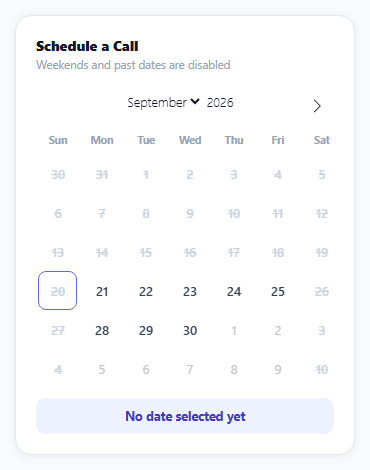
Flatpickr Booking Calendar with Disabled Dates · Forms · Plain HTML, CSS & JS · Live preview
What's included
Features
About this UI Snippet
Flatpickr Booking Calendar with Disabled Dates — Blocking and Labeling from One Array
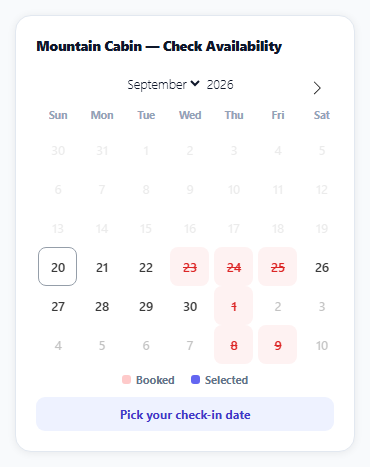
A real booking calendar needs booked dates to be both functionally unselectable and visually obvious — a date that's merely disabled with no visual distinction looks like a bug, and a date that's styled as "booked" without actually being blocked is worse. This snippet drives both behaviors from one shared BOOKED array of ISO date strings, so they can never disagree about which dates are taken.
disable makes dates functionally unselectable
Passing the BOOKED array directly to Flatpickr's disable option is what actually prevents a click on those dates from registering a selection — Flatpickr checks this list internally before accepting any date as selected, regardless of any additional styling applied elsewhere.
onDayCreate is the hook for data-driven styling per cell
Flatpickr doesn't automatically add a distinct class for "this specific date happens to be in a disable list" beyond its generic flatpickr-disabled class — for a custom look (strikethrough, red tint, a "booked" tooltip) tied to *this dataset specifically*, onDayCreate fires once for every calendar day cell as it's rendered, receiving the real day element to inspect and modify. This snippet's handler checks each cell's date against the same BOOKED array and adds a booked-date class only when it matches.
One array, two consumers, no possible disagreement
Both disable: BOOKED and the onDayCreate lookup read from the identical array — there's no second, separately maintained list of "dates that look booked" that could drift out of sync with "dates that are actually blocked." Adding or removing a booked date only ever requires editing BOOKED once.
The checkout date is derived, not separately selected
Rather than asking for a second date pick, the summary computes a checkout date one day after the selected check-in by cloning the Date object and calling setDate(getDate() + 1) — appropriate for a single-night booking flow; a multi-night version would pair this same disabled-dates technique with Flatpickr's range mode instead.
Reusing it
Swap the simulated BOOKED array for real reserved dates fetched from a booking API before initializing Flatpickr, and both the disabling and the visual styling keep working unchanged, since neither depends on how the array was populated.
Build with AI
Build, Understand, Optimize, and Extend It With AI
You don't have to figure out how to keep "blocked" and "looks blocked" in sync yourself. Paste this snippet's HTML, CSS, and JS into an AI coding assistant like Claude and ask it to explain exactly how the same BOOKED array drives both Flatpickr's disable option (which prevents selection) and the onDayCreate hook (which adds custom visual styling), and why keeping both behaviors reading from one array matters. The same assistant can help optimize it — ask whether comparing ISO date strings inside onDayCreate for every rendered day cell is efficient enough for a calendar spanning many months, or whether a Set would be a faster lookup structure than an array's indexOf. It's also useful for extending the effect: ask it to switch to range mode for multi-night bookings while keeping the same disabled-dates approach, fetch real booking data from an API before initializing the calendar, or add a price-per-night tooltip on hover for available dates. Treat the code less like a finished artifact and more like a starting point for a conversation.
Prompt to recreate it
Copy this into your AI assistant of choice to build the effect from scratch, or as a jumping-off point for your own variant:
Build a booking availability calendar using the Flatpickr library, where already-booked dates are both unselectable and visually distinct (load Flatpickr's CSS and JS from a CDN, no other library), in plain HTML, CSS, and JavaScript.

Requirements:
- Maintain a single array of already-booked dates (as ISO date strings), and use that same array both to disable those dates from being selected at all in the calendar, and to apply distinct visual styling (such as a strikethrough and a different background/text color) to those specific day cells, so the two behaviors can never disagree about which dates are booked.
- Render the calendar inline, disallow selecting any date before today, and use the calendar library's own per-day-cell creation hook (not manual DOM querying after render) to apply the custom booked-date styling and an explanatory tooltip to matching cells as they are built.
- Show a legend below the calendar explaining what the booked-date color and the selected-date color each mean.
- When an available date is selected, display a summary showing that date as a check-in date and a computed check-out date exactly one day later.
- Clicking a booked date must have no effect — it should not be selectable, and the calendar's selected-date summary should not change if a booked date is clicked.
Want to tighten it up first? Run this prompt through the AI Prompt Studio to score it across 8 quality dimensions, catch anti-patterns, and tune the wording for Claude, ChatGPT, or Gemini before you paste it in.
Source Code
<div class="bc-wrap">
  <div class="bc-card">
    <div class="bc-title">Mountain Cabin — Check Availability</div>
    <div id="bcCalendar"></div>
    <div class="bc-legend">
      <span><i class="bc-dot bc-dot-booked"></i>Booked</span>
      <span><i class="bc-dot bc-dot-selected"></i>Selected</span>
    </div>
    <div class="bc-summary" id="bcSummary">Pick your check-in date</div>
  </div>
</div>*{box-sizing:border-box;margin:0;padding:0}
body{font-family:system-ui,-apple-system,sans-serif;background:#f8fafc;min-height:100vh;display:flex;align-items:center;justify-content:center;padding:24px}
.bc-wrap{width:100%;max-width:340px}
.bc-card{background:#fff;border-radius:16px;padding:20px;box-shadow:0 1px 8px rgba(0,0,0,.07);border:1px solid #e2e8f0}
.bc-title{font-size:13.5px;font-weight:800;color:#0f172a;margin-bottom:12px}
.bc-legend{display:flex;gap:16px;justify-content:center;margin-top:10px;font-size:11px;font-weight:700;color:#64748b}
.bc-legend span{display:flex;align-items:center;gap:5px}
.bc-dot{width:9px;height:9px;border-radius:3px;display:inline-block}
.bc-dot-booked{background:#fecaca}
.bc-dot-selected{background:#6366f1}
.bc-summary{margin-top:10px;padding:9px;border-radius:9px;background:#eef2ff;color:#4338ca;font:700 12px system-ui;text-align:center}
.flatpickr-calendar{width:100%!important;box-shadow:none!important}
.flatpickr-current-month{font-size:13px!important;font-weight:800;color:#0f172a}
.flatpickr-weekday{font-size:10.5px!important;font-weight:800;color:#94a3b8!important}
.flatpickr-day{border-radius:8px!important;font-size:12.5px!important;font-weight:600}
.flatpickr-day.booked-date{background:#fef2f2!important;color:#dc2626!important;text-decoration:line-through;cursor:not-allowed}
.flatpickr-day.selected{background:#6366f1!important;border-color:#6366f1!important;color:#fff!important}
.flatpickr-day:hover:not(.flatpickr-disabled){background:#eef2ff}// Simulated already-booked nights for the current and next month --
// a real integration would fetch this from a reservations API.
var today = new Date();
function isoOffset(days) {
var d = new Date(today);
d.setDate(d.getDate() + days);
return d.getFullYear() + '-' + String(d.getMonth() + 1).padStart(2, '0') + '-' + String(d.getDate()).padStart(2, '0');
}
var BOOKED = [isoOffset(3), isoOffset(4), isoOffset(5), isoOffset(11), isoOffset(18), isoOffset(19), isoOffset(25)];
var summary = document.getElementById('bcSummary');
flatpickr('#bcCalendar', {
inline: true,
minDate: 'today',
disable: BOOKED,
// onDayCreate runs once per rendered day cell -- it's the hook for
// adding a class based on data (like "is this date booked") rather
// than a visual state Flatpickr already tracks itself (like selected).
onDayCreate: function (dObj, dStr, fp, dayElem) {
var iso = dayElem.dateObj.getFullYear() + '-' + String(dayElem.dateObj.getMonth() + 1).padStart(2, '0') + '-' + String(dayElem.dateObj.getDate()).padStart(2, '0');
if (BOOKED.indexOf(iso) !== -1) {
dayElem.classList.add('booked-date');
dayElem.setAttribute('title', 'Already booked');
}
},
onChange: function (selectedDates) {
if (!selectedDates.length) { summary.textContent = 'Pick your check-in date'; return; }
var d = selectedDates[0];
var checkout = new Date(d);
checkout.setDate(checkout.getDate() + 1);
summary.textContent = 'Check-in ' + d.toLocaleDateString('en-US', { month: 'short', day: 'numeric' }) +
' \u2192 Check-out ' + checkout.toLocaleDateString('en-US', { month: 'short', day: 'numeric' });
},
});Step by step
How to Use
- 1Add the Flatpickr CDNLoad flatpickr.min.css and flatpickr.min.js before the snippet's JS runs.
- 2Paste HTML, CSS, and JSA calendar renders with several dates already struck through.
- 3Try clicking a booked dateIt cannot be selected — the click has no effect.
- 4Click an available dateIt highlights and the check-in/check-out summary updates.
- 5Navigate to the next monthMore simulated booked dates appear, struck through the same way.
- 6Read the legendIt explains what the red and indigo indicators mean.
Real-world uses
Common Use Cases
Got questions?
Frequently Asked Questions
The same BOOKED array of ISO date strings is used two ways: passed directly to Flatpickr's disable option (which makes those dates functionally unclickable) and checked inside an onDayCreate handler that adds a custom booked-date CSS class to matching day cells (which makes them visually struck through and red). Because both behaviors read from the identical array, there's no way for a date to be blocked without also looking blocked, or vice versa.
Flatpickr calls the onDayCreate hook once for every individual day cell as it builds the calendar's DOM, passing the real day element along with its associated date. This is the correct place to add custom, data-driven styling or attributes to specific dates — like this snippet's booked-date class and "Already booked" tooltip — since it runs at the point where each day's actual DOM element exists and can be inspected against your own data.
Flatpickr's built-in flatpickr-disabled class provides a generic muted appearance for any disabled date, regardless of why it's disabled (could be a past date, a day-of-week rule, or a specific blocked date). This snippet wants disabled dates specifically caused by existing bookings to look distinctly different (red, strikethrough, with an explanatory tooltip) from other kinds of disabled dates, which requires the additional onDayCreate-driven class rather than relying on the generic disabled style alone.
Once a check-in date is selected, the code clones that Date object and calls setDate(getDate() + 1) on the clone to advance it by exactly one day, then formats both dates for the summary. This assumes a single-night booking; a multi-night version would instead use Flatpickr's range mode to let the user select both a check-in and check-out date directly, combined with the same disabled-dates technique.
Replace the simulated BOOKED array (currently generated with isoOffset for demo purposes) with an array of ISO date strings fetched from your reservations backend before calling flatpickr(...) — both the disable option and the onDayCreate styling check read from that same array and require no other changes once it contains real data.