


Learn Coding Visually
Learn to code with interactive, live-preview playgrounds — HTML, CSS, JavaScript, React & more.
 HTML Playground42 lessons · Click-based · Live preview
 CSS PlaygroundLearn CSS with a live editor
 JavaScript Playground60 lessons · DOM · Async · Canvas
 React PlaygroundLearn React with a live code editor
 GSAP PlaygroundLearn GSAP animation interactively
 SVG Playground44 lessons · shapes · paths · animation
 SCSS Playground45 lessons · Sass modules · tokens
 Tailwind PlaygroundLearn Tailwind CSS with a live editor
 Bootstrap 5 Playground50 lessons · live preview
Day.js Relative Time Feed — Free HTML CSS JS Snippet
Day.js Relative Time Feed · Dashboards · Plain HTML, CSS & JS · Live preview
What's included
Features
About this UI Snippet
Day.js Relative Time Feed — Why "2 Minutes Ago" Needs to Keep Recomputing
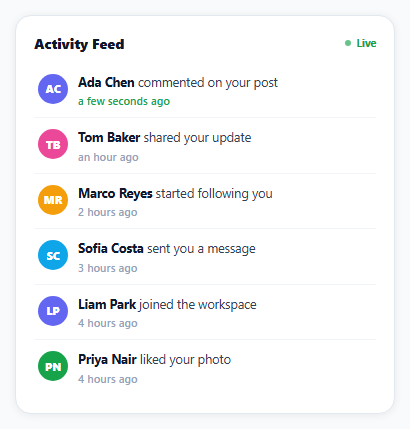
A relative timestamp like "2 minutes ago" is only accurate at the instant it's computed — leave it on screen without ever recalculating, and ten minutes later it's still lying. This snippet's core discipline is treating fromNow() as something to call again periodically, not a string to compute once and forget.
relativeTime is a plugin, not core Day.js
Day.js ships a deliberately minimal core and adds capabilities like fromNow() through plugins — dayjs.extend(dayjs_plugin_relativeTime) is what registers it, and skipping that line means .fromNow() simply doesn't exist on a dayjs object, a common first-time gotcha with the library.
fromNow() always compares against the real current moment
Calling item.time.fromNow() computes the difference between that stored timestamp and dayjs()'s value *at the moment fromNow() is called* — it does not cache or memoize a string from whenever the item was first created. That's what makes the periodic setInterval(render, 30000) meaningful: re-rendering doesn't just redraw the same labels, it recomputes each one fresh, so "2 minutes ago" genuinely becomes "3 minutes ago" without a page reload.
The feed re-sorts by time on every render, not just on insert
Rather than assuming new items always belong at the top (true for genuinely live pushes, but this snippet also seeds several backdated items on load), render() sorts a copy of the items array by timestamp descending every time it runs — which is what guarantees the visual order always matches actual chronological order regardless of the mix of seeded and live-pushed items.
"Fresh" gets its own visual treatment, computed the same way as the label
An item's green "fresh" styling is decided by dayjs().diff(item.time, 'minute') < 1 — the exact same kind of now-versus-then comparison fromNow() does internally, just checked directly for a boolean instead of formatted as a string. Both pieces of information are always in agreement because they're derived from the same live comparison at render time, not two different clocks.
Reusing it
Point the "new event arriving" setInterval at a real WebSocket message handler or Server-Sent Events listener instead of Math.random(), keep the same dayjs()-timestamped insert-and-render pattern, and this becomes a genuine live activity feed.
Build with AI
Build, Understand, Optimize, and Extend It With AI
You don't have to discover the "frozen relative timestamp" bug the hard way. Paste this snippet's HTML, CSS, and JS into an AI coding assistant like Claude and ask it to explain exactly why fromNow() must be called again periodically to stay accurate, rather than being computed once when an item is created, and why the plugin architecture requires calling dayjs.extend before fromNow() becomes available at all. The same assistant can help optimize it — ask whether re-rendering the entire list every 30 seconds is wasteful for a feed with many items, or whether only the timestamp text nodes should be updated in place instead of rebuilding the whole DOM list. It's also useful for extending the effect: ask it to connect the simulated live-event interval to a real WebSocket or Server-Sent Events endpoint, add a "mark all as read" feature, or group consecutive activity from the same person into one combined feed item. Treat the code less like a finished artifact and more like a starting point for a conversation.
Prompt to recreate it
Copy this into your AI assistant of choice to build the effect from scratch, or as a jumping-off point for your own variant:
Build a live-updating activity feed with human-readable relative timestamps (like "2 minutes ago") using the Day.js library with its relative-time plugin (load Day.js's core script and its relativeTime plugin script from a CDN, no other library), in plain HTML, CSS, and JavaScript.

Requirements:
- Seed the feed with several sample activity items (a person's name, an action description, and a timestamp), spread across different points in the past several hours rather than all being very recent.
- Display each item with the person's initials as a colored avatar, a description combining their name and action, and a relative time label computed using the date library's relative-time formatting method (not a manually written "X minutes ago" string).
- Visually distinguish very recent items (for example, less than one minute old) with a distinct color or style, computed using the same kind of current-time comparison the relative label itself uses, so the two pieces of information can never disagree about how recent an item is.
- Periodically re-render the entire feed (for example every 30 seconds) so that every displayed relative time label stays accurate as real time passes, without requiring a page reload — verify that the underlying date library recomputes the relative time fresh on each call rather than caching a fixed string from when the item was created.
- Periodically simulate a new activity item arriving (for example every 10-15 seconds) with the current timestamp, inserting it into the feed and keeping the full list sorted by actual chronological time (most recent first) regardless of the mix of seeded and newly-arrived items.
- Cap the total number of visible items so the feed doesn't grow indefinitely as new items keep arriving.
Want to tighten it up first? Run this prompt through the AI Prompt Studio to score it across 8 quality dimensions, catch anti-patterns, and tune the wording for Claude, ChatGPT, or Gemini before you paste it in.
Source Code
<div class="rf-wrap">
  <div class="rf-card">
    <div class="rf-head">
      <div class="rf-title">Activity Feed</div>
      <span class="rf-live"><span class="rf-dot"></span>Live</span>
    </div>
    <ul class="rf-list" id="rfList"></ul>
  </div>
</div>*{box-sizing:border-box;margin:0;padding:0}
body{font-family:system-ui,-apple-system,sans-serif;background:#f8fafc;min-height:100vh;display:flex;align-items:center;justify-content:center;padding:24px}
.rf-wrap{width:100%;max-width:380px}
.rf-card{background:#fff;border-radius:16px;padding:18px;box-shadow:0 1px 8px rgba(0,0,0,.07);border:1px solid #e2e8f0}
.rf-head{display:flex;justify-content:space-between;align-items:center;margin-bottom:12px}
.rf-title{font-size:14px;font-weight:800;color:#0f172a}
.rf-live{display:flex;align-items:center;gap:5px;font:700 10.5px system-ui;color:#16a34a}
.rf-dot{width:6px;height:6px;border-radius:50%;background:#16a34a;animation:rfPulse 1.4s ease-in-out infinite}
@keyframes rfPulse{0%,100%{opacity:1}50%{opacity:.3}}
.rf-list{list-style:none;display:flex;flex-direction:column;gap:2px}
.rf-item{display:flex;gap:10px;align-items:flex-start;padding:9px 4px;border-bottom:1px solid #f1f5f9}
.rf-item:last-child{border-bottom:none}
.rf-avatar{width:30px;height:30px;border-radius:50%;flex-shrink:0;display:flex;align-items:center;justify-content:center;font:800 11px system-ui;color:#fff}
.rf-body{flex:1;min-width:0}
.rf-text{font-size:12.5px;color:#334155;line-height:1.4}
.rf-text b{color:#0f172a}
.rf-time{font-size:11px;color:#94a3b8;margin-top:2px;font-weight:600}
.rf-time.rf-fresh{color:#16a34a}dayjs.extend(dayjs_plugin_relativeTime);
var COLORS = ['#6366f1', '#f59e0b', '#16a34a', '#ec4899', '#0ea5e9'];
function initials(name) { return name.split(' ').map(function (p) { return p[0]; }).join('').toUpperCase(); }
var ACTIONS = [
'{name} commented on your post', '{name} started following you', '{name} liked your photo',
'{name} shared your update', '{name} sent you a message', '{name} joined the workspace',
];
var NAMES = ['Ada Chen', 'Marco Reyes', 'Priya Nair', 'Tom Baker', 'Sofia Costa', 'Liam Park'];
var listEl = document.getElementById('rfList');
var items = [];
function seededRandom(seed) { var x = Math.sin(seed) * 10000; return x - Math.floor(x); }
// Seed the feed with events spread across the last several hours -- a
// realistic activity feed, not everything clustered at "just now".
for (var i = 0; i < 6; i++) {
var minutesAgo = Math.round(seededRandom(i * 7.3) * 240) + i * 5;
items.push({
id: i,
name: NAMES[i % NAMES.length],
action: ACTIONS[i % ACTIONS.length],
time: dayjs().subtract(minutesAgo, 'minute'),
});
}
function render() {
listEl.innerHTML = '';
items.slice().sort(function (a, b) { return b.time - a.time; }).forEach(function (item) {
var li = document.createElement('li');
li.className = 'rf-item';
var color = COLORS[NAMES.indexOf(item.name) % COLORS.length];
var fresh = dayjs().diff(item.time, 'minute') < 1;
li.innerHTML =
'<div class="rf-avatar" style="background:' + color + '">' + initials(item.name) + '</div>' +
'<div class="rf-body">' +
'<div class="rf-text"><b>' + item.name + '</b> ' + item.action.replace('{name}', '').trim() + '</div>' +
'<div class="rf-time' + (fresh ? ' rf-fresh' : '') + '" data-id="' + item.id + '">' + item.time.fromNow() + '</div>' +
'</div>';
listEl.appendChild(li);
});
}
render();
// Re-render every 30 seconds so every timestamp's relative label ("2 minutes
// ago" -> "3 minutes ago") stays live without a full page reload -- dayjs
// recomputes fromNow() fresh against the CURRENT time on each call, it does
// not cache the string from when the object was created.
setInterval(render, 30000);
// Simulate a new live event arriving periodically, inserted at the top with
// a "just now" timestamp exactly like a real WebSocket push would produce.
setInterval(function () {
var nextId = items.length;
items.unshift({
id: nextId,
name: NAMES[Math.floor(Math.random() * NAMES.length)],
action: ACTIONS[Math.floor(Math.random() * ACTIONS.length)],
time: dayjs(),
});
if (items.length > 8) items.pop();
render();
}, 12000);Step by step
How to Use
- 1Add the Day.js CDNLoad dayjs.min.js and the relativeTime plugin before the snippet's JS runs.
- 2Paste HTML, CSS, and JSA feed renders with six backdated items, newest first.
- 3Watch a fresh itemA newly-added item shows a green "just now" style label.
- 4Wait about 30 secondsRelative labels like "2 minutes ago" tick forward on their own.
- 5Wait about 12 secondsA new simulated event arrives at the top of the feed.
- 6Watch the feed reorderItems always stay sorted by real chronological time.
Real-world uses
Common Use Cases
Got questions?
Frequently Asked Questions
Day.js deliberately ships a minimal core library and moves less universally-needed features like relative time formatting into optional plugins, which keeps the base library small. Calling dayjs.extend(dayjs_plugin_relativeTime) registers that plugin's functionality (including the fromNow() method) onto every dayjs object — without that line, .fromNow() is simply not a method that exists yet.
fromNow() calculates its output by comparing a stored timestamp against dayjs()'s value at the exact moment fromNow() is called — it does not store or cache a fixed string when an item is first created. A label rendered once and left alone would become inaccurate as real time passes, so this snippet re-runs render() (which recomputes every fromNow() call) every 30 seconds to keep every displayed label truthful.
While a genuinely live push would always be newer than everything already in the feed, this snippet also seeds several backdated sample items when it first loads, mixed at various times in the past. Sorting a copy of the full array by timestamp on every render guarantees correct chronological order regardless of that mix, rather than relying on an assumption (new items are always newest) that happens to be true only for the live-push case.
Both the fresh check and the fromNow() label are computed as a live comparison against dayjs() (the current moment) at render time — the fresh check specifically computes dayjs().diff(item.time, "minute") and checks if it's under 1. Because both values derive from the same now-versus-then comparison at the same render pass, the green "fresh" indicator and the text label can never disagree about how recent an item actually is.
Replace the setInterval that generates random events with a handler for your real data source — a WebSocket onmessage callback or an EventSource listener — that calls the same items.unshift({ ..., time: dayjs() }) and render() pattern whenever a real event arrives. The periodic label-refresh interval and the sorting logic require no changes regardless of where new items come from.