

Learn Coding Visually
Learn to code with interactive, live-preview playgrounds — HTML, CSS, JavaScript, React & more.
 HTML Playground42 lessons · Click-based · Live preview
 CSS PlaygroundLearn CSS with a live editor
 JavaScript Playground60 lessons · DOM · Async · Canvas
 React PlaygroundLearn React with a live code editor
 GSAP PlaygroundLearn GSAP animation interactively
 SVG Playground44 lessons · shapes · paths · animation
 SCSS Playground45 lessons · Sass modules · tokens
 Tailwind PlaygroundLearn Tailwind CSS with a live editor
 Bootstrap 5 Playground50 lessons · live preview
FullCalendar Month View with Event Modal — Free HTML CSS JS Snippet
FullCalendar Month View with Event Modal · Dashboards · Plain HTML, CSS & JS · Live preview
What's included
Features
About this UI Snippet
FullCalendar Month View with Event Modal — Reading the Event Back, Not Re-Looking It Up
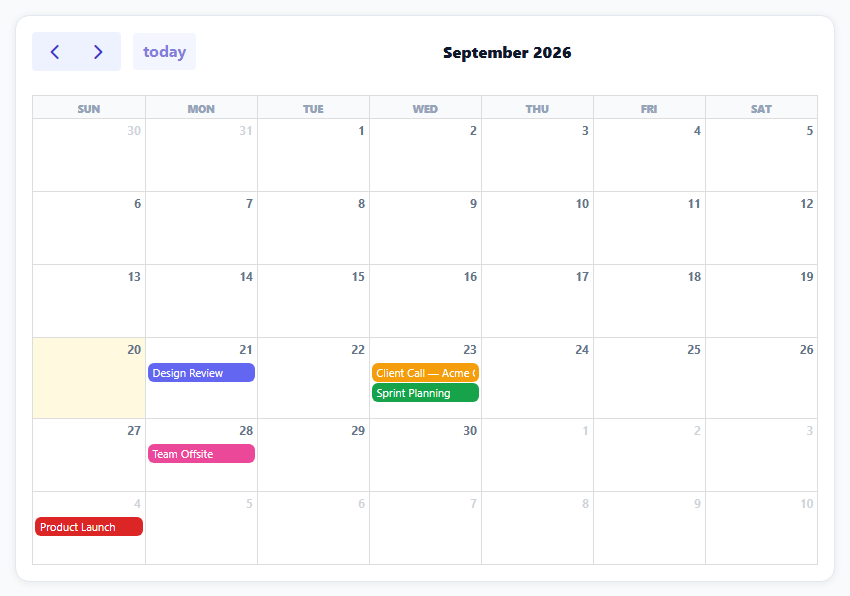
FullCalendar renders a real month grid with event pills, but showing a detail view on click needs one more piece: a way to connect "which pill was clicked" back to the event's full data (a description, in this case) without a fragile lookup by title or index. FullCalendar's own eventClick handler solves this by handing back the complete, calendar-managed event object.
events accepts extendedProps for anything beyond the built-in fields
FullCalendar's event objects have first-class fields for title, start, and backgroundColor, but nothing for arbitrary custom data like a description. extendedProps is exactly that escape hatch — any custom fields go there when defining events, and they come back intact on the event object FullCalendar passes to every callback, including eventClick.
eventClick's info.event is the full resolved event, not the raw input
The handler receives info.event, and reading info.event.title, info.event.backgroundColor, and info.event.extendedProps.description directly off it is what avoids having to search back through the original EVENTS array by title or id to find "which event was this." FullCalendar has already resolved and attached everything needed.
Color is data-driven per event, not per-view styling
Each event object sets its own backgroundColor, so FullCalendar renders that specific pill in that specific color automatically — and the modal reads the exact same resolved backgroundColor back off the clicked event for its accent bar, guaranteeing the modal's color always matches the pill that was actually clicked.
dayMaxEvents keeps a busy day from breaking the grid
With three events landing on day 3 in this dataset, dayMaxEvents: 3 caps how many event pills a single day cell shows before FullCalendar collapses the rest into a "+more" link — without it, a day with many events would visually overflow its cell and distort the whole month grid's row heights.
Reusing it
Replace the sample EVENTS array with real calendar data (from a database or scheduling API) in the same { title, start, color, description } shape, or add any other custom fields your modal needs into extendedProps — the click-to-modal wiring reads whatever's there without any other changes.
Build with AI
Build, Understand, Optimize, and Extend It With AI
You don't have to work out how to pass custom data through a calendar library's event lifecycle yourself. Paste this snippet's HTML, CSS, and JS into an AI coding assistant like Claude and ask it to explain exactly how extendedProps carries arbitrary custom fields through FullCalendar's internal event objects and out the other side into the eventClick callback's info.event, and why reading data off that resolved object is more robust than re-searching the original input array. The same assistant can help optimize it — ask whether the events array should be memoized or only rebuilt when the underlying data actually changes, especially in a framework component that re-renders often. It's also useful for extending the effect: ask it to add an "Edit" button inside the modal that opens an edit form pre-filled with the event's data, color-code events by category with a filterable legend, or fetch events asynchronously from a real API endpoint using FullCalendar's built-in event-source function support. Treat the code less like a finished artifact and more like a starting point for a conversation.
Prompt to recreate it
Copy this into your AI assistant of choice to build the effect from scratch, or as a jumping-off point for your own variant:
Build a month-view calendar where clicking an event opens a detail modal, using the FullCalendar library (load FullCalendar's global bundle from a CDN, no other library), in plain HTML, CSS, and JavaScript.

Requirements:
- Define a list of sample events, each with a title, a start date, a distinct color, and a longer description that is not one of the calendar library's standard built-in event fields.
- Render a month-view calendar with a toolbar for navigating between months and returning to today, styled so the events, day cells, and toolbar buttons match a clean custom design (not the library's default unstyled appearance).
- Render each event as a colored pill inside its date cell using that event's own assigned color.
- On clicking any event, open a modal dialog showing that event's title, a nicely formatted full date, and its full custom description — read this information directly from the event object the calendar library provides in its click event, not by separately searching your original data array to find a match.
- Make the modal's accent color match the exact color of the event pill that was clicked, since both should derive from the same single color value associated with that event.
- Support closing the modal both via an explicit close button and by clicking the semi-transparent overlay outside the modal card.
- Limit the number of event pills shown per day cell to a small number (such as 3), collapsing any additional events on a busy day into a "show more" indicator instead of letting the day cell grow and distort the calendar's layout.
Want to tighten it up first? Run this prompt through the AI Prompt Studio to score it across 8 quality dimensions, catch anti-patterns, and tune the wording for Claude, ChatGPT, or Gemini before you paste it in.
Source Code
<div class="fc-wrap">
<div id="fcCal"></div>
<div class="fc-modal-overlay" id="fcOverlay">
<div class="fc-modal">
<button class="fc-modal-close" id="fcClose" type="button" aria-label="Close">×</button>
<div class="fc-modal-color" id="fcColorBar"></div>
<h2 id="fcModalTitle"></h2>
<div class="fc-modal-time" id="fcModalTime"></div>
<p class="fc-modal-desc" id="fcModalDesc"></p>
</div>
</div>
</div>*{box-sizing:border-box;margin:0;padding:0}
body{font-family:system-ui,-apple-system,sans-serif;background:#f8fafc;padding:20px}
.fc-wrap{max-width:820px;margin:0 auto;background:#fff;border-radius:14px;padding:16px;box-shadow:0 1px 8px rgba(0,0,0,.07);border:1px solid #e2e8f0}
#fcCal .fc-toolbar-title{font-size:16px!important;font-weight:800;color:#0f172a}
#fcCal .fc-button{background:#eef2ff!important;border:none!important;color:#4338ca!important;font-weight:700!important;text-transform:none!important;box-shadow:none!important}
#fcCal .fc-button:hover{background:#e0e4ff!important}
#fcCal .fc-button-active{background:#6366f1!important;color:#fff!important}
#fcCal .fc-daygrid-day-number{font-size:11.5px;color:#64748b;font-weight:700}
#fcCal .fc-event{border:none;border-radius:6px;padding:1px 4px;font-size:11px;cursor:pointer}
#fcCal .fc-col-header-cell{background:#f8fafc}
#fcCal .fc-col-header-cell-cushion{font-size:10.5px;color:#94a3b8;font-weight:800;text-transform:uppercase}
.fc-modal-overlay{position:fixed;inset:0;background:rgba(15,23,42,.5);display:none;align-items:center;justify-content:center;z-index:1000;padding:20px}
.fc-modal-overlay.open{display:flex}
.fc-modal{background:#fff;border-radius:16px;padding:24px;max-width:340px;width:100%;position:relative;box-shadow:0 20px 50px rgba(0,0,0,.3)}
.fc-modal-close{position:absolute;top:12px;right:14px;background:none;border:none;font-size:22px;color:#94a3b8;cursor:pointer;line-height:1}
.fc-modal-color{width:36px;height:5px;border-radius:99px;margin-bottom:12px}
.fc-modal h2{font-size:16px;font-weight:800;color:#0f172a;margin-bottom:6px}
.fc-modal-time{font-size:12px;font-weight:700;color:#6366f1;margin-bottom:10px}
.fc-modal-desc{font-size:12.5px;color:#64748b;line-height:1.6}var today = new Date();
function dayOffset(n) { var d = new Date(today); d.setDate(d.getDate() + n); return d; }
function iso(d) { return d.toISOString().slice(0, 10); }
var EVENTS = [
{ title: 'Design Review', start: iso(dayOffset(1)), color: '#6366f1', description: 'Walk through the new onboarding flow with the design team.' },
{ title: 'Sprint Planning', start: iso(dayOffset(3)), color: '#16a34a', description: 'Plan next sprint\u2019s scope and assign story points.' },
{ title: 'Client Call \u2014 Acme Co.', start: iso(dayOffset(3)), color: '#f59e0b', description: 'Quarterly check-in on deliverables and renewal terms.' },
{ title: 'Team Offsite', start: iso(dayOffset(8)), color: '#ec4899', description: 'Full-day offsite at the downtown office \u2014 lunch provided.' },
{ title: 'Product Launch', start: iso(dayOffset(14)), color: '#dc2626', description: 'Public launch of the v3 dashboard redesign.' },
];
var overlay = document.getElementById('fcOverlay');
var closeBtn = document.getElementById('fcClose');
function openModal(event) {
document.getElementById('fcColorBar').style.background = event.backgroundColor;
document.getElementById('fcModalTitle').textContent = event.title;
document.getElementById('fcModalTime').textContent = event.start.toLocaleDateString('en-US', { weekday: 'long', month: 'long', day: 'numeric' });
document.getElementById('fcModalDesc').textContent = event.extendedProps.description;
overlay.classList.add('open');
}
closeBtn.addEventListener('click', function () { overlay.classList.remove('open'); });
overlay.addEventListener('click', function (e) { if (e.target === overlay) overlay.classList.remove('open'); });
var calendarEl = document.getElementById('fcCal');
var calendar = new FullCalendar.Calendar(calendarEl, {
initialView: 'dayGridMonth',
height: 'auto',
headerToolbar: { left: 'prev,next today', center: 'title', right: '' },
events: EVENTS.map(function (e) {
return { title: e.title, start: e.start, backgroundColor: e.color, extendedProps: { description: e.description } };
}),
// eventClick receives the FULL calendar-managed event object -- including
// its resolved backgroundColor and extendedProps -- so the modal never
// has to re-look-up the original data by title or id.
eventClick: function (info) {
openModal(info.event);
},
dayMaxEvents: 3,
});
calendar.render();Step by step
How to Use
- 1Add the FullCalendar CDNLoad the FullCalendar global bundle before the snippet's JS runs.
- 2Paste HTML, CSS, and JSA styled month grid renders with five sample events.
- 3Click any event pillA modal opens with its full title, date, and description.
- 4Close the modalClick the X or click outside the modal card.
- 5Navigate monthsUse Prev/Next/Today in the toolbar.
- 6Check a busy dayDay 3 shows a "+more" link once dayMaxEvents is exceeded.
Real-world uses
Common Use Cases
Got questions?
Frequently Asked Questions
Custom fields like a description are placed inside extendedProps when the event objects are first defined for the calendar. FullCalendar preserves extendedProps unchanged and attaches it to the resolved event object passed to every event-related callback, so info.event.extendedProps.description is reliably available inside eventClick even though description isn't one of FullCalendar's own built-in event fields.
info.event, passed into the eventClick callback, is FullCalendar's own fully-resolved representation of the specific event that was clicked — already carrying its title, computed background color, and extendedProps. Searching back through the original input array by title or matching a start date would be more fragile (breaking on duplicate titles, for instance) and is unnecessary work FullCalendar has already done for you.
Both the calendar pill and the modal read the same backgroundColor value — the pill because FullCalendar renders each event using the backgroundColor set on it, and the modal because it reads info.event.backgroundColor directly from the resolved event object passed into eventClick. There is only one color value per event, used in both places, so they cannot show a mismatched color.
It caps how many individual event pills FullCalendar renders inside a single day cell before collapsing the remainder into a "+N more" link that expands on click. Without a cap, a day cell with many events would grow to fit all of them, which can visually distort the height of that entire calendar row compared to other weeks — dayMaxEvents keeps every day cell a predictable, consistent size.
Replace the generated sample EVENTS array with real event data fetched from your backend, keeping the same shape (a title, a start date, a color, and any extra fields inside extendedProps that your modal needs to display). FullCalendar also supports passing a URL or a function directly to its events option for fetching data asynchronously, if you'd rather not pre-fetch the array yourself.