
Learn Coding Visually
Learn to code with interactive, live-preview playgrounds — HTML, CSS, JavaScript, React & more.
 HTML Playground42 lessons · Click-based · Live preview
 CSS PlaygroundLearn CSS with a live editor
 JavaScript Playground60 lessons · DOM · Async · Canvas
 React PlaygroundLearn React with a live code editor
 GSAP PlaygroundLearn GSAP animation interactively
 SVG Playground44 lessons · shapes · paths · animation
 SCSS Playground45 lessons · Sass modules · tokens
 Tailwind PlaygroundLearn Tailwind CSS with a live editor
 Bootstrap 5 Playground50 lessons · live preview
Keyboard Shortcuts Help Overlay — Press "?" Without Hijacking Text Input
Keyboard Shortcuts Help Overlay — Press "?" to Open · Misc · Plain HTML, CSS & JS · Live preview
What's included
Features
About this UI Snippet
Keyboard Shortcuts Overlay — Getting the "?" Trigger Actually Correct
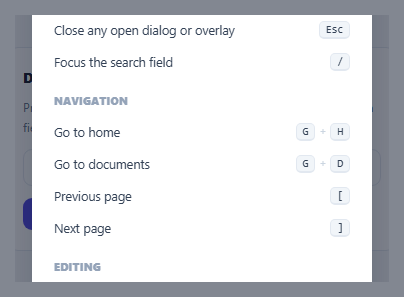
Binding a help overlay to the "?" key is a beloved pattern from tools like Gmail, Linear, and GitHub — but naively listening for keydown with key === '?' anywhere on the page breaks the moment a user is typing into a search box, a comment field, or any text input and genuinely wants to type a literal question mark. This snippet implements the one guard that makes the pattern actually safe to ship: checking whether the currently focused element is a text-input context before treating "?" as a shortcut trigger.
`isTypingContext()` — the one check that makes global hotkeys safe
Before treating any keypress as a shortcut, isTypingContext() checks document.activeElement's tag name against INPUT and TEXTAREA, and also checks isContentEditable (which catches rich-text editors built on a contenteditable div rather than a native form element). Only when none of these match does the "?" keypress get treated as "open the shortcuts overlay" — otherwise, the keypress is left completely alone, letting the browser's normal text-input behavior insert the literal "?" character exactly as the user intended.
This same guard pattern applies to every global shortcut, not just "?"
While this snippet only wires up one shortcut for real (the rest are documented in the overlay but not implemented, since they're illustrative), the isTypingContext() check is exactly the pattern any additional global hotkey in a real app would need — a "G then H" go-to-home shortcut, a "/" focus-search shortcut, anything bound at the document level has to make this same distinction, or it will break text entry the same way an unchecked "?" binding would.
One declarative shortcut list drives both the displayed reference and (in a real app) the actual bindings
SHORTCUT_GROUPS is a plain nested data structure — group titles, and within each group, a description paired with an array of key names. renderShortcuts() builds the entire overlay's HTML from this one array. In a real application, this same array is exactly what you'd also iterate over to *register* each shortcut's actual keyboard handler — keeping the reference documentation and the real key bindings sourced from one place means they can never drift apart from each other (a common real bug: a shortcuts overlay that lists a shortcut which was since removed from the actual app, or vice versa).
Focus management on open and close, matching standard modal conventions
openOverlay() records document.activeElement before showing the overlay and moves focus to its close button; closeOverlay() restores focus to whatever had it before. This is the same focus-restoration convention any accessible modal needs — a keyboard user who opened the overlay from anywhere on the page (not necessarily a specific "help" button) has their exact keyboard position preserved and correctly returned to them once the overlay closes.
Build with AI
Build, Understand, Optimize, and Extend It With AI
Ask an AI assistant to explain why checking the focused element's context before treating a keypress as a global shortcut is necessary, and to list which other HTML elements or attributes (beyond input, textarea, and contenteditable) might also need to be excluded in a more thorough implementation. It's also worth asking for a version that actually wires up and executes each documented shortcut's real action (not just displaying it as reference text), reusing the same SHORTCUT_GROUPS data structure to both render the overlay and register the real keydown handlers from one single source of truth.
Prompt to recreate it
Copy this into your AI assistant of choice to build the effect from scratch, or as a jumping-off point for your own variant:
Build a "?"-triggered keyboard shortcuts help overlay in HTML, CSS, and vanilla JavaScript — no external library.

Requirements:
- A page with at least one visible text input field, and a global keydown listener that opens a shortcuts reference overlay when the "?" key is pressed.
- Before treating a "?" keypress as a shortcut trigger, check whether the currently focused element is a text-input context (an <input>, a <textarea>, or any element with isContentEditable true) — if so, do NOT open the overlay or call preventDefault, allowing the character to be typed normally into that field instead.
- Define the entire list of documented shortcuts as one single declarative data structure (grouped by category, each entry with a description and its key combination), and generate all of the overlay's HTML content from that one data structure — no shortcut entry should be hardcoded directly into the markup.
- The overlay must be closable via the Escape key, a visible close button, and a click on its backdrop outside the modal content — all three should call the same shared close function.
- Implement standard accessible modal focus management: record whatever element has focus immediately before the overlay opens, move focus into the overlay when it opens, and restore focus to that originally recorded element when the overlay closes.
- Give the overlay appropriate ARIA attributes (role="dialog", aria-modal, aria-labelledby pointing to its heading) for correct assistive technology support.
Want to tighten it up first? Run this prompt through the AI Prompt Studio to score it across 8 quality dimensions, catch anti-patterns, and tune the wording for Claude, ChatGPT, or Gemini before you paste it in.
Source Code
<div class="demo">
  <div class="app-mock">
    <div class="app-mock-header">Docs Editor</div>
    <p class="app-mock-hint">Press <kbd>?</kbd> anywhere on this page (as long as you're not typing in a field) to open the shortcuts overlay.</p>
    <input type="text" class="app-mock-input" placeholder="Try typing here — ? types a literal question mark instead of opening the overlay" />
    <button class="app-mock-btn" id="openShortcutsBtn">Or click here to open it</button>
  </div>

  <div class="shortcuts-overlay" id="shortcutsOverlay" hidden>
    <div class="shortcuts-modal" role="dialog" aria-modal="true" aria-labelledby="shortcutsTitle">
      <div class="shortcuts-header">
        <h2 id="shortcutsTitle">Keyboard shortcuts</h2>
        <button class="shortcuts-close" id="shortcutsClose" aria-label="Close shortcuts overlay">×</button>
      </div>

      <div class="shortcuts-groups" id="shortcutsGroups"></div>
    </div>
  </div>
</div>
* { box-sizing: border-box; margin: 0; padding: 0; }
body { font-family: system-ui, sans-serif; background: #f8fafc; display: flex; align-items: center; justify-content: center; min-height: 100vh; padding: 24px; }
.demo { width: 400px; max-width: 100%; position: relative; }
.app-mock { background: #fff; border: 1px solid #e2e8f0; border-radius: 16px; padding: 20px; display: flex; flex-direction: column; gap: 12px; }
.app-mock-header { font-size: 13.5px; font-weight: 800; color: #111827; }
.app-mock-hint { font-size: 12px; color: #64748b; line-height: 1.6; }
kbd { background: #f1f5f9; border: 1px solid #e2e8f0; border-bottom-width: 2px; border-radius: 5px; padding: 1px 6px; font-size: 11px; font-family: 'SFMono-Regular', Consolas, monospace; color: #334155; }
.app-mock-input { padding: 9px 12px; border: 1.5px solid #e2e8f0; border-radius: 9px; font-size: 13px; font-family: inherit; }
.app-mock-input:focus-visible { outline: none; border-color: #6366f1; box-shadow: 0 0 0 3px rgba(99,102,241,0.15); }
.app-mock-btn { align-self: flex-start; padding: 8px 16px; border: none; border-radius: 9px; background: #4f46e5; color: #fff; font-size: 12.5px; font-weight: 700; cursor: pointer; font-family: inherit; }
.app-mock-btn:hover { background: #4338ca; }
.shortcuts-overlay { position: fixed; inset: 0; background: rgba(15,23,42,0.5); display: flex; align-items: center; justify-content: center; z-index: 50; }
.shortcuts-modal { width: 340px; max-width: calc(100vw - 40px); max-height: 80vh; overflow-y: auto; background: #fff; border-radius: 18px; padding: 22px; box-shadow: 0 30px 70px rgba(15,23,42,0.3); }
.shortcuts-header { display: flex; align-items: center; justify-content: space-between; margin-bottom: 14px; }
.shortcuts-header h2 { font-size: 15px; font-weight: 800; color: #111827; }
.shortcuts-close { border: none; background: transparent; font-size: 18px; color: #94a3b8; cursor: pointer; width: 26px; height: 26px; border-radius: 7px; }
.shortcuts-close:hover { background: #f1f5f9; }
.shortcuts-group { margin-bottom: 16px; }
.shortcuts-group:last-child { margin-bottom: 0; }
.shortcuts-group-title { font-size: 10.5px; font-weight: 800; color: #94a3b8; text-transform: uppercase; letter-spacing: 0.4px; margin-bottom: 8px; }
.shortcut-row { display: flex; align-items: center; justify-content: space-between; gap: 12px; padding: 7px 0; }
.shortcut-desc { font-size: 12.5px; color: #334155; }
.shortcut-keys { display: flex; gap: 4px; flex-shrink: 0; }
.shortcut-keys kbd { font-size: 10.5px; }const overlay = document.getElementById('shortcutsOverlay');
const closeBtn = document.getElementById('shortcutsClose');
const openBtn = document.getElementById('openShortcutsBtn');
const groupsContainer = document.getElementById('shortcutsGroups');
const mockInput = document.querySelector('.app-mock-input');
// A single declarative data source for the entire overlay — this is also
// exactly the kind of structure a real app would reuse to actually WIRE UP
// each shortcut's real handler elsewhere, keeping the documentation and the
// implementation from drifting apart over time.
const SHORTCUT_GROUPS = [
{
title: 'General',
shortcuts: [
{ keys: ['?'], desc: 'Show this shortcuts overlay' },
{ keys: ['Esc'], desc: 'Close any open dialog or overlay' },
{ keys: ['/'], desc: 'Focus the search field' },
],
},
{
title: 'Navigation',
shortcuts: [
{ keys: ['G', 'H'], desc: 'Go to home' },
{ keys: ['G', 'D'], desc: 'Go to documents' },
{ keys: ['['], desc: 'Previous page' },
{ keys: [']'], desc: 'Next page' },
],
},
{
title: 'Editing',
shortcuts: [
{ keys: ['Ctrl', 'B'], desc: 'Bold selected text' },
{ keys: ['Ctrl', 'Z'], desc: 'Undo' },
{ keys: ['Ctrl', 'Shift', 'Z'], desc: 'Redo' },
],
},
];
function renderShortcuts() {
groupsContainer.innerHTML = SHORTCUT_GROUPS.map((group) => `
<div class="shortcuts-group">
<p class="shortcuts-group-title">${group.title}</p>
${group.shortcuts.map((s) => `
<div class="shortcut-row">
<span class="shortcut-desc">${s.desc}</span>
<span class="shortcut-keys">
${s.keys.map((k) => `<kbd>${k}</kbd>`).join('<span style="color:#cbd5e1;font-size:10px;">+</span>')}
</span>
</div>
`).join('')}
</div>
`).join('');
}
let lastFocused = null;
function openOverlay() {
lastFocused = document.activeElement;
overlay.hidden = false;
closeBtn.focus();
}
function closeOverlay() {
overlay.hidden = true;
if (lastFocused) lastFocused.focus();
}
// The core trick: "?" must open the overlay when the user is issuing a
// keyboard shortcut, but must NOT hijack "?" while they're typing a literal
// question mark into a text field. Checking document.activeElement's tag
// (and whether it's editable) before treating a keypress as a shortcut is
// what makes this distinction correctly — the same guard every real
// shortcut-driven app needs for every single global hotkey, not just this one.
function isTypingContext() {
const el = document.activeElement;
if (!el) return false;
const tag = el.tagName;
return tag === 'INPUT' || tag === 'TEXTAREA' || el.isContentEditable;
}
document.addEventListener('keydown', (e) => {
if (e.key === 'Escape' && !overlay.hidden) {
closeOverlay();
return;
}
if (e.key === '?' && !isTypingContext()) {
e.preventDefault();
openOverlay();
}
});
closeBtn.addEventListener('click', closeOverlay);
openBtn.addEventListener('click', openOverlay);
overlay.addEventListener('click', (e) => { if (e.target === overlay) closeOverlay(); });
renderShortcuts();Step by step
How to Use
- 1Press "?" anywhere on the pageAs long as focus isn't inside a text field, the shortcuts overlay opens immediately, listing every documented shortcut grouped by category.
- 2Click into the text input and try "?"It types a literal question mark instead of opening the overlay — isTypingContext() correctly detects the input has focus and skips the shortcut handling entirely.
- 3Press Escape or click outside the overlayBoth close it, restoring keyboard focus to whatever element had it before the overlay opened.
- 4Add a new shortcut to the referenceAdd an entry to the relevant group in SHORTCUT_GROUPS (or a new group) — renderShortcuts() picks it up automatically with no other markup changes needed.
- 5Wire a real shortcut's actual behaviorFor any implemented (not just documented) shortcut, apply the same isTypingContext() guard before running its handler, exactly as the "?" trigger does.
Real-world uses
Common Use Cases
Got questions?
Frequently Asked Questions
It correctly types a literal "?" character and does NOT open the shortcuts overlay. isTypingContext() checks whether the currently focused element is an input, textarea, or contenteditable element before treating any keypress as a shortcut, and skips the shortcut handling entirely when it is.
The isTypingContext() check is written as a reusable pattern specifically because every global keyboard shortcut a real app adds needs the same guard — any additional hotkey (like a "/" focus-search shortcut) should call this same check before running its own handler.
Entirely from the SHORTCUT_GROUPS data structure — a plain array of groups, each containing a title and a list of {keys, description} entries. renderShortcuts() builds the full HTML from this array, so adding, removing, or reordering shortcuts only requires editing that one data structure.
No — most of the listed shortcuts (like Ctrl+B for bold, or "G then H" for navigation) are illustrative reference entries in this demo, not wired to real handlers. In a real app, you would iterate the same SHORTCUT_GROUPS data to also register each shortcut's actual keydown handler, applying the same isTypingContext() guard to each one.
Rich text editors are frequently built on a contenteditable div rather than a native <input> or <textarea>, so checking only tag names would miss that case entirely and incorrectly treat "?" typed into a rich text editor as a shortcut trigger instead of a literal character.
openOverlay() records whatever element currently has focus before showing the overlay and moves focus to its close button. closeOverlay() restores focus back to that recorded element — the same focus-preservation convention any accessible modal should follow.