


Learn Coding Visually
Learn to code with interactive, live-preview playgrounds — HTML, CSS, JavaScript, React & more.
 HTML Playground42 lessons · Click-based · Live preview
 CSS PlaygroundLearn CSS with a live editor
 JavaScript Playground60 lessons · DOM · Async · Canvas
 React PlaygroundLearn React with a live code editor
 GSAP PlaygroundLearn GSAP animation interactively
 SVG Playground44 lessons · shapes · paths · animation
 SCSS Playground45 lessons · Sass modules · tokens
 Tailwind PlaygroundLearn Tailwind CSS with a live editor
 Bootstrap 5 Playground50 lessons · live preview
Days Between Dates Calculator — With Business Days Option
Days Between Dates Calculator · Misc · Plain HTML, CSS & JS · Live preview
What's included
Features
About this UI Snippet
Days Between Dates Calculator — Calendar & Business Day Difference with Full Breakdown
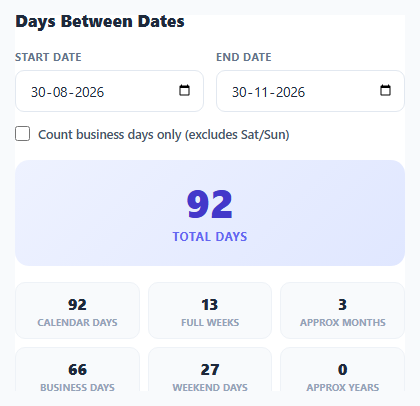
Counting the days between two dates seems trivial until leap years, month-length differences, or weekend exclusions enter the picture — subtracting two date strings by hand reliably produces off-by-one errors. This snippet computes the exact day count between any two dates using genuine Date arithmetic, offers a business-days-only mode that walks and classifies every calendar day in the range, and breaks the result down into weeks, months, weekends, and years for context.
Avoiding timezone bugs with local-date parsing
The single biggest source of off-by-one bugs in date-difference calculators is timezone handling. An HTML <input type="date"> returns a string like "2026-03-15", and passing that directly to new Date("2026-03-15") parses it as UTC midnight — which, in any timezone behind UTC, displays as the *previous* day locally. parseLocalDate() avoids this entirely by manually splitting the string on - and constructing the date with new Date(year, month - 1, day), the three-argument Date constructor that always builds a date in the browser's local timezone rather than UTC. Every date used in this tool goes through that function, which is what keeps the day count accurate regardless of which timezone the visitor is in.
Millisecond-difference division, not manual counting
For the plain calendar-day count, the tool takes the simplest reliable approach: subtracting two Date objects yields a millisecond difference, divided by 86400000 (the number of milliseconds in a day) and rounded to the nearest whole number. Rounding rather than flooring or ceiling matters here because daylight saving time transitions can shift a "24-hour" day to 23 or 25 real hours in some timezones, and rounding correctly absorbs that half-hour-scale discrepancy without introducing an off-by-one error on the vast majority of date ranges that don't cross a DST boundary.
Counting business days by walking the calendar, not by formula
Rather than using a closed-form formula to estimate weekdays (which gets subtly wrong near the start and end of a range), countBusinessDays() walks every single day from the start to the end date with cursor.setDate(cursor.getDate() + 1), checking getDay() against Saturday (6) and Sunday (0) on each one and incrementing a counter for every weekday found. This brute-force approach is deliberately simple and unambiguously correct — for typical date ranges of days, weeks, or a few years, the performance cost of iterating day by day is negligible, and it sidesteps the edge cases a mathematical shortcut formula would need to special-case (partial weeks at either end, for instance).
Handling reversed date order gracefully
If the end date is chosen before the start date, the tool does not error out — it swaps which date is treated as earlier and later internally for all calculations, while still labeling the result as reversed so the input itself isn't silently rewritten out from under the user.
A breakdown, not just one number
Beyond the headline total, the result is broken into full weeks (Math.floor(diffDays / 7)), an approximate month count using calendar-month arithmetic ((later.getFullYear() - earlier.getFullYear()) * 12 + (later.getMonth() - earlier.getMonth())), business days, weekend days (the calendar-day total minus business days), and an approximate year count. Presenting several units at once means the same calculation instantly answers "how many weeks is that" or "roughly how many months" without a second lookup.
Build with AI
Build, Understand, Optimize, and Extend It With AI
Paste this snippet's JavaScript into an AI assistant like Claude and ask it to explain exactly why parsing an HTML date input's value with the three-argument Date constructor avoids the UTC-parsing off-by-one bug that new Date(dateString) alone would introduce — it is one of the most common date-handling mistakes in web development. It is also a good base to extend: ask for a configurable list of holidays to exclude from the business-day count, support for a specific work week definition (e.g. excluding Friday and Saturday for regions where that is the weekend), or a shareable URL that encodes the selected date range as query parameters.
Prompt to recreate it
Copy this into your AI assistant of choice to build the effect from scratch, or as a jumping-off point for your own variant:
Build a days-between-dates calculator in plain HTML, CSS, and JavaScript, no libraries.

Requirements:
- Two native <input type="date"> fields for a start date and an end date, recalculating live on every change.
- Parse each date input's string value manually (splitting on the dash and constructing a Date with the three-argument local-timezone constructor) rather than passing the raw string directly to new Date(), to avoid the UTC-parsing off-by-one bug that shifts the displayed date by one day in timezones behind UTC.
- Calculate the total calendar days between the two dates using millisecond-difference division, rounded to the nearest whole day to correctly absorb daylight saving time transitions.
- Add a checkbox toggle for "business days only" that, when checked, switches the headline result to a count produced by iterating every single calendar day in the range and counting only Monday through Friday (excluding Saturday and Sunday) rather than using an estimation formula.
- Handle the case where the end date is chosen earlier than the start date by determining which is actually earlier internally for all calculations, without erroring, and label the displayed result to indicate the dates were reversed.
- Below the headline number, show a breakdown grid with several derived stats calculated from the same date range: total calendar days, full weeks, approximate months (using calendar month arithmetic, not day division), business days, weekend days, and approximate years.
- Default the two date inputs to today and a date three months in the future so the tool shows a real, non-empty result immediately on load.
Want to tighten it up first? Run this prompt through the AI Prompt Studio to score it across 8 quality dimensions, catch anti-patterns, and tune the wording for Claude, ChatGPT, or Gemini before you paste it in.
Source Code
<div class="wrap">
  <h2>Days Between Dates</h2>

  <div class="date-row">
    <div class="field">
      <label>Start date</label>
      <input type="date" id="start-date" />
    </div>
    <div class="field">
      <label>End date</label>
      <input type="date" id="end-date" />
    </div>
  </div>

  <label class="toggle">
    <input type="checkbox" id="business-toggle" />
    Count business days only (excludes Sat/Sun)
  </label>

  <div class="result-card">
    <div class="big-number" id="big-number">0</div>
    <div class="big-label" id="big-label">total days</div>
  </div>

  <div class="breakdown-grid" id="breakdown-grid"></div>
</div>
* { box-sizing: border-box; margin: 0; padding: 0; }
body { font-family: system-ui, -apple-system, sans-serif; background: #f8fafc; min-height: 100vh; display: flex; align-items: center; justify-content: center; padding: 28px 20px; }
.wrap { width: 100%; max-width: 440px; background: #fff; border: 1px solid #e2e8f0; border-radius: 18px; padding: 24px; }
h2 { font-size: 17px; font-weight: 800; color: #1e293b; margin-bottom: 18px; }
.date-row { display: grid; grid-template-columns: 1fr 1fr; gap: 12px; margin-bottom: 14px; }
.field label { display: block; font-size: 11px; font-weight: 700; color: #64748b; text-transform: uppercase; letter-spacing: 0.03em; margin-bottom: 6px; }
.field input { width: 100%; padding: 10px 10px; border: 1.5px solid #e2e8f0; border-radius: 9px; font-family: inherit; font-size: 13.5px; color: #1e293b; }
.field input:focus { outline: none; border-color: #6366f1; }
.toggle { display: flex; align-items: center; gap: 8px; font-size: 12.5px; color: #475569; font-weight: 600; margin-bottom: 18px; cursor: pointer; }
.toggle input { accent-color: #6366f1; width: 15px; height: 15px; }
.result-card { background: linear-gradient(135deg, #eef2ff, #e0e7ff); border-radius: 14px; padding: 22px; text-align: center; margin-bottom: 16px; }
.big-number { font-size: 40px; font-weight: 800; color: #4338ca; line-height: 1; font-variant-numeric: tabular-nums; }
.big-label { font-size: 12px; font-weight: 700; color: #6366f1; text-transform: uppercase; letter-spacing: 0.05em; margin-top: 6px; }
.breakdown-grid { display: grid; grid-template-columns: repeat(3, 1fr); gap: 8px; }
.stat { background: #f8fafc; border: 1px solid #eef2f7; border-radius: 10px; padding: 10px; text-align: center; }
.stat .n { font-size: 16px; font-weight: 800; color: #1e293b; }
.stat .l { font-size: 9.5px; font-weight: 700; color: #94a3b8; text-transform: uppercase; letter-spacing: 0.03em; margin-top: 2px; }
.error-text { font-size: 12.5px; color: #dc2626; font-weight: 600; text-align: center; margin-bottom: 12px; }const startInput = document.getElementById('start-date');
const endInput = document.getElementById('end-date');
const businessToggle = document.getElementById('business-toggle');
const bigNumber = document.getElementById('big-number');
const bigLabel = document.getElementById('big-label');
const breakdownGrid = document.getElementById('breakdown-grid');
const MS_PER_DAY = 86400000;
function parseLocalDate(str) {
const parts = str.split('-').map(Number);
return new Date(parts[0], parts[1] - 1, parts[2]);
}
function countBusinessDays(start, end) {
let count = 0;
const cursor = new Date(start);
while (cursor <= end) {
const day = cursor.getDay();
if (day !== 0 && day !== 6) count++;
cursor.setDate(cursor.getDate() + 1);
}
return count;
}
function calc() {
const startRaw = startInput.value;
const endRaw = endInput.value;
if (!startRaw || !endRaw) {
bigNumber.textContent = '0';
bigLabel.textContent = 'select both dates';
breakdownGrid.innerHTML = '';
return;
}
const start = parseLocalDate(startRaw);
const end = parseLocalDate(endRaw);
const earlier = start <= end ? start : end;
const later = start <= end ? end : start;
const reversed = start > end;
const diffDays = Math.round((later - earlier) / MS_PER_DAY);
if (businessToggle.checked) {
const businessDays = countBusinessDays(earlier, later);
bigNumber.textContent = businessDays;
bigLabel.textContent = 'business days' + (reversed ? ' (dates reversed)' : '');
} else {
bigNumber.textContent = diffDays;
bigLabel.textContent = 'total days' + (reversed ? ' (dates reversed)' : '');
}
const weeks = Math.floor(diffDays / 7);
const months = (later.getFullYear() - earlier.getFullYear()) * 12 + (later.getMonth() - earlier.getMonth());
const businessDays = countBusinessDays(earlier, later);
const weekendDays = diffDays + 1 - businessDays;
breakdownGrid.innerHTML =
stat(diffDays, 'calendar days') +
stat(weeks, 'full weeks') +
stat(Math.max(0, months), 'approx months') +
stat(businessDays, 'business days') +
stat(Math.max(0, weekendDays), 'weekend days') +
stat(Math.floor(diffDays / 365), 'approx years');
}
function stat(n, label) {
return '<div class="stat"><div class="n">' + n + '</div><div class="l">' + label + '</div></div>';
}
startInput.addEventListener('input', calc);
endInput.addEventListener('input', calc);
businessToggle.addEventListener('change', calc);
const today = new Date();
const inThreeMonths = new Date(today.getFullYear(), today.getMonth() + 3, today.getDate());
function toIso(d) {
return d.getFullYear() + '-' + String(d.getMonth() + 1).padStart(2, '0') + '-' + String(d.getDate()).padStart(2, '0');
}
startInput.value = toIso(today);
endInput.value = toIso(inThreeMonths);
calc();Step by step
How to Use
- 1Pick a start and end dateUse the native date pickers to select any two dates — the calculation updates instantly.
- 2Read the headline resultThe large number shows the total calendar days between your two dates by default.
- 3Toggle business days onlyCheck the box to switch the headline number to count only Monday-Friday, excluding weekends.
- 4Check the breakdown gridSee the same range expressed in weeks, approximate months, business days, weekend days, and approximate years all at once.
- 5Try a reversed rangePick an end date earlier than the start date — the calculator still works correctly and labels the result as reversed.
- 6Export in your formatClick HTML for a standalone file, JSX for a React component, or Tailwind for a React + Tailwind version.
Real-world uses
Common Use Cases
Got questions?
Frequently Asked Questions
An HTML date input returns a string like "2026-03-15", and passing that string straight into new Date() parses it as UTC midnight, which can display as the previous calendar day in timezones behind UTC. Manually splitting the string and using new Date(year, month - 1, day) builds the date in the browser's local timezone instead, avoiding that off-by-one bug entirely.
countBusinessDays() walks every single date from the start to the end of the range one day at a time, checking each one's getDay() value against Saturday (6) and Sunday (0), and counts every day that isn't a weekend. This brute-force day-by-day approach avoids the edge cases a shortcut formula would need to handle at partial weeks.
The calculator does not error. It internally determines which of the two selected dates is earlier and which is later for the purpose of calculation, while labeling the displayed result as reversed so you know the order was swapped.
No, business-day counting here only excludes Saturdays and Sundays; it has no knowledge of public holidays, which vary by country and region. For holiday-aware counting, you would need to supply a specific holiday list to exclude those additional dates.
It usually isn't, but if you're manually counting inclusively (counting both the start and end date as separate days), remember the calendar-day total here measures the difference between the two dates, not the number of individual calendar days spanned inclusively — those differ by exactly one.
The millisecond-difference calculation is rounded rather than floored specifically to absorb the 23-or-25-hour day that occurs on a DST transition, so a date range crossing a DST change still returns the correct whole-day count in virtually all cases.