

Learn Coding Visually
Learn to code with interactive, live-preview playgrounds — HTML, CSS, JavaScript, React & more.
 HTML Playground42 lessons · Click-based · Live preview
 CSS PlaygroundLearn CSS with a live editor
 JavaScript Playground60 lessons · DOM · Async · Canvas
 React PlaygroundLearn React with a live code editor
 GSAP PlaygroundLearn GSAP animation interactively
 SVG Playground44 lessons · shapes · paths · animation
 SCSS Playground45 lessons · Sass modules · tokens
 Tailwind PlaygroundLearn Tailwind CSS with a live editor
 Bootstrap 5 Playground50 lessons · live preview
Unit Price Calculator — Compare Cost Per Unit for Best Value
Unit Price / Best Value Calculator · Misc · Plain HTML, CSS & JS · Live preview
What's included
Features
About this UI Snippet
Unit Price Calculator — Find the True Best Value by Comparing Cost Per Unit
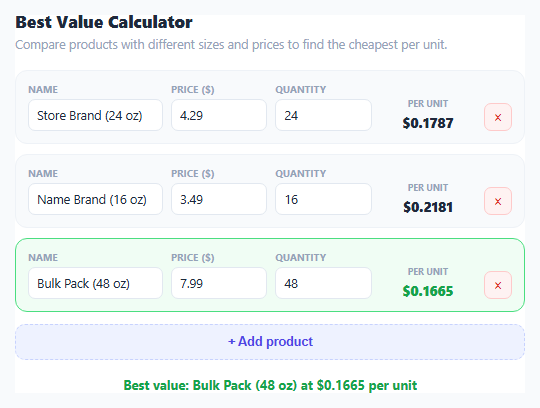
The bigger package is not always the cheaper one, and the "per 100g" unit price label on a grocery store shelf tag is easy to misread or simply absent for some products. This snippet turns that comparison into a live spreadsheet-like table: add any number of products with a name, a price, and a quantity, and it computes each one's exact cost per unit, then highlights the genuinely cheapest option — a comparison that is otherwise easy to get wrong doing mental math between differently sized packages.
The core calculation is deliberately simple
computeUnitPrice() divides a product's price by its qty, producing a straightforward dollars-per-unit figure. The unit itself is left to the user's own consistent choice — ounces, grams, count, liters, whatever makes sense for the products being compared — since the tool's job is only to normalize price against quantity, not to convert between measurement systems. This is intentional: forcing a specific unit would make the tool unusable for comparing, say, a count of items against a count of items in a different-sized multipack, which is just as valid a "quantity" as a weight or volume.
An array of items, not a fixed two-way comparison
Unlike a simple "compare two products" calculator, items are stored as a growable array of { name, price, qty } objects, so the same tool handles comparing two products or ten equally well — useful when a grocery aisle offers a store brand, a name brand, and a bulk pack all in different sizes, and you want to see all three ranked at once rather than running three separate pairwise comparisons.
Finding the true minimum without assuming input order
Rather than assuming the first item or hard-coding which row to highlight, render() computes every item's unit price, filters out any that failed to compute (due to empty or invalid input), and finds the actual numeric minimum with Math.min(...validPrices). It then re-scans to find which specific item matches that minimum using a small floating-point tolerance (Math.abs(up - minPrice) < 1e-9) rather than strict equality, which avoids a genuine floating-point comparison bug — two mathematically identical unit prices computed through slightly different division paths can differ by a tiny fractional amount that strict === would treat as unequal, incorrectly failing to highlight a tied best value.
Graceful handling of incomplete rows
A newly added blank row, or a row where quantity is left as zero or non-numeric, does not crash the comparison or produce NaN/Infinity results silently polluting the "best value" determination — computeUnitPrice() explicitly checks Number.isFinite() on both inputs and requires a positive quantity, returning null for anything invalid. Invalid rows show an em dash instead of a broken number and are excluded entirely from the best-value comparison, so adding a blank row while still filling in a comparison never accidentally "wins" with a $0 division artifact.
Live delegated event handling for a dynamic row count
Because rows are added and removed dynamically, input and click handling use event delegation on the shared container rather than attaching listeners per row — a single input listener reads data-idx and data-field attributes from whichever input fired the event, and a single click listener reads data-remove from whichever remove button was clicked. This means the number of rows can grow or shrink freely without ever needing to re-wire event listeners.
Build with AI
Build, Understand, Optimize, and Extend It With AI
Paste this snippet's JavaScript into an AI assistant like Claude and ask it to explain exactly why the best-value comparison uses a small floating-point tolerance (Math.abs(a - b) < 1e-9) instead of strict equality when finding the minimum unit price — it's a subtle but real bug class in any numeric comparison involving division. It's also a good base to extend: ask for unit conversion support (so ounces and grams can be compared directly), a percentage-cheaper-than-runner-up statistic next to the winner, or persisting the comparison list to localStorage so it survives a page reload.
Prompt to recreate it
Copy this into your AI assistant of choice to build the effect from scratch, or as a jumping-off point for your own variant:
Build a unit price / best value comparison calculator in plain HTML, CSS, and JavaScript, no libraries.

Requirements:
- A dynamic, growable list of product rows, each with a name text input, a price number input, and a quantity number input, stored as an array of objects in JavaScript (not read fresh from the DOM on every calculation).
- An "Add product" button that appends a new blank row to the list and focuses its first input, and a remove button on each row that deletes that specific product from the array.
- Compute each row's unit price as price divided by quantity, showing it to four decimal places; if the price or quantity is missing, non-numeric, or the quantity is zero or negative, show a placeholder dash for that row instead of a broken number, and exclude it from the best-value comparison entirely.
- Determine the single cheapest valid unit price using the true numeric minimum across all valid rows, then identify and visually highlight (with distinct styling) every row whose unit price matches that minimum using a small floating-point tolerance comparison rather than strict equality, since two mathematically equal divisions can differ by a tiny rounding amount.
- Show a summary line naming the winning product and its unit price whenever at least one valid row exists.
- Use event delegation (a single input listener and a single click listener on the shared list container, reading data attributes from the event target) to handle edits and removals across an arbitrary and changing number of rows, rather than attaching per-row listeners.
Want to tighten it up first? Run this prompt through the AI Prompt Studio to score it across 8 quality dimensions, catch anti-patterns, and tune the wording for Claude, ChatGPT, or Gemini before you paste it in.
Source Code
<div class="wrap">
  <h2>Best Value Calculator</h2>
  <p class="sub">Compare products with different sizes and prices to find the cheapest per unit.</p>

  <div class="items" id="items"></div>

  <button id="add-item">+ Add product</button>

  <div class="winner" id="winner"></div>
</div>
* { box-sizing: border-box; margin: 0; padding: 0; }
body { font-family: system-ui, -apple-system, sans-serif; background: #f8fafc; min-height: 100vh; padding: 28px 20px; }
.wrap { max-width: 560px; margin: 0 auto; background: #fff; border: 1px solid #e2e8f0; border-radius: 18px; padding: 24px; }
h2 { font-size: 17px; font-weight: 800; color: #1e293b; }
.sub { font-size: 12.5px; color: #94a3b8; margin: 4px 0 18px; }
.items { display: flex; flex-direction: column; gap: 10px; margin-bottom: 12px; }
.item-row {
display: grid; grid-template-columns: 1.4fr 1fr 1fr 1fr auto; gap: 8px; align-items: end;
background: #f8fafc; border: 1.5px solid #eef2f7; border-radius: 12px; padding: 12px;
transition: border-color 0.15s, background 0.15s;
}
.item-row.best { border-color: #4ade80; background: #f0fdf4; }
.item-row .field { display: flex; flex-direction: column; gap: 4px; }
.item-row label { font-size: 9.5px; font-weight: 700; color: #94a3b8; text-transform: uppercase; letter-spacing: 0.03em; }
.item-row input { padding: 7px 8px; border: 1.5px solid #e2e8f0; border-radius: 7px; font-size: 12.5px; font-family: inherit; color: #1e293b; width: 100%; }
.item-row input:focus { outline: none; border-color: #6366f1; }
.unit-price-cell { text-align: center; }
.unit-price-cell .up { font-size: 13.5px; font-weight: 800; color: #1e293b; }
.unit-price-cell .up.best-price { color: #16a34a; }
.unit-price-cell .lbl { font-size: 8.5px; color: #94a3b8; font-weight: 700; }
.remove-btn { width: 28px; height: 28px; border-radius: 7px; border: 1px solid #fecaca; background: #fef2f2; color: #dc2626; font-size: 14px; cursor: pointer; align-self: end; }
.remove-btn:hover { background: #fee2e2; }
#add-item { width: 100%; padding: 10px; border-radius: 10px; border: 1.5px dashed #c7d2fe; background: #eef2ff; color: #4f46e5; font-weight: 700; font-size: 12.5px; cursor: pointer; margin-bottom: 16px; }
#add-item:hover { background: #e0e7ff; }
.winner { text-align: center; font-size: 13px; font-weight: 700; color: #16a34a; min-height: 18px; }const itemsEl = document.getElementById('items');
const addItemBtn = document.getElementById('add-item');
const winnerEl = document.getElementById('winner');
let items = [
{ name: 'Store Brand (24 oz)', price: '4.29', qty: '24' },
{ name: 'Name Brand (16 oz)', price: '3.49', qty: '16' },
{ name: 'Bulk Pack (48 oz)', price: '7.99', qty: '48' },
];
function computeUnitPrice(item) {
const price = parseFloat(item.price);
const qty = parseFloat(item.qty);
if (!Number.isFinite(price) || !Number.isFinite(qty) || qty <= 0 || price < 0) return null;
return price / qty;
}
function render() {
const unitPrices = items.map(computeUnitPrice);
const validPrices = unitPrices.filter(p => p !== null);
const minPrice = validPrices.length ? Math.min(...validPrices) : null;
itemsEl.innerHTML = items.map((item, i) => {
const up = unitPrices[i];
const isBest = up !== null && minPrice !== null && Math.abs(up - minPrice) < 1e-9;
const upText = up === null ? '—' : '$' + up.toFixed(4);
return '<div class="item-row' + (isBest ? ' best' : '') + '">' +
'<div class="field"><label>Name</label><input data-idx="' + i + '" data-field="name" value="' + escapeAttr(item.name) + '" /></div>' +
'<div class="field"><label>Price ($)</label><input data-idx="' + i + '" data-field="price" value="' + escapeAttr(item.price) + '" inputmode="decimal" /></div>' +
'<div class="field"><label>Quantity</label><input data-idx="' + i + '" data-field="qty" value="' + escapeAttr(item.qty) + '" inputmode="decimal" /></div>' +
'<div class="field unit-price-cell"><label class="lbl">Per unit</label><div class="up' + (isBest ? ' best-price' : '') + '">' + upText + '</div></div>' +
'<button class="remove-btn" data-remove="' + i + '" title="Remove">\u00d7</button>' +
'</div>';
}).join('');
if (minPrice !== null) {
const bestIdx = unitPrices.findIndex(p => p !== null && Math.abs(p - minPrice) < 1e-9);
const bestName = items[bestIdx].name || 'Item ' + (bestIdx + 1);
winnerEl.textContent = 'Best value: ' + bestName + ' at $' + minPrice.toFixed(4) + ' per unit';
} else {
winnerEl.textContent = '';
}
}
function escapeAttr(str) {
return String(str).replace(/&/g, '&').replace(/"/g, '"');
}
itemsEl.addEventListener('input', (e) => {
const idx = e.target.dataset.idx;
const field = e.target.dataset.field;
if (idx === undefined) return;
items[idx][field] = e.target.value;
render();
});
itemsEl.addEventListener('click', (e) => {
const btn = e.target.closest('button[data-remove]');
if (!btn) return;
items.splice(parseInt(btn.dataset.remove, 10), 1);
render();
});
addItemBtn.addEventListener('click', () => {
items.push({ name: '', price: '', qty: '' });
render();
const lastInput = itemsEl.querySelector('.item-row:last-child input');
if (lastInput) lastInput.focus();
});
render();Step by step
How to Use
- 1Fill in each product's name, price, and quantityEnter a name, the total price, and the quantity (any consistent unit — ounces, count, liters) for each product.
- 2Add more products to compareClick "+ Add product" to append another row — compare as many options as you like at once.
- 3Read each row's unit priceThe "Per unit" column shows price divided by quantity to four decimal places for precise comparison.
- 4Spot the highlighted best valueThe cheapest per-unit row is highlighted green, and the summary line names the winning product explicitly.
- 5Remove a productClick the × button on any row to remove it from the comparison.
- 6Export in your formatClick HTML for a standalone file, JSX for a React component, or Tailwind for a React + Tailwind version.
Real-world uses
Common Use Cases
Got questions?
Frequently Asked Questions
Whatever unit you enter as the quantity — ounces, grams, count, liters, or anything else. The tool only divides price by quantity; it doesn't convert between measurement systems, so make sure every product you're comparing uses the same unit for a valid comparison.
It computes every valid row's unit price, finds the true numeric minimum among them with Math.min(), then re-scans to find which item(s) match that minimum within a tiny floating-point tolerance rather than exact equality, which correctly handles cases where two computed prices are mathematically equal but differ by a microscopic rounding amount.
That row shows an em dash instead of a unit price and is excluded entirely from the best-value comparison — it never appears as the "winner" due to a division-by-zero or NaN artifact, and it doesn't block the other valid rows from being compared correctly.
Yes, there is no fixed limit. Click "+ Add product" as many times as needed; the comparison and best-value highlight recalculate correctly regardless of how many rows are present.
Many real-world unit prices are small fractions of a cent per unit (for example, $4.29 for 24 ounces is about $0.1788 per ounce), and rounding to only two decimal places would hide the actual difference between two closely priced options, sometimes making a real tie look like a clear winner or vice versa.
No, it compares only the price and quantity values you enter directly. Enter the final discounted price if you want the comparison to reflect a coupon or sale price.