Learn Coding Visually
Learn to code with interactive, live-preview playgrounds — HTML, CSS, JavaScript, React & more.
 HTML Playground42 lessons · Click-based · Live preview
 CSS PlaygroundLearn CSS with a live editor
 JavaScript Playground60 lessons · DOM · Async · Canvas
 React PlaygroundLearn React with a live code editor
 GSAP PlaygroundLearn GSAP animation interactively
 SVG Playground44 lessons · shapes · paths · animation
 SCSS Playground45 lessons · Sass modules · tokens
 Tailwind PlaygroundLearn Tailwind CSS with a live editor
 Bootstrap 5 Playground50 lessons · live preview
Role-Based Seat Mix Pricing Calculator — Free HTML CSS JS Snippet
Role-Based Seat Mix Pricing Calculator · Pricing · Plain HTML, CSS & JS · Live preview
What's included
Features
About this UI Snippet
Role-Based Seat Mix Calculator — Independent Per-Role Steppers with a Live Blended Total
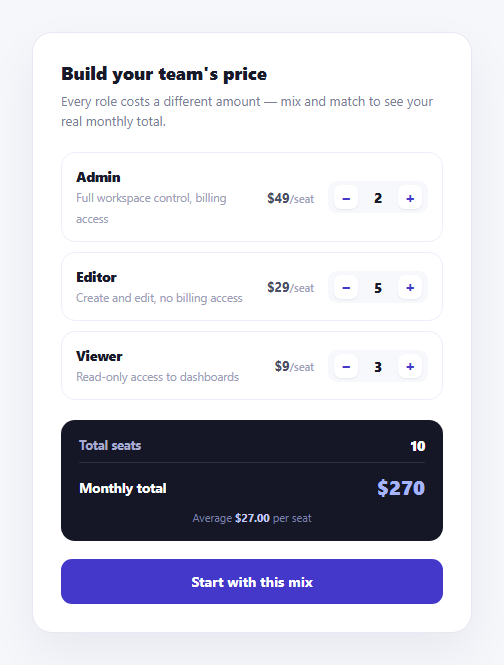
Flat per-seat pricing pretends every user costs the same to support — but an admin with billing access and a read-only viewer rarely cost (or should be priced) the same. This calculator prices each role independently: three role cards, each with its own rate and its own increment/decrement stepper, and a summary that recalculates the live team total and blended average from whatever mix a visitor builds.
No separately-tracked total — everything is re-derived
recalcTotals() never increments a running total variable when a stepper is clicked. Instead, every time it runs, it loops over all .rsm-role cards fresh, reads each one's data-rate attribute and its count element's data-count attribute, and sums both from scratch. This means the displayed total can never drift from what the steppers actually show — there is no intermediate state to get out of sync, only a pure recalculation from the DOM's current attribute values.
Rate and count live in the DOM as data attributes, not JavaScript variables
Each role's per-seat rate is set once as data-rate on the .rsm-role card itself, and each stepper's live count is tracked as data-count on its .rsm-count span — both read directly off the markup rather than mirrored into a separate JavaScript object. This keeps the HTML and the state honest: viewing the page source at any moment shows you exactly what the calculator currently thinks each role costs and how many seats are set, since there's nowhere else for that state to hide.
`adjustCount()` clamps before it ever reaches the total
Rather than letting a count go negative or unbounded, adjustCount() clamps the next value with Math.max(0, Math.min(999, current + delta)) before writing it back to the data-count attribute. A role can be reduced all the way to zero seats (fading the card via .rsm-role-empty) without breaking the total math — a zero-count role simply contributes rate * 0 = 0 to the sum, same as if it weren't there.
The blended average tells a different story than any single rate
avg = totalPrice / totalSeats is deliberately shown alongside the raw total, since a team weighted toward cheaper Viewer seats will show a low blended average even with a few expensive Admin seats mixed in — a number that a single flat per-seat rate could never communicate, and that helps a visitor sanity-check whether their planned mix is being priced reasonably.
Customizing it
Add a fourth role by copying an existing .rsm-role block with its own data-rate and a stepper starting count, and adding matching minus/plus click handlers in the roleCards.forEach loop — recalcTotals() already sums generically over however many .rsm-role elements exist, so no changes are needed there. Swap the flat per-seat rates for volume-discounted rates by making recalcTotals() apply a discount multiplier once a role's count crosses a threshold.
Build with AI
Build, Understand, Optimize, and Extend It With AI
Rather than tracing the recalculation logic by hand, paste this snippet's HTML, CSS, and JS into an AI coding assistant like Claude and ask it to explain exactly why recalcTotals() re-sums every role's rate times count from the DOM's data attributes on every single click, instead of incrementing a running total variable, and what class of bug that design choice avoids. The same assistant can help you extend it — ask it to add volume discounts that reduce a role's per-seat rate once its count crosses a threshold (e.g. 10+ Editor seats), add an annual-versus-monthly billing toggle that recalculates the total accordingly, or persist the seat mix to the URL as query parameters so a prospect can share or bookmark a specific configuration. It's also useful for a validation review: ask whether the 0-to-999 clamp range makes sense for your actual product, or whether a maximum total-seats cap across all roles combined should be enforced separately from each role's own limit. Treat the code less like a finished artifact and more like a starting point for a conversation.
Prompt to recreate it
Copy this into your AI assistant of choice to build the effect from scratch, or as a jumping-off point for your own variant:
Build a role-based seat mix pricing calculator card in plain HTML, CSS, and vanilla JavaScript — no framework, no chart library.

Requirements:
- Three or more "role" cards (e.g. Admin, Editor, Viewer), each displaying a role name, a short permissions description, its own distinct per-seat price, and an independent stepper (minus button, live count, plus button) for that role's seat count.
- Store each role's per-seat rate as a data attribute on its card element and each stepper's live count as a data attribute on its count display element — do not track rate or count in separate JavaScript variables disconnected from the DOM.
- On every stepper click, recalculate the entire summary from scratch by looping over all role cards fresh and re-summing (rate times count) for each — do not increment or decrement a previously stored running total value.
- Display three summary figures that update live: total seats across all roles combined, the total monthly price, and a blended average price per seat (total price divided by total seats).
- Clamp each role's stepper between a minimum of 0 and a reasonable maximum (e.g. 999) so it can never go negative or grow unbounded from rapid clicking.
- When a role's count reaches 0, visually indicate that role is currently excluded from the mix (e.g. reduced opacity) without breaking the total calculation — a zero-count role should simply contribute zero to the sum.
- Format the total price with thousands separators.
Want to tighten it up first? Run this prompt through the AI Prompt Studio to score it across 8 quality dimensions, catch anti-patterns, and tune the wording for Claude, ChatGPT, or Gemini before you paste it in.
Step by step
How to Use
- 1Adjust each role's seat countUse the + and − steppers on Admin, Editor, and Viewer independently.
- 2Watch the summary update liveTotal seats, monthly total, and the blended average per seat recalculate on every click.
- 3Reduce a role to zeroThat role card fades and contributes nothing to the total, without breaking the calculation.
- 4Add a fourth roleCopy an .rsm-role block in the HTML panel with its own data-rate, and add its stepper handlers in the JS panel.
- 5Change a role's rateEdit the data-rate attribute on the .rsm-role div and the displayed price next to it.
- 6Export in your formatClick "HTML" for a standalone file, "JSX" for a React component, or "Tailwind" for a React + Tailwind version.
Real-world uses
Common Use Cases
Got questions?
Frequently Asked Questions
recalcTotals() loops over every .rsm-role card, reads its data-rate attribute and its stepper's data-count attribute, multiplies them, and sums the result across all roles. It runs this full recalculation from scratch on every single stepper click rather than incrementing a stored total, so the displayed total can never drift from what the steppers show.
The stepper clamps at 0 (it will not go negative), the role card visually fades via the rsm-role-empty class, and that role simply contributes rate multiplied by 0, which is 0, to the total sum. The math handles a zero-seat role the same as if it were not in the mix at all.
It is totalPrice divided by totalSeats across all three roles combined, which produces a single blended rate. This is meaningfully different from any one role's flat price and helps a visitor sanity-check whether a mix weighted toward cheaper Viewer seats is bringing the effective average down as expected.
Each role's data-rate lives directly on its .rsm-role element, and each stepper's live data-count lives on its .rsm-count span, both readable straight from the DOM. This keeps a single source of truth for state right in the markup rather than mirroring it into a separate JavaScript object that could fall out of sync with what is visually displayed.
Copy an existing .rsm-role block in the HTML panel, give it its own data-rate value and starting data-count, and add its minus/plus buttons' click handlers by extending the roleCards.forEach loop in the JS panel (or letting the existing generic loop pick it up automatically, since it already iterates over every .rsm-role element found on the page). recalcTotals() requires no changes since it already sums generically over all role cards present.
Yes, each stepper is clamped between 0 and 999 inside adjustCount() via Math.max(0, Math.min(999, current + delta)), preventing a runaway click sequence from producing an unrealistic seat count or a negative one.