Learn Coding Visually
Learn to code with interactive, live-preview playgrounds — HTML, CSS, JavaScript, React & more.
 HTML Playground42 lessons · Click-based · Live preview
 CSS PlaygroundLearn CSS with a live editor
 JavaScript Playground60 lessons · DOM · Async · Canvas
 React PlaygroundLearn React with a live code editor
 GSAP PlaygroundLearn GSAP animation interactively
 SVG Playground44 lessons · shapes · paths · animation
 SCSS Playground45 lessons · Sass modules · tokens
 Tailwind PlaygroundLearn Tailwind CSS with a live editor
 Bootstrap 5 Playground50 lessons · live preview
Radar Sweep Scan Loader — Free HTML CSS JS Snippet
Radar Sweep Scan Loader · Loaders · Plain HTML, CSS & JS · Live preview
What's included
Features
About this UI Snippet
Radar Sweep Scan Loader — Rotating Beam That Paints Blips by Angle
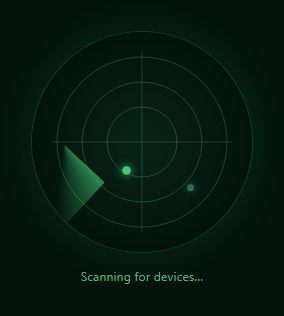
A radar sweep loader mimics the classic circular radar display: a bright beam continuously rotates around a center point, and contacts on the screen only flash brightly the instant the beam crosses their angular position, then fade until the next pass. This snippet builds that behavior for real — the beam rotation is a lightweight CSS animation, but each blip's paint-and-fade timing is computed every frame in JavaScript against the beam's actual current angle, so blips only ever light up in sync with the sweep passing over them rather than blinking on an unrelated independent timer.
The sweep beam is pure CSS, the blips are not
The rotating beam itself (.rs-sweep) is a conic-gradient background on a small element rotated continuously by a CSS @keyframes animation — cheap, GPU-friendly, and needs no JavaScript to animate smoothly. But a CSS animation alone has no way to know "the beam is currently crossing 214 degrees," so anything that must react to the beam's live position — the blips — has to be computed separately in JavaScript rather than as more CSS animation.
Keeping JS-computed blips in sync with a CSS-driven beam
The trick is the constant SWEEP_PERIOD = 2800, deliberately kept equal to the CSS animation's 2.8s duration. currentSweepAngle(elapsed) derives the beam's current angle purely from elapsed time modulo that period — the same period the CSS animation uses — so the JavaScript-computed angle and the CSS-rendered beam position stay synchronized without any direct communication between the two, as long as both read from the same wall-clock time and the same period constant.
Painting a blip only when the beam crosses it
Each of six randomly-placed contacts stores its own polar angle. Every animation frame, tick() compares the beam's current angle against each contact's angle using a wrapped angular-difference calculation (((sweepAngle - c.angle + 540) % 360) - 180, which correctly handles the 359-to-0 degree wraparound) — when that difference is small, the contact is freshly "painted" and its lastPainted timestamp updates. Every frame afterward, the contact's opacity and radius fade based on how long ago it was last painted, creating the signature "flash and decay" blip behavior real radar displays have.
Randomized contact placement, not a fixed pattern
Contact positions are generated once at load with random polar angle and radius (converted to Cartesian x/y via cos/sin), so the pattern of blips differs on every page load rather than always lighting up in the same six spots — appropriate for a loading indicator meant to suggest ongoing discovery rather than a static decoration.
Cycling status text
The hint text beneath the radar cycles through a short list of scanning-themed phrases once per full sweep rotation, computed from Math.floor(elapsed / SWEEP_PERIOD) % labels.length — giving the loader a sense of ongoing multi-stage work without needing any real backend progress data to drive it.
Build with AI
Build, Understand, Optimize, and Extend It With AI
Paste this snippet's HTML, CSS, and JS into an AI coding assistant like Claude and ask it to explain exactly how SWEEP_PERIOD keeps the JavaScript-computed blip timing synchronized with the independently-running CSS beam animation, and why the wrapped angular-difference formula is needed instead of a plain subtraction. It's also a good candidate for extension — ask it to add a trailing "fade tail" behind the sweep beam itself, tie blip discovery to real async results (e.g. flash a blip only once a corresponding network request actually resolves), or add a distance-ping label near each blip showing a simulated range value.
Prompt to recreate it
Copy this into your AI assistant of choice to build the effect from scratch, or as a jumping-off point for your own variant:
Build a radar-sweep loading indicator in plain HTML, CSS, and JavaScript — no libraries.

Requirements:
- A circular radar field with concentric range rings and crosshair lines drawn as inline SVG.
- A rotating "sweep beam" implemented as a CSS conic-gradient on a rotated element, animated continuously with a CSS @keyframes rotation (not JavaScript-driven rotation) at a known, fixed duration.
- Several randomly-placed "contact" blips (circles) at random polar positions within the radar field, generated once when the page loads so the pattern differs each time.
- A JavaScript requestAnimationFrame loop that computes the beam's current angle purely from elapsed time and the SAME rotation duration used by the CSS animation, so the two stay synchronized without directly communicating.
- Each blip must only become fully visible ("painted") at the instant the computed beam angle passes over that blip's own stored angle, using an angular-difference calculation that correctly handles the wraparound between 359 and 0 degrees — then fade back down in opacity over roughly a second until the beam completes another rotation and passes it again.
- Cycling status text beneath the radar that changes to a new phrase from a short list once per full beam rotation.
- Style it with a dark background and a green (or similar) radar-scope color palette with a subtle glow effect.
Want to tighten it up first? Run this prompt through the AI Prompt Studio to score it across 8 quality dimensions, catch anti-patterns, and tune the wording for Claude, ChatGPT, or Gemini before you paste it in.
Step by step
How to Use
- 1Paste HTML, CSS, and JSA circular radar display sweeps continuously, painting randomly placed blips as the beam crosses them.
- 2Watch the paint-and-fade cycleEach blip flashes bright only when the rotating beam passes its angle, then fades until the next rotation.
- 3Change the sweep speedUpdate both the CSS animation duration (2.8s) and the matching SWEEP_PERIOD constant in JS together — they must stay equal to stay in sync.
- 4Adjust contact countEdit CONTACT_COUNT to show more or fewer randomly-placed blips.
- 5Recolor the themeEdit the green color values in the CSS for a different radar palette (e.g. amber or blue).
- 6Customize the status textEdit the labels array in the JS panel to match your own scanning or loading copy.
Real-world uses
Common Use Cases
Got questions?
Frequently Asked Questions
Both use the same period value — 2.8 seconds — defined once in the CSS animation-duration and again as the SWEEP_PERIOD constant in JS. currentSweepAngle() derives the beam's angle purely from elapsed time modulo that shared period, so as long as both start at the same moment and use the same period, the JS-computed angle always matches where the CSS beam visually is, without any direct communication between the two.
Each contact stores a lastPainted timestamp, updated only when the beam's current angle is close enough to that contact's stored angle. Every frame, opacity is computed as a function of how long ago that paint happened (fade = 1 - age / 1400), producing a bright flash immediately after the beam passes and a gradual fade until the next rotation reaches it again — matching how a real radar display's phosphor persistence works.
A naive subtraction (sweepAngle - contactAngle) breaks near the 359-to-0 wraparound, producing a huge false difference for angles that are actually close together. The formula ((sweepAngle - c.angle + 540) % 360) - 180 normalizes the difference into a -180 to 180 range first, so angles like 358 and 2 correctly compute as only 4 degrees apart.
Yes — edit the CONTACT_COUNT constant. Each contact is generated with a random polar angle and radius at load time, converted to Cartesian coordinates for SVG placement, so more contacts simply means more randomly-scattered blips within the same radar field.
Yes — the CSS beam rotation costs nothing extra in JS, and the per-frame blip loop is a fixed small array (default 6 contacts) doing simple trigonometry and attribute updates, well within budget for any modern browser even running continuously.
Generate the contacts array once (in useMemo or a computed ref) so positions are not re-randomized on every re-render, and run the requestAnimationFrame loop in a mount effect with cleanup that cancels the frame on unmount, matching the pattern used by other per-frame animated loaders in this library.