Learn Coding Visually
Learn to code with interactive, live-preview playgrounds — HTML, CSS, JavaScript, React & more.
 HTML Playground42 lessons · Click-based · Live preview
 CSS PlaygroundLearn CSS with a live editor
 JavaScript Playground60 lessons · DOM · Async · Canvas
 React PlaygroundLearn React with a live code editor
 GSAP PlaygroundLearn GSAP animation interactively
 SVG Playground44 lessons · shapes · paths · animation
 SCSS Playground45 lessons · Sass modules · tokens
 Tailwind PlaygroundLearn Tailwind CSS with a live editor
 Bootstrap 5 Playground50 lessons · live preview
Hero with Interactive Command Palette Demo — Free HTML CSS JS Snippet
Hero with Interactive Command Palette Demo · Heroes · Plain HTML, CSS & JS · Live preview
What's included
Features
About this UI Snippet
Command Palette Hero Demo — Live Cmd+K Search Embedded in the Hero Section
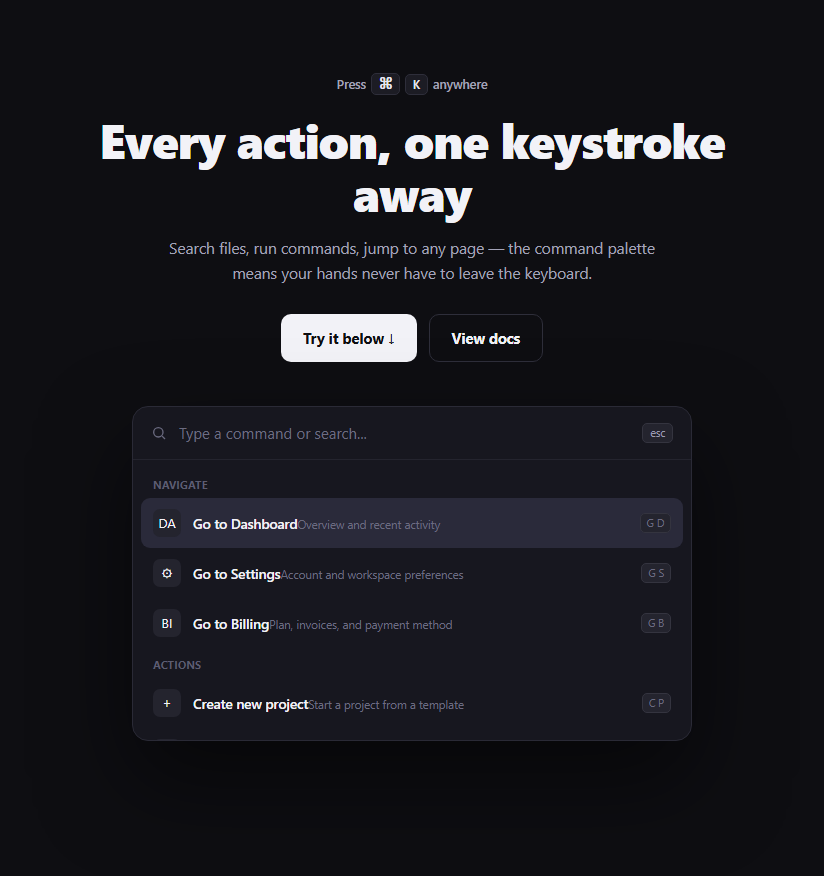
Most product heroes describe a keyboard-driven command palette in a bullet point. This one lets a visitor actually use one, right in the fold — a real, working Cmd+K-style palette with grouped results, live substring filtering, match highlighting, and full arrow-key navigation, all before they've signed up for anything.
A single `render()` function owns the entire palette state
Rather than separately manipulating the DOM for filtering, highlighting, and active-item styling, one render() function reads the current input value, filters the commands array into currentMatches, and rebuilds the results list from scratch as an HTML string. This "re-render the whole list on every state change" approach — the same idea React popularized — keeps the DOM, the filtered data, and the active selection index from ever drifting out of sync with each other, because there's only one code path that produces the visible list.
Match highlighting without a regex library
highlight(text, query) finds the query's position with a plain indexOf on lowercased strings, then slices the original (correctly-cased) text into a before/match/after triple and wraps the matched slice in <mark>. Every slice is passed through escapeHtml() first — user-typed text is being inserted as HTML via innerHTML, so escaping &, <, and > prevents a visitor's own search query from being interpreted as markup.
Grouped results via a "last group seen" tracker
The commands array isn't pre-grouped into nested arrays; instead render() walks the flat, filtered list once and inserts a .cpd-group-label heading only when the current item's group differs from lastGroup. This keeps the source data flat and simple (just add a command with any group string) while still rendering correctly-grouped section headers, including when filtering removes an entire group from view.
Keyboard navigation matches real palette conventions
ArrowDown/ArrowUp move activeIndex and re-render (clamped so it can't go out of bounds), Enter calls runActive() on whichever command is currently active — regardless of whether it was reached by keyboard or mouse hover — and Escape clears the query. Hovering a result with the mouse also updates activeIndex and re-renders, so keyboard and mouse interaction always agree on which single item is "active" at any moment.
"Running" a command is simulated, but the state machine is real
runActive() swaps the input's value to show a checkmark confirmation, then resets everything after a short delay — there's no real navigation since this is a demo, but the selection, filtering, and active-index tracking are all fully functional, so the interaction pattern is exactly what you'd wire real navigation into.
Customizing it
Add real commands by extending the commands array with group, name, sub, icon, and shortcut fields — everything else (grouping, filtering, highlighting) works generically off that data. Replace runActive()'s checkmark simulation with real navigation (e.g. window.location.href) once wiring this into an actual app rather than a marketing demo.
Build with AI
Build, Understand, Optimize, and Extend It With AI
Instead of tracing the render cycle by hand, paste this snippet's HTML, CSS, and JS into an AI coding assistant like Claude and ask it to explain exactly how render() keeps the filtered command list, the grouped headings, the highlighted match text, and the active-selection index all in sync from a single function call, and why every piece of user-typed text passes through escapeHtml() before being inserted via innerHTML. The same assistant can help you extend it — ask it to add fuzzy matching (so "gd" also matches "Go to Dashboard") instead of plain substring matching, persist recently-run commands to the top of the list using localStorage, or wire a real global Cmd+K / Ctrl+K keyboard shortcut listener on document that opens this palette as an actual modal overlay rather than an always-visible hero element. It's also useful for an accessibility review: ask whether the results list needs role="listbox" and aria-activedescendant so screen reader users get equivalent feedback to the sighted arrow-key navigation. Treat the code less like a finished artifact and more like a starting point for a conversation.
Prompt to recreate it
Copy this into your AI assistant of choice to build the effect from scratch, or as a jumping-off point for your own variant:
Build a hero section in plain HTML, CSS, and vanilla JavaScript centered on a fully working command-palette search demo, styled like a Cmd+K launcher — no framework, no fuzzy-search library.

Requirements:
- A flat JavaScript array of command objects, each with a group name, a display name, a short subtitle, an icon character, and an optional keyboard shortcut label.
- A search input inside a palette-styled card. Typing must filter the array live via case-insensitive substring matching against each command's name, and results must render grouped under their group name as a heading — inserting a group heading only when the group changes as you walk the filtered, still-flat list, not from pre-nested data.
- Highlight the matched substring within each result's name using a <mark> element, built by slicing the original (correctly-cased) string around the lowercase match position — and pass every piece of text derived from the live search query through an HTML-escaping function before inserting it via innerHTML, since it comes from user input.
- Implement full keyboard navigation on the input: ArrowDown and ArrowUp move a single shared "active index" up and down through the currently filtered results (clamped at the bounds), Enter "runs" whichever result is currently active regardless of whether it was reached by keyboard or mouse hover, and Escape clears the search query.
- Hovering a result with the mouse must also update the same active-index state used by keyboard navigation, so the two interaction methods can never show two different items as "active" at once.
- Running a command should not perform real navigation (there is nothing to navigate to in a demo) — instead briefly show a confirmation state in the input (e.g. a checkmark) and then reset the input and selection after a short delay.
- Rebuild the entire results list from one single render function on every state change (typing, arrow key, hover, or run) rather than patching individual DOM nodes for each kind of change.
Want to tighten it up first? Run this prompt through the AI Prompt Studio to score it across 8 quality dimensions, catch anti-patterns, and tune the wording for Claude, ChatGPT, or Gemini before you paste it in.
Step by step
How to Use
- 1Click into the search boxOr click "Try it below" to focus the palette input automatically.
- 2Type to filter commandsTry "set" or "invite" — matching results stay grouped and the matched text is highlighted.
- 3Navigate with arrow keysPress ArrowDown/ArrowUp to move the active selection; the highlighted row follows.
- 4Press Enter to run a commandThe input briefly shows a confirmation checkmark, then resets.
- 5Edit the commands listIn the JS panel, edit the commands array — add group, name, sub, icon, and shortcut fields.
- 6Export in your formatClick "HTML" for a standalone file, "JSX" for a React component, or "Tailwind" for a React + Tailwind version.
Real-world uses
Common Use Cases
Got questions?
Frequently Asked Questions
It is fully functional within the scope of a demo: typing filters real data, arrow keys move a real active selection, Enter triggers a real (simulated) command-run state, and Escape clears the query. The only thing that is not "real" is that runActive() shows a checkmark confirmation instead of performing actual navigation, since there is nowhere for a marketing demo to navigate to.
The commands array is flat with each entry carrying its own group string field. render() walks the filtered list once, tracking the group of the previously rendered item in a lastGroup variable, and only inserts a new .cpd-group-label heading when the current item's group differs from it — so grouping falls out naturally from the data order rather than needing pre-nested arrays.
The results list is built as an HTML string and inserted via innerHTML, and the query text driving the highlight comes directly from user input. Without escaping, a visitor typing characters like < or & into the search box could have those characters interpreted as HTML markup rather than displayed literally, which is a real (if low-stakes, client-side-only) injection risk.
No — both update the same activeIndex variable and both call render() afterward, so whichever interaction happened most recently (a hover or an arrow key press) is reflected consistently in both the highlighted row and whichever item Enter would run.
Add an object with group, name, sub, icon, and shortcut fields to the commands array at the top of the JS panel. The filtering, grouping, and highlighting logic all read from this array generically, so a new entry appears in search results and under the correct group heading automatically.
Replace the body of runActive() — currently a checkmark-and-reset simulation — with real logic per command, such as window.location.href = cmd.url for navigation commands or a function call for action commands. You would likely also want to add a url or action field to each entry in the commands array to drive that logic.