Learn Coding Visually
Learn to code with interactive, live-preview playgrounds — HTML, CSS, JavaScript, React & more.
 HTML Playground42 lessons · Click-based · Live preview
 CSS PlaygroundLearn CSS with a live editor
 JavaScript Playground60 lessons · DOM · Async · Canvas
 React PlaygroundLearn React with a live code editor
 GSAP PlaygroundLearn GSAP animation interactively
 SVG Playground44 lessons · shapes · paths · animation
 SCSS Playground45 lessons · Sass modules · tokens
 Tailwind PlaygroundLearn Tailwind CSS with a live editor
 Bootstrap 5 Playground50 lessons · live preview
Text Statistics Analyzer — Free HTML CSS JS Snippet
Text Statistics Analyzer · Misc · Plain HTML, CSS & JS · Live preview
What's included
Features
About this UI Snippet
Text Statistics Analyzer — Word Count, Reading Time & Word Frequency, Computed Live
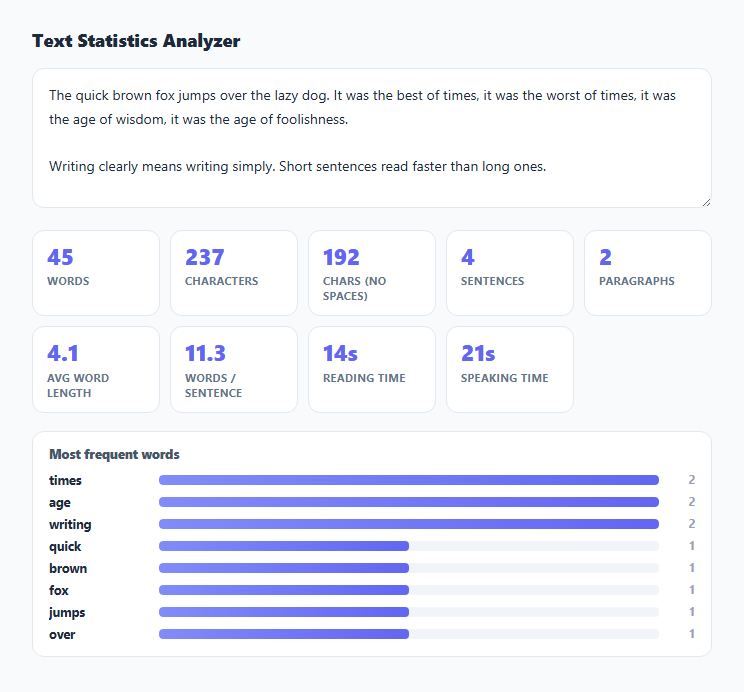
Word processors bury character and word counts behind a menu, and most standalone "word counter" tools stop there. This snippet computes a fuller picture of a piece of text — word, character, sentence, and paragraph counts, average sentence length, estimated reading and speaking time, and the most frequent non-trivial words — entirely with regular expressions and array operations, updating on every keystroke.
Counting words without miscounting punctuation
Rather than splitting on whitespace (which would count a lone hyphen or ellipsis as a word), the tool matches the text against /[A-Za-z0-9']+/g — a sequence of letters, digits, or apostrophes. This correctly counts don't as one word rather than two, while punctuation-only fragments and stray symbols are never counted, which is closer to how a human would count words by hand than a naive whitespace split.
Detecting sentence boundaries with a fallback for the last sentence
Sentence counting matches runs of non-terminator characters followed by one or more ., !, or ? characters, with a second alternative in the same pattern ([^.!?]+$) to catch trailing text that never received a closing punctuation mark. Without that fallback, a piece of text ending mid-thought without a period would silently lose its last sentence from the count — a small detail that matters most for text still being drafted, which is exactly when a live word-count tool gets used.
Splitting paragraphs on blank lines, not just newlines
Paragraphs are detected by splitting on /\n\s*\n/ — one or more blank lines — rather than every single newline, since a single line break inside a paragraph (a soft wrap) should not itself start a new paragraph. Each resulting chunk is trimmed and empty chunks are discarded, so trailing blank lines at the end of the text do not inflate the count.
Estimating reading and speaking time from established rates
Reading time uses 200 words per minute, a commonly cited average adult silent-reading speed; speaking time uses roughly 130 words per minute, closer to a natural conversational speaking pace. Both are simple divisions of the word count by these rates, then formatted by formatTime() into a compact "Xm Ys" string, or just seconds for anything under a minute — useful for sanity-checking whether a video script or presentation script actually fits its intended time slot.
Building a stop-word-filtered frequency list
wordFrequency() lowercases every word, skips a small built-in list of common English stop words (the, a, of, and, and similar) along with single-character tokens, and tallies the rest in a Map. The resulting entries are sorted by count descending and the top eight are rendered as horizontal bars scaled relative to the most frequent word — surfacing the words a piece of writing actually leans on, rather than being dominated by function words that appear in every English sentence regardless of topic.
Build with AI
Build, Understand, Optimize, and Extend It With AI
Paste this snippet's JavaScript into an AI assistant like Claude and ask it to explain why the sentence-detection regular expression needs a fallback alternative for trailing text with no closing punctuation, and how it might misfire on abbreviations like "Dr." or "e.g." It is also a good base to extend: ask for a real readability formula like Flesch-Kincaid grade level using syllable estimation, a customizable stop-word list, or per-paragraph statistics instead of only whole-document totals.
Prompt to recreate it
Copy this into your AI assistant of choice to build the effect from scratch, or as a jumping-off point for your own variant:
Build a client-side text statistics analyzer in plain HTML, CSS, and JavaScript, no libraries.

Requirements:
- A textarea where typed or pasted text is analyzed live on every input event.
- Count words using a regular expression that matches runs of letters, digits, and apostrophes (so contractions count as one word), not a plain whitespace split.
- Count characters with and without whitespace.
- Count sentences by matching runs of non-terminator characters followed by one or more of . ! ?, including a fallback that still counts trailing text with no closing punctuation mark.
- Count paragraphs by splitting on blank-line breaks (one or more empty lines), not every single line break, trimming and discarding empty resulting chunks.
- Compute and display average word length and average words per sentence.
- Estimate reading time using roughly 200 words per minute and speaking time using roughly 130 words per minute, formatted compactly as minutes and seconds (or just seconds under a minute).
- Build a "most frequent words" list: lowercase every matched word, exclude a small built-in set of common English stop words and single-character tokens, tally occurrences, and render the top 8 as horizontal bars scaled relative to the most frequent word's count.
- No external libraries — implement everything with plain JavaScript regular expressions and array methods.
Want to tighten it up first? Run this prompt through the AI Prompt Studio to score it across 8 quality dimensions, catch anti-patterns, and tune the wording for Claude, ChatGPT, or Gemini before you paste it in.
Step by step
How to Use
- 1Paste or type your textEvery statistic recalculates live as you type — no submit button or delay.
- 2Read the stat cardsWord count, character counts (with and without spaces), sentence count, and paragraph count are all shown at a glance.
- 3Check average word and sentence lengthUseful as a rough readability signal — very high averages often mean a passage is dense or overly long-winded.
- 4Check estimated reading and speaking timeReading time assumes ~200 words per minute; speaking time assumes ~130 words per minute, closer to natural speech pace.
- 5Scan the most frequent wordsCommon English stop words are filtered out automatically so the bars reflect the text's actual recurring topics or themes.
Real-world uses
Common Use Cases
Got questions?
Frequently Asked Questions
The text is matched against a regular expression capturing runs of letters, digits, and apostrophes. This treats a contraction like "don't" as one word and ignores standalone punctuation, which is closer to a natural word count than simply splitting on whitespace.
Sentences are detected by matching text between terminating punctuation marks (period, exclamation point, question mark), with a fallback that also counts trailing text with no closing punctuation. Abbreviations like "Dr." or decimal numbers can occasionally be miscounted as sentence boundaries, since the tool uses pattern matching rather than true natural-language sentence segmentation.
Reading time assumes roughly 200 words per minute, a commonly cited average adult silent-reading pace. Speaking time assumes roughly 130 words per minute, closer to a natural conversational speaking rate. Both are configurable by editing the divisor constants in the JS panel.
Common English stop words (the, a, of, and, and similar function words) and single-character tokens are deliberately filtered out so the list highlights a text's actual recurring topics rather than being dominated by grammatical filler words present in almost any English sentence.
The text is split on one or more blank lines (a run of whitespace containing at least two newlines), not on every single line break, so a soft-wrapped line within one paragraph does not get counted as starting a new paragraph.
No. All counting and analysis happens locally in the browser using plain JavaScript string and array methods — nothing is transmitted over the network.