You Might Also Like
Learn Coding Visually
Learn to code with interactive, live-preview playgrounds — HTML, CSS, JavaScript, React & more.
 HTML Playground42 lessons · Click-based · Live preview
 CSS PlaygroundLearn CSS with a live editor
 JavaScript Playground60 lessons · DOM · Async · Canvas
 React PlaygroundLearn React with a live code editor
 GSAP PlaygroundLearn GSAP animation interactively
 SVG Playground44 lessons · shapes · paths · animation
 SCSS Playground45 lessons · Sass modules · tokens
 Tailwind PlaygroundLearn Tailwind CSS with a live editor
 Bootstrap 5 Playground50 lessons · live preview
Readability Score Gauge — Free Live Flesch Reading Ease Meter
Readability Score Gauge · Dashboards · Plain HTML, CSS & JS · Live preview
What's included
Features
About this UI Snippet
Readability Score Gauge — A Live, Real Flesch Reading Ease Meter
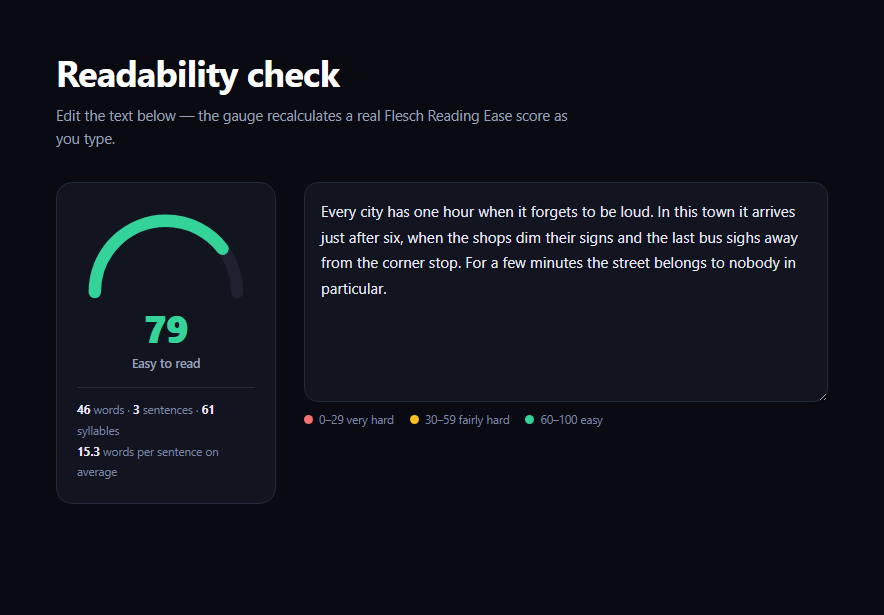
Most "readability score" widgets either hardcode a fake number or hide the formula entirely. This snippet computes a genuine Flesch Reading Ease score from whatever text is typed into it, live, and shows every input the formula actually uses — word count, sentence count, syllable count, and the resulting average sentence length — so the score is legible, not a black box.
The real formula, not an approximation of one
The score comes from 206.835 - 1.015 * (words / sentences) - 84.6 * (syllables / words) — the same Flesch Reading Ease formula used by Microsoft Word's readability statistics, the Hemingway Editor, and most SEO content-scoring plugins. Higher scores mean easier text: 60–100 reads as plain English, 30–59 needs a more attentive reader, and below 30 is dense, technical writing. The formula rewards two things independently — shorter sentences and shorter (fewer-syllable) words — which is why a single long, polysyllabic sentence can drag the score down even in an otherwise simple paragraph.
Estimating syllables without a dictionary
There's no built-in browser API for counting English syllables, so countSyllables() uses a compact heuristic: it counts transitions into vowel groups, strips a silent trailing "e", and floors every word at one syllable. It won't get every irregular word exactly right, but across a real paragraph the small per-word errors average out, which is exactly the tradeoff lightweight readability tools make instead of shipping a full pronunciation dictionary.
Sentence and word counting, done carefully
Sentences are split on ., !, and ? and filtered for non-empty fragments, with a floor of one sentence so a fragment with no terminal punctuation doesn't divide by zero. Words are split on whitespace and filtered to those containing at least one letter, so stray punctuation or numbers alone don't inflate the count. Both counts are shown directly beneath the gauge, alongside the derived average words-per-sentence — the single number most responsible for a score swinging up or down.
The arc as a direct read of the score
The gauge is a single SVG semicircle path with a known, fixed length; the visible stroke-dashoffset is set to ARC_LENGTH * (1 - score / 100), so the filled portion of the arc is a direct, linear read of the 0–100 score — no separate mapping table to keep in sync. The arc's color and the label beneath the number both key off the same three score bands (via bandFor()), so a glance at color alone tells you which zone the text falls in.
Customizing it
Swap in a different readability formula (Gunning Fog, SMOG, Coleman-Liau) by replacing the one calculation inside analyze() — every other piece (the gauge arc, the band coloring, the stat breakdown) is formula-agnostic. Pair it with an SEO score meter for a fuller content-quality panel, or a circular char counter for a simpler companion stat.
Build with AI
Build, Understand, Optimize, and Extend It With AI
Paste this snippet's HTML, CSS, and JS into an AI coding assistant like Claude and ask it to explain exactly how the Flesch Reading Ease formula weighs sentence length against word length, and why a heuristic vowel-group syllable counter is an acceptable tradeoff compared to a full pronunciation dictionary for a live-typing tool. It's also useful for extending the demo — ask it to add a second gauge for a different formula like Gunning Fog or SMOG so the two scores can be compared side by side, highlight the longest sentence in the textarea as the biggest contributor to a low score, or add a color-coded per-sentence breakdown. Use the conversation to understand exactly which levers (sentence length vs. word complexity) move the score before you decide which one to optimize in your own writing.
Prompt to recreate it
Copy this into your AI assistant of choice to build the effect from scratch, or as a jumping-off point for your own variant:
Build a "readability score gauge" in plain HTML, CSS, and JavaScript — no external libraries or CDNs — that computes a real Flesch Reading Ease score from user-typed text and updates live.

Requirements:
- An SVG semicircle gauge (a track arc plus a colored fill arc using stroke-dasharray/stroke-dashoffset) whose filled portion maps linearly to a 0-100 score, plus a large numeric score display and a text label describing the current band (easy/fairly hard/very hard).
- A textarea pre-filled with a short sample paragraph, wired to an input event listener that recalculates everything on every keystroke.
- Implement the actual Flesch Reading Ease formula: 206.835 - 1.015 * (word count / sentence count) - 84.6 * (syllable count / word count), clamped to the 0-100 range.
- Implement sentence counting by splitting on ./!/? and filtering empty fragments (floored at 1 to avoid divide-by-zero), word counting by splitting on whitespace and filtering to tokens containing at least one letter (floored at 1), and a syllable-counting heuristic that counts vowel-group transitions per word with adjustments for a silent trailing "e" (no external dictionary or API).
- Color the gauge arc and a text label based on three score bands: 60-100 green/easy, 30-59 amber/fairly hard, below 30 red/very hard.
- Display a stat breakdown below or beside the gauge showing the actual word count, sentence count, syllable count, and average words per sentence used to compute the current score, so the formula's inputs are visible rather than hidden behind the number.
- Handle empty input gracefully (show a neutral placeholder state rather than a score of 0 or a crash).
Want to tighten it up first? Run this prompt through the AI Prompt Studio to score it across 8 quality dimensions, catch anti-patterns, and tune the wording for Claude, ChatGPT, or Gemini before you paste it in.
Step by step
How to Use
- 1Paste HTML, CSS, and JSA gauge and a pre-filled textarea render with a live score.
- 2Edit the textThe gauge, score, and stat breakdown recalculate on every keystroke.
- 3Try a long, dense sentenceWatch the score drop and the arc shrink toward the red band.
- 4Try short, plain sentencesThe score climbs back toward the green band.
- 5Read the stat lineSee exactly how many words, sentences, and syllables drove the score.
- 6Swap the formulaReplace the calculation in analyze() with a different readability metric.
Real-world uses
Common Use Cases
Got questions?
Frequently Asked Questions
It's the real, published Flesch Reading Ease formula — 206.835 minus 1.015 times the average words per sentence, minus 84.6 times the average syllables per word — the same formula built into Microsoft Word's readability statistics and used by tools like the Hemingway Editor. It is not a hardcoded or randomized number.
It uses a vowel-group heuristic (counting transitions into runs of vowels, adjusting for silent trailing "e") rather than a full pronunciation dictionary, so individual irregular words can be off by one syllable. Across a real paragraph those small errors tend to cancel out, which is the same tradeoff most lightweight, dependency-free readability tools make.
60-100 corresponds to text a general audience finds easy to read (short sentences, short words); 30-59 is fairly difficult, typical of more formal or technical writing; below 30 is very difficult, dense academic or legal-style prose. The gauge's color bands (green, amber, red) map directly to these three ranges.
The formula divides by both sentence count and word count, so a genuine zero in either denominator would produce Infinity or NaN. Flooring both at 1 keeps the calculation defined for edge cases like a single word with no terminal punctuation, without meaningfully distorting the score for any real paragraph of text.
Move analyze() and bandFor() into pure utility functions (they take a string and return plain data, with no DOM access), then call them from your framework's input-change handler or a debounced watcher, and bind the returned score/band to the arc's stroke-dashoffset and stroke color via state instead of direct DOM writes.