You Might Also Like
Learn Coding Visually
Learn to code with interactive, live-preview playgrounds — HTML, CSS, JavaScript, React & more.
 HTML Playground42 lessons · Click-based · Live preview
 CSS PlaygroundLearn CSS with a live editor
 JavaScript Playground60 lessons · DOM · Async · Canvas
 React PlaygroundLearn React with a live code editor
 GSAP PlaygroundLearn GSAP animation interactively
 SVG Playground44 lessons · shapes · paths · animation
 SCSS Playground45 lessons · Sass modules · tokens
 Tailwind PlaygroundLearn Tailwind CSS with a live editor
 Bootstrap 5 Playground50 lessons · live preview
Trip Itinerary Day Timeline — Free Vertical Timeline Snippet
Trip Itinerary Day Timeline · Dashboards · Plain HTML, CSS & JS · Live preview
What's included
Features
About this UI Snippet
Trip Itinerary Day Timeline — One Day of a Trip, Stop by Stop
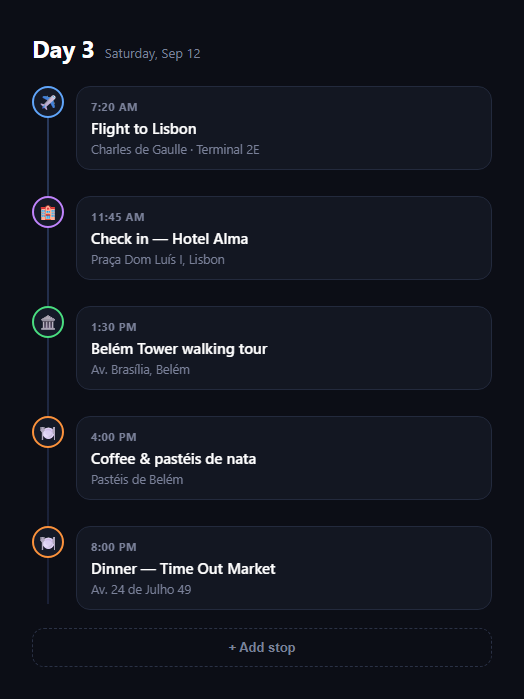
The itinerary day timeline is the vertical list travel apps use to lay out a single day of a trip — a flight, a hotel check-in, a walking tour, a couple of meals — each stop time-stamped, iconed, and connected by a line running down the left edge. This snippet builds it in plain HTML, CSS, and JS.
A connecting line with no JavaScript
The vertical line down the timeline's spine is a single ::before pseudo-element on the <ol>, positioned absolutely and stretched with top/bottom offsets. It sits behind the icon circles (via z-index), so stops read as beads threaded on a thread rather than separate boxes.
Type-coded icons
Each <li> carries a data-type attribute — flight, hotel, activity, or restaurant — and the icon circle's border color is keyed off that attribute in CSS. A flight stop gets a blue ring, a hotel a purple one, and so on, so scanning down the line tells you the shape of the day before you read a single word.
Staggered entrance
Each list item fades and slides in on load with a short animation-delay incrementing per child, using nth-child rather than JavaScript to sequence the reveal — a cheap way to make a static itinerary feel alive without a scroll library.
Cards, not just text
Each stop's content — time, title, location — sits in its own bordered card offset from the icon by a small left margin, so the timeline reads clearly even when titles wrap to two lines or locations run long.
Extendable via one function
The "Add stop" button appends a new <li> from a small queue of extra stops, showing how you'd hydrate the timeline from a real itinerary API — build the markup string once, insert it, and disable the control once the day is fully populated.
Customizing it
Add a "current stop" highlight for today's active item, collapse past stops, or group the list by multiple days with a header per day. Pair it with a boarding pass, property listing card, or an order tracking timeline for a different kind of sequence.
Build with AI
Build, Understand, Optimize, and Extend It With AI
Instead of guessing at how the connecting line and staggered reveal work, paste this snippet's HTML, CSS, and JS into an AI coding assistant like Claude and ask it to explain how a single ::before pseudo-element on the list, combined with z-index layering against the icon circles, produces the "beads on a thread" look with no extra DOM elements. It's also a good assistant for extensions — ask it to add a "current stop" highlight that tracks the nearest upcoming time, group the timeline into multiple collapsible days, or replace the emoji icons with inline SVGs that recolor via currentColor instead of data-type border colors. Use the conversation to adapt the pattern to your itinerary data model rather than treating the snippet as finished.
Prompt to recreate it
Copy this into your AI assistant of choice to build the effect from scratch, or as a jumping-off point for your own variant:
Build a "trip itinerary day timeline" component in plain HTML, CSS, and JavaScript with no external dependencies.

Requirements:
- A day header showing a day label ("Day 3") and a full date.
- An ordered list of itinerary stops, each with an icon, a data-type attribute (flight, hotel, activity, restaurant), a time, a title, and a location.
- A continuous vertical line running behind all the stop icons, implemented as a single pseudo-element on the list container (not per-item borders or separate divs), positioned so it starts near the first icon and ends near the last.
- Icon circles that sit on top of the line (correct z-index) and change border color based on each stop's data-type via CSS attribute selectors — a distinct color per type.
- Each stop's time/title/location content in its own bordered card, offset from the icon so long location text or wrapped titles don't disturb the timeline alignment.
- A CSS keyframe entrance animation (fade + slight vertical slide) applied to each stop on page load, staggered per item using nth-child animation-delay so stops appear to cascade in rather than all at once.
- An "Add stop" button that demonstrates dynamically appending a new stop to the timeline from a small in-memory array/queue, disabling itself once the queue is empty.
- Keep the whole thing narrow and mobile-first (a single centered column, max-width around 460px).
Want to tighten it up first? Run this prompt through the AI Prompt Studio to score it across 8 quality dimensions, catch anti-patterns, and tune the wording for Claude, ChatGPT, or Gemini before you paste it in.
Step by step
How to Use
- 1Paste HTML, CSS, and JSA day header and connected timeline of stops render.
- 2Watch the staggered revealEach stop fades and slides in on load.
- 3Note the icon colorsdata-type on each item colors its icon ring.
- 4Click "Add stop"New items append with the same connecting line.
- 5Swap in real dataBuild the same markup from your itinerary API.
- 6Restyle per typeAdjust the data-type selectors for your own palette.
Real-world uses
Common Use Cases
Got questions?
Frequently Asked Questions
The vertical line is a single ::before pseudo-element on the ol, absolutely positioned with top and bottom offsets so it spans the list, and given a lower z-index than the icon circles so stops appear threaded on it rather than overlapping it.
Each li carries a data-type attribute (flight, hotel, activity, restaurant), and the icon circle's border-color is set with a [data-type="..."] CSS selector. Changing the attribute is enough to recolor a stop — no per-item inline styles or extra classes needed.
Each .idt-item animates from a slightly offset, transparent state to its resting state using a CSS keyframe, with animation-delay incrementing per child via nth-child selectors. It's a pure-CSS stagger — no scroll or animation library involved — that plays once on page load.
Build the same li markup — icon, data-type, time, title, location — for each stop from your itinerary API response and either render it server-side or append it client-side the way the "Add stop" button's handler does, which builds an HTML string and calls appendChild.
Yes — repeat the .idt-header plus .idt-timeline block once per day, each with its own ol so the connecting line and stagger delays reset per day. You could also wrap each day in a collapsible section for a multi-day trip view.