You Might Also Like
Learn Coding Visually
Learn to code with interactive, live-preview playgrounds — HTML, CSS, JavaScript, React & more.
 HTML Playground42 lessons · Click-based · Live preview
 CSS PlaygroundLearn CSS with a live editor
 JavaScript Playground60 lessons · DOM · Async · Canvas
 React PlaygroundLearn React with a live code editor
 GSAP PlaygroundLearn GSAP animation interactively
 SVG Playground44 lessons · shapes · paths · animation
 SCSS Playground45 lessons · Sass modules · tokens
 Tailwind PlaygroundLearn Tailwind CSS with a live editor
 Bootstrap 5 Playground50 lessons · live preview
Flight Status Tracker — Free Live Status Card Snippet
Flight Status Tracker · Dashboards · Plain HTML, CSS & JS · Live preview
What's included
Features
About this UI Snippet
Flight Status Tracker — A Status Card That Recolors With the Flight
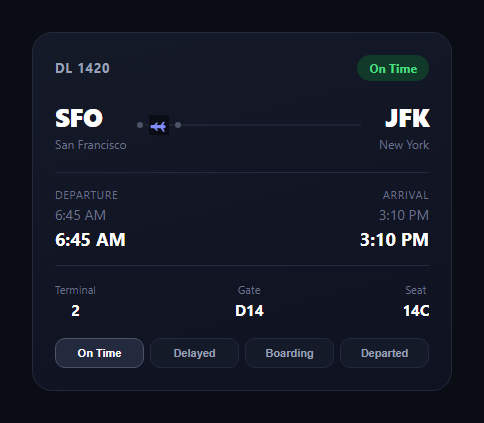
The flight status tracker is the compact card airlines and trip-planning apps use to show a single flight's health at a glance — origin and destination, a route line with a plane glyph, scheduled vs. actual times, and a status pill that changes color as the flight moves through its lifecycle. This snippet builds the whole thing in plain HTML, CSS, and JavaScript, no dependencies.
One data-status attribute drives everything
The card's outer element carries a data-status attribute — on-time, delayed, boarding, or departed — and every color change in the CSS is a [data-status="..."] selector keyed off that single source of truth. The JavaScript's setStatus() function just swaps the attribute and updates a handful of text nodes; there's no class-list juggling or inline style writes scattered through the script.
Scheduled vs. actual times
Each time column shows a struck-through scheduled time alongside a bold actual time. When the status flips to Delayed, the scheduled time gets a text-decoration: line-through and the actual time recolors to orange — a pattern lifted directly from real airline apps, where the delta between scheduled and actual is the whole point of the widget.
Route line with a plane glyph
Between the two airport codes sits a thin line with two dots and an inline SVG plane icon in the middle. It's built with a pseudo-element line and flex layout rather than an image, so it recolors and repositions with pure CSS — the plane even nudges forward when the flight departs, hinting at motion without a real animation loop.
Gate and terminal that change with status
Gate assignments often change close to boarding, so this card lets the gate value update independently of the status pill's color — moving from D14 to D22 when boarding starts, a detail that mirrors how airport displays actually behave.
Fully self-contained state
No external state library, no CDN. Four buttons at the bottom simulate an airline's push updates for demo purposes; in production you'd call setStatus() from your own polling or websocket handler instead of a click listener.
Customizing it
Add a baggage claim field, wire in real flight data from an aviation API, or swap the pill copy for delay-reason text. Pair it with a boarding pass, a seat picker, or a flight search form upstream.
Build with AI
Build, Understand, Optimize, and Extend It With AI
Rather than guessing at how to wire status changes cleanly, paste this snippet's HTML, CSS, and JS into an AI coding assistant like Claude and ask it to walk through why keying every color rule off a single data-status attribute on the outer card, instead of toggling individual classes on each child element, keeps the state management in one place. It can also help you extend the pattern — ask it to add a "Cancelled" status with its own color and copy, wire the gate field to reassign automatically when boarding starts, or connect setStatus() to a real aviation-data API via polling or a websocket. Treat this as a starting point to adapt, not a finished, drop-in production widget.
Prompt to recreate it
Copy this into your AI assistant of choice to build the effect from scratch, or as a jumping-off point for your own variant:
Build a "flight status tracker" card in plain HTML, CSS, and JavaScript with no external dependencies.

Requirements:
- A card showing a flight number, two airport codes with city names on either end of a route line, and a status pill in the top-right corner.
- The route line should include an inline SVG plane icon between two dots, built with CSS (pseudo-element line, flex layout) rather than an image.
- Below the route, show departure and arrival times as two columns, each displaying a scheduled time and an actual time — the scheduled time should get a struck-through style and the actual time should recolor when the flight is delayed.
- A meta row showing terminal, gate, and seat, where the gate value can change independently of the status color (e.g. reassigned when boarding starts).
- Drive all state from a single data-status attribute on the outer card element (values: on-time, delayed, boarding, departed) — every color change (pill background/text, border, time colors) should be a CSS selector keyed off that attribute, not individual inline styles or class toggles per element.
- A setStatus(status) JavaScript function that updates the data-status attribute and the relevant text content (pill label, gate, actual times) from a small config object keyed by status.
- Four toggle buttons wired to setStatus() for demo purposes, using aria-pressed to mark which one is active.
- Make the plane icon subtly shift position when the status becomes "departed" to hint at motion without a continuous animation loop.
Want to tighten it up first? Run this prompt through the AI Prompt Studio to score it across 8 quality dimensions, catch anti-patterns, and tune the wording for Claude, ChatGPT, or Gemini before you paste it in.
Step by step
How to Use
- 1Paste HTML, CSS, and JSA route card with times, gate, and status pill renders.
- 2Click the status buttonsThe pill, times, and gate update together.
- 3Watch Delayed strike the scheduleScheduled time gets struck through, actual time recolors.
- 4Wire real dataCall setStatus() from your polling or websocket handler.
- 5Restyle the route lineAdjust the line, dots, and plane glyph in CSS.
- 6Add fieldsExtend the meta row with baggage claim or aircraft type.
Real-world uses
Common Use Cases
Got questions?
Frequently Asked Questions
The card's outer element carries a data-status attribute set to on-time, delayed, boarding, or departed. Every color rule in the CSS is scoped to a [data-status="..."] selector, so setStatus() only needs to change that one attribute and every dependent color — pill, times, border — updates through CSS alone.
Each time column renders two lines: a scheduled time with text-decoration applied conditionally, and a bold actual time. When status becomes delayed, the CSS strikes through the scheduled time and recolors the actual time to orange, visually showing the delta the way real airline status pages do.
No, it's an inline SVG path, so it inherits currentColor and recolors or repositions with plain CSS. It sits on a route line built from a pseudo-element and two dots, and nudges forward slightly when the flight departs to hint at motion.
Replace the four demo buttons with your own polling or websocket handler and call setStatus(status) with on-time, delayed, boarding, or departed whenever new data arrives. You can also extend statusConfig with real departure/arrival times and gate values pulled from an aviation data API.
Yes. Keep data-status as a piece of state (useState, a ref, or a signal) on the card element, and reactively update the attribute plus the text fields when new flight data arrives. The CSS ports unchanged since all the visual logic lives in attribute selectors.