You Might Also Like
Learn Coding Visually
Learn to code with interactive, live-preview playgrounds — HTML, CSS, JavaScript, React & more.
 HTML Playground42 lessons · Click-based · Live preview
 CSS PlaygroundLearn CSS with a live editor
 JavaScript Playground60 lessons · DOM · Async · Canvas
 React PlaygroundLearn React with a live code editor
 GSAP PlaygroundLearn GSAP animation interactively
 SVG Playground44 lessons · shapes · paths · animation
 SCSS Playground45 lessons · Sass modules · tokens
 Tailwind PlaygroundLearn Tailwind CSS with a live editor
 Bootstrap 5 Playground50 lessons · live preview
Restaurant Order Status Tracker — Free Animated Step Tracker
Restaurant Order Status Tracker · Dashboards · Plain HTML, CSS & JS · Live preview
What's included
Features
About this UI Snippet
Restaurant Order Status Tracker — A Pulsing Horizontal Stepper
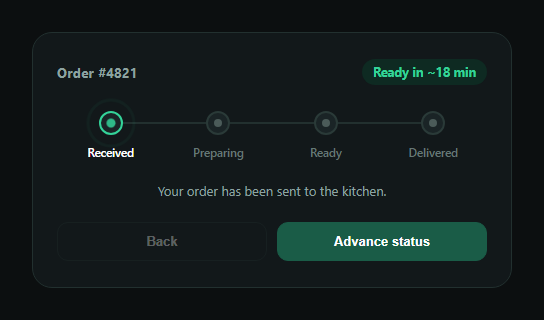
The restaurant order status tracker is the horizontal progress bar food delivery and pickup apps use to show where an order stands — Received, Preparing, Ready, Delivered — with the current step visibly pulsing and an estimated time note underneath. This snippet builds it in plain HTML, CSS, and JavaScript, no dependencies.
Three step states, one class each
Every step in the <ol> can be plain, .ros-done, or .ros-active. render() derives all three purely from a single current index — steps before it get .ros-done, the step at it gets .ros-active, everything else stays unstyled. Connecting lines between steps use a .ros-done check on each step's own ::before pseudo-element, so the line-fill and dot-fill both track the same index without extra bookkeeping.
A pulsing active step, built from two animations
The active dot layers two effects: an inner .ros-pulse dot that scales up and down on a 1.4s loop, and an outer ::after ring that expands and fades outward like a sonar ping. Both are pure CSS @keyframes running only while .ros-active is present, so the pulse starts and stops automatically as current changes — no setInterval needed to manage it.
An ETA that changes with status
The pill in the header and the note below the stepper both read from parallel arrays (etas, notes) indexed by current, so advancing the status updates the copy and the time estimate together — "Ready in ~18 min" while preparing, "Ready now" once ready, "Delivered" at the end.
Demo controls you'd replace with real events
The Back/Advance buttons exist so you can see every state in this demo; in production you'd call render() (after updating current) from your own order-status webhook or polling handler instead of a click. The Advance button disables and relabels itself "Completed" once the order reaches the final step.
Customizing it
Add a fifth step for multi-stage delivery (Preparing → Out for delivery → Delivered), swap the dot pulse for a different loading indicator, or connect the note text to real kitchen timing data. Pair it with an order tracking timeline, order summary, or a menu item customizer upstream in the ordering flow.
Build with AI
Build, Understand, Optimize, and Extend It With AI
Instead of working out the animation timing and state logic on your own, paste this snippet's HTML, CSS, and JS into an AI coding assistant like Claude and ask it to explain how a single current index drives every step's done/active class in render(), and how the active dot's pulse is built from two separate CSS keyframe animations (an inner scaling dot and an outer expanding ring) that only run while the ros-active class is present. It's also useful for extending the pattern — ask it to add a fifth "Out for delivery" step, connect the tracker to a websocket or polling handler instead of the demo buttons, or replace the pulse with a different loading indicator. Use it to adapt the state-driving logic to your real order pipeline.
Prompt to recreate it
Copy this into your AI assistant of choice to build the effect from scratch, or as a jumping-off point for your own variant:
Build a "restaurant order status tracker" horizontal stepper in plain HTML, CSS, and JavaScript with no external dependencies.

Requirements:
- An order header showing an order ID and an ETA pill that updates with the status.
- A horizontal ordered list of four steps (Received, Preparing, Ready, Delivered), each with a dot and a label, connected by a horizontal line between steps.
- Drive all step states from a single current index variable (0-3): steps before current should show a "done" style (filled dot, filled connecting line, brighter label), the step at current should show an "active" style, and later steps stay in a neutral/dim style.
- The active step's dot should visibly pulse — implement this as two layered CSS keyframe animations: an inner dot that scales up and down in a loop, and an outer ring pseudo-element that expands outward and fades like a sonar ping — both driven purely by the "active" class being present, with no setInterval needed to start/stop them.
- A status note paragraph and the ETA pill should both update their text based on the current step index, using parallel arrays of copy indexed the same way as the steps.
- Back and Advance buttons for demo purposes that decrement/increment the current index and re-render; the Advance button should disable itself and read "Completed" once the last step is reached, and Back should disable at the first step.
Want to tighten it up first? Run this prompt through the AI Prompt Studio to score it across 8 quality dimensions, catch anti-patterns, and tune the wording for Claude, ChatGPT, or Gemini before you paste it in.
Step by step
How to Use
- 1Paste HTML, CSS, and JSA four-step order tracker renders at "Received".
- 2Click Advance statusThe active step pulses and the note/ETA update.
- 3Watch completed steps fillPast steps and their connecting lines turn green.
- 4Reach DeliveredThe advance button disables and reads "Completed".
- 5Wire real eventsCall render() after updating current from your own data.
- 6Add or rename stepsExtend the steps list, notes, and etas arrays together.
Real-world uses
Common Use Cases
Got questions?
Frequently Asked Questions
render() reads a single current index and derives every step's visual state from a comparison against it — indexes below current get the ros-done class, the index equal to current gets ros-active, and everything else is untouched. The connecting lines and dot fills both read the same ros-done class, so nothing can fall out of sync.
The active dot layers two independent CSS keyframe animations: an inner .ros-pulse element that scales and fades on a loop, and an outer ::after ring pseudo-element that expands outward and fades like a sonar ping. Both only run while the parent carries the ros-active class, so they start and stop automatically as the class is toggled.
Two parallel arrays, notes and etas, are indexed by the same current variable that drives the step states, so advancing the status updates the header pill and the note paragraph in the same render() call that updates the stepper — there's only one source of truth for "what step are we on".
Replace the Back/Advance button handlers with your own event source — a webhook payload, a polling interval, or a websocket message — that sets current to the appropriate step index (0 for Received through 3 for Delivered) and calls render(). The demo buttons are only there so you can preview every state.
Yes — add a new li.ros-step with its own data-step value in the HTML, and add matching entries to the notes and etas arrays at the same index. render() and the CSS rules are generic over the number of steps, so no other logic changes are required.