You Might Also Like
Learn Coding Visually
Learn to code with interactive, live-preview playgrounds — HTML, CSS, JavaScript, React & more.
 HTML Playground42 lessons · Click-based · Live preview
 CSS PlaygroundLearn CSS with a live editor
 JavaScript Playground60 lessons · DOM · Async · Canvas
 React PlaygroundLearn React with a live code editor
 GSAP PlaygroundLearn GSAP animation interactively
 SVG Playground44 lessons · shapes · paths · animation
 SCSS Playground45 lessons · Sass modules · tokens
 Tailwind PlaygroundLearn Tailwind CSS with a live editor
 Bootstrap 5 Playground50 lessons · live preview
Quiz Result Breakdown — Free Score Ring & Per-Question Review UI
Quiz Result Breakdown · Dashboards · Plain HTML, CSS & JS · Live preview
What's included
Features
About this UI Snippet
Quiz Result Breakdown — Score Ring, Pass Banner, and Answer Review
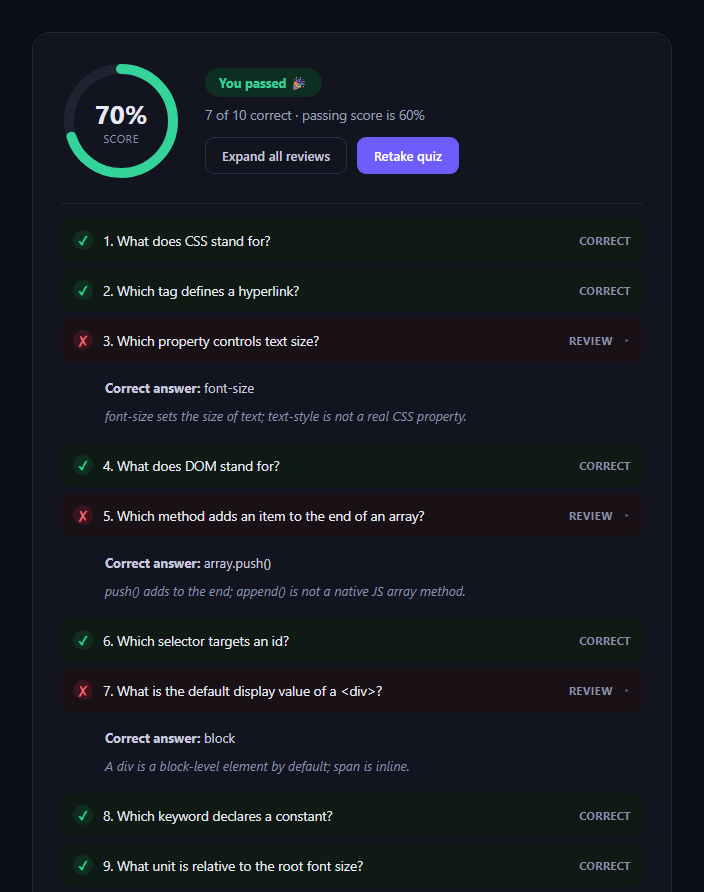
The quiz result breakdown is the screen a learner sees right after submitting: an animated score ring, a clear pass or fail banner, and a per-question list they can drill into to see what they got wrong and why. This snippet builds the whole pattern in plain HTML, CSS, and JavaScript.
A computed score, not a hardcoded number
The script counts .qrb-item[data-correct="true"] elements against the total and derives the percentage from that count — change how many list items are marked correct and the ring, banner, and label all update automatically, so the markup stays the single source of truth.
The ring is real geometry
The SVG circle's circumference is computed as 2 * Math.PI * r (with r="52" matching the markup), then stroke-dashoffset is set to circumference - (percent/100) * circumference. Setting the offset on the next animation frame (rather than immediately) lets the browser register the starting dasharray first, so the fill animates from empty to the score instead of snapping into place.
Pass/fail changes the whole tone
Crossing the pass threshold swaps the banner's text, color, and even the ring's stroke color between green and red — a passing result and a failing one should not just differ by a number, they should read differently at a glance.
Per-question review, independently expandable
Each wrong answer is a .qrb-item with a nested .qrb-review panel using the same grid-template-rows: 0fr/1fr collapse technique as an accordion. Clicking a row toggles only that item's qrb-open class, so learners can compare several wrong answers side by side instead of the panel forcing one-at-a-time review.
Expand-all shortcut
The "Expand all reviews" button opens every wrong-answer panel in one click, useful when a learner wants to skim all their mistakes at once rather than clicking through each one.
Customizing it
Wire the correct/incorrect counting to your real quiz-submission data, add per-question point values instead of equal weighting, or animate the ring with a duration proportional to the score. Pair it with a quiz card for the question flow itself, or a circular progress ring elsewhere in the same dashboard.
Build with AI
Build, Understand, Optimize, and Extend It With AI
Instead of reverse-engineering the ring math by trial and error, paste this snippet's HTML, CSS, and JS into an AI coding assistant like Claude and ask it to explain exactly how circumference (2 * Math.PI * r) and stroke-dashoffset combine to turn a percentage into a partial circle, and why the dashoffset is set inside requestAnimationFrame rather than synchronously. The same assistant can help you extend the data model — for example computing score from weighted question point values instead of equal counts, or adding a third state (partially correct, for multi-select questions) that needs its own icon and color. It's also a good way to sanity-check the accordion accessibility: ask whether the review toggle buttons need aria-expanded, and how to make the "expand all" shortcut also move focus sensibly for keyboard users.
Prompt to recreate it
Copy this into your AI assistant of choice to build the effect from scratch, or as a jumping-off point for your own variant:
Build a "quiz result breakdown" panel in plain HTML, CSS, and JavaScript — no frameworks, no dependencies.

Requirements:
- An SVG ring/circle progress indicator showing the quiz score as a percentage, where the fill amount is computed from real circle geometry: circumference = 2 * Math.PI * r using the circle's actual radius attribute, and stroke-dashoffset = circumference - (percent/100) * circumference. Animate the fill from empty to the final value on page load using a CSS transition, deferring the dashoffset assignment to a requestAnimationFrame callback so the transition has something to animate from.
- The score percentage must be computed by counting DOM elements marked as correct out of the total question elements — do not hardcode the percentage as a separate number; it must derive from the same markup that lists the questions.
- A pass/fail banner whose text, background color, and the ring's stroke color all change together based on whether the computed score meets a passing threshold (e.g. 60%).
- A list of every question with a correct/incorrect indicator. Questions answered incorrectly are clickable and expand an inline review panel (showing "your answer" vs "correct answer" plus a brief explanation) using a smooth height animation; each incorrect question's panel must expand and collapse independently of the others, not as a single shared accordion.
- Include an "expand all reviews" button that opens every incorrect question's review panel at once.
- Keep everything in a dark theme, and make sure the JavaScript only references classnames/ids that exist in the HTML you write.
Want to tighten it up first? Run this prompt through the AI Prompt Studio to score it across 8 quality dimensions, catch anti-patterns, and tune the wording for Claude, ChatGPT, or Gemini before you paste it in.
Step by step
How to Use
- 1Paste the HTML, CSS, and JSA results card with a score ring and question list render.
- 2Watch the ring animateIt fills from empty to the computed score on load.
- 3Read the pass/fail bannerIts color and text reflect the 60% threshold.
- 4Click a wrong answerIts review panel expands with your answer and the correct one.
- 5Click "Expand all reviews"Every wrong answer opens at once.
- 6Edit data-correct on list itemsThe score, ring, and banner recompute from the markup.
Real-world uses
Common Use Cases
Got questions?
Frequently Asked Questions
The script queries all elements with class qrb-item to get the total question count, then queries only those with data-correct="true" to get the correct count, and divides one by the other. Because it reads the DOM rather than using a hardcoded number, changing which items carry data-correct="true" in your markup automatically updates the ring, the label, and the pass/fail banner.
The SVG circle's circumference is computed with the actual geometry formula, 2 * Math.PI * r, using r="52" to match the circle drawn in the markup. The stroke-dashoffset is then set to circumference minus the score's share of the circumference, so at 70% the visible arc covers exactly 70% of the ring — it is real trigonometry-adjacent circle math, not a percentage-width hack.
The dasharray is set to the full circumference immediately, but the dashoffset (which controls how much is hidden) is only set inside a requestAnimationFrame callback. That defers the change to the next paint, after the browser has already rendered the starting state, so the CSS transition on stroke-dashoffset has an initial value to animate from instead of jumping straight to the final one.
Yes. Each .qrb-item that has a review panel toggles its own qrb-open class independently when its row is clicked, rather than closing any other open item first. That lets a learner compare several mistakes side by side. The "Expand all reviews" button simply adds qrb-open to every item with data-correct="false" in one pass.
Store questions as an array of objects with a correct boolean, your answer, and the correct answer text. Compute score = correct.length / total in render, derive the ring's dashoffset the same way, and toggle an "open" set of question ids in component state when a row is clicked instead of a DOM class. The ring math and grid-template-rows collapse animation are plain CSS and port unchanged.