Source Code
<div class="wrap">
  <div class="card" id="card">
    <div class="quiz" id="quiz">
      <div class="top">
        <span class="q-counter" id="counter">Question 1 of 5</span>
        <span class="q-score" id="scoreChip">0 pts</span>
      </div>
      <div class="progress"><div class="progress-fill" id="progress" style="width:20%"></div></div>
      <h2 class="question" id="question">Which CSS property creates a flexible box layout?</h2>
      <div class="options" id="options"></div>
      <button class="next-btn" id="nextBtn" onclick="next()" disabled>Next</button>
    </div>
    <div class="results" id="results" style="display:none">
      <div class="result-ring">
        <svg viewBox="0 0 120 120"><circle class="rbg" cx="60" cy="60" r="52"/><circle class="rfg" id="resultRing" cx="60" cy="60" r="52"/></svg>
        <div class="result-pct" id="resultPct">0%</div>
      </div>
      <h2 class="result-title" id="resultTitle">Nice work!</h2>
      <p class="result-sub" id="resultSub">You scored 0 out of 5</p>
      <button class="next-btn" onclick="restart()">Try Again</button>
    </div>
  </div>
</div>
* { box-sizing: border-box; margin: 0; padding: 0; }
body { font-family: system-ui, sans-serif; background: linear-gradient(135deg,#7c3aed,#a855f7); min-height: 100vh; display: flex; align-items: center; justify-content: center; padding: 24px; }
.wrap { width: 100%; max-width: 460px; }
.card { background: #fff; border-radius: 24px; box-shadow: 0 24px 70px rgba(124,58,237,0.3); padding: 30px; }
.top { display: flex; justify-content: space-between; align-items: center; margin-bottom: 14px; }
.q-counter { font-size: 12px; font-weight: 700; color: #94a3b8; }
.q-score { font-size: 12px; font-weight: 800; color: #7c3aed; background: rgba(124,58,237,0.1); padding: 4px 12px; border-radius: 20px; }
.progress { height: 6px; background: #f1f5f9; border-radius: 3px; overflow: hidden; margin-bottom: 24px; }
.progress-fill { height: 100%; background: linear-gradient(90deg,#7c3aed,#a855f7); border-radius: 3px; transition: width 0.4s ease; }
.question { font-size: 19px; font-weight: 800; color: #1e293b; line-height: 1.4; margin-bottom: 22px; }
.options { display: flex; flex-direction: column; gap: 10px; margin-bottom: 22px; }
.option { display: flex; align-items: center; gap: 12px; padding: 15px 16px; border: 2px solid #e2e8f0; border-radius: 14px; font-size: 14px; font-weight: 600; color: #334155; cursor: pointer; transition: all 0.15s; text-align: left; background: #fff; }
.option:hover:not(.locked) { border-color: #c4b5fd; background: #faf5ff; }
.option .key { width: 26px; height: 26px; border-radius: 7px; background: #f1f5f9; display: flex; align-items: center; justify-content: center; font-size: 12px; font-weight: 800; color: #64748b; flex-shrink: 0; transition: all 0.15s; }
.option.selected { border-color: #7c3aed; background: #faf5ff; }
.option.selected .key { background: #7c3aed; color: #fff; }
.option.correct { border-color: #16a34a; background: #f0fdf4; }
.option.correct .key { background: #16a34a; color: #fff; }
.option.wrong { border-color: #dc2626; background: #fef2f2; }
.option.wrong .key { background: #dc2626; color: #fff; }
.option.locked { cursor: default; }
.mark { margin-left: auto; font-size: 16px; font-weight: 800; }
.next-btn { width: 100%; padding: 15px; background: #7c3aed; color: #fff; border: none; border-radius: 14px; font-size: 15px; font-weight: 800; cursor: pointer; transition: all 0.15s; }
.next-btn:hover:not(:disabled) { background: #6d28d9; }
.next-btn:disabled { background: #e2e8f0; color: #94a3b8; cursor: not-allowed; }
.results { text-align: center; padding: 10px 0; }
.result-ring { position: relative; width: 120px; height: 120px; margin: 0 auto 20px; }
.result-ring svg { width: 100%; height: 100%; transform: rotate(-90deg); }
.rbg { fill: none; stroke: #f1f5f9; stroke-width: 9; }
.rfg { fill: none; stroke: #7c3aed; stroke-width: 9; stroke-linecap: round; stroke-dasharray: 326.7; stroke-dashoffset: 326.7; transition: stroke-dashoffset 1s ease; }
.result-pct { position: absolute; inset: 0; display: flex; align-items: center; justify-content: center; font-size: 30px; font-weight: 900; color: #1e293b; }
.result-title { font-size: 22px; font-weight: 800; color: #1e293b; margin-bottom: 6px; }
.result-sub { font-size: 14px; color: #64748b; margin-bottom: 24px; }var QUESTIONS = [
{ q: 'Which CSS property creates a flexible box layout?', opts: ['display: flex', 'position: float', 'layout: box', 'align: grid'], correct: 0 },
{ q: 'What does the JavaScript "===" operator check?', opts: ['Value only', 'Value and type', 'Type only', 'Reference only'], correct: 1 },
{ q: 'Which HTML tag is used for the largest heading?', opts: ['<head>', '<h6>', '<h1>', '<heading>'], correct: 2 },
{ q: 'What does API stand for?', opts: ['Applied Program Index', 'Automated Process Input', 'Application Programming Interface', 'Advanced Protocol Internet'], correct: 2 },
{ q: 'Which method adds an element to the end of an array?', opts: ['push()', 'pop()', 'shift()', 'unshift()'], correct: 0 }
];
var KEYS = ['A', 'B', 'C', 'D'];
var current = 0;
var score = 0;
var answered = false;
function renderQuestion() {
answered = false;
var item = QUESTIONS[current];
document.getElementById('counter').textContent = 'Question ' + (current + 1) + ' of ' + QUESTIONS.length;
document.getElementById('question').textContent = item.q;
document.getElementById('progress').style.width = ((current + 1) / QUESTIONS.length * 100) + '%';
document.getElementById('nextBtn').disabled = true;
document.getElementById('nextBtn').textContent = current === QUESTIONS.length - 1 ? 'Finish' : 'Next';
var container = document.getElementById('options');
container.innerHTML = item.opts.map(function(opt, i) {
return '<button class="option" onclick="select(this,' + i + ')"><span class="key">' + KEYS[i] + '</span>' + opt + '<span class="mark"></span></button>';
}).join('');
}
function select(btn, i) {
if (answered) return;
answered = true;
var item = QUESTIONS[current];
var options = document.querySelectorAll('.option');
options.forEach(function(o, idx) {
o.classList.add('locked');
if (idx === item.correct) { o.classList.add('correct'); o.querySelector('.mark').textContent = '✓'; }
});
if (i === item.correct) {
score++;
document.getElementById('scoreChip').textContent = score + ' pts';
} else {
btn.classList.add('wrong');
btn.querySelector('.mark').textContent = '✕';
}
document.getElementById('nextBtn').disabled = false;
}
function next() {
if (current < QUESTIONS.length - 1) {
current++;
renderQuestion();
} else {
showResults();
}
}
function showResults() {
document.getElementById('quiz').style.display = 'none';
document.getElementById('results').style.display = 'block';
var pct = Math.round(score / QUESTIONS.length * 100);
var ring = document.getElementById('resultRing');
setTimeout(function() { ring.style.strokeDashoffset = 326.7 * (1 - pct / 100); }, 100);
document.getElementById('resultPct').textContent = pct + '%';
document.getElementById('resultSub').textContent = 'You scored ' + score + ' out of ' + QUESTIONS.length;
var title = pct === 100 ? 'Perfect score! 🎉' : pct >= 60 ? 'Nice work!' : 'Keep practising!';
document.getElementById('resultTitle').textContent = title;
}
function restart() {
current = 0;
score = 0;
document.getElementById('scoreChip').textContent = '0 pts';
document.getElementById('results').style.display = 'none';
document.getElementById('quiz').style.display = 'block';
document.getElementById('resultRing').style.strokeDashoffset = '326.7';
renderQuestion();
}
renderQuestion();Learn Coding Visually
Learn to code with interactive, live-preview playgrounds — HTML, CSS, JavaScript, React & more.
 HTML Playground42 lessons · Click-based · Live preview
 CSS PlaygroundLearn CSS with a live editor
 JavaScript Playground60 lessons · DOM · Async · Canvas
 React PlaygroundLearn React with a live code editor
 GSAP PlaygroundLearn GSAP animation interactively
 SVG Playground44 lessons · shapes · paths · animation
 SCSS Playground45 lessons · Sass modules · tokens
 Tailwind PlaygroundLearn Tailwind CSS with a live editor
 Bootstrap 5 Playground50 lessons · live preview
What's included
Features
About this UI Snippet
Quiz Card — Multiple Choice, Instant Feedback, Scoring & Results Ring
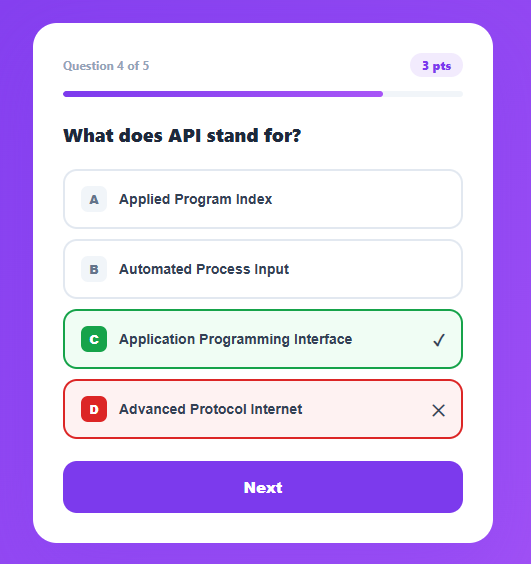
An interactive quiz is a powerful engagement tool used in e-learning, lead generation, onboarding, and content marketing — the single-question relative is the poll widget. This snippet provides a complete multiple-choice quiz with a progress bar, lettered answer options, instant correct/incorrect feedback, live scoring, and an animated circular results ring at the end showing the percentage score with a performance message.
The data-driven question model
Questions live in a QUESTIONS array, each with a prompt, an options array, and the index of the correct answer. renderQuestion() builds the options as buttons with letter keys (A, B, C, D) from this data. This separation of content from logic means adding, editing, or shuffling questions never touches the rendering or scoring code — you just edit the array.
Instant answer feedback
When an option is clicked, select() locks all options (preventing changes), highlights the correct answer in green with a checkmark, and if the choice was wrong, marks it red with a cross. This immediate reveal is a proven learning reinforcement pattern — showing the right answer at the moment of choice helps retention far better than deferring feedback to the end. The answered flag prevents re-answering after a choice is locked.
Scoring and progression
A correct answer increments the score and updates the points chip in the header. The Next button stays disabled until an answer is chosen, enforcing that the user engages with each question. On the final question, the button relabels to Finish and triggers the results screen instead of advancing.
The animated results ring
The results screen shows a circular SVG progress ring identical in technique to a radial gauge: stroke-dasharray equals the circumference and stroke-dashoffset animates to reveal the proportion matching the score percentage. A short setTimeout before setting the offset ensures the browser registers the initial state, so the ring animates from empty rather than snapping. The percentage counts in the centre and a performance message adapts to the score band.
The progress bar
A linear progress bar at the top fills proportionally to the current question number, giving users a clear sense of how far through the quiz they are — important for completion rates, since an unknown length discourages finishing.
Restart
The Try Again button resets the score, current index, ring offset, and visibility, returning to the first question — enabling repeat attempts without a page reload, which is valuable for practice quizzes and study tools.
Build with AI
Build, Understand, Optimize, and Extend It With AI
You do not have to trace the quiz's state machine by hand to see how it holds together. Paste this snippet's HTML, CSS, and JS into an AI coding assistant like Claude and ask it to explain exactly why the answered flag guards select() against re-answering, and why the results ring's stroke-dashoffset animation is set inside a setTimeout rather than immediately after the results panel is shown. The same assistant can help optimize it — ask whether re-querying all .option elements from the DOM on every select() call scales poorly for quizzes with many questions rendered ahead of time, or how to avoid re-running querySelectorAll when the options array is already available in memory. It is just as useful for extending the quiz: ask it to add a per-question countdown timer, shuffle both question order and option order while keeping the correct index accurate, or persist scores across sessions with localStorage. Treat the code less like a finished artifact and more like a starting point for a conversation.
Prompt to recreate it
Copy this into your AI assistant of choice to build the effect from scratch, or as a jumping-off point for your own variant:
Build a multiple-choice quiz card in plain HTML, CSS, and JavaScript with no framework or library.

Requirements:
- Drive the entire quiz from a single QUESTIONS array of objects, each with a question string, an array of option strings, and the zero-based index of the correct option — no question content or scoring logic hardcoded outside this array.
- Render lettered option buttons (A, B, C, D) dynamically from the current question's options array, and show a progress bar whose width is (current question index + 1) divided by total questions.
- On selecting an option: lock all options from further clicks using an answered boolean flag, immediately reveal the correct answer in a distinct color with a checkmark, and if the clicked option was wrong, mark that option in a different color with an X — do not wait for a "submit" step, feedback must be instant on click.
- Keep the Next button disabled until an option has been selected for the current question, and relabel it to "Finish" on the last question.
- On finishing, hide the quiz and show a results panel with an SVG ring whose stroke-dasharray equals its circumference and whose stroke-dashoffset animates from fully-offset (empty) to a value representing the percentage score — the offset change must be deferred by one tick (e.g. a short setTimeout) after the panel becomes visible so the transition actually plays instead of snapping instantly to its end state.
- Show an adaptive message based on the score band (e.g. a distinct message for a perfect score versus a passing score versus a low score), and include a restart function that resets score, current question index, and the ring's offset without a full page reload.
Want to tighten it up first? Run this prompt through the AI Prompt Studio to score it across 8 quality dimensions, catch anti-patterns, and tune the wording for Claude, ChatGPT, or Gemini before you paste it in.
Step by step
How to Use
- 1Answer each questionClick one of the lettered options. The correct answer turns green and your choice turns red if it was wrong — feedback is instant and the answer locks.
- 2Advance through the quizAfter answering, click Next to move on. The progress bar fills and the points chip tracks your running score. The button reads Finish on the last question.
- 3View your resultsAt the end, an animated ring shows your percentage, the exact score, and a message that adapts to how well you did.
- 4Retake the quizClick Try Again to reset and start over from the first question — no page reload needed.
- 5Add your own questionsEdit the QUESTIONS array in the JS. Each entry needs a q (prompt), an opts array, and correct (the zero-based index of the right answer). Add as many as you like — everything scales automatically.
- 6Export for your frameworkClick "JSX" for a React component using useState for the current index and score. Click "Vue" for a Vue 3 SFC with reactive quiz state.
Real-world uses
Common Use Cases
Got questions?
Frequently Asked Questions
Edit the QUESTIONS array at the top of the JavaScript. Each question is an object with three keys: q (the question text), opts (an array of answer strings, typically four), and correct (the zero-based index of the right answer within opts). Add as many question objects as you want — the counter, progress bar, scoring, and results all scale to the array length automatically with no other changes.
The ring uses stroke-dasharray set to its circumference and stroke-dashoffset to control how much is revealed. It starts fully offset (empty). When the results screen shows, a short setTimeout delays setting the final offset by one tick. This delay lets the browser paint the empty state first, so the transition animates smoothly from 0 to the score percentage instead of snapping instantly to the final value — the same technique used for any reveal-on-mount CSS transition.
Shuffle the QUESTIONS array with a Fisher-Yates shuffle before the quiz starts. To shuffle answer options too, map each question's opts into objects that remember whether each was the correct one, shuffle that array, then derive the new correct index from where the originally-correct option landed. Track the correct answer by identity rather than a fixed index so shuffling never breaks scoring.
Store current (question index), score, and answered in useState. Render the current question from QUESTIONS[current]. On option click, if not answered, set answered true, update the option styles via derived state (compare each index to the correct answer), and increment score for a correct pick. Next increments current or, on the last question, flips a showResults flag. Compute the ring dashoffset from score / total for the results view.