Source Code
<div class="page">
  <div class="poll-card" id="poll-card">
    <div class="poll-badge">Poll</div>
    <h3 class="poll-q">Which frontend framework do you prefer in 2026?</h3>
    <div class="poll-options" id="poll-options">
      <button class="poll-opt" onclick="vote(this)" data-id="0">
        <span class="opt-label">React</span>
        <span class="opt-bar-wrap"><span class="opt-bar" style="--pct:0%"></span></span>
        <span class="opt-pct">0%</span>
      </button>
      <button class="poll-opt" onclick="vote(this)" data-id="1">
        <span class="opt-label">Vue.js</span>
        <span class="opt-bar-wrap"><span class="opt-bar" style="--pct:0%"></span></span>
        <span class="opt-pct">0%</span>
      </button>
      <button class="poll-opt" onclick="vote(this)" data-id="2">
        <span class="opt-label">Svelte</span>
        <span class="opt-bar-wrap"><span class="opt-bar" style="--pct:0%"></span></span>
        <span class="opt-pct">0%</span>
      </button>
      <button class="poll-opt" onclick="vote(this)" data-id="3">
        <span class="opt-label">Angular</span>
        <span class="opt-bar-wrap"><span class="opt-bar" style="--pct:0%"></span></span>
        <span class="opt-pct">0%</span>
      </button>
    </div>
    <div class="poll-footer">
      <span class="vote-count" id="vote-count">0 votes</span>
      <button class="reset-btn" onclick="reset()" id="reset-btn" style="display:none">Reset</button>
    </div>
  </div>
</div>
* { box-sizing: border-box; margin: 0; padding: 0; }
body { font-family: system-ui, sans-serif; background: #f8fafc; min-height: 100vh; display: flex; align-items: center; justify-content: center; padding: 32px 24px; }
.page { width: 100%; max-width: 400px; }
.poll-card { background: #fff; border-radius: 16px; padding: 22px; border: 1px solid #e2e8f0; box-shadow: 0 2px 12px rgba(0,0,0,0.06); }
.poll-badge { display: inline-block; font-size: 10px; font-weight: 700; letter-spacing: 1px; text-transform: uppercase; color: #6366f1; background: rgba(99,102,241,0.1); padding: 3px 10px; border-radius: 20px; margin-bottom: 10px; }
.poll-q { font-size: 15px; font-weight: 700; color: #0f172a; line-height: 1.45; margin-bottom: 16px; }
.poll-options { display: flex; flex-direction: column; gap: 8px; }
.poll-opt { background: #f8fafc; border: 1.5px solid #e2e8f0; border-radius: 10px; padding: 10px 12px; text-align: left; cursor: pointer; display: grid; grid-template-columns: 1fr auto auto; align-items: center; gap: 10px; transition: border-color 0.15s; font-family: inherit; }
.poll-opt:hover:not(:disabled) { border-color: #6366f1; }
.poll-opt.voted { border-color: #6366f1; background: rgba(99,102,241,0.04); cursor: default; }
.poll-opt.winner { border-color: #10b981; background: rgba(16,185,129,0.04); }
.poll-opt:disabled { cursor: default; }
.opt-label { font-size: 13px; font-weight: 600; color: #0f172a; }
.poll-opt.winner .opt-label { color: #059669; }
.opt-bar-wrap { width: 100px; height: 6px; background: #e2e8f0; border-radius: 3px; overflow: hidden; }
.opt-bar { display: block; height: 100%; width: var(--pct); background: #6366f1; border-radius: 3px; transition: width 0.5s ease; }
.poll-opt.winner .opt-bar { background: #10b981; }
.opt-pct { font-size: 12px; font-weight: 700; color: #64748b; width: 34px; text-align: right; }
.poll-opt.winner .opt-pct { color: #059669; }
.poll-footer { display: flex; justify-content: space-between; align-items: center; margin-top: 14px; padding-top: 12px; border-top: 1px solid #f1f5f9; }
.vote-count { font-size: 12px; color: #94a3b8; }
.reset-btn { font-size: 12px; font-weight: 600; color: #94a3b8; background: none; border: none; cursor: pointer; transition: color 0.12s; }
.reset-btn:hover { color: #6366f1; }let votes = [0, 0, 0, 0];
let myVote = null;
// Seed with realistic starting data
const SEED = [142, 67, 58, 43];
votes = [...SEED];
function vote(btn) {
if (myVote !== null) return;
const id = +btn.dataset.id;
myVote = id;
votes[id]++;
render();
document.getElementById('reset-btn').style.display = '';
}
function render() {
const total = votes.reduce((a,b)=>a+b,0);
const max = Math.max(...votes);
const opts = document.querySelectorAll('.poll-opt');
opts.forEach((opt, i) => {
const pct = total ? Math.round(votes[i]/total*100) : 0;
opt.querySelector('.opt-bar').style.setProperty('--pct', pct+'%');
opt.querySelector('.opt-pct').textContent = pct + '%';
opt.disabled = myVote !== null;
opt.classList.toggle('voted', i === myVote);
opt.classList.toggle('winner', myVote !== null && votes[i] === max);
});
document.getElementById('vote-count').textContent = total.toLocaleString() + ' vote' + (total!==1?'s':'');
}
function reset() {
votes = [...SEED]; myVote = null;
document.getElementById('reset-btn').style.display = 'none';
render();
}
render();Learn Coding Visually
Learn to code with interactive, live-preview playgrounds — HTML, CSS, JavaScript, React & more.
 HTML Playground42 lessons · Click-based · Live preview
 CSS PlaygroundLearn CSS with a live editor
 JavaScript Playground60 lessons · DOM · Async · Canvas
 React PlaygroundLearn React with a live code editor
 GSAP PlaygroundLearn GSAP animation interactively
 SVG Playground44 lessons · shapes · paths · animation
 SCSS Playground45 lessons · Sass modules · tokens
 Tailwind PlaygroundLearn Tailwind CSS with a live editor
 Bootstrap 5 Playground50 lessons · live preview
Poll Widget — Free HTML CSS JS Voting Snippet
Poll Widget · Cards · Plain HTML, CSS & JS · Live preview
What's included
Features
About this UI Snippet
Poll Widget — Click to Vote, Animated Progress Bars, Winner Highlight & Vote Count
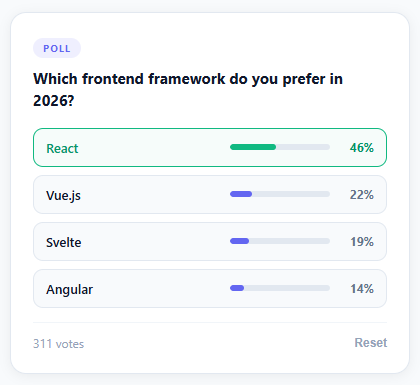
A poll that opens at "0 votes, 0%, 0%, 0%, 0%" feels like a room nobody else has walked into yet — and that emptiness is itself a reason not to vote. The polls that *do* drive engagement, on community sites and product pages alike, almost always show a confident, populated result the instant they load, with bars that animate into place the moment you add your voice to the count. This snippet recreates that — a question card with four options, realistic seeded vote counts, click-to-vote with smoothly animating progress bars, a green "winner" highlight, a running total, and a reset button for demoing the before-and-after.
Animating a CSS custom property instead of `width` directly
Each result bar is a <span> with width: var(--pct) and transition: width 0.5s ease in its CSS, while the JavaScript only ever calls element.style.setProperty('--pct', pct + '%'). That indirection is the whole trick: writing to a custom property updates a value that CSS itself is watching, so the browser's transition engine smoothly interpolates from the old percentage to the new one without a single line of animation code on the JavaScript side. The same property-driven approach shows up in the Sparkline Chart and Donut Chart snippets — hand the *value* to CSS and let CSS own the *motion*.
Why the poll opens with votes already in it
The SEED array — [142, 67, 58, 43] — exists purely to solve the cold-start problem: a poll showing a believable 142-to-43 spread looks like something people actually care about, while one showing four flat zero-bars looks abandoned. Casting your own vote simply increments the seeded count rather than starting a new one, and reset() restores the original SEED array — handy for replaying the demo, and a pattern worth borrowing any time you're building a component that needs to look "alive" before a single real user has interacted with it.
Highlighting a winner only once there's something to win
Before anyone votes, every option renders identically — there's no winner yet, so nothing should look like one. The moment vote() runs, render() finds Math.max(...votes) and applies the .winner class (green border, green bar, green percentage) to whichever option(s) match it — plural, deliberately, since a tie means every tied option gets to be "the winner" rather than arbitrarily picking one. That small bit of correctness is easy to skip and immediately noticeable when it's missing.
One vote, then the door closes
A single module-level variable, myVote, remembers which option — if any — the current visitor chose. The vote() function's very first line is a guard: if (myVote !== null) return, and every button gets disabled once a vote is cast. It's the simplest possible implementation of "one vote per person," and the FAQ below covers the natural next step — persisting that choice to localStorage so a page refresh can't be used to vote again.
Build with AI
Build, Understand, Optimize, and Extend It With AI
You don't have to trace the CSS custom property trick by hand. Paste this snippet's HTML, CSS, and JS into an AI coding assistant like Claude and ask it to explain exactly why the bar animates smoothly when JavaScript only calls setProperty on a --pct custom property rather than writing to style.width directly, and why the SEED array of realistic starting vote counts matters for engagement compared to starting every option at zero. The same assistant can help optimize it, for example checking whether the myVote guard correctly blocks a double-vote in every code path, or whether Math.max(...votes) for finding the winner handles a tie between two or more options correctly. It's also useful for extending the effect: ask it to persist the vote to localStorage so a page refresh cannot be used to vote twice, connect it to a real backend endpoint and WebSocket for live updates, or add a countdown showing when the poll closes. Treat the code less like a finished artifact and more like a starting point for a conversation.
Prompt to recreate it
Copy this into your AI assistant of choice to build the effect from scratch, or as a jumping-off point for your own variant:
Build a click-to-vote poll widget in plain HTML, CSS, and vanilla JavaScript with animated result bars, using only a CSS custom property to drive the animation — no JavaScript animation loop.

Requirements:
- A poll card with a question and at least four selectable options, each rendered as a button containing a label, a progress bar track with an inner fill element, and a percentage label.
- Seed the vote counts with realistic non-zero starting numbers (not all zeros) so the poll looks already-populated and credible before anyone votes.
- Each bar fill element's width must be driven entirely by a CSS custom property (for example --pct) referenced in the CSS as width: var(--pct), with a CSS transition on width — JavaScript must only ever call element.style.setProperty to update that custom property, never touch style.width directly, so the smooth animation comes from CSS alone.
- Clicking any option must: increment that option's vote count, recompute every option's percentage of the new total, update every bar's custom property and percentage label, disable all the vote buttons so a second vote cannot be cast in the same session, and visually highlight whichever option (or options, in the event of a tie) currently has the maximum vote count as the "winner" with a distinct color.
- A running total vote count displayed below the options that updates every time a vote is cast, with correct singular/plural wording (1 vote vs 2 votes).
- A reset control that restores the original seeded vote counts, clears whichever option the user had selected, and re-enables voting.
Want to tighten it up first? Run this prompt through the AI Prompt Studio to score it across 8 quality dimensions, catch anti-patterns, and tune the wording for Claude, ChatGPT, or Gemini before you paste it in.
Step by step
How to Use
- 1Click any option to cast your voteClicking an option increments its count, animates all progress bars to their new percentages, and highlights the winning option in green. Voting disables all buttons so only one vote per session is possible.
- 2Click Reset to undo your voteThe Reset button restores the seeded starting counts and re-enables voting. Use this to demonstrate the before/after state or to let multiple users test the snippet.
- 3Update the poll question and optionsEdit .poll-q text for the question. Add or remove .poll-opt buttons — increment data-id for each new option. Update the SEED array to match your starting vote counts.
- 4Seed with realistic dataUpdate const SEED = [N,N,N,N] with real vote counts from your database. This shows users a credible result distribution before they vote, increasing engagement compared to starting from zero.
- 5Connect to a real voting APIIn vote(), replace the local votes[id]++ with fetch("/api/poll/vote", { method:"POST", body: JSON.stringify({ optionId: id }) }). On page load, fetch current counts and set votes = apiCounts before calling render().
- 6Export in your formatClick "HTML" for a standalone file, "JSX" for a React component with useState for votes and myVote, or "Tailwind" for a React + Tailwind CSS version.
Real-world uses
Common Use Cases
Got questions?
Frequently Asked Questions
Each .opt-bar has width: var(--pct) in CSS and transition: width 0.5s ease. When JavaScript calls element.style.setProperty("--pct", "42%"), the CSS variable updates, which changes the computed width from the old value to "42%". The CSS transition animates between the old and new computed width values over 0.5 seconds. This approach avoids JavaScript animation loops and keeps all animation logic in CSS.
Store the voted state in localStorage: localStorage.setItem("poll_voted_" + pollId, optionId). On page load: const saved = localStorage.getItem("poll_voted_" + pollId); if (saved !== null) { myVote = +saved; render(); }. This persists the vote across refreshes. For stronger enforcement, use a server-side vote record with the user's IP or account ID.
Remove the onclick handler from .poll-opt buttons and add pointer-events: none to the CSS. Or add a "Show results" button that calls render() with myVote set to -1 (a sentinel value that shows bars without highlighting a winner). This lets users see the distribution without casting a vote.
Click "JSX" to download. Manage votes (array of numbers) and myVote (number|null) with useState. The vote function: setVotes(prev => { const next=[...prev]; next[id]++; return next; }); setMyVote(id). Derive total, percentages, and maxVotes from the votes array with useMemo. Pass a resetPoll prop that calls setVotes(SEED) and setMyVote(null).