You Might Also Like
Learn Coding Visually
Learn to code with interactive, live-preview playgrounds — HTML, CSS, JavaScript, React & more.
 HTML Playground42 lessons · Click-based · Live preview
 CSS PlaygroundLearn CSS with a live editor
 JavaScript Playground60 lessons · DOM · Async · Canvas
 React PlaygroundLearn React with a live code editor
 GSAP PlaygroundLearn GSAP animation interactively
 SVG Playground44 lessons · shapes · paths · animation
 SCSS Playground45 lessons · Sass modules · tokens
 Tailwind PlaygroundLearn Tailwind CSS with a live editor
 Bootstrap 5 Playground50 lessons · live preview
Flight Search Form — Travel Booking HTML CSS JS
Flight Search Form · Forms · Plain HTML, CSS & JS · Live preview
What's included
Features
About this UI Snippet
Flight Search Form — Origin/Destination Swap, Passenger Stepper & Date Validation
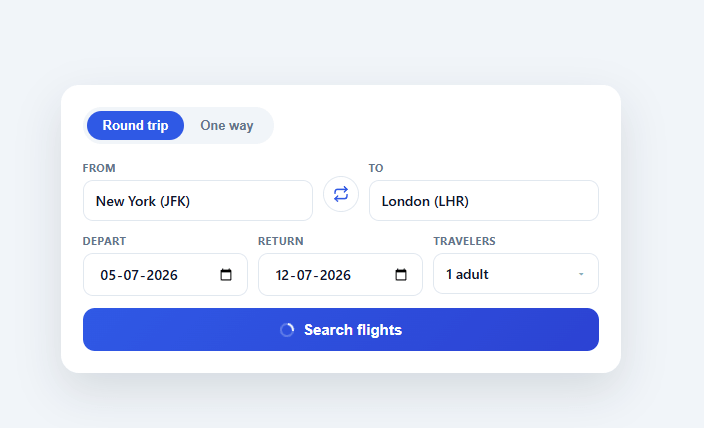
Every travel booking site opens with the same widget: an origin/destination pair, departure and return dates, a passenger count, and a search button — yet getting the small interactions right (swapping cities, picking a traveler count without a clunky native select, validating dates) is what separates a form that feels professional from one that feels like a prototype. This snippet builds the full pattern in plain HTML, CSS, and vanilla JavaScript.
Round trip vs. one way
A pill-style tab toggle switches between "Round trip" and "One way". Choosing one way hides the return-date field by setting its visibility to hidden (not display: none, which would reflow the row and shift the passenger field) and disables its input so a hidden date can't be submitted. This keeps the three-column date row visually stable while the modes change.
The swap button
Between the From and To fields, a circular button swaps the two input values directly — a one-line value exchange — and adds a .spun class that rotates the icon 180° via a CSS transform transition, removed after 250ms with setTimeout. Because only transform is animated, the rotation is GPU-friendly and converts safely to every export target.
Passenger stepper popover
Rather than a native <select> (which can't show "Adults" and "Children" as separate counters), the traveler field opens a popover with two stepper rows, each with decrement/increment buttons bound to a shared fsfStep(key, delta) function. The function enforces a floor of one adult, a floor of zero children, and a combined cap of eight travelers, then updates both the visible counts and a computed summary label ("2 adults, 1 child") on the trigger button. The popover animates in with opacity and transform: translateY() scale() only — never height — so it stays smooth after every framework export. A document-level click listener closes it when you click outside, and a "Done" button closes it explicitly.
Submit validation
Clicking Search runs through ordered checks — both fields filled, origin and destination not identical (case-insensitive), a departure date chosen, and (in round-trip mode) a return date on or after departure — surfacing the first failing message in a red error line above the button. Passing validation triggers a simulated search: the button disables, shows a spinning ring icon and "Searching…", then resolves to a checkmark label before resetting, so the interaction reads as asynchronous even without a real API call.
Sensible defaults
On load, the departure date defaults to two weeks out and the return date to one week after that, so the form never starts on today's date (which would make the date pickers feel arbitrary) and demonstrates working dates immediately.
Build with AI
Build, Understand, Optimize, and Extend It With AI
You don't have to trace fsfStep and the validation chain line by line yourself. Paste this snippet's HTML, CSS, and JS into an AI coding assistant like Claude and ask it to explain exactly why the return-date field is hidden with visibility hidden rather than display none when switching to one-way, and why the traveler popover only animates opacity and transform instead of height. The same assistant can help optimize it — ask whether the document-level click listener that closes the popover should be scoped more tightly, or whether the ordered validation checks in the submit handler could short-circuit more cheaply. It's also a good way to extend the form: have it add an airport-code autocomplete dropdown on the From and To fields, a multi-city mode with repeatable flight-leg rows, or real fetch-based search wired into the existing simulated-loading state. Treat the code less like a finished artifact and more like a starting point for a conversation.
Prompt to recreate it
Copy this into your AI assistant of choice to build the effect from scratch, or as a jumping-off point for your own variant:
Build a flight search form in plain HTML, CSS, and JavaScript — no libraries, no date-picker plugin.

Requirements:
- A round-trip/one-way pill tab toggle where switching to one-way hides the return-date field using CSS visibility hidden (not display none, so the row layout never reflows) and disables its input so a hidden date can never be submitted.
- From and To text fields with a circular swap button between them that exchanges the two input values directly and briefly rotates its icon 180 degrees via a CSS transform transition, reverting the rotation class after the transition duration with a timeout.
- A "Travelers" field that opens a popover (not a native select) containing two independent steppers — Adults and Children — each with decrement/increment buttons. Enforce a minimum of 1 adult, a minimum of 0 children, and a combined maximum of 8 travelers, and keep a live computed summary label (e.g. "2 adults, 1 child") on the trigger button in sync with every step. The popover must open on trigger click, close on an explicit Done button, and also close when a document-level click lands outside it — and must animate only opacity and transform, never height or visibility, so it stays smooth after conversion to any framework.
- A submit handler that runs validation checks in a fixed order — both origin and destination filled, origin not equal to destination (case-insensitive), a departure date chosen, and, only in round-trip mode, a return date on or after the departure date — and shows the first failing message in a persistent inline error area, replacing any previous message.
- On successful validation, disable the submit button, show a spinning loading icon with a "Searching…" label for roughly a second, then swap to a success label before reverting to the default label after a further delay — all via setTimeout, simulating an async request without a real network call.
- Default the departure date to two weeks from today and the return date to one week after that on page load, rather than leaving the date inputs blank.
Want to tighten it up first? Run this prompt through the AI Prompt Studio to score it across 8 quality dimensions, catch anti-patterns, and tune the wording for Claude, ChatGPT, or Gemini before you paste it in.
Step by step
How to Use
- 1Paste HTML, CSS, and JSA flight search card appears with round-trip/one-way tabs, From/To fields, dates, and a traveler stepper.
- 2Swap origin and destinationClick the circular arrow button between the fields — the two values exchange instantly with a rotating icon.
- 3Open the traveler popoverClick the "1 adult" button. Use the +/− steppers to adjust adults and children; the label updates live.
- 4Switch trip typeClick "One way" to hide and disable the return date field; click "Round trip" to bring it back.
- 5Submit and see validationClick Search with empty or identical fields to see the inline error message; fix it and the button proceeds.
- 6Wire up real flight dataReplace the simulated setTimeout in the submit handler with a fetch to your flight-search API and render results below the form.
Real-world uses
Common Use Cases
Got questions?
Frequently Asked Questions
Replace the setTimeout block in the submit handler with a fetch call passing the from, to, depart, return, and pax values; render the returned flight list below the form on success and show the API's error message in the existing #fsfError element on failure.
Attach an input listener to the From/To fields that filters a static airport array and renders a positioned dropdown below the field, similar to the suggestion-list pattern in an address autocomplete field, then set the input's value on selection.
Add a third tab "Multi-city" that renders a repeatable list of From/To/date row groups with an "Add another flight" button; reuse the existing swap and validation logic per row.
Tailwind's default transition utility (and most framework export targets) only reliably animates transform, opacity, and a few color properties. Animating height or visibility directly causes the popover to snap instead of glide after conversion, so this snippet sticks to transform/opacity for guaranteed cross-framework smoothness.
In React, hold trip, pax, and field values in useState and derive the passenger label with useMemo; in Vue, use ref()/computed(); in Angular, use component fields and a getter. The validation order and popover open/close logic translate directly into each framework's event handlers.