You Might Also Like
Learn Coding Visually
Learn to code with interactive, live-preview playgrounds — HTML, CSS, JavaScript, React & more.
 HTML Playground42 lessons · Click-based · Live preview
 CSS PlaygroundLearn CSS with a live editor
 JavaScript Playground60 lessons · DOM · Async · Canvas
 React PlaygroundLearn React with a live code editor
 GSAP PlaygroundLearn GSAP animation interactively
 SVG Playground44 lessons · shapes · paths · animation
 SCSS Playground45 lessons · Sass modules · tokens
 Tailwind PlaygroundLearn Tailwind CSS with a live editor
 Bootstrap 5 Playground50 lessons · live preview
Cascading Select — Dependent Dropdowns HTML CSS JS
Cascading Select · Forms · Plain HTML, CSS & JS · Live preview
What's included
Features
<select> elements stay keyboard- and screen-reader friendly and native on mobile, with a custom caret and focus ring.DATA[country][state] = [cities] object drives all three levels, so swapping the data swaps the whole cascade.fill rebuilds a select's options with a fresh placeholder, used for every level from one helper.updateSummary shows a neutral prompt, a partial path, or a highlighted complete "Country › Region › City".About this UI Snippet
Cascading Select — Country → State → City Dependent Dropdowns With Reset Logic
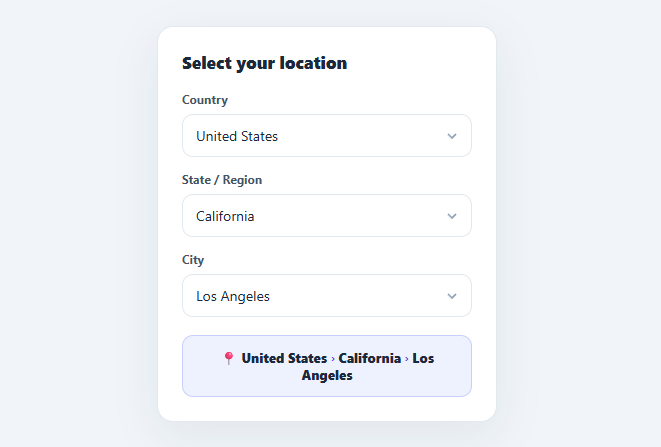
Cascading (dependent) selects are everywhere data is hierarchical: country → state → city, category → subcategory → product, make → model → trim. Each choice narrows and populates the next, and crucially, changing a parent must reset its children so you can never submit an impossible combination. This snippet implements the pattern correctly with native <select> elements in plain HTML, CSS, and vanilla JavaScript: dependent population, proper reset/disable cascading, and a live summary.
Native selects, custom-styled
It uses real <select> elements — keyboard-accessible, screen-reader friendly, and native on mobile — with the default arrow removed (appearance: none) and a custom SVG caret layered on top, plus a focus ring. Native is the right call for cascading data: it just works on every device and needs no popover/keyboard code, while still looking custom.
Correct dependency and reset logic
The data is a nested object (DATA[country][state] = [cities]). On load, fill populates the country select from the top-level keys. onCountry repopulates the state select from that country's regions and enables it — and always resets and disables the city select, because the previously chosen city no longer makes sense. onState repopulates and enables cities from DATA[country][state]. This downward reset is the heart of a correct cascade: clearing children whenever a parent changes prevents stale, invalid selections (a city from a different country) from lingering or being submitted.
Disabled-until-ready states
Child selects start disabled with helpful placeholder text ("Select a country first", "Select a region first"), so the required order is obvious and users can't interact out of sequence. A child re-disables itself the moment its parent is cleared. The caret dims on disabled selects for a coherent look.
Live summary
updateSummary rebuilds a breadcrumb from the three values: nothing chosen shows a neutral prompt, a partial selection shows "United States › California …", and a complete one shows a highlighted "📍 United States › California › Los Angeles" in an accent panel — immediate confirmation of the full path.
The whole thing is driven by one nested DATA object, so wiring it to real or API-loaded data is a matter of swapping that object (or fetching the next level on each change). Pair this with a country selector for a searchable single picker, a multi-select dropdown for multi-value fields, or a checkout payment form address step.
Build with AI
Build, Understand, Optimize, and Extend It With AI
Rather than tracing the reset chain across three functions by hand, paste this snippet's HTML, CSS, and JS into an AI coding assistant like Claude and ask it to explain exactly why onCountry() always resets and disables the city select even though it only directly manages the state select, and why that downward reset is essential to prevent an invalid country/city combination from ever being submitted. The same assistant can help optimize it — ask whether the nested DATA object approach would still work cleanly if country and state lists needed to be fetched from an API instead of being hardcoded, and what loading-state handling that would require. It's also useful for extending the form: ask it to restore a previously saved selection on page load by programmatically triggering the same cascade, add a fourth level (e.g. neighborhood), or swap the plain selects for a searchable combobox at each level while keeping the reset logic intact. Treat the code less like a finished artifact and more like a starting point for a conversation.
Prompt to recreate it
Copy this into your AI assistant of choice to build the effect from scratch, or as a jumping-off point for your own variant:
Build a three-level "cascading select" (country, state, city) in plain HTML, CSS, and JavaScript using native select elements — no custom dropdown library.

Requirements:
- Represent the location data as a single nested object where each country key maps to an object of state keys, and each state key maps to an array of city strings, so the whole cascade is driven from one data structure.
- The state and city selects must start disabled with a placeholder option text telling the user to complete the previous level first (e.g. "Select a country first").
- Changing the country select must repopulate the state select's options from that country's keys and enable it, but must also immediately reset the city select back to its disabled placeholder state — even though the city select isn't the one that changed — so a city belonging to a different country can never remain selected.
- Changing the state select must repopulate the city select's options from that state's city array and enable it.
- Write one reusable function that rebuilds any select's option list from an array plus a placeholder string, used for all three levels rather than three separate populate functions.
- Maintain a live summary line below the selects that shows a neutral placeholder when nothing is chosen, a partial breadcrumb (e.g. "Country › State …") when some but not all levels are chosen, and a fully highlighted breadcrumb path when all three levels are selected.
- Style the selects with the browser's default appearance removed and a custom SVG caret icon layered on top via absolute positioning, with the caret dimming when its select is disabled.
Want to tighten it up first? Run this prompt through the AI Prompt Studio to score it across 8 quality dimensions, catch anti-patterns, and tune the wording for Claude, ChatGPT, or Gemini before you paste it in.
Step by step
How to Use
- 1Paste HTML, CSS, and JSThree dropdowns appear — Country is ready, while State and City are disabled with "select first" placeholders.
- 2Pick a countryChoosing one populates the State dropdown with that country's regions and enables it; City stays disabled.
- 3Pick a regionThe City dropdown fills with that region's cities and enables.
- 4Pick a cityThe summary updates to a highlighted "📍 Country › Region › City" path.
- 5Change the countryPick a different country — State and City reset and re-disable so no stale, invalid combination remains.
- 6Plug in real dataReplace the nested
DATAobject (or fetch each level on change) — the cascade and reset logic stay the same.
Real-world uses
Common Use Cases
Got questions?
Frequently Asked Questions
Fetch each level on demand: on country change, await the regions for that country, then call fill(stateSel, regions, …); on region change, fetch and fill cities. Show a "Loading…" placeholder while the request is in flight and keep the child disabled until it resolves. The reset logic stays identical — always clear children before fetching the next level.
After populating each level, set the select's value to the saved choice and trigger the next level's population programmatically (call onCountry(countrySel) then onState(stateSel) after setting values). This rebuilds the dependent options so the saved city is present and selected, rather than showing an empty child.
For dependent/cascading data, native <select> is the pragmatic choice: it is fully accessible, keyboard-operable, and renders as the OS-native picker on mobile (a big usability win for long lists) with zero extra code. Custom dropdowns add popover, focus-trap, and keyboard logic for little benefit here. Use a custom control (like the country selector) only when you need search or rich option content.
Check that countrySel.value, stateSel.value, and citySel.value are all non-empty before allowing submission, and mark the missing field. Since children can't be selected before their parents, validating the deepest (city) effectively confirms the whole path — but check all three to be safe, and re-run validation if data is loaded asynchronously.
In React, hold country, state, and city in useState; derive each select's options from the data and the parent's value, and reset children in the parent's onChange (set state/city to ''). In Vue, use v-model with computed option lists and watchers that clear children. In Angular, [(ngModel)] with getters for options. The nested-data and reset logic port unchanged.