You Might Also Like
Learn Coding Visually
Learn to code with interactive, live-preview playgrounds — HTML, CSS, JavaScript, React & more.
 HTML Playground42 lessons · Click-based · Live preview
 CSS PlaygroundLearn CSS with a live editor
 JavaScript Playground60 lessons · DOM · Async · Canvas
 React PlaygroundLearn React with a live code editor
 GSAP PlaygroundLearn GSAP animation interactively
 SVG Playground44 lessons · shapes · paths · animation
 SCSS Playground45 lessons · Sass modules · tokens
 Tailwind PlaygroundLearn Tailwind CSS with a live editor
 Bootstrap 5 Playground50 lessons · live preview
Content Calendar Grid — Free Month-View Content Planner (HTML/CSS/JS)
Content Calendar Grid · Dashboards · Plain HTML, CSS & JS · Live preview
What's included
Features
About this UI Snippet
Content Calendar Grid — Month View With Colored Chips and a Day Detail Panel
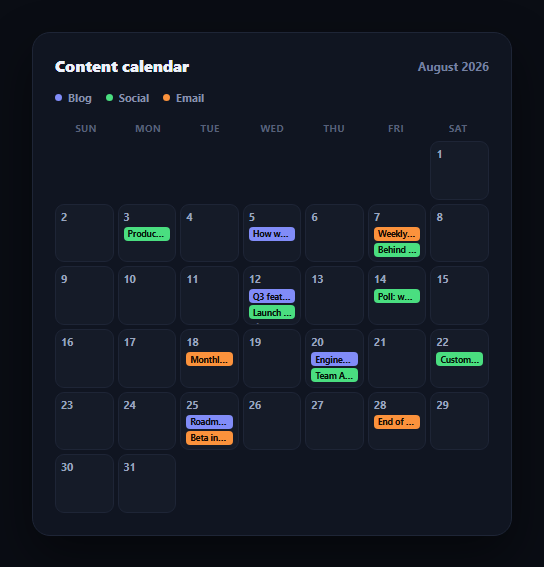
Marketing teams plan across multiple content types — blog posts, social updates, email sends — and a shared month view is the fastest way to see the whole publishing cadence at a glance. This snippet builds that content calendar in plain HTML, CSS, and vanilla JavaScript: a 7-column month grid, up to two colored chips per day with graceful overflow, and a click-through panel showing everything scheduled on a given day.
A month grid built from two numbers
The grid is generated from just DAYS_IN_MONTH and START_WEEKDAY (which weekday the 1st falls on) — renderGrid() pads the front of the grid with invisible empty cells so day 1 lands in the correct weekday column, then renders one cell per day of the month. This is the same technique any calendar UI needs, and it's isolated in one small loop rather than tangled into the rendering of each day's content.
Type-coded chips with honest overflow
Each day's scheduled posts are stored as an array under that day's number in a POSTS lookup object. A day cell shows at most its first two posts as small colored chips — indigo for blog, green for social, orange for email — and if more exist, a "+N more" label makes the overflow explicit instead of silently hiding it or awkwardly shrinking chips to fit. The chip color and its label both come from the same type field, so a chip can never be colored inconsistently with what it says.
Click a day, see everything
Clicking any day cell opens a detail panel below the grid listing every post scheduled that day — not just the two visible chips — each with its type dot, type label, and title. The clicked cell gets a distinct active outline so it's clear which day the panel is describing, and a close button collapses the panel and clears that highlight.
Where it fits
Pair it with a calendar widget for a date-picker use case, a schedule table for a list-based alternative view of the same data, or a gantt table for longer-running campaign timelines alongside daily content.
Customizing it
Swap in real dates computed from the actual current month (rather than the hardcoded August 2026 example), add drag-to-reschedule, or extend the POSTS lookup with status (draft/scheduled/published) so chips can also communicate publishing state.
Build with AI
Build, Understand, Optimize, and Extend It With AI
You don't have to work out the month-grid math by hand. Paste this snippet's HTML, CSS, and JS into an AI coding assistant like Claude and ask it to explain exactly how START_WEEKDAY and DAYS_IN_MONTH combine in renderGrid() to pad the grid so day 1 always lands in the correct weekday column, and why each day's chips and detail-panel rows read color from the same type field instead of two separate color assignments that could drift apart. The same assistant can help you make it dynamic — ask it to compute DAYS_IN_MONTH and START_WEEKDAY from a real JavaScript Date object for the current month instead of hardcoded constants, and to add "previous month" / "next month" navigation that regenerates the grid. It's also useful for extending the data model: ask it to add a draft/scheduled/published status to each post that shows as a secondary indicator on the chip, or to make chips draggable between days to reschedule content. Treat the code less like a finished artifact and more like a starting point for a conversation.
Prompt to recreate it
Copy this into your AI assistant of choice to build the effect from scratch, or as a jumping-off point for your own variant:
Build a month-view "content calendar" grid in plain HTML, CSS, and JavaScript with no framework or library.

Requirements:
- Render a standard 7-column (Sunday-Saturday) month grid for a given month, using a days-in-month count and a start-weekday value to correctly pad empty cells before day 1 so it lands in the right weekday column.
- Store scheduled content in a lookup object keyed by day number, where each day can have zero or more post objects, each with a "type" (e.g. blog, social, email) and a title.
- Each day cell should render up to 2 small colored chips (one per scheduled post, color-coded consistently by type — a different color for each of at least 3 content types) and, if a day has more than 2 posts, an honest "+N more" indicator rather than hiding or cramming the extras.
- Include a color-coded legend above the grid explaining what each chip color means.
- Clicking any day cell must open a detail panel (below or beside the grid) listing every post scheduled that day — including ones not visible as chips — each showing its type and title, and must visually mark that day cell as the active/selected one.
- Clicking a different day updates the panel and moves the active-day highlight; a close control collapses the panel and clears the highlight.
- Days with zero scheduled posts should still be clickable and show a clear "nothing scheduled" message in the panel rather than an empty list.
Want to tighten it up first? Run this prompt through the AI Prompt Studio to score it across 8 quality dimensions, catch anti-patterns, and tune the wording for Claude, ChatGPT, or Gemini before you paste it in.
Step by step
How to Use
- 1Paste HTML, CSS, and JSAn August 2026 month grid renders with colored post chips on scheduled days.
- 2Scan the legendBlog is indigo, social is green, email is orange.
- 3Spot a busy dayDays with 3+ posts show two chips plus a "+N more" label.
- 4Click any dayA detail panel opens below listing every post scheduled that day.
- 5Click another dayThe active highlight moves and the panel updates to the new day.
- 6Close the panelClick the × to collapse it and clear the active-day highlight.
Real-world uses
Common Use Cases
Got questions?
Frequently Asked Questions
A START_WEEKDAY constant (0 for Sunday through 6 for Saturday) tells renderGrid() how many empty, invisible padding cells to render before day 1, so day 1 lands in the correct weekday column. Combined with DAYS_IN_MONTH, that's all the grid needs to lay out any month correctly.
Each day cell only has room for two chips before it gets cramped or the aspect-ratio square overflows. Rather than shrinking chips illegibly or silently dropping extra posts, the third-and-beyond posts are summarized as a "+N more" label — clicking the day still reveals the complete list in the detail panel.
Every post object has a type field ("blog", "social", or "email"), and both its chip and its dot in the detail panel apply a CSS class built directly from that field (ccg-blog, ccg-social, ccg-email). Because the chip and the panel row read the same type value, a post's color is always consistent wherever it appears.
The detail panel still opens (so clicking any day is a consistent interaction) but shows a plain "No content scheduled this day" message instead of an empty list, so it's clear the day was intentionally checked and simply has nothing planned.
Move POSTS and activeDay into component state, and derive the grid cells and the panel's post list with a map/computed property instead of manual innerHTML writes. The month-padding calculation (empty cells before day 1) and the overflow-count logic are pure and port over unchanged.