You Might Also Like
Learn Coding Visually
Learn to code with interactive, live-preview playgrounds — HTML, CSS, JavaScript, React & more.
 HTML Playground42 lessons · Click-based · Live preview
 CSS PlaygroundLearn CSS with a live editor
 JavaScript Playground60 lessons · DOM · Async · Canvas
 React PlaygroundLearn React with a live code editor
 GSAP PlaygroundLearn GSAP animation interactively
 SVG Playground44 lessons · shapes · paths · animation
 SCSS Playground45 lessons · Sass modules · tokens
 Tailwind PlaygroundLearn Tailwind CSS with a live editor
 Bootstrap 5 Playground50 lessons · live preview
On-Call Schedule Rotation — Free Weekly Incident Rotation Widget
On-Call Schedule Rotation · Dashboards · Plain HTML, CSS & JS · Live preview
What's included
Features
About this UI Snippet
On-Call Schedule Rotation — Who’s Up, Who’s Next, and When It Changes
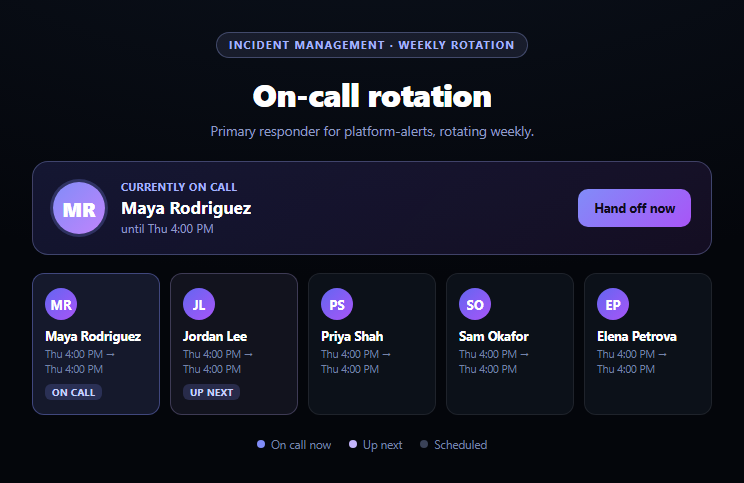
Every incident-management and DevOps dashboard needs one thing above the fold: who's on call right now, and when does that change. This widget builds exactly that — a highlighted current-responder card plus a horizontal, scrollable strip of the surrounding rotation — driven entirely by a roster array and a single rotation-start timestamp, with a "hand off now" button that genuinely advances the schedule rather than just relabeling a card.
One index and one timestamp drive the whole schedule
The entire rotation is computed from two values: ROSTER, an ordered array of names, and rotationStart, the timestamp the current person's shift began. personAt(offset) wraps around the roster with modular arithmetic to find who's on call offset weeks from now (or in the past, for negative offsets), and slotStart(offset) adds offset * WEEK_MS to rotationStart to get that slot's start time. Every card in the strip, and the highlighted current-responder banner, are just this pair of functions called with different offsets — there's no separately maintained list of "who's on call this week, and this week, and this week."
A strip that shows recent past through near future
Rather than only ever showing "now" and "next," the strip renders one slot before the current one (RANGE_BEFORE = 1) through four slots after it (RANGE_AFTER = 4), so a viewer can see both the tail of the last handoff and enough of the runway ahead to plan around. Each card carries its own real formatted date range (formatDay() renders "Fri 9:00 AM" style labels) rather than a relative "in 2 weeks" — the kind of concrete detail an on-call engineer actually needs when checking who to page or when their own shift starts.
A handoff that really advances the schedule
handOffNow() does two things: increments currentIndex to the next roster member, and resets rotationStart to right now, so the newly-current person's shift genuinely starts at the moment of the handoff rather than continuing to count down an old shift's clock. Every downstream card recomputes from that new state on the next render() call — the same "recompute from source state" discipline used by this library's SLA countdown badge, where a single deadline timestamp drives every visual detail rather than juggling parallel state.
Visual hierarchy that matches operational priority
The current responder gets a large, prominent banner card with an avatar and countdown-to-handoff text; the strip below uses distinct highlight styles for "current" and "next" so a fast glance answers "who do I page" without reading every card. Pair this with an SLA countdown badge for the response-time half of an incident dashboard, or a status dashboard for overall system health alongside it.
Customizing it
Swap the fixed weekly cadence for a custom-length rotation, pull the roster and start time from a real scheduling API, or add a "swap with" dropdown so any two upcoming slots can be manually reordered instead of only ever advancing sequentially.
Build with AI
Build, Understand, Optimize, and Extend It With AI
Paste this snippet's HTML, CSS, and JS into an AI coding assistant like Claude and ask it to explain why the entire rotation — every card's person, date range, and highlight state — is derived from just two values (the roster array and a single rotationStart timestamp) via personAt() and slotStart(), rather than storing each week's assignment as separately maintained data. It's a good prompt for reasoning about the hand-off mechanics specifically: ask why handOffNow() resets rotationStart to the current time rather than simply advancing it by one week, and what would go wrong if it didn't. For extensions, ask it to add a secondary/backup on-call role shown alongside the primary for each slot, a manual override that lets any two upcoming slots be swapped instead of only advancing sequentially, or integration with the SLA countdown badge snippet so a ticket's badge shows the current on-call person's name directly. Treat the code less like a finished artifact and more like a starting point for a conversation.
Prompt to recreate it
Copy this into your AI assistant of choice to build the effect from scratch, or as a jumping-off point for your own variant:
Build an "On-Call Schedule Rotation" widget in plain HTML, CSS, and JavaScript — no libraries.

Requirements:
- A prominent "currently on call" card showing the current responder's name, an avatar (generated from their initials), and a formatted "until [day] [time]" label showing exactly when their shift hands off.
- A horizontal, scrollable strip of cards below it showing the rotation: at least one slot before the current one (to show recent history) and several slots after it (upcoming handoffs), each showing the assigned person, their avatar, and a real formatted date/time range for their shift — not a vague relative label like "in 3 weeks."
- Drive the entire schedule from exactly two pieces of state: an ordered array of names (the roster) and a single timestamp marking when the current shift began. Compute who is on call at any given weekly offset (past or future) via modular arithmetic over the roster array combined with that timestamp, so every card in the strip — and the current-responder banner — is derived from the same two values rather than independently tracked per-slot data.
- A "Hand off now" button that advances the rotation to the next person in the roster (wrapping around at the end) and resets the shift-start timestamp to the current moment, then fully re-renders the strip and the current-responder banner from that updated state.
- Visually distinguish the "current" and "next" slots from the rest of the strip (e.g. a highlighted background and a small badge label), and keep the current slot scrolled into view within the horizontally scrollable strip whenever the schedule updates.
Want to tighten it up first? Run this prompt through the AI Prompt Studio to score it across 8 quality dimensions, catch anti-patterns, and tune the wording for Claude, ChatGPT, or Gemini before you paste it in.
Step by step
How to Use
- 1Paste HTML, CSS, and JSThe current responder's card and a rotation strip render.
- 2Scroll the strip horizontallySee past, current, and upcoming weekly shifts with real dates.
- 3Read the current-until textShows exactly when the current shift hands off.
- 4Click "Hand off now"Advances the rotation to the next person, resetting the shift clock.
- 5Watch the strip re-renderEvery card recomputes from the new rotation state.
- 6Swap in your real rosterEdit the ROSTER array with your team's actual names.
Real-world uses
Common Use Cases
Got questions?
Frequently Asked Questions
Two values drive the entire schedule: a ROSTER array listing everyone in rotation order, and a rotationStart timestamp marking when the current person's shift began. personAt(0) reads the roster at the current index, and every other card in the strip is just personAt() called with a different weekly offset — there's no separately maintained "current person" variable disconnected from the roster and index.
handOffNow() advances currentIndex to the next person in the roster (wrapping back to the start if it reaches the end) and resets rotationStart to the current timestamp, so the newly-current person's shift genuinely begins at that moment. The entire strip then re-renders from that updated state, recomputing every card's dates and highlighting rather than just relabeling the existing cards.
Showing one slot before the current shift (in addition to several after it) gives a viewer context on the recent handoff — who just finished being on call — alongside the near-future rotation, rather than only ever showing "now and next." The RANGE_BEFORE and RANGE_AFTER constants control how many slots render on each side and can be adjusted to show more or less history and lookahead.
Replace the ROSTER array and rotationStart with data fetched from your actual on-call scheduling system (PagerDuty, Opsgenie, or an internal API), keeping the same shape: an ordered list of people and a timestamp for when the current shift started. The rendering logic, date formatting, and hand-off mechanics all work unchanged as long as those two values reflect real schedule data.
Keep ROSTER, rotationStart, and currentIndex as component state, and call the same personAt/slotStart calculations inside your render function or a computed property, mapping the resulting array of slots to your framework's list-rendering syntax. The handOffNow logic becomes a simple state-updating click handler; there's no DOM-specific logic beyond the optional scrollIntoView call for keeping the current slot visible.