You Might Also Like
Learn Coding Visually
Learn to code with interactive, live-preview playgrounds — HTML, CSS, JavaScript, React & more.
 HTML Playground42 lessons · Click-based · Live preview
 CSS PlaygroundLearn CSS with a live editor
 JavaScript Playground60 lessons · DOM · Async · Canvas
 React PlaygroundLearn React with a live code editor
 GSAP PlaygroundLearn GSAP animation interactively
 SVG Playground44 lessons · shapes · paths · animation
 SCSS Playground45 lessons · Sass modules · tokens
 Tailwind PlaygroundLearn Tailwind CSS with a live editor
 Bootstrap 5 Playground50 lessons · live preview
SLA Countdown Badge — Free Support Ticket Response-Time Countdown
SLA Countdown Badge · Dashboards · Plain HTML, CSS & JS · Live preview
What's included
Features
About this UI Snippet
SLA Countdown Badge — Live Urgency Bands That Shift as the Deadline Approaches
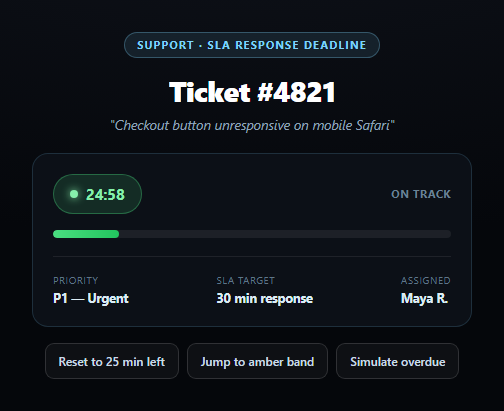
Support and incident tools live or die on whether an SLA deadline is visible at a glance, and this badge is built for exactly that: a live countdown to a response-time deadline that changes color as urgency increases, then keeps running into negative time with a distinct, unmistakable style once the deadline has passed. It's the pattern behind the small red timer chip on every serious ticketing and on-call tool.
A single deadline drives everything
The whole widget is a function of one deadline timestamp and a TOTAL_MS SLA window (30 minutes here, matching a P1 response target). render(), called every second, computes remainingMs = deadline - Date.now() and derives everything else from it — the formatted countdown text, the progress bar's fill percentage, and which urgency band applies. There's no separate state to keep in sync; moving the deadline is the only thing any control needs to do.
Three bands, one classify function
classify() turns elapsed-time percentage into a band name: green below 50% elapsed, amber from 50-80%, red above 80%, and overdue once remainingMs crosses zero. Because the bands are computed from a continuous percentage rather than hardcoded time thresholds, the same logic scales correctly whether the SLA window is 30 minutes or 4 hours — swap TOTAL_MS and the color transitions still land at the right relative points.
Overdue is a different state, not just "more red"
Crossing zero doesn't just turn the badge a darker shade of red — formatDuration() keeps formatting negative durations with a leading minus sign, so the badge visibly counts *up* past the deadline (-03:12, -03:13...), and a distinct overdue CSS class adds a pulsing glow animation that the red band alone doesn't have. That distinction matters operationally: "12 minutes overdue and climbing" is a different signal than "12 minutes left and red," and the UI should never blur the two.
A progress bar that mirrors the badge
The horizontal track fill shares the exact same band classes and color logic as the badge text, so a manager scanning a row of these badges can read urgency from the bar's color and length alone, without needing to read the digits. Pair this with an on-call schedule rotation to show who owns the response, or a status dashboard for a fleet of tickets at once.
Customizing it
Change TOTAL_MS per priority tier (P1 vs P3 have very different SLA windows), wire the deadline to a real ticket-creation timestamp plus an SLA policy lookup, or add a browser notification when a badge crosses into the red band.
Build with AI
Build, Understand, Optimize, and Extend It With AI
Paste this snippet's HTML, CSS, and JS into an AI coding assistant like Claude and ask it to explain why the urgency bands are computed from an elapsed-time percentage rather than fixed minute thresholds, and how that choice makes the same classify() function correctly handle a 30-minute P1 SLA and a 4-hour P3 SLA without any code changes. It's a good prompt for reasoning about the overdue state specifically — ask why formatDuration() is written to keep formatting negative durations rather than clamping at zero, and what real operational difference that distinction communicates to a support agent. For extensions, ask it to add a browser Notification (check this library's notification-permission-prompt snippet for the pattern) that fires the moment a badge crosses into the red band, a compact variant for showing many badges in a table row, or a tooltip breaking down exactly when the ticket was created and when its SLA target falls. Treat the code less like a finished artifact and more like a starting point for a conversation.
Prompt to recreate it
Copy this into your AI assistant of choice to build the effect from scratch, or as a jumping-off point for your own variant:
Build an "SLA Countdown Badge" in plain HTML, CSS, and JavaScript — no libraries.

Requirements:
- A badge showing a live countdown timer (formatted as MM:SS or H:MM:SS) to a fixed deadline timestamp, alongside a band label (e.g. "On track" / "At risk" / "Critical" / "Overdue — breach") and a horizontal progress bar that fills as the SLA window elapses.
- Drive the entire widget from a single deadline timestamp and a total SLA window duration constant. On a recurring one-second interval, compute the remaining milliseconds (deadline minus current time) and derive the countdown text, the progress bar's fill percentage, and the current urgency band from that single value — do not maintain separate state for the timer, the bar, and the band label that could drift out of sync.
- Classify the urgency band by the percentage of the SLA window that has elapsed, not by fixed time thresholds: green below roughly 50% elapsed, amber from 50% to 80% elapsed, red above 80% elapsed, and a distinct "overdue" band once remaining time reaches zero or goes negative — with color/style transitions on the badge and the progress bar matching each band.
- CRITICAL: once the deadline passes, the badge must NOT freeze at zero or simply stay a static red — it should switch to a visually distinct overdue style (e.g. a pulsing glow animation) and the countdown must keep running into negative time, displaying the overdue duration with a leading minus sign so it's clear the ticket is a specific amount of time past its deadline and still counting.
- Include a couple of demo/simulation buttons that jump the deadline to specific states (e.g. "jump to amber band," "simulate overdue") purely by adjusting the deadline value, so all the resulting visual changes flow through the same single render function used by the live countdown.
Want to tighten it up first? Run this prompt through the AI Prompt Studio to score it across 8 quality dimensions, catch anti-patterns, and tune the wording for Claude, ChatGPT, or Gemini before you paste it in.
Step by step
How to Use
- 1Paste HTML, CSS, and JSA green "On track" badge counts down from 25 minutes.
- 2Watch it tickThe badge, band label, and progress bar update every second.
- 3Click "Jump to amber band"Sets the deadline so the badge lands at 70% elapsed.
- 4Click "Simulate overdue"The badge crosses zero and counts up in negative time.
- 5Observe the overdue pulseA distinct animated style marks a breached SLA.
- 6Click "Reset"Returns to a fresh 25-minutes-remaining state.
Real-world uses
Common Use Cases
Got questions?
Frequently Asked Questions
classify() computes what percentage of the total SLA window has elapsed (1 minus the fraction of time remaining) and compares it against two thresholds: 50% elapsed moves it to amber, 80% elapsed moves it to red, and crossing the deadline entirely (zero or negative time remaining) moves it to a distinct overdue state. Because this is percentage-based rather than fixed time thresholds, the same logic works correctly for any SLA window length.
The badge doesn't just turn a darker red — it switches to a dedicated overdue state with its own pulsing glow animation, and the countdown timer itself keeps running past zero, showing the elapsed overdue time with a leading minus sign (e.g. -03:12) rather than freezing at 00:00 or disappearing. That distinction matters because "overdue and still climbing" is a meaningfully different signal from merely "critical."
The bar uses the exact same band classification and color logic as the badge, filling from 0% to 100% as the SLA window elapses. That lets someone scanning a list of many tickets read relative urgency from bar length and color alone, without needing to parse each countdown's exact digits — useful for a dashboard showing dozens of tickets at once.
Replace the deadline variable with a real timestamp computed from the ticket's creation time plus its SLA policy duration (e.g. createdAt + priorityToSlaMs[ticket.priority]), and set TOTAL_MS to that same policy duration so the band percentages remain meaningful. The render loop, band classification, and formatting logic all work unchanged as long as deadline and TOTAL_MS reflect the real values.
Store the deadline and TOTAL_MS as props or component state, and run the render() calculation inside a setInterval started in a mount effect, updating a small piece of local state (remainingMs and band) each tick rather than touching the DOM directly. Clear the interval in your cleanup function so it doesn't keep running after the component unmounts, and derive the badge's CSS classes from the current band value.