You Might Also Like
Learn Coding Visually
Learn to code with interactive, live-preview playgrounds — HTML, CSS, JavaScript, React & more.
 HTML Playground42 lessons · Click-based · Live preview
 CSS PlaygroundLearn CSS with a live editor
 JavaScript Playground60 lessons · DOM · Async · Canvas
 React PlaygroundLearn React with a live code editor
 GSAP PlaygroundLearn GSAP animation interactively
 SVG Playground44 lessons · shapes · paths · animation
 SCSS Playground45 lessons · Sass modules · tokens
 Tailwind PlaygroundLearn Tailwind CSS with a live editor
 Bootstrap 5 Playground50 lessons · live preview
Workout Interval Timer — Free HTML CSS JS Snippet
Workout Interval Timer · Dashboards · Plain HTML, CSS & JS · Live preview
What's included
Features
About this UI Snippet
Workout Interval Timer — Configurable Work/Rest Rounds With a Phase-Coded Ring
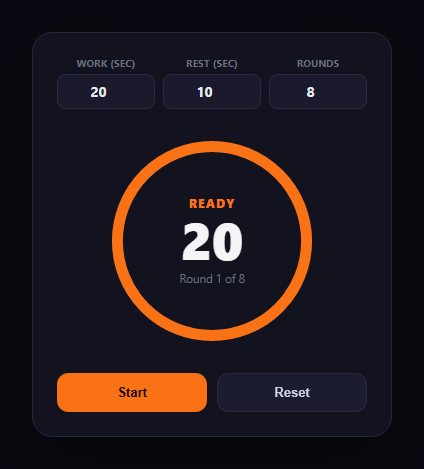
Interval training lives or dies on the timer: work and rest phases need to be unmistakable at a glance, transitions need a cue you can catch out of the corner of your eye mid-exercise, and the round count needs to be right there so you know how much is left. This snippet builds a Tabata-style interval timer in plain HTML, CSS, and vanilla JavaScript, with configurable work duration, rest duration, and round count. Pair it with a water intake tracker or sleep cycle chart in a broader fitness dashboard, or compare it with pomodoro timer and countdown timer for related countdown patterns.
A small state machine, not scattered flags
The timer's entire behavior lives in one state object — phase (ready/work/rest/done), the current round, and timeLeft — updated by a single tick() function that runs every second. When timeLeft runs out, tick() decides the next phase: work rolls into rest, rest either advances to the next round's work phase or, on the final round, calls finish(). Centralizing this logic in one function is what makes the timer's behavior predictable and easy to extend (adding a warm-up phase, for instance, is one more branch).
A ring that changes color with the phase
The same SVG stroke-dashoffset technique used in a progress ring drives the countdown visually, but here the ring's *color* changes with the phase — orange during work, blue during rest, green when the workout completes — so you can tell which phase you're in from peripheral vision without reading the phase label. The ring resets to full and counts back down to empty on every new phase, rather than continuing to drain across the whole workout.
A pulse cue at every transition
At the exact moment a phase changes — work to rest, rest to the next round, or completion — the phase label briefly scales up and back down via a CSS class toggle (pulse(), removed after 250ms with setTimeout). This is the audio-free equivalent of a haptic buzz: a sharp, brief visual jolt exactly when your attention should shift, which matters far more mid-workout than a color that merely changes gradually.
Pause and resume, not just start
Clicking the primary button while running pauses the countdown in place (clearing the interval without resetting timeLeft) and relabels itself "Resume"; clicking again picks up exactly where it left off. The config inputs (work/rest/round duration) lock as soon as a workout starts, preventing an accidental mid-workout edit from desyncing the ring's percentage math, and unlock again on Reset.
Extending it
Add a short countdown "warm-up" phase before round 1, a distinct color for the final round to build urgency, or swap the visual pulse for the Web Vibration API's navigator.vibrate() on supporting mobile browsers for a real haptic cue alongside the visual one.
Build with AI
Build, Understand, Optimize, and Extend It With AI
You don't have to design the phase state machine by hand. Paste this snippet's HTML, CSS, and JS into an AI coding assistant like Claude and ask it to explain exactly how one state object and a single tick() function drive every work/rest/round transition, and why the ring's fill percentage is calculated against the current phase's own duration rather than the workout's total elapsed time. The same assistant can help you optimize it — ask whether setInterval(tick, 1000) can drift over a long workout compared to computing elapsed time from Date.now(), and how you'd correct for that drift. It's also useful for extending the timer: ask it to add a short warm-up countdown before round 1, a distinct "final round" visual treatment, an audio beep option, or persistence so a workout resumes correctly if the page is accidentally refreshed mid-session. Treat the code less like a finished artifact and more like a starting point for a conversation.
Prompt to recreate it
Copy this into your AI assistant of choice to build the effect from scratch, or as a jumping-off point for your own variant:
Build a Tabata-style "workout interval timer" in plain HTML, CSS, and JavaScript — no frameworks, no audio, no libraries.

Requirements:
- Provide three configurable number inputs (work duration in seconds, rest duration in seconds, and number of rounds) that are editable before a workout starts and become disabled once the timer is running, so the countdown math can never desync from a mid-run edit.
- Drive the entire timer from one central state object (current phase — ready/work/rest/done, current round number, and time remaining in the current phase) updated by a single per-second tick function that decides all phase transitions in one place: work rolls into rest, rest either advances to the next round's work phase or finishes the workout if the round count is reached.
- Render a large countdown number and an SVG circular progress ring whose fill drains over the course of the CURRENT phase only (resetting to full at the start of every new phase, not draining across the whole workout), and whose stroke color changes distinctly between the work phase and the rest phase (plus a third distinct color/state for workout-complete).
- At the exact moment each phase transition happens (work-to-rest, rest-to-next-round, and completion), trigger a brief, audio-free "pulse" visual cue — e.g. the phase label or ring scaling up and back down quickly — so a transition is noticeable even out of the corner of your eye, without relying on sound.
- Support pausing mid-countdown (freezing the current time-remaining exactly where it is, not resetting the phase) and resuming from that exact paused point, plus a full reset back to the initial ready state that also re-enables the configuration inputs.
- Show the current round out of the total configured rounds at all times, and show a clear, distinct completed state (not just "0" on the clock) once every round is finished.
Want to tighten it up first? Run this prompt through the AI Prompt Studio to score it across 8 quality dimensions, catch anti-patterns, and tune the wording for Claude, ChatGPT, or Gemini before you paste it in.
Step by step
How to Use
- 1Set work, rest, and roundsAdjust the three number inputs before starting — they lock once the timer is running.
- 2Click StartThe ring fills orange and counts down the first work interval.
- 3Watch the phase changeAt zero, the label pulses, the ring turns blue, and rest begins counting down.
- 4Follow the roundsWork and rest alternate automatically until the configured round count is reached.
- 5Pause and resumeClick the primary button mid-countdown to pause in place; click again to resume.
- 6Finish or resetThe ring turns green with a checkmark on completion, or click Reset any time to start over.
Real-world uses
Common Use Cases
Got questions?
Frequently Asked Questions
tick() runs every second, decrementing timeLeft. When timeLeft drops below zero, a single block of logic decides the next phase: if the current phase was "work," it switches to "rest" with the configured rest duration; if it was "rest," it either advances to the next round's work phase or, if the last round just finished resting, calls finish(). This keeps all transition logic in one place instead of scattered across separate timers.
During an actual workout you're rarely looking directly at the timer — you catch it in peripheral vision between reps. A phase-appropriate ring color (orange for work, blue for rest, green for done) is readable at a glance without focusing on or reading the text label, which is the whole point of a color-coded cue: it works even when you can't spare full attention.
Pausing calls clearInterval() on the running timer but does not touch timeLeft, phase, or round — so the countdown is frozen exactly where it was. The button relabels itself "Resume," and clicking it again starts a new setInterval that continues decrementing from the preserved timeLeft, rather than restarting the current phase from its full duration.
The ring's fill percentage is calculated as timeLeft divided by the current phase's configured duration (work or rest). If you changed the work duration mid-countdown, that denominator would suddenly not match the timeLeft value that was already counting down, producing a ring that jumps or shows an inaccurate percentage. Locking the inputs during a run prevents that mismatch; Reset re-enables them.
Inside pulse() (or wherever a phase transition is triggered), call navigator.vibrate(200) — or a short pattern array like [100, 50, 100] — guarded by a check for navigator.vibrate existing, since the Vibration API is only supported on some mobile browsers and requires a user gesture in the page's history. Keep the visual scale-pulse as the primary cue since vibration support and permissions are inconsistent across browsers.