You Might Also Like
Learn Coding Visually
Learn to code with interactive, live-preview playgrounds — HTML, CSS, JavaScript, React & more.
 HTML Playground42 lessons · Click-based · Live preview
 CSS PlaygroundLearn CSS with a live editor
 JavaScript Playground60 lessons · DOM · Async · Canvas
 React PlaygroundLearn React with a live code editor
 GSAP PlaygroundLearn GSAP animation interactively
 SVG Playground44 lessons · shapes · paths · animation
 SCSS Playground45 lessons · Sass modules · tokens
 Tailwind PlaygroundLearn Tailwind CSS with a live editor
 Bootstrap 5 Playground50 lessons · live preview
Idle Detection Badge — Free Heuristic + Native IdleDetector Demo
Idle Detection Badge · Dashboards · Plain HTML, CSS & JS · Live preview
What's included
Features
About this UI Snippet
Idle Detection Badge — A Heuristic That Works Everywhere, Enhanced by the Real API
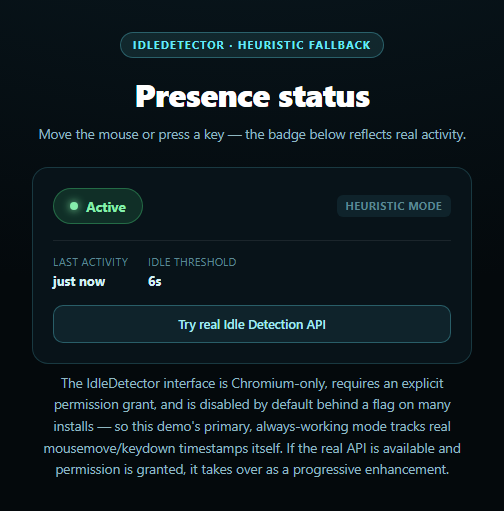
Most "idle detection" demos reach straight for the IdleDetector interface and quietly break everywhere it isn't available — which, in practice, is almost everywhere: it's Chromium-only, requires an explicit permission grant through IdleDetector.requestPermission(), and is routinely disabled or blocked inside sandboxed preview iframes like the one likely rendering this demo. This snippet inverts that priority. The primary, always-on mode is a genuine activity heuristic built from real DOM events; the native API is wired in as an optional, opt-in upgrade.
The heuristic that actually runs
Every mousemove, keydown, pointerdown, touchstart, and scroll event updates lastActivityAt to the current timestamp. A 500ms interval, heuristicTick(), compares that timestamp against IDLE_THRESHOLD_MS (six seconds here) and flips the badge to "Idle" the moment that much real time has passed with zero activity — then flips straight back to "Active" the instant any tracked event fires again. Nothing here depends on permissions, browser support, or an installed context; it's the same technique behind countless "away" statuses in chat apps, just made honest about being a heuristic rather than dressed up as something more authoritative.
The real API, opted into deliberately
Clicking "Try real Idle Detection API" calls IdleDetector.requestPermission() behind a capability check for 'IdleDetector' in window. If granted, a live IdleDetector instance is started with a 60-second threshold (the API's practical minimum) and its change event reports both userState ('active'/'idle') and screenState ('locked'/'unlocked') — the latter is something no DOM-event heuristic could ever detect, since a locked screen fires no browser events at all. When it successfully takes over, the heuristic timer is cleared and the mode label switches from "heuristic mode" to "native mode."
Why this order, not the reverse
Attempting the real API first and falling back only on failure would mean most visitors briefly see a permission prompt attempt, or a silent failure, before anything useful renders. Starting from a fully working heuristic and treating the native API as a bonus — exactly the shape used by this library's canvas audio frequency bars snippet for microphone access — means the badge is meaningful from the first paint no matter what the browser or embedding context allows.
A third state a heuristic can't reach
The "Locked" badge state only ever appears via the real API's screenState, and the UI is explicit that this is a native-only capability — the heuristic mode simply has no equivalent. Pair this badge with a team presence list or collaborator presence bar for a multi-user version of the same pattern.
Customizing it
Tune IDLE_THRESHOLD_MS, add a "step away" auto-logout timer keyed off the idle state, or feed the state into a websocket to broadcast presence to other users in a real collaborative app.
Build with AI
Build, Understand, Optimize, and Extend It With AI
Paste this snippet's HTML, CSS, and JS into an AI coding assistant like Claude and ask it to explain why the heuristic mode is built to run first and unconditionally, with the real IdleDetector API wired in only as an opt-in enhancement behind a button click, rather than the more obvious-seeming approach of trying IdleDetector first and falling back to the heuristic on failure. It's a good prompt for reasoning about the actual mechanics too — ask what screenState reports that no DOM-event heuristic could ever detect, and why detector.start() is called with a 60-second threshold rather than something shorter. For extensions, ask it to add a configurable idle threshold input, broadcast the idle/active/locked state over a WebSocket for a real multi-user presence feature, or add an auto-logout countdown that starts once the badge goes idle. Treat the code less like a finished artifact and more like a starting point for a conversation.
Prompt to recreate it
Copy this into your AI assistant of choice to build the effect from scratch, or as a jumping-off point for your own variant:
Build an "Idle Detection Badge" in plain HTML, CSS, and JavaScript — no libraries.

Requirements:
- A badge element that shows one of three states — Active, Idle, or Locked — with distinct colors for each, plus a "last activity" readout and a label showing which detection mode is currently driving the badge (heuristic or native).
- CRITICAL: make the PRIMARY, always-working detection method a real heuristic, not the native browser API. Attach listeners for mousemove, keydown, pointerdown, touchstart, and scroll on the window, record the timestamp of the most recent event, and run a recurring check (e.g. every 500ms) that flips the badge to Idle once a configurable threshold (a handful of seconds) has passed with no activity, flipping straight back to Active the moment any tracked event fires again. This heuristic must work with zero permissions and in every browser, since it is the mode most viewers of this demo will actually experience.
- Add a button that, only when clicked, attempts to use the real native IdleDetector API as a progressive enhancement: check 'IdleDetector' in window first, then call IdleDetector.requestPermission() inside a try/catch, and only if permission is granted, construct a new IdleDetector, listen for its change event to read both userState ('active'/'idle') and screenState ('locked'/'unlocked'), and call detector.start(). On success, stop the heuristic's interval timer and switch the mode label to native, and use screenState to show the Locked badge state that the heuristic alone cannot detect.
- On any failure of the native path — the API not existing (the common case, since IdleDetector is Chromium-only), permission denied, or blocked by a permissions policy (a likely scenario inside a sandboxed preview iframe) — leave the heuristic running uninterrupted and show a specific status message explaining what happened, disabling the "try real API" button so it's clear that mode isn't available rather than leaving it clickable and silently failing again.
Want to tighten it up first? Run this prompt through the AI Prompt Studio to score it across 8 quality dimensions, catch anti-patterns, and tune the wording for Claude, ChatGPT, or Gemini before you paste it in.
Step by step
How to Use
- 1Paste HTML, CSS, and JSAn "Active" badge renders immediately in heuristic mode.
- 2Stop moving the mouse or typingAfter the threshold, the badge flips to "Idle" automatically.
- 3Move the mouse or press a keyIt flips straight back to "Active."
- 4Click "Try real Idle Detection API"Requests permission for the native IdleDetector where available.
- 5Grant or deny the permissionThe status line reports exactly what happened either way.
- 6Watch the mode labelIt reads "heuristic mode" or "native mode" depending on what's active.
Real-world uses
Common Use Cases
Got questions?
Frequently Asked Questions
The native IdleDetector interface is implemented only in Chromium browsers, requires an explicit permission grant via IdleDetector.requestPermission(), and is frequently disabled by default or blocked entirely inside sandboxed contexts like the preview iframe likely rendering this demo. Rather than depend on that narrow path, the badge starts in a heuristic mode that tracks real mouse and keyboard events directly — no permission needed — and only switches to native mode if you explicitly request it and it succeeds.
It listens for mousemove, keydown, pointerdown, touchstart, and scroll events on the window and records the timestamp of the most recent one. A recurring check compares the current time against that timestamp, and if more time has passed than the configured threshold (six seconds in this demo, tunable via IDLE_THRESHOLD_MS) with zero activity, the badge flips to Idle. Any tracked event firing again flips it straight back to Active.
The heuristic can only ever infer idleness from events that fire in the browser tab, so it has no way to know if the screen is locked — a locked device fires no DOM events, but the tab itself may still technically be open. The real IdleDetector API's screenState property reports 'locked' directly from the OS, which is why this snippet's "Locked" badge state is only reachable through the native API, never the heuristic.
Requesting idle-detection permission triggers a real browser permission prompt, and attempting that automatically on page load would be an unwanted surprise for most visitors of a demo page. Making it an explicit opt-in click respects that it's a meaningful permission request, and means the badge is already fully functional in heuristic mode before you ever decide whether to grant it.
Move the activity event listeners and the setInterval heuristic check into a mount effect, storing lastActivityAt and the current state in refs or component state. Keep the IdleDetector setup in the button's click handler exactly as shown, and make sure to call detector's abort signal (or otherwise stop it) and clear the heuristic interval in your component's cleanup function so neither keeps running after unmount.