You Might Also Like
Learn Coding Visually
Learn to code with interactive, live-preview playgrounds — HTML, CSS, JavaScript, React & more.
 HTML Playground42 lessons · Click-based · Live preview
 CSS PlaygroundLearn CSS with a live editor
 JavaScript Playground60 lessons · DOM · Async · Canvas
 React PlaygroundLearn React with a live code editor
 GSAP PlaygroundLearn GSAP animation interactively
 SVG Playground44 lessons · shapes · paths · animation
 SCSS Playground45 lessons · Sass modules · tokens
 Tailwind PlaygroundLearn Tailwind CSS with a live editor
 Bootstrap 5 Playground50 lessons · live preview
Water Intake Tracker — Free HTML CSS JS Snippet
Water Intake Tracker · Dashboards · Plain HTML, CSS & JS · Live preview
What's included
Features
About this UI Snippet
Water Intake Tracker — Fillable Bottle, Progress Ring & Quick-Add Logging
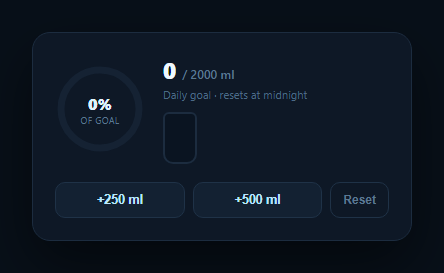
Hydration tracking works best when logging a glass of water takes one tap and the current state is legible at a glance. This widget combines three familiar visual metaphors — a progress ring, a filling bottle, and a running total — all driven by the same number, plus two quick-add buttons sized to how people actually drink water (a glass, a bottle). It pairs naturally with a BMI calculator or a broader health dashboard.
One number, three views
current is the single source of truth for how many milliliters have been logged today. render() derives everything else from it: the percentage of the daily goal, the progress ring's stroke offset, the bottle's fill height, and the raw milliliter total — so there's never a case where the ring says one thing and the bottle says another, because both are just different renderings of the same percentage.
A ring drawn with stroke-dashoffset
The progress ring is two overlapping SVG circles: a static track and a colored fill circle whose stroke-dasharray is set to its full circumference and whose stroke-dashoffset is animated down as progress increases. Rotating the SVG -90deg makes the fill start from the top rather than the 3 o'clock position, matching the convention used by most goal-ring UI (including Apple's Activity rings).
A bottle that fills like a real container
The bottle is a simple bordered rectangle with a small "cap" pseudo-element and an absolutely positioned fill div anchored to the bottom, whose height animates as a percentage. Because the fill grows from the bottom up rather than a generic left-to-right bar, it reads intuitively as liquid filling a vessel — closer to how a real water bottle empties and fills.
Quick-add sized to real habits
The +250 ml and +500 ml buttons map to a standard glass and a standard bottle respectively, so logging intake takes one tap for the common cases rather than opening a number input every time. Both buttons funnel through the same click handler pattern reading a data-ml attribute, so adding a third quick-add size (say, +750 ml for a large bottle) is a one-line HTML change with no new JavaScript.
Daily reset
This demo's Reset button simulates the day rolling over; in production you'd instead reset current to zero automatically at local midnight (comparing the logged date to today's date on load, or scheduling a reset), and persist the running total to localStorage or your backend so it survives a page reload during the day.
Build with AI
Build, Understand, Optimize, and Extend It With AI
You don't have to work out the SVG ring math by hand. Paste this snippet's HTML, CSS, and JS into an AI coding assistant like Claude and ask it to explain exactly how stroke-dasharray and stroke-dashoffset combine with the -90 degree rotation to produce a ring that fills clockwise from the top, and why deriving the ring offset, bottle height, and displayed total from one current value keeps all three views guaranteed in sync. The same assistant can help you optimize it — ask whether the fill percentage calculation should round differently to avoid the ring and the displayed percentage disagreeing by a pixel at edge values. It's also useful for extending the tracker: ask it to add a weekly hydration history view, persist today's total to localStorage with an automatic midnight reset, or let the user set a custom daily goal instead of a fixed 2000 ml. Treat the code less like a finished artifact and more like a starting point for a conversation.
Prompt to recreate it
Copy this into your AI assistant of choice to build the effect from scratch, or as a jumping-off point for your own variant:
Build a daily "water intake tracker" widget in plain HTML, CSS, and JavaScript — no frameworks or libraries.

Requirements:
- Track a single running total (milliliters logged today) as the one source of truth, and derive every visual from it: a percentage-of-goal number, an SVG circular progress ring, and a bottle-shaped container that visually fills from the bottom.
- Build the progress ring using two overlapping SVG circles (a static background track and a colored fill circle) where the fill circle's stroke-dasharray equals its full circumference and its stroke-dashoffset is set based on the current percentage of the goal, with a CSS transition so changes animate smoothly; rotate the SVG so the ring visually fills clockwise starting from the top rather than the default right-side start point.
- Build a bottle/container element (CSS shapes are fine, no image assets) with an inner fill layer anchored to the bottom whose height is set as a percentage and animates smoothly, so it reads as liquid filling a vessel rather than a generic horizontal progress bar.
- Add two quick-add buttons for common serving sizes (e.g. +250 ml for a glass and +500 ml for a bottle) that each add their fixed amount to the running total and trigger every visual (ring, bottle fill, and displayed number) to update together.
- Clamp the ring and bottle fill percentage at 100% even if the logged total exceeds the daily goal, while still showing the true, uncapped total number.
- Include a reset control for testing, and in the visible copy, note that in a real app this tracker is meant to reset automatically at local midnight each day rather than needing a manual reset.
Want to tighten it up first? Run this prompt through the AI Prompt Studio to score it across 8 quality dimensions, catch anti-patterns, and tune the wording for Claude, ChatGPT, or Gemini before you paste it in.
Step by step
How to Use
- 1Paste HTML, CSS, and JSA hydration card renders at 0 ml with an empty ring and bottle.
- 2Click +250 ml or +500 mlThe total, ring, and bottle fill all update together with a smooth animated transition.
- 3Watch the goal ringThe ring fills clockwise from the top as you approach the 2000 ml daily goal.
- 4Click ResetThe tracker returns to 0 ml — simulating the daily reset.
- 5Change the goalEdit the GOAL constant to match a different daily target.
- 6Persist itStore current in localStorage or your backend, keyed to today's date, for a real app.
Real-world uses
Common Use Cases
Got questions?
Frequently Asked Questions
The ring fill is an SVG circle with stroke-dasharray set to its full circumference, so the visible stroke length is controlled entirely by stroke-dashoffset — a lower offset reveals more of the circle. render() sets that offset based on the current percentage, and a CSS transition on stroke-dashoffset animates the change smoothly whenever current updates.
The SVG is rotated -90 degrees with a CSS transform. SVG circles start drawing at the 3 o'clock position by default, so without the rotation the ring would begin filling from the right side. Rotating it -90 degrees moves the starting point to 12 o'clock, matching the convention used by most circular goal-ring UI.
The raw milliliter total displayed keeps counting up accurately, but the ring and bottle fill percentage are both clamped to 100% via Math.min(100, ...) so neither visual overflows or wraps. This means the ring and bottle always represent "how much of my goal is met," capped sensibly, while the number still shows your true total.
Store the logged total together with the date it was logged (e.g. in localStorage as { date: "2026-08-22", ml: 1250 }). On load, compare the stored date to today's date; if they differ, reset current to zero before rendering. You can also schedule a setTimeout to the next local midnight to reset the UI live if the page stays open overnight.
Keep current as component state (a number), and derive the percentage, ring offset, and bottle height with computed values (useMemo, a Vue computed property, or an Angular getter) rather than direct DOM writes. The quick-add buttons become state updaters (setCurrent(c => c + amount)), and persistence to localStorage or an API is a straightforward effect keyed on current changing.