You Might Also Like
Learn Coding Visually
Learn to code with interactive, live-preview playgrounds — HTML, CSS, JavaScript, React & more.
 HTML Playground42 lessons · Click-based · Live preview
 CSS PlaygroundLearn CSS with a live editor
 JavaScript Playground60 lessons · DOM · Async · Canvas
 React PlaygroundLearn React with a live code editor
 GSAP PlaygroundLearn GSAP animation interactively
 SVG Playground44 lessons · shapes · paths · animation
 SCSS Playground45 lessons · Sass modules · tokens
 Tailwind PlaygroundLearn Tailwind CSS with a live editor
 Bootstrap 5 Playground50 lessons · live preview
Version History Timeline — Free HTML CSS JS Snippet
Version History Timeline · Dashboards · Plain HTML, CSS & JS · Live preview
What's included
Features
About this UI Snippet
Version History Timeline — Restore Points, Authors & Version Comparison
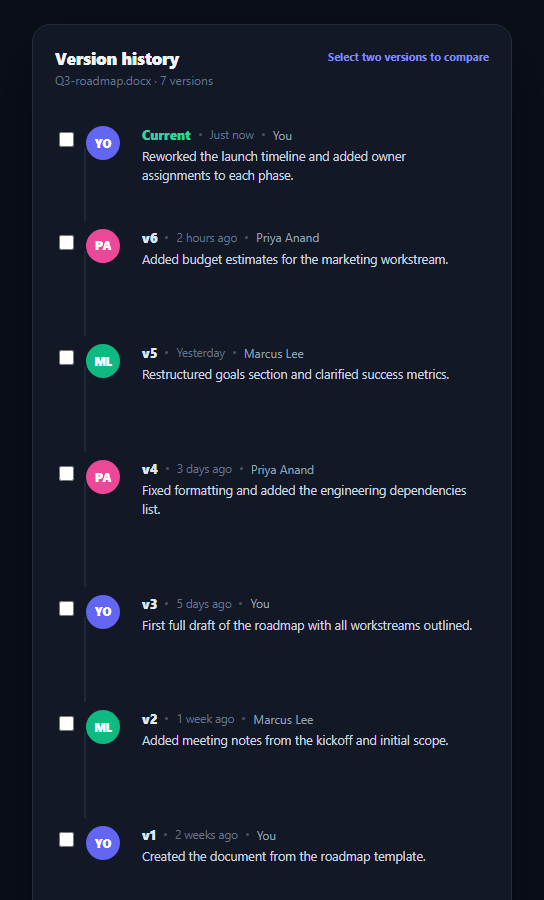
Any collaborative document tool — a docs editor, a design file, a CMS entry — needs a way to show how a file evolved and let people jump back to an earlier state. The version history timeline lists every save as a point in time with who made it and what changed, and lets you restore or compare across points. This snippet builds a complete version history in plain HTML, CSS, and vanilla JavaScript, with no dependencies.
A timeline built from one data array
Every version in VERSIONS carries an id, a label, an author with initials and a color, a relative timestamp, a one-line summary, and diff stats. render() maps that array into the list, so adding a real version — from your document's revision API — is a data change, not a markup change. The connecting line between avatars is drawn with a CSS ::before pseudo-element rather than an SVG, keeping the timeline lightweight and easy to restyle.
Restore actions that stay out of the way
Each past version gets a "Restore this version" button that's invisible until you hover the row, then fades and slides in. This keeps the list scannable at rest — nobody needs to see seven restore buttons at once — while making the action obvious and reachable the moment you're actually looking at that version. Clicking it flips the button to a confirmed "Restored" state, the same pattern you'd wire to a real restore-version API call.
Comparing two versions
Each row also has a compare checkbox. Checking exactly two reveals a diff summary panel showing the added/removed line counts and a bulleted list of what changed between them, ordered newest-first regardless of click order. Checking a third automatically drops the oldest selection, so you're never stuck needing to manually uncheck something to compare a different pair — similar in spirit to how comment thread sorting reorders without losing state.
Author identity at a glance
Each version shows a colored initials avatar for its author, echoing the visual language of avatar stack and team presence list — consistent author coloring across a document's history makes it easy to spot "which versions did I make" versus a collaborator's at a glance, without reading every name.
Wiring it to a real backend
Swap the VERSIONS array for your document API's revision list, keeping the same shape (id, author, time, summary, added/removed counts, and a changes array or generated diff). The restore button's click handler is where you'd call your actual restore-version endpoint; the compare panel is where you'd render a real line-level diff if your backend produces one.
Build with AI
Build, Understand, Optimize, and Extend It With AI
You don't have to work out the selection-management logic by hand. Paste this snippet's HTML, CSS, and JS into an AI coding assistant like Claude and ask it to explain exactly how the selected array caps itself at two entries by dropping the oldest checkbox when a third is checked, and why the compare panel always sorts the pair newest-first regardless of click order. The same assistant can help you optimize it — ask whether re-rendering the full list on every restore click is necessary or whether a targeted class swap on just the clicked button is enough. It's also useful for extending the timeline: ask it to add pagination for documents with dozens of versions, a real line-level diff renderer, or a confirmation dialog before restore actually overwrites the current version. Treat the code less like a finished artifact and more like a starting point for a conversation.
Prompt to recreate it
Copy this into your AI assistant of choice to build the effect from scratch, or as a jumping-off point for your own variant:
Build a document "version history timeline" in plain HTML, CSS, and JavaScript — no frameworks, no libraries.

Requirements:
- Render a vertical list of version entries from a single data array, each with an id, author name and initials, a relative timestamp, a one-line change summary, and added/removed line counts, with the current version visually distinguished at the top and a connecting timeline line drawn between entries using a CSS pseudo-element (not an SVG or image).
- Each past (non-current) version must show a "Restore this version" button that is invisible at rest and fades/slides into view only when that specific row is hovered, so the list stays visually calm when not being interacted with; clicking it should flip the button into a distinct confirmed "Restored" state.
- Give every version a compare checkbox. When exactly two are checked, show a diff summary panel with the added/removed line counts and a bulleted list of what changed, always ordered so the newer of the two selected versions is treated as the "after" state regardless of the order the boxes were checked in.
- If a third checkbox is checked while two are already selected, automatically uncheck and drop the oldest of the two current selections so the comparison always reflects your two most recent picks, without requiring the user to manually deselect anything.
- Show a small hint text that updates based on selection state: prompting to select two versions, prompting to select one more, or confirming two are being compared.
- Give each author a consistent colored initials avatar so a reader can visually tell at a glance which versions came from which person.
Want to tighten it up first? Run this prompt through the AI Prompt Studio to score it across 8 quality dimensions, catch anti-patterns, and tune the wording for Claude, ChatGPT, or Gemini before you paste it in.
Step by step
How to Use
- 1Paste HTML, CSS, and JSA version timeline renders with the current version at the top and six prior versions below it.
- 2Hover a past versionA "Restore this version" button fades in over that row's summary.
- 3Click restoreThe button switches to a confirmed green "Restored" state.
- 4Check two compare boxesA diff panel appears showing added/removed line counts and what changed.
- 5Check a third boxThe oldest selection is dropped automatically so the pair stays at two.
- 6Connect real dataReplace VERSIONS with your document API's revision list in the same shape.
Real-world uses
Common Use Cases
Got questions?
Frequently Asked Questions
Each checkbox click adds or removes that version's id from a selected array. When selected has two entries, updateCompare() sorts them newest-first and pulls their diff stats and changes from the VERSIONS array to render the panel. Anything other than exactly two selections hides the panel and updates the hint text to tell you how many more to pick.
The oldest of the two currently selected ids is removed — its checkbox is unchecked programmatically and dropped from the selected array — before the new one is added. This keeps the comparison always showing your two most recent picks without requiring you to manually deselect anything first.
Give each version a real revision id from your backend, and in the click handler for .vht-restore, call your document API's restore-version endpoint with that id instead of just toggling the button's text and class. On success, keep the "Restored" confirmation state and optionally refresh the version list so the restored version's copy becomes the new "Current" entry.
This snippet shows a diff summary (line counts and a change list) rather than a full inline diff, since most document APIs return structured change summaries rather than raw text diffs. If your backend does return line-level diffs, render them inside .vht-compare-changes using a diff-rendering approach appropriate to your content type (text diff, rich-text operational transform log, or a JSON patch).
Model VERSIONS as state or a prop, track selected version ids in component state, and derive the compare panel's visibility and content from that selection with a computed value or useMemo. The restore and compare logic are plain functions of the array and selection, so they port directly — only the DOM string-building in render() needs to become JSX or template syntax.