Source Code
<div class="tpl-card">
  <div class="tpl-head">
    <h3>Team</h3>
    <input type="text" id="tplSearch" placeholder="Search teammates…">
  </div>
  <div class="tpl-list" id="tplList"></div>
</div>*{box-sizing:border-box;margin:0;padding:0}
body{font-family:system-ui,-apple-system,sans-serif;background:#f1f5f9;min-height:100vh;display:flex;align-items:center;justify-content:center;padding:24px}
.tpl-card{background:#fff;border-radius:16px;padding:18px;width:100%;max-width:360px;box-shadow:0 18px 44px rgba(15,23,42,.1)}
.tpl-head{margin-bottom:12px}
.tpl-head h3{font-size:15px;font-weight:800;color:#0f172a;margin-bottom:8px}
.tpl-head input{width:100%;border:1.5px solid #e2e8f0;border-radius:9px;padding:8px 11px;font-size:13px;font-family:inherit;color:#0f172a;transition:border-color .15s}
.tpl-head input:focus{outline:none;border-color:#6366f1}
.tpl-list{display:flex;flex-direction:column;gap:3px;max-height:340px;overflow-y:auto}
.tpl-row{display:flex;align-items:center;gap:11px;padding:8px;border-radius:10px;transition:background .12s}
.tpl-row:hover{background:#f8fafc}
.tpl-avatar-wrap{position:relative;flex-shrink:0}
.tpl-avatar{width:36px;height:36px;border-radius:50%;display:flex;align-items:center;justify-content:center;color:#fff;font-size:12px;font-weight:800}
.tpl-dot{position:absolute;bottom:-1px;right:-1px;width:11px;height:11px;border-radius:50%;border:2px solid #fff}
.tpl-dot.online{background:#22c55e}
.tpl-dot.away{background:#f59e0b}
.tpl-dot.dnd{background:#ef4444}
.tpl-dot.offline{background:#cbd5e1}
.tpl-info{flex:1;min-width:0}
.tpl-name{font-size:13.5px;font-weight:700;color:#1e293b}
.tpl-sub{font-size:11.5px;color:#94a3b8;white-space:nowrap;overflow:hidden;text-overflow:ellipsis}
.tpl-empty{padding:24px 0;text-align:center;font-size:13px;color:#94a3b8}var PEOPLE = [
{ name: 'Priya Nair', role: 'Engineering', status: 'online', color: '#6366f1', note: 'Active now' },
{ name: 'Marcus Webb', role: 'Design', status: 'online', color: '#22c55e', note: 'Active now' },
{ name: 'Yuki Tanaka', role: 'Product', status: 'away', color: '#f59e0b', note: 'Away · back at 2pm' },
{ name: 'Elena Cruz', role: 'Engineering', status: 'dnd', color: '#ec4899', note: 'In a meeting' },
{ name: 'Tomás Rivera', role: 'Sales', status: 'offline', color: '#0ea5e9', note: 'Last seen 3h ago' },
{ name: 'Sarah Kim', role: 'Support', status: 'online', color: '#a855f7', note: 'Active now' },
{ name: 'David Okafor', role: 'Marketing', status: 'offline', color: '#f97316', note: 'Last seen yesterday' },
];
var STATUS_LABEL = { online: 'Active now', away: 'Away', dnd: 'Do not disturb', offline: 'Offline' };
var STATUS_RANK = { online: 0, away: 1, dnd: 1, offline: 2 };
function initials(name) {
return name.split(' ').map(function (p) { return p[0]; }).slice(0, 2).join('').toUpperCase();
}
function render(filter) {
var q = (filter || '').toLowerCase();
var list = PEOPLE
.filter(function (p) { return p.name.toLowerCase().indexOf(q) !== -1 || p.role.toLowerCase().indexOf(q) !== -1; })
.slice()
.sort(function (a, b) { return STATUS_RANK[a.status] - STATUS_RANK[b.status]; });
var container = document.getElementById('tplList');
if (!list.length) {
container.innerHTML = '<div class="tpl-empty">No teammates match "' + filter + '"</div>';
return;
}
container.innerHTML = list.map(function (p) {
return '<div class="tpl-row">' +
'<div class="tpl-avatar-wrap">' +
'<div class="tpl-avatar" style="background:' + p.color + '">' + initials(p.name) + '</div>' +
'<span class="tpl-dot ' + p.status + '" title="' + STATUS_LABEL[p.status] + '"></span>' +
'</div>' +
'<div class="tpl-info">' +
'<div class="tpl-name">' + p.name + '</div>' +
'<div class="tpl-sub">' + p.role + ' · ' + p.note + '</div>' +
'</div>' +
'</div>';
}).join('');
}
document.getElementById('tplSearch').addEventListener('input', function () {
render(this.value);
});
render('');Learn Coding Visually
Learn to code with interactive, live-preview playgrounds — HTML, CSS, JavaScript, React & more.
 HTML Playground42 lessons · Click-based · Live preview
 CSS PlaygroundLearn CSS with a live editor
 JavaScript Playground60 lessons · DOM · Async · Canvas
 React PlaygroundLearn React with a live code editor
 GSAP PlaygroundLearn GSAP animation interactively
 SVG Playground44 lessons · shapes · paths · animation
 SCSS Playground45 lessons · Sass modules · tokens
 Tailwind PlaygroundLearn Tailwind CSS with a live editor
 Bootstrap 5 Playground50 lessons · live preview
Team Presence List — Online Status Roster HTML CSS JS
Team Presence List · Cards · Plain HTML, CSS & JS · Live preview
What's included
Features
About this UI Snippet
Team Presence List — Status Dots, Status-Sorted Order & Live Search Filter
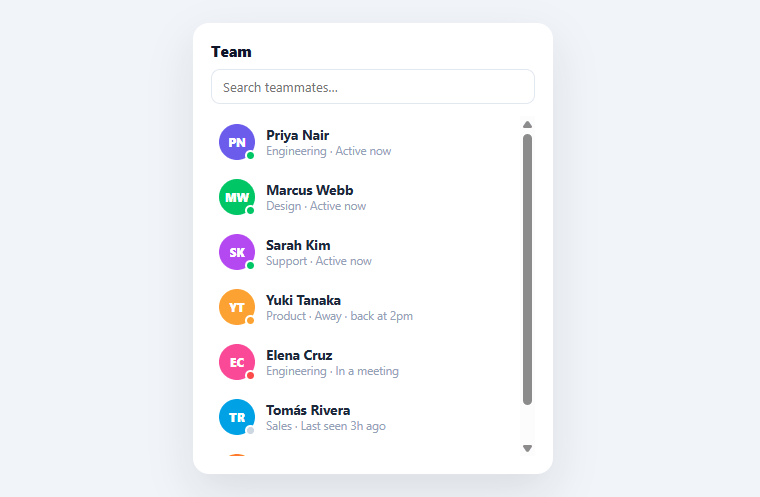
A presence list — the roster of teammates with a small colored dot showing who's around right now — is the ambient-awareness feature that makes a tool feel alive: a glance tells you who you can ping immediately versus who's away or offline. This snippet builds the full pattern: four status states, automatic status-priority sorting, and a live filter over name and role.
Four statuses, one rank-based sort
Each person has a status of online, away, dnd (do not disturb), or offline, each rendered as its own dot color. Rather than sorting alphabetically (which buries available teammates among offline ones), STATUS_RANK maps each status to a sort priority — online first, away and dnd tied in the middle, offline last — so the people you're most likely to want to reach right now surface at the top of the list automatically, every time the list re-renders.
Search filters without losing the status sort
Typing in the search box filters PEOPLE by a case-insensitive match against *either* the name or the role, then re-applies the same status-priority sort to the filtered results — so searching "engineering" still shows online engineers before offline ones, rather than returning matches in their original array order. This is implemented as one small render(filter) function that does both jobs every time, so there's no separate "now reapply the sort" step to forget.
Initials avatars from a name string
initials() splits a person's name on spaces, takes the first character of each of the first two words, and uppercases them — turning "Priya Nair" into "PN" with no avatar image required. Each person also has an assigned background color, so even a long roster of initials-only avatars stays visually distinguishable at a glance, the same approach used by Slack and Linear when a user hasn't set a profile photo.
A status dot that explains itself on hover
Every status dot carries a title attribute with its full label ("Do not disturb," not just a red color), so hovering any dot — even without reading the subtext line beside the name — gives an explicit, accessible explanation of what that color means, rather than asking users to memorize a color-coding convention.
Presence as a trust signal, not just decoration
A status dot's real job is answering "will this person actually see my message soon?" before you send it — which is why ordering by reachability matters more than it might first seem. A roster sorted alphabetically with status as an afterthought makes every lookup a manual scan; sorting by status first turns the same data into an answer at a glance, the difference between a nice-to-have indicator and a genuinely useful piece of team-coordination UI.
Build with AI
Build, Understand, Optimize, and Extend It With AI
You don't have to trace the combined filter-and-sort logic by hand. Paste this snippet's HTML, CSS, and JS into an AI coding assistant like Claude and ask it to explain exactly why STATUS_RANK ties away and dnd together at the same priority level while online and offline sit at opposite ends, and how a single render function manages to both filter by the search query and re-apply the status sort every time it runs without any separate "resort" step. The same assistant can help optimize it — for instance whether rebuilding the entire list's innerHTML on every keystroke is wasteful for a roster of hundreds of people compared to diffing only changed rows, or whether the initials function handles single-word names or names with three or more parts correctly. It's also useful for extending the roster: ask it to group rows under status section headers instead of just sorting, add real avatar image fallback, or wire status updates in from a live WebSocket feed. Treat the code less like a finished artifact and more like a starting point for a conversation.
Prompt to recreate it
Copy this into your AI assistant of choice to build the effect from scratch, or as a jumping-off point for your own variant:
Build a searchable "team presence roster" in plain HTML, CSS, and JavaScript using a single combined filter-and-sort render function — no framework, no external library.

Requirements:
- A data array of people, each with a name, a role, one of four status values (online, away, do-not-disturb, offline), an accent color, and a short status note string.
- A status-to-priority ranking lookup where online ranks first, away and do-not-disturb rank tied in the middle, and offline ranks last — used to sort the list so the most reachable people always appear first, not alphabetically.
- A single render function, callable with a search string, that filters the full people array by a case-insensitive match against either the name or the role field, then sorts the filtered results using the status-priority ranking (not the original array order), and finally rebuilds the visible list from that filtered-and-sorted result — every call must repeat both steps, not just one.
- Generate each person's avatar as colored initials (first letter of up to the first two words in their name, uppercased) rather than requiring an image, using their assigned accent color as the avatar background.
- Render a small status-colored dot on each avatar with a native tooltip/title attribute spelling out the full status label in words (e.g. "Do not disturb"), not relying on color alone to convey meaning.
- Wire a search input's input event to call the render function with the current field value on every keystroke, and show a distinct empty-state message that includes the unmatched query text when no one matches.
- Cap the list's visible height with internal scrolling so the card's overall size stays constant regardless of how many people are in the roster.
Want to tighten it up first? Run this prompt through the AI Prompt Studio to score it across 8 quality dimensions, catch anti-patterns, and tune the wording for Claude, ChatGPT, or Gemini before you paste it in.
Step by step
How to Use
- 1Paste HTML, CSS, and JSA team roster renders with seven people, each with a colored avatar, a status dot, and a status-aware sub-line.
- 2Read the orderingOnline teammates appear first, then away/do-not-disturb, then offline — not alphabetical order.
- 3Search by name or roleType in the search box to filter the list by either field; the status-priority sort still applies to the filtered results.
- 4Hover a status dotA native tooltip shows the full status label (e.g. "Do not disturb") even without reading the row's subtext.
- 5Clear the searchEmpty the search field to see the full roster again, still sorted by status.
- 6Connect real presence dataReplace the static PEOPLE array's status field with live values from your presence service (WebSocket or polling), calling render() with the current search value on every update.
Real-world uses
Common Use Cases
Got questions?
Frequently Asked Questions
Open a WebSocket (or poll a presence API) and, on each status update, find the matching person in PEOPLE by id and update their status field, then call render(currentSearchValue) to re-sort and re-render the list with the new live status.
Store a lastActiveAt timestamp per person instead of (or alongside) the note string, and compute a relative label ("3h ago", "yesterday") at render time using a small time-formatting helper, refreshing it periodically with setInterval so it stays accurate without a full data refetch.
Add an avatarUrl field to each person object, and in render(), conditionally output an <img> tag when it's present, falling back to the existing initials-and-color div when it's missing — so the component degrades gracefully for people without a profile photo.
Group PEOPLE into buckets by status using the same STATUS_RANK order, render a header (e.g. "Online — 3") above each non-empty bucket's rows, and skip headers for empty buckets — the underlying filter and per-person row template stay the same.
In React, keep people and the search query in useState and derive the sorted/filtered list with useMemo; in Vue, use a computed property over a reactive people array; in Angular, use a component method or pipe for the same filter-then-sort logic. The status-rank sorting is plain array logic that needs no changes across frameworks.