Learn Coding Visually
Learn to code with interactive, live-preview playgrounds — HTML, CSS, JavaScript, React & more.
 HTML Playground42 lessons · Click-based · Live preview
 CSS PlaygroundLearn CSS with a live editor
 JavaScript Playground60 lessons · DOM · Async · Canvas
 React PlaygroundLearn React with a live code editor
 GSAP PlaygroundLearn GSAP animation interactively
 SVG Playground44 lessons · shapes · paths · animation
 SCSS Playground45 lessons · Sass modules · tokens
 Tailwind PlaygroundLearn Tailwind CSS with a live editor
 Bootstrap 5 Playground50 lessons · live preview
Pomodoro Timer — Free HTML CSS JS Snippet
Pomodoro Timer · Dashboards · Plain HTML, CSS & JS · Live preview
What's included
Features
About this UI Snippet
Pomodoro Timer — Circular SVG Ring, Auto-Cycling Focus & Break Modes
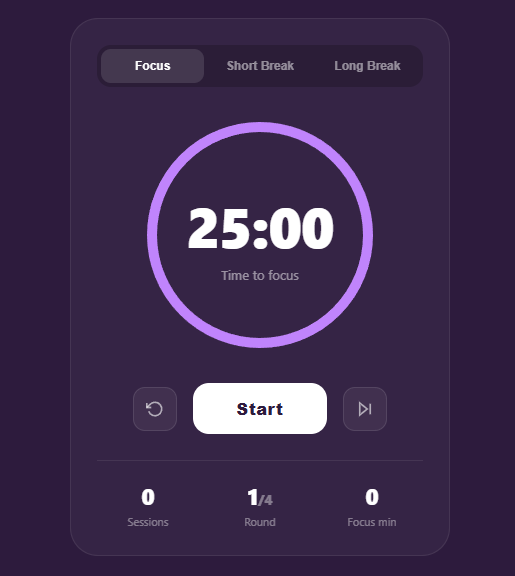
The Pomodoro Technique breaks work into focused 25-minute intervals separated by short breaks, with a longer break after every fourth session. This snippet implements a complete, polished Pomodoro timer with a circular SVG progress ring, three modes (Focus, Short Break, Long Break), automatic cycling between focus and breaks, a session counter, a round tracker, accumulated focus minutes, and an ambient background colour that shifts with the active mode.
The circular SVG progress ring
The ring is two stacked SVG circles. The background circle is a faint track; the foreground circle is the animated progress indicator. The technique relies on stroke-dasharray and stroke-dashoffset: the dasharray equals the circle's circumference (2πr ≈ 678.58 for r=108), and the dashoffset is animated from 0 to the full circumference to "drain" the ring as time elapses. The SVG is rotated −90° so the ring starts depleting from the top, and stroke-linecap: round gives the progress end a soft cap.
The countdown engine
A setInterval fires every second, decrementing the remaining seconds and calling render(), which formats MM:SS with padStart and updates the ring offset proportionally (remaining ÷ total duration). When remaining hits zero, complete() runs. Storing remaining as a plain seconds integer — rather than wall-clock timestamps — keeps the logic simple, though for background-tab accuracy you would reconcile against Date.now() on each tick.
Auto-cycling and the Pomodoro rules
complete() encodes the classic Pomodoro flow: after a focus session it increments the session count and accumulated focus minutes, then switches to a short break — unless it was the 4th session, in which case it switches to a long break and advances the round. After any break it returns to focus mode. This automatic mode-switching is what distinguishes a true Pomodoro timer from a plain countdown.
Mode theming
Each mode has its own ring colour and a body background class. switchMode() updates the active mode button, the phase label, the ring stroke colour, and the body class, which drives a 0.6-second background transition. The colour shift gives an ambient, glanceable signal of whether you should be working or resting without reading any text.
Controls
The Start button toggles to Pause while running and visually de-emphasises. Reset returns the current mode to its full duration. Skip jumps straight to completion, advancing to the next phase — useful when you finish early or want to move on.
Build with AI
Build, Understand, Optimize, and Extend It With AI
You don't have to work out the ring math or the auto-cycle rules by hand. Paste this snippet's HTML, CSS, and JS into an AI coding assistant like Claude and ask it to explain exactly how the stroke-dasharray value of 678.58 relates to the circle's radius of 108, and how complete decides between switching to a short break versus a long break based on the sessions count modulo 4. The same assistant can help optimize it, for example checking whether the plain per-second setInterval counter drifts when the browser throttles a backgrounded tab, and how to reconcile it against Date.now() instead. It's also useful for extending the effect: ask it to persist sessions, rounds, and focus minutes to localStorage so they survive a refresh, add a browser notification and chime when a phase completes, or make the three durations user-configurable instead of hardcoded. Treat the code less like a finished artifact and more like a starting point for a conversation.
Prompt to recreate it
Copy this into your AI assistant of choice to build the effect from scratch, or as a jumping-off point for your own variant:
Build a Pomodoro focus timer in plain HTML, CSS, and vanilla JavaScript using an SVG circular progress ring — no libraries, no canvas.

Requirements:
- Three switchable modes (Focus, Short Break, Long Break), each with its own fixed duration in seconds, its own accent color, and its own phase label, selectable via tab buttons.
- A circular progress ring built from two stacked SVG circles: a faint background track circle and a foreground progress circle whose stroke-dasharray is set to its own circumference (2 times pi times its radius) and whose stroke-dashoffset animates from 0 up to that same circumference as time elapses, so the ring visually drains; rotate the SVG -90 degrees so the drain starts from the top.
- A setInterval-driven countdown that decrements a plain integer of remaining seconds once per second, formats it as MM:SS with zero-padding, and updates the ring's stroke-dashoffset proportionally to remaining divided by the current mode's total duration.
- When the countdown reaches zero, automatically advance the flow: completing a focus session increments a session counter and an accumulated focus-minutes counter, then switches to a short break, except that every 4th completed focus session must switch to a long break instead and advance a round counter.
- Completing any break must always switch back to focus mode automatically, with no user action required.
- Start/Pause, Reset (return the current mode to its full duration), and Skip (jump straight to completion and advance to the next phase) controls, plus an ambient body background color that transitions smoothly whenever the active mode changes.
Want to tighten it up first? Run this prompt through the AI Prompt Studio to score it across 8 quality dimensions, catch anti-patterns, and tune the wording for Claude, ChatGPT, or Gemini before you paste it in.
Step by step
How to Use
- 1Start a focus sessionClick Start to begin the 25-minute focus countdown. The ring drains as time passes and the button switches to Pause.
- 2Take breaks automaticallyWhen a focus session ends, the timer switches to a short break on its own. After four focus sessions it switches to a long break and advances the round counter.
- 3Switch modes manuallyUse the Focus, Short Break, and Long Break tabs to jump to any mode. The background colour shifts to match, giving an ambient cue.
- 4Pause, reset, or skipPause stops the countdown without losing your place. Reset restores the current mode to full time. Skip jumps to the end and advances to the next phase.
- 5Track your progressThe stats row shows completed sessions, the current round out of four, and total focus minutes accumulated for the day.
- 6Export for your frameworkClick "JSX" for a React component using useEffect for the interval and useState for the timer state. Click "Vue" for a Vue 3 SFC with onMounted/onUnmounted cleanup.
Real-world uses
Common Use Cases
Got questions?
Frequently Asked Questions
The Pomodoro Technique, created by Francesco Cirillo, breaks work into 25-minute focused intervals (Pomodoros) separated by 5-minute short breaks, with a longer 15-30 minute break after every four Pomodoros. This timer encodes that flow exactly: completing a focus session automatically starts a short break, and every fourth completion triggers a long break and advances the round counter. You can also switch modes manually at any time.
Browsers throttle setInterval in inactive tabs, so a pure per-second counter can drift behind in the background. For accuracy, store the target end time as Date.now() + remaining * 1000 when starting, and on each tick compute remaining = Math.round((endTime - Date.now()) / 1000) instead of simply decrementing. This reconciles against the real clock so the timer stays correct even after the tab was backgrounded.
In the complete() function, play a sound with the Web Audio API or an Audio element: new Audio("/chime.mp3").play(). For desktop notifications, first request permission with Notification.requestPermission() on a user gesture, then fire new Notification("Break time!", { body: "Focus session complete" }) when a phase ends. Combine both so users get an audible and visual cue even when the tab is not focused. Browsers block autoplay audio until the user has interacted with the page, so trigger the first sound from the Start button click to unlock the audio context for later automatic plays.
Each mode adds a class to the document body (focus, short, or long), and the body has a 0.6-second background transition. Focus mode is a deep purple, short break a calm green, and long break a restful blue. This ambient colour shift gives a glanceable, peripheral signal of whether you should be working or resting — you can tell your current state from across the room without reading the timer. Colour-coding states this way reduces the cognitive load of context-switching between work and rest.
Store mode, remaining, running, sessions, and round in useState. Run the countdown in a useEffect that sets an interval when running is true and clears it on cleanup: useEffect(() => { if (!running) return; const id = setInterval(() => setRemaining(r => r - 1), 1000); return () => clearInterval(id); }, [running]). Watch remaining for zero in another effect to trigger the auto-cycle. Compute the ring dashoffset from remaining / duration.