More Loaders Snippets
Front-End Coding Playgrounds
Learn to code with interactive, live-preview playgrounds — HTML, CSS, JavaScript, React & more.
 HTML Playground42 lessons · Click-based · Live preview
 CSS PlaygroundLearn CSS with a live editor
 JavaScript Playground60 lessons · DOM · Async · Canvas
 React PlaygroundLearn React with a live code editor
 GSAP PlaygroundLearn GSAP animation interactively
 SVG Playground44 lessons · shapes · paths · animation
 SCSS Playground45 lessons · Sass modules · tokens
 Tailwind PlaygroundLearn Tailwind CSS with a live editor
 Bootstrap 5 Playground50 lessons · live preview
Breathing Animation — Free HTML CSS JS Snippet
Breathing / Focus Ring · Loaders · Plain HTML, CSS & JS · Live preview
What's included
Features
About this UI Snippet
Breathing Animation — Guided Patterns, CSS scale Pulse & Phase Timer Countdown
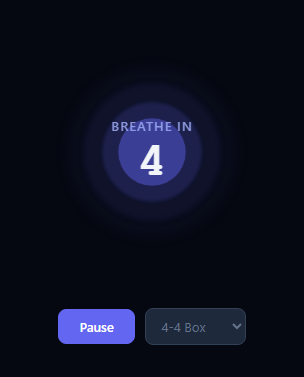
A guided breathing animation is a visual tool for practicing breathing techniques that reduce anxiety, improve focus, and aid in sleep. The visual expanding and contracting circle guides the user through each phase — inhale, hold, exhale — in sync with a countdown timer, so the user can follow along without counting mentally. This snippet implements three clinically recognised breathing patterns using data-driven animation: box breathing (4-4), the 4-7-8 technique, and equal breathing (5-5).
How the breathing pattern data structure works
Each breathing pattern is stored as an array of { label, dur } phase objects in the patterns object. The 4-4 pattern has two phases: [{label:'Breathe in', dur:4}, {label:'Breathe out', dur:4}]. The 4-7-8 pattern adds a hold phase: inhale 4s, hold 7s, exhale 8s. The 5-5 pattern is simple equal breathing: in 5s, out 5s. The setPattern(key) function resets to the first phase and duration when the user switches patterns.
The CSS animation tied to breathing phases
Four .ring divs of increasing size and decreasing opacity create the layered glow rings around the central core. All rings share the same @keyframes breathe animation: 0%,100% { transform: scale(0.8); opacity: 0.7 } to 50% { transform: scale(1.1); opacity: 1 }. The animation duration is dynamically set in updateUI() via r.style.animationDuration = dur, where dur = (pat[phase].dur * 2) + 's' — doubling the phase duration makes the animation complete exactly one full scale cycle per inhale-exhale pair.
Hold state pausing
During a hold phase, r.style.animationPlayState = 'paused' freezes the rings at their current scale position, visually communicating "stay expanded" during the hold. On inhale and exhale phases, animationPlayState is set back to 'running'.
The phase countdown timer
setInterval(tick, 1000) decrements remaining each second. When it reaches zero, the phase index increments (wrapping via modulo) and remaining resets to the new phase's duration. The updateUI() function then updates both the label text and countdown number displayed inside the core element.
Pause and resume controls
The toggle() function pauses and resumes the session by clearing or restarting the setInterval and toggling the ring's animationPlayState. This lets users pause mid-session if interrupted without losing their place in the pattern.
Build with AI
Build, Understand, Optimize, and Extend It With AI
You don't have to work out the duration math by hand to see why the rings feel synced to the countdown. Paste this snippet's HTML, CSS, and JS into an AI coding assistant like Claude and ask it to explain exactly why dur is computed as the phase duration times two before being written to animationDuration, and how setting animationPlayState to paused during a hold phase freezes the rings without restarting the keyframe from the beginning. The same assistant can help optimize it — asking whether the setInterval-driven countdown could drift over a long session compared to a timestamp-based approach, or whether four separately-styled ring elements could be generated from one shared config object instead of four hardcoded CSS blocks. It's also useful for extending the tool: ask it to add a cycle counter that auto-stops after a set number of breaths, persist the last-used pattern to localStorage, or add the Web Audio phase-transition tones mentioned in the FAQ. Treat the code less like a finished artifact and more like a starting point for a conversation.
Prompt to recreate it
Copy this into your AI assistant of choice to build the effect from scratch, or as a jumping-off point for your own variant:
Build a "guided breathing animation" in plain HTML, CSS, and JavaScript that supports multiple named breathing patterns with different phase counts and durations — no animation library, no canvas.

Requirements:
- Store breathing patterns as a plain JavaScript object where each pattern is an array of phase objects, each phase having a label (like "Breathe in", "Hold", "Breathe out") and a duration in seconds; patterns must be able to have two phases (equal in/out) or three phases (in/hold/out) without any special-casing in the render logic.
- Render four concentric circular div elements of increasing size and decreasing opacity, all sharing one CSS keyframe animation that scales from a smaller size up to a larger size and back down, so they read as layered glow rings pulsing together.
- Drive a one-second setInterval countdown that decrements a remaining-seconds counter; when it reaches zero, advance to the next phase in the current pattern (wrapping back to the first phase after the last), reset the countdown to that phase's duration, and update both a text label and a numeric countdown display.
- Every time the phase changes, set each ring's CSS animationDuration inline to exactly double the new phase's duration in seconds, so one full scale-up-and-down cycle of the animation always aligns with one inhale-then-exhale (or single phase) length regardless of which pattern is active.
- When the current phase's label indicates a hold, set the rings' animationPlayState to paused so they visibly freeze at whatever scale they reached, then resume to running for the next breathing phase.
- Provide a pause/resume control that stops and restarts the countdown interval and correspondingly pauses or resumes the ring animation without losing the current phase or remaining time, plus a selector that switches between at least three different named patterns, resetting to the start of the newly selected pattern.
Step by step
How to Use
- 1Observe the breathing animation running by defaultThe animation starts automatically on the 4-4 box breathing pattern. Watch the layered rings expand during the Breathe in phase (countdown 4,3,2,1) and contract during the Breathe out phase. The Pause button lets you stop mid-session.
- 2Switch between breathing patterns using the dropdownUse the dropdown selector to change patterns: 4-4 Box Breathing for general stress relief, 4-7-8 (longer exhale, clinically studied for anxiety reduction), and 5-5 Equal Breathing for balanced calm. The animation duration and phase labels update immediately on change.
- 3Add a custom breathing pattern to the patterns objectIn the JS panel, add a new key to the patterns object: "6-2-6": [{label:"Breathe in",dur:6},{label:"Hold",dur:2},{label:"Breathe out",dur:6}]. Then add a matching option in the HTML select element: <option value="6-2-6">6-2-6 Extended</option>.
- 4Change the ring colours and glow to match your app themeIn the CSS panel, update the rgba(99,102,241,...) values in .r1 through .r4 backgrounds to your accent colour. Adjust the blur() values to control the softness of the outer glow rings. The inner .r1 has no blur for a sharp center, while .r4 has blur(8px) for the outermost ambient glow.
- 5Add a session duration limiterTrack completed cycles in a counter variable. After N cycles (e.g. 5 complete breath cycles), call the toggle() function to stop the session and show a completion message. Each cycle is one full pass through all phases in the pattern array.
- 6Export as a standalone breathing exercise page or React componentClick HTML for a self-contained breathing exercise page, JSX for a React component managing phase state and animation via useEffect and useState, or Tailwind for a styled React version ready for integration into a wellness or productivity application.
Real-world uses
Common Use Cases
Got questions?
Frequently Asked Questions
Each pattern is an array of { label, dur } phase objects stored in the patterns object. When a pattern is selected via setPattern(key), the pat variable is set to the pattern array and phase resets to 0. The setInterval(tick, 1000) decrements the remaining counter each second. When remaining reaches zero, phase increments by 1 and wraps back to 0 via modulo when it reaches pat.length. The updateUI() function then reads pat[phase].dur to set the new remaining countdown and pat[phase].label to update the instruction text. The animation duration is set as (pat[phase].dur * 2) + 's' — doubling the phase duration aligns the CSS scale animation peak with the midpoint of the breathe-in duration.
The @keyframes breathe animation is applied in CSS with a static duration. In updateUI(), the duration is overridden at runtime using element.style.animationDuration = dur where dur equals the doubled phase duration as a string like '8s'. Inline styles in CSS cascade above class-based declarations, so this override takes effect immediately without removing or re-adding the animation class. Setting animationPlayState to 'paused' during hold phases freezes the rings at their peak scale, visually communicating the hold state.
Add a new entry to the patterns object: patterns['6-2-6'] = [{label:'Breathe in',dur:6},{label:'Hold',dur:2},{label:'Breathe out',dur:6}]. Then add a matching option in the HTML select element: <option value='6-2-6'>6-2-6 Extended</option>. The setPattern() function reads the select value and looks up the pattern by key, so no other JS changes are needed. You can also add entirely new phase labels — any string works as the label.
Use the Web Audio API to generate a brief tone at each phase transition. In updateUI(), create a tone when the phase changes: const ctx = new (window.AudioContext || window.webkitAudioContext)(); const osc = ctx.createOscillator(); const gain = ctx.createGain(); osc.connect(gain); gain.connect(ctx.destination); osc.frequency.value = pat[phase].label.includes('in') ? 440 : pat[phase].label.includes('Hold') ? 528 : 220; gain.gain.setValueAtTime(0.1, ctx.currentTime); gain.gain.exponentialRampToValueAtTime(0.001, ctx.currentTime + 0.3); osc.start(ctx.currentTime); osc.stop(ctx.currentTime + 0.3). Different frequencies for each phase provide distinct audio cues: high for inhale, mid for hold, low for exhale.