You Might Also Like
Learn Coding Visually
Learn to code with interactive, live-preview playgrounds — HTML, CSS, JavaScript, React & more.
 HTML Playground42 lessons · Click-based · Live preview
 CSS PlaygroundLearn CSS with a live editor
 JavaScript Playground60 lessons · DOM · Async · Canvas
 React PlaygroundLearn React with a live code editor
 GSAP PlaygroundLearn GSAP animation interactively
 SVG Playground44 lessons · shapes · paths · animation
 SCSS Playground45 lessons · Sass modules · tokens
 Tailwind PlaygroundLearn Tailwind CSS with a live editor
 Bootstrap 5 Playground50 lessons · live preview
Circular Char Counter — Ring Character Counter Textarea
Circular Char Counter · Forms · Plain HTML, CSS & JS · Live preview
What's included
Features
About this UI Snippet
Circular Char Counter — Progress-Ring Character Count with Soft Limit
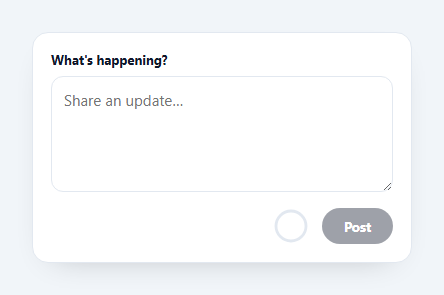
A circular character counter shows how much of a length limit a user has used as a filling progress ring, turning amber as they near the limit and red when they pass it — the compact pattern popularised by Twitter/X. This snippet builds it on a textarea with an SVG ring, a soft limit, and submit gating, in plain HTML, CSS, and vanilla JavaScript.
An SVG ring driven by stroke-dashoffset
The ring is two overlapping SVG circles: a grey track and a coloured fill. The fill's stroke-dasharray is set to its circumference and its stroke-dashoffset is animated from full (empty) to zero (complete) as the text grows — the same technique behind every circular progress indicator. The SVG is rotated −90° so the ring starts filling from the top, and a CSS transition makes each keystroke's change smooth.
A soft limit that doesn't lose text
Rather than a hard maxlength that silently swallows keystrokes at the limit, this counter uses a soft limit: you can keep typing past it (up to a generous hard cap), the ring goes red, the remaining count goes negative, and the Post button disables. This is friendlier — users can paste a slightly-too-long draft and trim it down rather than having characters vanish as they type.
Progressive disclosure of the number
When you're well under the limit the ring shows no number — just a calm progress fill. Only when you get within 20 characters does the exact remaining count appear inside the ring, and it turns red once negative. Showing the number only when it matters keeps the UI quiet during normal typing and draws attention exactly when the user needs it.
Submit gating
The Post button is disabled when the field is empty or over the limit, so the counter does double duty as a validity indicator. Because the gating is derived from the same remaining value that colours the ring, the visual state and the button state can never disagree.
Accessible and portable
The textarea keeps a hard maxlength as a final safety net and a real label, and the ring is marked aria-hidden since the meaningful state (button enabled/disabled, the textarea itself) is conveyed without it. The whole counter is a single update() function with no dependencies — a clean reference for the ring-counter pattern you'll want on any composer or bio field.
Build with AI
Build, Understand, Optimize, and Extend It With AI
Rather than assuming stroke-dashoffset is just a magic property, paste this snippet's HTML, CSS, and JS into an AI coding assistant like Claude and ask it to explain exactly how the −90 degree SVG rotation combined with the dasharray/dashoffset pair makes the ring appear to fill clockwise from the top, and why the textarea keeps a hard maxlength of 320 as a safety net even though the soft limit of 280 is what actually drives the visual warnings. The same assistant can help you refine it — ask whether the "show the number only within 20 characters of the limit" threshold should itself be a named constant tied to MAX rather than a hardcoded 20, so changing MAX doesn't leave the warning window feeling mismatched. It's also useful for extending the counter: ask it to support multiple independent counters on one page without id collisions, add a gentle shake animation when the user tries to submit while over the limit, or swap the ring for a horizontal bar variant that shares the same update() logic. Treat the code less like a finished artifact and more like a starting point for a conversation.
Prompt to recreate it
Copy this into your AI assistant of choice to build the effect from scratch, or as a jumping-off point for your own variant:
Build a "circular character counter" for a textarea in plain HTML, CSS, and JavaScript using inline SVG — no charting library.

Requirements:
- An SVG ring made of two overlapping circles sharing the same center and radius: a static gray track circle and a colored fill circle, with the fill circle's stroke-dasharray set to match its own circumference and its stroke-dashoffset driving how much of the ring is visibly filled.
- Rotate the SVG by -90 degrees so the ring visually starts filling from the top rather than the 3 o'clock position, and animate stroke-dashoffset changes with a CSS transition so each keystroke's ring update is smooth rather than an instant jump.
- Implement a soft limit distinct from the textarea's hard maxlength attribute: users must be able to keep typing past the soft limit (so no characters are silently dropped), with the ring's fill amount and color reflecting a percentage of that soft limit, not the hard maxlength.
- The ring's stroke color must shift through three states based on how many characters remain before the soft limit: a neutral/brand color normally, a warning color once remaining characters drop to a small threshold (e.g. 20 or fewer) while still non-negative, and an error color once the remaining count goes negative.
- Only display the exact remaining-character number inside the ring once the user is within that same small threshold of the limit — during normal typing well under the limit, show no number at all, just the filling ring.
- A submit/post button must be disabled whenever the textarea is empty or the soft limit has been exceeded, deriving its disabled state from the exact same remaining-character calculation that colors the ring, so the button state and the ring's visual state can never contradict each other.
Want to tighten it up first? Run this prompt through the AI Prompt Studio to score it across 8 quality dimensions, catch anti-patterns, and tune the wording for Claude, ChatGPT, or Gemini before you paste it in.
Step by step
How to Use
- 1Paste HTML, CSS, and JSA textarea renders with a circular counter and a Post button.
- 2Type a messageThe ring fills as you type toward the limit.
- 3Approach the limitWithin 20 characters the remaining count appears and the ring turns amber.
- 4Go overThe ring and count turn red and Post disables, but your text stays.
- 5Set your limitChange the MAX constant to your character budget.
- 6Wire PostReplace the click handler with your real submit.
Real-world uses
Common Use Cases
Got questions?
Frequently Asked Questions
The colored circle has its stroke-dasharray set to the full circumference, and its stroke-dashoffset is moved from the full length (empty ring) toward zero (full ring) in proportion to characters used. The SVG is rotated −90° so it fills from the top, and a CSS transition on stroke-dashoffset smooths each keystroke.
A hard maxlength silently stops accepting input at the cap, which is frustrating when you paste a slightly long draft — characters just vanish. A soft limit lets you go over (the ring turns red and Post disables) so you can see the overage and trim it down. A high hard maxlength still acts as a final safety net against pathological input.
Showing a live count during normal typing is visual noise — most of the time the user is nowhere near the limit. Revealing the exact remaining number only within the last 20 characters keeps the interface calm and draws attention precisely when it becomes useful, which is the behaviour the Twitter/X composer popularised.
Edit the MAX constant — it drives the ring fill percentage, the warning threshold, the remaining count, and the submit gating, so everything stays consistent. You can also adjust the "within 20" warning window by changing the comparison in the update function.
Bind the textarea value to state and compute remaining, the ring offset, and the color class as derived values on each change. Render the SVG with the computed stroke-dashoffset and toggle the warn/over classes from state. Gate the submit button on the same derived values. Tailwind users swap the classes for utilities; the ring math is unchanged.