You Might Also Like
Learn Coding Visually
Learn to code with interactive, live-preview playgrounds — HTML, CSS, JavaScript, React & more.
 HTML Playground42 lessons · Click-based · Live preview
 CSS PlaygroundLearn CSS with a live editor
 JavaScript Playground60 lessons · DOM · Async · Canvas
 React PlaygroundLearn React with a live code editor
 GSAP PlaygroundLearn GSAP animation interactively
 SVG Playground44 lessons · shapes · paths · animation
 SCSS Playground45 lessons · Sass modules · tokens
 Tailwind PlaygroundLearn Tailwind CSS with a live editor
 Bootstrap 5 Playground50 lessons · live preview
Color Mixer — Blend Two Colors into a Swatch Scale
Color Mixer · Forms · Plain HTML, CSS & JS · Live preview
What's included
Features
About this UI Snippet
Color Mixer — Interpolate a Swatch Scale Between Two Colors
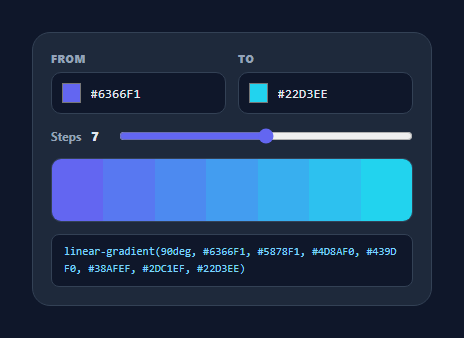
A color mixer blends two colors into an evenly-spaced scale of swatches — the quick way to build a gradient, generate tints between a brand pair, or pick a mid-point shade. This snippet interpolates the colors in the browser, lets you set how many steps to generate, and copies any swatch or the full gradient, in plain HTML, CSS, and vanilla JavaScript.
Linear interpolation in RGB
The mixer converts each end color from hex to RGB, then for each step computes a position t from 0 to 1 and linearly interpolates every channel: c1 + (c2 - c1) * t. With n steps the positions are spread i / (n - 1) so the first swatch is exactly the "from" color, the last is exactly the "to" color, and the rest are even blends. The result is rounded back to a hex string per swatch — straightforward, predictable color math with no library.
Adjustable resolution
A range slider sets the number of steps from 3 to 11, re-rendering the scale live. Three steps give you a from / mid / to triad; eleven give a smooth ramp you can pull individual tints from. This is handy for generating a tint scale for a design system (50→500→900) or for finding the precise middle color between two brand hues.
Readable labels, click to copy
Each swatch shows its hex on hover, and the label color flips between dark and light based on the swatch's luminance so it stays legible on both pale and dark blends. Clicking a swatch copies its hex to the clipboard with a brief "Copied" confirmation — so the mixer doubles as a palette picker, not just a preview.
Dual input, kept in sync
Both end colors have a native <input type="color"> swatch and a hex field that stay in sync both ways: pick from the OS color picker and the hex updates, or type a hex (3- or 6-digit, with or without #) and the swatch follows. A small validator normalizes and ignores invalid input so the scale never breaks mid-typing.
Gradient output
Below the scale, the mixer prints a ready-to-use linear-gradient(90deg, …) built from the generated stops, and clicking it copies the whole declaration. That turns a two-color choice into a paste-ready CSS gradient or a discrete palette in one step. The pure interpolation helpers are easy to lift into a theme generator or design tool, making this a compact, dependency-free reference for blending colors.
Build with AI
Build, Understand, Optimize, and Extend It With AI
You don't have to trace the interpolation math by hand to understand it. Paste this snippet's HTML, CSS, and JS into an AI coding assistant like Claude and ask it to explain exactly why the step positions are computed as i divided by (n - 1) rather than i divided by n, and what would break at the endpoints if that changed. The same assistant can help you optimize it — for example asking whether rebuilding the entire swatch row and re-attaching click listeners on every slider move is necessary, or whether the DOM nodes could be reused instead. It is also a fast way to extend the mixer: ask it to add an option to interpolate through HSL or OKLCH instead of raw RGB for perceptually even steps, support three or more anchor colors instead of just two, or export the scale as CSS custom properties instead of a single gradient string. Treat the code less like a finished artifact and more like a starting point for a conversation.
Prompt to recreate it
Copy this into your AI assistant of choice to build the effect from scratch, or as a jumping-off point for your own variant:
Build a two-color mixer in plain HTML, CSS, and JavaScript that generates an evenly interpolated swatch scale — no color libraries.

Requirements:
- Two color inputs ("from" and "to"), each pairing a native input type="color" swatch with a synced hex text field accepting 3- or 6-digit hex with or without a leading hash.
- A range slider controlling the number of generated swatches (e.g. from 3 to 11 steps), re-rendering the scale live as it moves.
- A pure mix function that linearly interpolates each RGB channel independently between the two end colors at a position t, where t for step i is computed as i / (n - 1) so the first swatch exactly equals the "from" color and the last exactly equals the "to" color.
- Render each interpolated step as a swatch cell filling its background with the computed hex color, with a hex label that switches between a light and dark text color based on that swatch's own luminance so it stays legible on every step.
- Clicking any swatch must copy its hex code to the clipboard via the Clipboard API and show a brief "Copied" confirmation overlay that disappears after under a second.
- Below the scale, generate and display a ready-to-use CSS linear-gradient() string built from the same stops in order, and make clicking it copy the full declaration to the clipboard.
- Keep the hex/RGB conversion and interpolation functions pure and dependency-free so they could be reused in a separate palette-generation script.
Want to tighten it up first? Run this prompt through the AI Prompt Studio to score it across 8 quality dimensions, catch anti-patterns, and tune the wording for Claude, ChatGPT, or Gemini before you paste it in.
Step by step
How to Use
- 1Paste HTML, CSS, and JSA mixer renders with two end colors and a generated swatch scale.
- 2Choose two colorsUse the swatch pickers or type hex values for the From and To colors.
- 3Set the stepsDrag the slider to generate 3–11 evenly-spaced blends.
- 4Copy a swatchHover to see its hex; click to copy it to the clipboard.
- 5Grab the gradientClick the linear-gradient() string to copy a paste-ready CSS gradient.
- 6Reuse the mathLift the mix/toHex helpers into a palette or theme generator.
Real-world uses
Common Use Cases
Got questions?
Frequently Asked Questions
Each end color is converted to RGB, then for every step the mixer computes a position t from 0 to 1 and linearly interpolates each channel as c1 + (c2 - c1) * t, rounding back to hex. Positions are spread as i / (n - 1), so the first and last swatches exactly match your two colors and the middle ones are even blends.
Each label's color is chosen from the swatch's luminance (a weighted sum of its RGB channels): light swatches get a dark label and dark swatches get a light one, so the hex text stays legible across the whole scale. It is the same readability idea behind contrast-aware text on colored backgrounds.
This version interpolates in sRGB, which is simple and predictable and fine for most UI gradients and tint scales. If you need perceptually even steps you can swap the mix function to interpolate in HSL, OKLCH, or LAB — the rest of the snippet (steps, copy, gradient output) stays the same because it only depends on getting a color per step.
Yes. The mixer builds a linear-gradient(90deg, …) from the generated stops and shows it below the scale; click it to copy the full declaration. You can also click any individual swatch to copy its hex if you want discrete palette values rather than a gradient.
Keep the toRgb, toHex, and mix helpers as plain functions and hold the two colors and step count in state. Compute the swatch array as derived state and render it, with click handlers that copy via the Clipboard API. Two-way bind the color and hex inputs to the same state. Tailwind users swap the classes for utilities; the interpolation logic is unchanged.