You Might Also Like
Learn Coding Visually
Learn to code with interactive, live-preview playgrounds — HTML, CSS, JavaScript, React & more.
 HTML Playground42 lessons · Click-based · Live preview
 CSS PlaygroundLearn CSS with a live editor
 JavaScript Playground60 lessons · DOM · Async · Canvas
 React PlaygroundLearn React with a live code editor
 GSAP PlaygroundLearn GSAP animation interactively
 SVG Playground44 lessons · shapes · paths · animation
 SCSS Playground45 lessons · Sass modules · tokens
 Tailwind PlaygroundLearn Tailwind CSS with a live editor
 Bootstrap 5 Playground50 lessons · live preview
Shortcut Recorder — Capture Keyboard Hotkeys in a Field
Shortcut Recorder · Forms · Plain HTML, CSS & JS · Live preview
What's included
Features
About this UI Snippet
Shortcut Recorder — Capture and Edit Keyboard Hotkeys with Conflict Detection
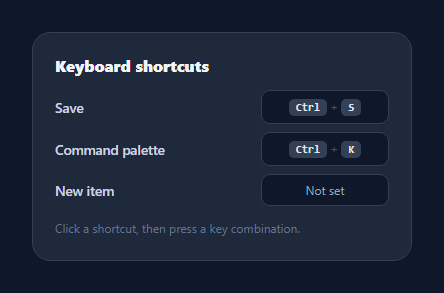
A shortcut recorder lets users rebind a keyboard hotkey by simply pressing the combination they want — the control behind every "customise keyboard shortcuts" settings screen in editors, IDEs, and power-user apps. This snippet captures a live key chord, renders it as kbd chips, normalises modifiers per platform, and flags duplicates, in plain HTML, CSS, and vanilla JavaScript.
Click to record, press to set
Each shortcut is a button showing its current binding. Click it and it enters recording mode (a glowing focus ring and "Press keys…" prompt); the next key combination you press is captured and saved. Pressing Escape cancels without changing anything. Clicking the field again toggles recording off. This click-then-press flow is exactly how native preference panes capture shortcuts.
Reading a chord correctly
The trick to capturing chords is ignoring lone modifier presses. When keydown fires for Control, Shift, Alt, or Meta by itself, the recorder waits — a shortcut isn't complete until a non-modifier key arrives. When a real key lands, it reads the modifier flags (ctrlKey, metaKey, altKey, shiftKey) and assembles them in a consistent order, then appends the key. preventDefault() stops the browser acting on combos like Ctrl+S while you're recording.
Platform-aware labels
Modifiers are prettified for humans: Control becomes "Ctrl", and Meta becomes "Cmd" on macOS or "Win" elsewhere via a quick platform check. Special keys map to symbols — arrows to ↑↓←→, Escape to "Esc", space to "Space" — and single character keys are upper-cased so "k" displays as "K". The result renders as individual kbd chips joined by +, the familiar way shortcuts appear in menus and docs.
Duplicate detection
After a binding is set, the recorder checks whether any other shortcut already uses the same combination and flags both with a red ring and a hint ("That combination is already used"). Catching conflicts at capture time is what separates a real shortcut editor from a text field — two actions bound to the same chord is a bug users can't diagnose themselves.
Portable and minimal
The captured value is a plain string like Ctrl+K stored in a data attribute, trivial to persist or feed into a hotkey library. The whole recorder is one keydown handler and a small render function with no dependencies — a clean reference for building keyboard-shortcut customisation into any settings screen.
Build with AI
Build, Understand, Optimize, and Extend It With AI
You don't need to work out the modifier-key-then-real-key capture logic by hand. Paste this snippet's HTML, CSS, and JS into an AI coding assistant like Claude and ask it to explain exactly why the keydown handler returns early when e.key is itself one of the MODS entries, or how the PRETTY lookup table normalizes both special keys and platform-specific Meta labeling into readable chips. The same assistant can help optimize it, for example checking whether attaching the keydown listener to the whole document rather than just the recording field could ever cause unexpected interference with other page shortcuts. It's also useful for extending the feature: ask it to persist bindings to localStorage so they survive a reload, support recording a second alternate combo per action, or reserve certain browser-critical combos like Ctrl+W from ever being assignable. Treat the code less like a finished artifact and more like a starting point for a conversation.
Prompt to recreate it
Copy this into your AI assistant of choice to build the effect from scratch, or as a jumping-off point for your own variant:
Build a keyboard shortcut recorder with duplicate detection in plain HTML, CSS, and JavaScript, no framework, no libraries.

Requirements:
- A list of actions, each with a button-like field that displays its currently bound key combination as individual small chip elements joined visually by a plus sign, or "Not set" when empty.
- Clicking a field must enter a recording mode (visually distinct via a focus-ring style and a placeholder like "Press keys…"), and clicking the currently-recording field again must exit recording mode without changing its binding.
- Attach a single document-level keydown listener that only acts when a field is actively recording. It must call preventDefault to stop the browser handling the combo, and must explicitly ignore keydown events where the pressed key is itself a bare modifier (Control, Alt, Shift, or Meta) — only a subsequent non-modifier key should complete and save the combo.
- When a real key arrives, read the modifier boolean flags from the event (ctrlKey, metaKey, altKey, shiftKey) and assemble them into the combo string in a fixed, consistent order followed by the key itself, rather than relying on key event order.
- Normalize special key names for display: the Meta key must render as "Cmd" on macOS and "Win" on other platforms (detected via navigator.platform), arrow keys must render as arrow glyphs, Escape must render as "Esc", and single printable characters must be upper-cased.
- Pressing Escape while recording must cancel and restore the previous binding unchanged, distinct from completing a combo.
- After saving a new combo, check every other field's stored combo for an exact match and, if found, visually flag both the newly recorded field and the conflicting one with a distinct warning style plus a text hint explaining the conflict.
Want to tighten it up first? Run this prompt through the AI Prompt Studio to score it across 8 quality dimensions, catch anti-patterns, and tune the wording for Claude, ChatGPT, or Gemini before you paste it in.
Step by step
How to Use
- 1Paste HTML, CSS, and JSA list of actions renders, each with its current shortcut.
- 2Click a shortcutThe field starts recording and prompts you to press keys.
- 3Press a combinationHold modifiers and press a key — it captures as Ctrl+K style chips.
- 4Cancel if neededPress Esc while recording to leave the binding unchanged.
- 5Watch for conflictsA red ring warns when a combo is already used by another action.
- 6Read the valueEach field stores its combo string in data-combo — persist it as you like.
Real-world uses
Common Use Cases
Got questions?
Frequently Asked Questions
On keydown while recording, it ignores presses that are only a modifier (Control, Shift, Alt, Meta) and waits for a real key. When one arrives, it reads ctrlKey/metaKey/altKey/shiftKey, assembles them in a fixed order, appends the key, and saves the result. It also calls preventDefault so the browser does not act on combos like Ctrl+S during capture.
Yes. The Meta key renders as "Cmd" on macOS and "Win" on other platforms via a navigator.platform check, and Control always shows as "Ctrl". You can extend the PRETTY map to localise further or to display the actual ⌘/⌥/⇧/⌃ glyphs if you prefer the macOS style.
After a binding is set, the recorder scans the other fields for the same combo string. If it finds one, it adds a red ring to the field and shows a hint that the combination is already used. You decide the policy — warn only (as here), block the save, or swap the binding away from the other action.
A plain string such as "Ctrl+K" or "Cmd+Shift+P", held in the field's data-combo attribute. It is easy to persist to storage or a backend, render in menus, and feed into a hotkey matcher at runtime by comparing it against the same modifier flags on keydown.
Hold each binding in state and render the chips from it. Track a "recording" id in state, attach a window keydown listener while recording (in an effect that cleans up), and update the binding when a non-modifier key arrives. Compute the duplicate flag as derived state. Tailwind users replace the classes with utilities; the keydown logic is identical across frameworks.