Learn Coding Visually
Learn to code with interactive, live-preview playgrounds — HTML, CSS, JavaScript, React & more.
 HTML Playground42 lessons · Click-based · Live preview
 CSS PlaygroundLearn CSS with a live editor
 JavaScript Playground60 lessons · DOM · Async · Canvas
 React PlaygroundLearn React with a live code editor
 GSAP PlaygroundLearn GSAP animation interactively
 SVG Playground44 lessons · shapes · paths · animation
 SCSS Playground45 lessons · Sass modules · tokens
 Tailwind PlaygroundLearn Tailwind CSS with a live editor
 Bootstrap 5 Playground50 lessons · live preview
Percentage Change Calculator — Free HTML CSS JS Snippet
Percentage Change Calculator · Misc · Plain HTML, CSS & JS · Live preview
What's included
Features
About this UI Snippet
Percentage Change Calculator — % Increase/Decrease, X% of Y & "X is What % of Y", Live
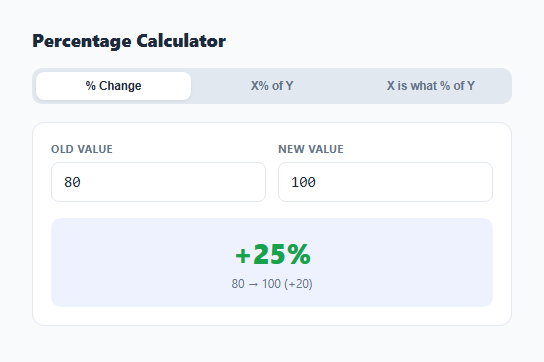
Percentage math has exactly three shapes that come up constantly — how much did something change by, what is a percentage of a number, and what percentage does one number represent of another — and each one uses a subtly different formula that is easy to mix up under pressure. This snippet implements all three as separate live-calculating tabs so the right formula is always applied to the right question.
Percentage change: signed, and divided by the absolute old value
The percentage-change formula is ((new - old) / |old|) * 100. Dividing by the *absolute value* of the old number, not the raw old number, matters when the old value is negative — without the absolute value, going from -50 to -25 would compute as a negative percentage change even though the number actually improved (moved closer to zero, or increased). The result keeps its sign: a positive percentage clearly indicates growth, a negative one indicates decline, and the result card's color (green for positive, red for negative) reinforces the direction at a glance without having to parse the sign character.
Why old value cannot be zero
Percentage change is mathematically undefined when the old value is zero — going from 0 to any nonzero number is not a finite percentage increase, it is a change from nothing to something. Rather than displaying Infinity% or NaN, the calculator explicitly detects a zero old value and shows a clear message instead, which is more honest than a technically-correct-but-meaningless number.
X% of Y: the simplest and most common percentage question
This is just (percentage / 100) * value — used constantly for tips, discounts, and taxes — implemented as its own tab so it never has to be derived by mentally inverting the change formula.
X is what % of Y: the inverse relationship
This tab answers a different question from the other two: given two absolute numbers, what percentage does the first represent of the second, computed as (x / y) * 100. It is easy to reach for the percentage-change formula here by mistake, but that formula measures *change* between two states of the same thing, while this one measures *proportion* between two different quantities — the calculator keeps them as clearly separate tools so the wrong formula is never applied to the wrong question by habit.
Locale-aware number formatting throughout
Every result passes through fmt(), which rounds to two decimal places and formats using toLocaleString() — so a large result like 12345.6 renders with the browser's locale-appropriate thousands separator (12,345.6 in most English locales) rather than as an unformatted raw number, making every result immediately easier to read at a glance.
Build with AI
Build, Understand, Optimize, and Extend It With AI
Paste this snippet's JavaScript into an AI assistant like Claude and ask it to explain exactly why the percentage-change formula divides by the absolute value of the old number rather than the raw old number, and walk through what would go wrong with a negative starting value if that absolute value were omitted. It is also a good base to extend: ask for a "percentage point difference" mode (the raw difference between two percentages, as opposed to a percentage change of a percentage), a compound percentage-change chain calculator for multiple sequential changes, or a shareable URL that encodes the current tab and inputs as query parameters.
Prompt to recreate it
Copy this into your AI assistant of choice to build the effect from scratch, or as a jumping-off point for your own variant:
Build a client-side percentage calculator in plain HTML, CSS, and JavaScript, no libraries.

Requirements:
- A tabbed interface with three independent calculators: "% Change" (percentage increase or decrease between an old and new value), "X% of Y" (a percentage of a value), and "X is what % of Y" (what percentage one number represents of another).
- Each tab has its own two number inputs and recalculates live on every input event, independently of the other tabs, so switching tabs never loses previously entered values.
- The % Change calculator must compute ((new value - old value) / absolute value of old value) * 100, correctly handling a negative old value, and must show a clear explanatory message instead of a numeric result (never Infinity or NaN) when the old value is zero.
- The % Change result must be visually color-coded: a distinct color for a positive (increase) result and a different distinct color for a negative (decrease) result, along with the raw numeric difference shown underneath.
- The "X% of Y" calculator computes (percentage / 100) * value.
- The "X is what % of Y" calculator computes (X / Y) * 100, with a clear message instead of a numeric result when Y is zero.
- Format every numeric result using toLocaleString with a maximum of 2 decimal places so large results include locale-appropriate thousands separators.
Want to tighten it up first? Run this prompt through the AI Prompt Studio to score it across 8 quality dimensions, catch anti-patterns, and tune the wording for Claude, ChatGPT, or Gemini before you paste it in.
Step by step
How to Use
- 1Choose the right tab for your question"% Change" for growth/decline between two numbers, "X% of Y" for a straight percentage of a value, "X is what % of Y" for a proportion between two numbers.
- 2Enter the two numbersResults update live as you type — no calculate button required.
- 3Read the result and directionIn the % Change tab, a green result means an increase and a red result means a decrease, with the raw difference shown underneath.
- 4Watch for the zero-old-value messagePercentage change from zero is mathematically undefined, so the calculator shows a clear explanation instead of Infinity or NaN.
- 5Switch tabs to check a different kind of percentage questionAll three tabs stay independently populated, so you can flip back and forth without losing your inputs.
Real-world uses
Common Use Cases
Got questions?
Frequently Asked Questions
It computes ((new value minus old value) divided by the absolute value of the old value) times 100. Using the absolute value of the old number keeps the result meaningful even when the old value itself is negative.
Percentage change from zero is mathematically undefined, since you would be dividing by zero. Rather than displaying Infinity or NaN, the calculator explicitly detects this case and shows a clear message.
"X% of Y" starts with a known percentage and a known value and finds the resulting amount, like calculating a 15% tip on a $240 bill. "X is what % of Y" starts with two known amounts and finds what percentage relationship they have, like finding what percent 45 is of 180. They are inverse operations answering different questions.
No — a negative result correctly indicates a decrease from the old value to the new value, and is intentionally shown in red as a visual cue. A positive, green result indicates an increase.
Every result is rounded to two decimal places and passed through toLocaleString(), which adds locale-appropriate thousands separators (like commas in most English locales) to make larger numbers easier to read at a glance.
Yes, all three fields accept negative numbers where mathematically meaningful. The % Change tab in particular is specifically designed to handle a negative old value correctly by dividing by its absolute value rather than the signed value.