Learn Coding Visually
Learn to code with interactive, live-preview playgrounds — HTML, CSS, JavaScript, React & more.
 HTML Playground42 lessons · Click-based · Live preview
 CSS PlaygroundLearn CSS with a live editor
 JavaScript Playground60 lessons · DOM · Async · Canvas
 React PlaygroundLearn React with a live code editor
 GSAP PlaygroundLearn GSAP animation interactively
 SVG Playground44 lessons · shapes · paths · animation
 SCSS Playground45 lessons · Sass modules · tokens
 Tailwind PlaygroundLearn Tailwind CSS with a live editor
 Bootstrap 5 Playground50 lessons · live preview
Multi-Resource Usage Billing Simulator — Free HTML CSS JS Snippet
Multi-Resource Usage Billing Simulator · Pricing · Plain HTML, CSS & JS · Live preview
What's included
Features
About this UI Snippet
Multi-Resource Usage Billing Simulator — Independent Sliders, One Live Combined Total
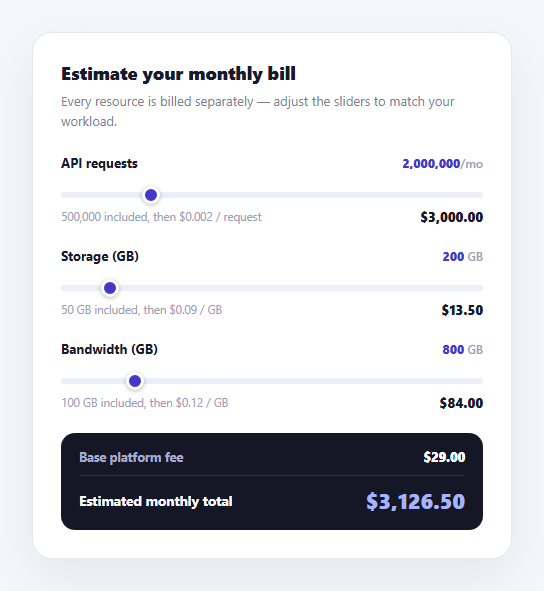
Real usage-based products rarely bill on a single dimension — infrastructure tools charge separately for compute, storage, and bandwidth, each with its own free allowance and its own overage rate. This calculator models that directly: three independent sliders, each representing a different resource with its own included-free tier and per-unit rate, summing into one live estimated monthly bill alongside a flat base platform fee.
Each resource is a self-contained object, not three parallel variable sets
Rather than tracking three separate rate variables, three included variables, and three slider references as loose globals, resources is built once with .map() into an array of objects — each bundling its own el, rate, included, slider, valueEl, and costEl. This means adding a fourth resource is purely a matter of adding a fourth .mru-resource block to the HTML with matching data-rate/data-included attributes and IDs; the .map() construction and every function that follows already operates generically over "however many resources exist."
The included allowance is subtracted before the rate is ever applied
costForResource() computes billableUnits = Math.max(0, usage - resource.included) before multiplying by the rate — so a resource never bills for its free tier, and the Math.max(0, ...) guard means a usage value at or below the included allowance always produces exactly $0 for that resource, never a negative charge.
One `recalc()` re-sums everything, every single time
Just like avoiding a drifting running total in a seat calculator, recalc() starts fresh from BASE_FEE on every call and adds each resource's freshly computed cost in a loop — nothing is incrementally adjusted. This guarantees the grand total displayed always exactly equals the sum of what's currently shown on each resource's own cost line, since both are computed from the same pass over the same slider values.
Rate and included-allowance data live on the markup, not hardcoded in JavaScript
Each .mru-resource div carries its own data-rate and data-included attributes, read once when resources is built. This keeps the pricing model's actual numbers visible directly in the HTML rather than buried in a JavaScript array literal disconnected from the resource it describes — useful both for maintainability and for anyone skimming the page source to understand the pricing shown.
`toLocaleString` handles two different formatting jobs
formatUnits() rounds and comma-formats a raw usage number (e.g. API request counts, which are always whole numbers), while formatMoney() uses toLocaleString with explicit minimumFractionDigits/maximumFractionDigits set to 2, guaranteeing every dollar figure always shows exactly two decimal places even when the underlying float happens to compute to a whole number.
Customizing it
Add a fourth resource (e.g. "Compute hours") by copying an .mru-resource block with its own data-rate/data-included values and a matching slider/value/cost element ID sequence — the .map()-built resources array and recalc() both already generalize to any number of resource blocks found on the page. Adjust BASE_FEE to match your actual platform's flat monthly fee, or set it to 0 for a purely usage-based model with no base charge.
Build with AI
Build, Understand, Optimize, and Extend It With AI
Rather than working out the multi-resource math by hand, paste this snippet's HTML, CSS, and JS into an AI coding assistant like Claude and ask it to explain exactly how the resources array is built generically from however many .mru-resource elements exist on the page via .map(), and why costForResource() clamps the billable units with Math.max(0, ...) before multiplying by the rate. The same assistant can help you extend it — ask it to add stepped/tiered overage rates per resource (so the rate itself decreases past a second threshold, similar to volume pricing) instead of one flat overage rate, add a small bar chart visualizing each resource's share of the total bill, or persist the slider values to the URL as query parameters so a prospect can share their specific usage estimate. It's also useful for a UX review: ask whether the slider step sizes and max values make sense for a realistic range of customer workloads, or whether a direct numeric input alongside each slider would let power users enter exact figures faster than dragging. Treat the code less like a finished artifact and more like a starting point for a conversation.
Prompt to recreate it
Copy this into your AI assistant of choice to build the effect from scratch, or as a jumping-off point for your own variant:
Build a multi-resource usage billing simulator card in plain HTML, CSS, and vanilla JavaScript — no chart or slider library, native range inputs only.

Requirements:
- Three independently billed resources (e.g. API requests, storage in GB, bandwidth in GB), each rendered as its own block containing a resource name, a live usage value display, a range slider, and a cost line showing that resource's included free allowance, its per-unit overage rate, and its currently computed cost.
- Store each resource's per-unit overage rate and included free allowance as data attributes directly on its container element in the HTML, not as separate values hardcoded only in the JavaScript.
- Build the JavaScript's internal representation of all resources by querying and mapping over however many resource container elements exist in the HTML, so the same code handles three resources or five without being rewritten — do not hardcode three separate variable sets.
- For each resource, compute its cost as only the usage above its included allowance (clamped so usage at or below the allowance always costs exactly $0, never negative) multiplied by its overage rate.
- On every single slider move, recalculate the ENTIRE bill from scratch — a flat base platform fee plus the freshly computed cost of every resource summed together — rather than incrementally adjusting a previously stored total value.
- Moving one resource's slider must only change that resource's own displayed cost and the grand total; it must never affect another resource's displayed cost.
- Format usage numbers with thousands separators and format every dollar amount to always show exactly two decimal places.
Want to tighten it up first? Run this prompt through the AI Prompt Studio to score it across 8 quality dimensions, catch anti-patterns, and tune the wording for Claude, ChatGPT, or Gemini before you paste it in.
Step by step
How to Use
- 1Drag any resource sliderAPI requests, storage, and bandwidth each recalculate their own cost line independently.
- 2Watch the grand total updateThe estimated monthly total re-sums the base fee plus all three resource costs on every slider move.
- 3Notice the included allowanceUsage below each resource's included amount contributes nothing to that resource's cost.
- 4Add a fourth resourceCopy an .mru-resource block in the HTML panel with its own data-rate and data-included values.
- 5Change the base platform feeEdit the BASE_FEE constant near the top of the JS panel.
- 6Export in your formatClick "HTML" for a standalone file, "JSX" for a React component, or "Tailwind" for a React + Tailwind version.
Real-world uses
Common Use Cases
Got questions?
Frequently Asked Questions
costForResource() subtracts each resource's included allowance from the current slider usage, clamped to a minimum of zero with Math.max(0, usage - resource.included), then multiplies whatever is left by that resource's own per-unit rate. Usage at or below the included allowance always produces exactly $0 for that resource.
No — each resource's cost is computed purely from its own rate, its own included allowance, and its own slider value. Moving the API requests slider only changes that resource's cost line; the storage and bandwidth lines are unaffected. All three are simply summed together, along with the base fee, into the one grand total.
recalc() starts from BASE_FEE fresh on every single call and loops through every resource, adding each one's freshly computed cost. Nothing is incrementally added or subtracted from a previously stored total, so the displayed grand total always exactly matches the sum of what is currently shown on each individual resource cost line.
Copy an existing .mru-resource block in the HTML panel, set its own data-rate and data-included attribute values, and give its slider, value display, and cost display elements the next sequential ID number (e.g. mruSlider3, mruVal3, mruCost3). The resources array is built via .map() over every .mru-resource element found on the page, so recalc() picks up the new resource automatically with no further JavaScript changes.
Setting both to 2 guarantees every dollar figure always displays exactly two decimal places, even when the underlying floating-point calculation happens to land on a whole number like 84 — without that setting, toLocaleString() would sometimes show "$84" and other times "$84.50," which reads as visually inconsistent across resource cost lines.
Yes — set that resource's data-included attribute to "0". Math.max(0, usage - 0) simply equals usage, so the resource bills from the very first unit at its full rate with no free tier subtracted.