Learn Coding Visually
Learn to code with interactive, live-preview playgrounds — HTML, CSS, JavaScript, React & more.
 HTML Playground42 lessons · Click-based · Live preview
 CSS PlaygroundLearn CSS with a live editor
 JavaScript Playground60 lessons · DOM · Async · Canvas
 React PlaygroundLearn React with a live code editor
 GSAP PlaygroundLearn GSAP animation interactively
 SVG Playground44 lessons · shapes · paths · animation
 SCSS Playground45 lessons · Sass modules · tokens
 Tailwind PlaygroundLearn Tailwind CSS with a live editor
 Bootstrap 5 Playground50 lessons · live preview
Edge Swipe Back Navigation — Free HTML CSS JS Snippet
Edge Swipe Back Navigation · Navigation · Plain HTML, CSS & JS · Live preview
What's included
Features
About this UI Snippet
Edge Swipe Back Navigation — iOS-Style Drag-From-Edge Screen Stack in Vanilla JS
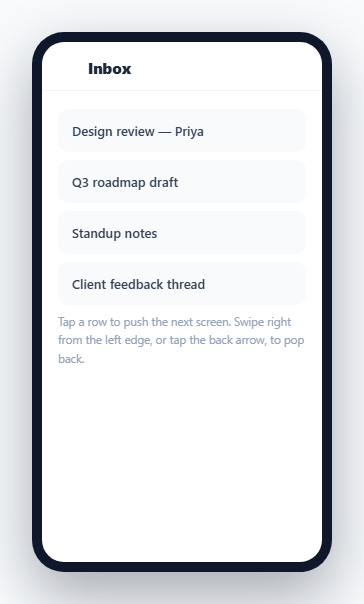
Mobile apps built with a push/pop navigation stack almost universally support swiping in from the very left edge of the screen to go back, dragging the current screen aside in real time to reveal the previous one peeking in underneath — a much more direct, cancelable interaction than only offering a small back-arrow tap target. This snippet implements the real gesture physics with the Pointer Events API: the drag distance is tracked live, both screens move together in proportion to the drag, and lifting your finger either commits the pop or snaps back based on how far you dragged.
A real navigation stack, not two hardcoded screens
stack is a plain array of indices into a SCREENS list. push(screenIdx) and pop() mutate that array and call renderStack(), which rebuilds only the top two visible layers with CSS transforms — the top screen at translateX(0) and the one beneath it partially shifted left at translateX(-30%), exactly matching how iOS renders a peeking previous screen with parallax rather than a hard cut. Any number of screens can be pushed; this is a genuine stack, not a fixed two-screen demo.
Restricting the gesture to the edge zone
The pointerdown handler checks localX > EDGE_ZONE and bails immediately if the touch didn't start within the leftmost 24px of the screen — this is the defining constraint of an *edge* swipe gesture as opposed to a general swipe-anywhere gesture, and it's essential so that normal scrolling or tapping rows elsewhere on the screen is never mistaken for a back-navigation attempt.
Live 1:1 drag tracking, not a fixed animation
While dragging, pointermove computes progress as the raw drag distance divided by the screen width (clamped to 0–1) and applies it directly as a percentage transform to both the top screen (sliding right) and the screen beneath it (sliding the rest of the way in from its -30% offset toward 0) — every pixel of finger movement maps directly to a pixel of screen movement, with transition: none set during the drag so there is zero animation lag between touch and visual response.
Commit-or-cancel on release
endDrag() reads the final progress value against a 0.35 threshold: past it, pop() runs and completes the transition off-screen; below it, both screens animate back to their resting positions instead. This threshold-based commit/cancel behavior — rather than always completing or always reverting — is what makes the gesture feel physically responsive instead of all-or-nothing, and matches the same threshold pattern iOS itself uses for its edge-swipe-back gesture.
A visible scrim on the receding screen
The .es-below::after pseudo-element darkens whichever screen sits beneath the active one with a semi-transparent overlay, reinforcing the sense that it is "behind" the active screen in a real depth stack rather than simply positioned off to the side.
Build with AI
Build, Understand, Optimize, and Extend It With AI
Paste this snippet's HTML, CSS, and JS into an AI coding assistant like Claude and ask it to explain exactly how the EDGE_ZONE check in the pointerdown handler prevents this gesture from ever conflicting with normal scrolling or row taps, and how the progress value computed in pointermove drives both the top screen and the peeking screen beneath it with a single shared number. It's also a good candidate for extension — ask it to add velocity-based completion (a fast flick should complete the pop even if released before the 35% threshold, the way iOS does), add a matching push transition when tapping forward instead of only an instant slide, or wire the stack up to real client-side routing so each pushed screen corresponds to a URL.
Prompt to recreate it
Copy this into your AI assistant of choice to build the effect from scratch, or as a jumping-off point for your own variant:
Build an iOS-style edge-swipe-to-go-back navigation stack in plain HTML, CSS, and JavaScript using the Pointer Events API — no gesture or animation library.

Requirements:
- Maintain a navigation stack as a plain array of screen identifiers, with push() and pop() functions that mutate the array and re-render the visible screens — support any stack depth, not just two hardcoded screens.
- Render only the top two stack entries as absolutely positioned layers: the active (top) screen at a resting position covering the full container, and the screen directly beneath it shifted partially to the left (a parallax "peeking" effect), with a semi-transparent scrim over the peeking screen so it reads as visually behind the active one.
- On pointerdown, only begin tracking a drag if the touch/click started within a small, configurable pixel distance from the very left edge of the container — a touch starting anywhere else must not trigger the gesture, so it never conflicts with scrolling or tapping other content.
- On pointermove during an active drag, compute how far the pointer has moved as a proportion of the container's width (clamped between 0 and 1) and apply that proportion directly as a live percentage transform to both the active screen (sliding it right, off toward the edge) and the peeking screen beneath it (sliding it the rest of the way toward its full resting position) — the movement must track the pointer with no animation lag while dragging is in progress.
- On pointerup, compare the final drag proportion against a threshold (e.g. 0.35): if it exceeds the threshold, complete the pop with a smooth animated transition; if not, animate both screens back to their original resting positions instead.
- Also provide a conventional back-arrow button in each screen's header that calls the exact same pop function as a completed swipe gesture, for users who prefer tapping.
- Tapping content within a screen (not near the edge) must push a new screen onto the stack with a slide-in transition.
Want to tighten it up first? Run this prompt through the AI Prompt Studio to score it across 8 quality dimensions, catch anti-patterns, and tune the wording for Claude, ChatGPT, or Gemini before you paste it in.
Step by step
How to Use
- 1Tap a row to push a new screenTapping any row slides in the next screen from the right, adding it to the top of the navigation stack.
- 2Swipe from the very left edge to go backPress down within the leftmost ~24px of the phone frame and drag right — the current screen follows your finger in real time.
- 3Release past the halfway point to commitDragging more than about 35% of the screen width and releasing completes the pop; releasing before that snaps both screens back to their resting position.
- 4Tap the back arrow as an alternativeThe header back button calls the same pop() function as a completed swipe, for users who prefer tapping over gesturing.
- 5Adjust the edge zone widthChange the EDGE_ZONE constant in the JS panel to widen or narrow how close to the left edge a touch must start to begin tracking.
- 6Add more screens to the stackExtend the SCREENS array — push() and pop() work with any stack depth without additional changes.
Real-world uses
Common Use Cases
Got questions?
Frequently Asked Questions
The pointerdown handler measures the touch's x-position relative to the container and immediately returns without starting a drag if that position is greater than the EDGE_ZONE constant (24px by default). Only a touch starting within that narrow left-edge band begins tracking a back-swipe.
pointermove computes progress as the raw horizontal drag distance divided by the container's width, clamped between 0 and 1, and applies it directly as a percentage transform to both the top screen (translateX(progress * 100%)) and the screen beneath it (translating the remaining distance from its -30% resting offset toward 0%) — a direct, un-eased mapping so there is no perceptible lag between finger and screen movement.
endDrag() compares the final progress value against a 0.35 threshold. If the drag passed that threshold, pop() runs and the screen finishes animating off-screen; if not, both screens animate back to their original resting transforms instead of completing the navigation.
A CSS transition adds a delay between a style change and its visual result. During an active drag, every pointermove event must move the screen instantly to match the finger exactly — any transition lag would make the drag feel disconnected from the touch. Transitions are re-enabled only once the drag ends, so the snap-back or completing animation is smooth.
Yes — stack is a plain array and can hold any number of pushed screen indices. renderStack() only ever positions the top two entries visually (the active screen and the one directly beneath it), which is both how the real interaction should look and keeps rendering cheap regardless of stack depth.
Keep the stack array in component state (e.g. useState<number[]>), and drive the pointerdown/pointermove/pointerup handlers with refs to the current and previous screen elements rather than direct DOM queries, applying the same progress-based transform math inside the move handler.