Source Code
<div class="db-app">
  <div class="db-header">
    <h2>Dots and Boxes</h2>
    <div class="stats">
      <div class="stat p1"><span class="stat-label">You</span><span class="stat-val" id="db-p1">0</span></div>
      <div class="stat p2"><span class="stat-label">CPU</span><span class="stat-val" id="db-p2">0</span></div>
    </div>
  </div>

  <p class="db-turn" id="db-turn">Your turn — click a dashed line to claim it.</p>

  <div class="db-board-wrap">
    <svg id="db-board" viewBox="0 0 320 320" xmlns="http://www.w3.org/2000/svg"></svg>
  </div>

  <div class="db-actions">
    <button class="ghost-btn" id="db-reset">New Game</button>
  </div>
</div>
* { box-sizing: border-box; margin: 0; padding: 0; }
body { font-family: system-ui, sans-serif; background: #f8fafc; min-height: 100vh; }
.db-app { max-width: 420px; margin: 0 auto; padding: 32px 20px; display: flex; flex-direction: column; align-items: center; gap: 14px; }
.db-header { width: 100%; display: flex; align-items: center; justify-content: space-between; }
.db-header h2 { font-size: 19px; font-weight: 800; color: #1e293b; }
.stats { display: flex; gap: 10px; }
.stat { background: #fff; border: 1px solid #e2e8f0; border-radius: 12px; padding: 6px 14px; min-width: 56px; text-align: center; }
.stat-label { display: block; font-size: 9.5px; font-weight: 700; letter-spacing: 0.04em; text-transform: uppercase; color: #94a3b8; }
.stat-val { display: block; font-size: 15px; font-weight: 800; }
.stat.p1 .stat-val { color: #6366f1; }
.stat.p2 .stat-val { color: #f43f5e; }
.db-turn { font-size: 12.5px; font-weight: 600; color: #64748b; text-align: center; min-height: 32px; line-height: 1.5; }
.db-turn.win { color: #16a34a; font-weight: 800; }
.db-turn.wait { color: #f59e0b; }
.db-board-wrap { width: 100%; max-width: 320px; background: #fff; border: 1px solid #e2e8f0; border-radius: 14px; padding: 12px; }
#db-board { width: 100%; display: block; }
.db-dot { fill: #1e293b; }
.db-line { stroke: #cbd5e1; stroke-width: 6; stroke-linecap: round; cursor: pointer; transition: stroke 0.1s, stroke-width 0.1s; }
.db-line:hover { stroke: #a5b4fc; stroke-width: 8; }
.db-line.taken-p1 { stroke: #6366f1; cursor: default; }
.db-line.taken-p2 { stroke: #f43f5e; cursor: default; }
.db-line.taken-p1:hover, .db-line.taken-p2:hover { stroke-width: 6; }
.db-line-hit { stroke: transparent; stroke-width: 20; cursor: pointer; }
.db-box { transition: fill 0.2s; }
.db-box.p1 { fill: rgba(99,102,241,0.18); }
.db-box.p2 { fill: rgba(244,63,94,0.18); }
.db-box-label { font-size: 13px; font-weight: 800; text-anchor: middle; dominant-baseline: middle; pointer-events: none; }
.db-box-label.p1 { fill: #6366f1; }
.db-box-label.p2 { fill: #f43f5e; }
.ghost-btn {
background: none; border: 1.5px solid #e2e8f0; border-radius: 10px;
padding: 8px 16px; font-size: 12px; font-weight: 700; color: #475569;
cursor: pointer; font-family: inherit; transition: border-color 0.15s, color 0.15s;
}
.ghost-btn:hover { border-color: #6366f1; color: #6366f1; }const GRID = 4; // 4x4 dots = 3x3 boxes
const boardEl = document.getElementById('db-board');
const turnEl = document.getElementById('db-turn');
const p1El = document.getElementById('db-p1');
const p2El = document.getElementById('db-p2');
const PAD = 30, STEP = (320 - PAD * 2) / (GRID - 1);
// hLines[r][c] = line between dot(r,c) and dot(r,c+1) — GRID rows, GRID-1 cols
// vLines[r][c] = line between dot(r,c) and dot(r+1,c) — GRID-1 rows, GRID cols
let hLines, vLines, boxes; // boxes[r][c] = null | 'p1' | 'p2'
let scores = { p1: 0, p2: 0 };
let current = 'p1';
let gameOver = false;
let cpuTimer = null;
function dotXY(r, c) { return [PAD + c * STEP, PAD + r * STEP]; }
function newGameState() {
hLines = Array.from({ length: GRID }, () => Array(GRID - 1).fill(false));
vLines = Array.from({ length: GRID - 1 }, () => Array(GRID).fill(false));
boxes = Array.from({ length: GRID - 1 }, () => Array(GRID - 1).fill(null));
}
function boxLines(r, c) {
// The 4 edges bounding box (r,c): top/bottom horizontal, left/right vertical
return {
top: ['h', r, c], bottom: ['h', r + 1, c],
left: ['v', r, c], right: ['v', r, c + 1],
};
}
function isLineTaken(type, r, c) {
return type === 'h' ? hLines[r][c] : vLines[r][c];
}
function setLine(type, r, c) {
if (type === 'h') hLines[r][c] = true; else vLines[r][c] = true;
}
function boxComplete(r, c) {
const b = boxLines(r, c);
return Object.values(b).every(([t, rr, cc]) => isLineTaken(t, rr, cc));
}
function el(tag, attrs) {
const e = document.createElementNS('http://www.w3.org/2000/svg', tag);
Object.entries(attrs).forEach(([k, v]) => e.setAttribute(k, v));
return e;
}
function render() {
boardEl.innerHTML = '';
// Boxes (fill + owner initial) drawn first, beneath lines
for (let r = 0; r < GRID - 1; r++) {
for (let c = 0; c < GRID - 1; c++) {
const owner = boxes[r][c];
const [x, y] = dotXY(r, c);
const rect = el('rect', { x: x + 4, y: y + 4, width: STEP - 8, height: STEP - 8, rx: 4, class: 'db-box' + (owner ? ' ' + owner : '') });
boardEl.appendChild(rect);
if (owner) {
const label = el('text', { x: x + STEP / 2, y: y + STEP / 2, class: 'db-box-label ' + owner });
label.textContent = owner === 'p1' ? 'Y' : 'C';
boardEl.appendChild(label);
}
}
}
// Horizontal lines
for (let r = 0; r < GRID; r++) {
for (let c = 0; c < GRID - 1; c++) {
const [x1, y1] = dotXY(r, c);
const [x2, y2] = dotXY(r, c + 1);
drawLine(x1, y1, x2, y2, 'h', r, c);
}
}
// Vertical lines
for (let r = 0; r < GRID - 1; r++) {
for (let c = 0; c < GRID; c++) {
const [x1, y1] = dotXY(r, c);
const [x2, y2] = dotXY(r + 1, c);
drawLine(x1, y1, x2, y2, 'v', r, c);
}
}
// Dots on top
for (let r = 0; r < GRID; r++) {
for (let c = 0; c < GRID; c++) {
const [x, y] = dotXY(r, c);
boardEl.appendChild(el('circle', { cx: x, cy: y, r: 4.5, class: 'db-dot' }));
}
}
}
// Track which player claimed each line for coloring
let hOwner, vOwner;
function drawLine(x1, y1, x2, y2, type, r, c) {
const taken = isLineTaken(type, r, c);
const owner = type === 'h' ? hOwner[r][c] : vOwner[r][c];
const visible = el('line', { x1, y1, x2, y2, class: 'db-line' + (taken ? ' taken-' + owner : '') });
boardEl.appendChild(visible);
if (!taken) {
const hit = el('line', { x1, y1, x2, y2, class: 'db-line-hit' });
hit.addEventListener('click', () => claimLine(type, r, c, 'p1'));
boardEl.appendChild(hit);
}
}
function claimLine(type, r, c, player) {
if (gameOver || current !== player || isLineTaken(type, r, c)) return;
setLine(type, r, c);
if (type === 'h') hOwner[r][c] = player; else vOwner[r][c] = player;
let claimedAny = false;
for (let r2 = 0; r2 < GRID - 1; r2++) {
for (let c2 = 0; c2 < GRID - 1; c2++) {
if (!boxes[r2][c2] && boxComplete(r2, c2)) {
boxes[r2][c2] = player;
scores[player]++;
claimedAny = true;
}
}
}
p1El.textContent = String(scores.p1);
p2El.textContent = String(scores.p2);
const totalBoxes = (GRID - 1) * (GRID - 1);
if (scores.p1 + scores.p2 === totalBoxes) {
gameOver = true;
render();
if (scores.p1 > scores.p2) endMessage('You win ' + scores.p1 + '\u2013' + scores.p2 + '!');
else if (scores.p2 > scores.p1) endMessage('CPU wins ' + scores.p2 + '\u2013' + scores.p1 + '.');
else endMessage('It\u2019s a tie, ' + scores.p1 + '\u2013' + scores.p2 + '.');
return;
}
// Completing a box grants another turn for the same player — classic Dots and Boxes rule
if (!claimedAny) current = player === 'p1' ? 'p2' : 'p1';
render();
updateTurnMessage();
if (current === 'p2' && !gameOver) {
turnEl.textContent = 'CPU is thinking\u2026';
turnEl.className = 'db-turn wait';
cpuTimer = setTimeout(cpuMove, 550);
}
}
function updateTurnMessage() {
if (gameOver) return;
turnEl.textContent = current === 'p1' ? 'Your turn — click a dashed line to claim it.' : 'CPU\u2019s turn.';
turnEl.className = 'db-turn';
}
function endMessage(msg) {
turnEl.textContent = msg;
turnEl.className = 'db-turn win';
}
function allLines() {
const lines = [];
for (let r = 0; r < GRID; r++) for (let c = 0; c < GRID - 1; c++) if (!hLines[r][c]) lines.push(['h', r, c]);
for (let r = 0; r < GRID - 1; r++) for (let c = 0; c < GRID; c++) if (!vLines[r][c]) lines.push(['v', r, c]);
return lines;
}
function edgesAroundBox(r, c) {
const b = boxLines(r, c);
return Object.values(b);
}
function countTakenEdges(r, c) {
return edgesAroundBox(r, c).filter(([t, rr, cc]) => isLineTaken(t, rr, cc)).length;
}
function cpuMove() {
if (gameOver) return;
const candidates = allLines();
// 1. Prefer any move that completes a box right now.
for (const [t, r, c] of candidates) {
if (wouldCompleteBox(t, r, c)) { claimLine(t, r, c, 'p2'); return; }
}
// 2. Otherwise avoid handing the human a free 3rd-edge box: prefer lines
// that don't bring any adjacent box up to 3 taken edges.
const safe = candidates.filter(([t, r, c]) => !createsThirdEdge(t, r, c));
const pool = safe.length ? safe : candidates;
const pick = pool[Math.floor(Math.random() * pool.length)];
claimLine(pick[0], pick[1], pick[2], 'p2');
}
function wouldCompleteBox(type, r, c) {
return adjacentBoxes(type, r, c).some(([br, bc]) => countTakenEdges(br, bc) === 3);
}
function createsThirdEdge(type, r, c) {
return adjacentBoxes(type, r, c).some(([br, bc]) => countTakenEdges(br, bc) === 2);
}
function adjacentBoxes(type, r, c) {
const out = [];
if (type === 'h') {
if (r - 1 >= 0) out.push([r - 1, c]);
if (r < GRID - 1) out.push([r, c]);
} else {
if (c - 1 >= 0) out.push([r, c - 1]);
if (c < GRID - 1) out.push([r, c]);
}
return out.filter(([br, bc]) => br >= 0 && br < GRID - 1 && bc >= 0 && bc < GRID - 1);
}
function reset() {
clearTimeout(cpuTimer);
newGameState();
hOwner = Array.from({ length: GRID }, () => Array(GRID - 1).fill(null));
vOwner = Array.from({ length: GRID - 1 }, () => Array(GRID).fill(null));
scores = { p1: 0, p2: 0 };
current = 'p1';
gameOver = false;
p1El.textContent = '0';
p2El.textContent = '0';
updateTurnMessage();
render();
}
document.getElementById('db-reset').addEventListener('click', reset);
reset();Learn Coding Visually
Learn to code with interactive, live-preview playgrounds — HTML, CSS, JavaScript, React & more.
 HTML Playground42 lessons · Click-based · Live preview
 CSS PlaygroundLearn CSS with a live editor
 JavaScript Playground60 lessons · DOM · Async · Canvas
 React PlaygroundLearn React with a live code editor
 GSAP PlaygroundLearn GSAP animation interactively
 SVG Playground44 lessons · shapes · paths · animation
 SCSS Playground45 lessons · Sass modules · tokens
 Tailwind PlaygroundLearn Tailwind CSS with a live editor
 Bootstrap 5 Playground50 lessons · live preview
What's included
Features
About this UI Snippet
Dots and Boxes Game — SVG Grid, Extra-Turn Rule & Heuristic CPU Opponent
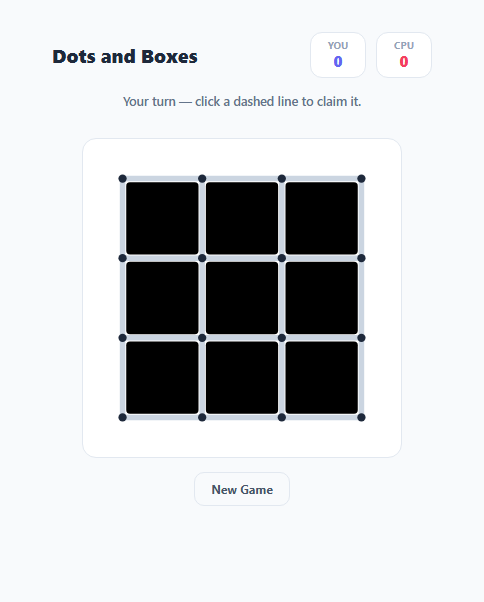
Dots and Boxes is a classic pencil-and-paper game played on a grid of dots: two players take turns drawing one line between two adjacent dots, and whoever draws the fourth and final edge of a 1x1 box claims it, marks it with their initial, and — critically — gets to go again. This snippet implements the full rule set on an SVG grid against a heuristic single-player CPU opponent, not just a static grid mockup.
Modeling a grid of lines, not a grid of cells
Most grid games track a 2D array of cell states. Dots and Boxes needs the opposite: the *lines between* dots are what players claim. This snippet uses two separate arrays, hLines[r][c] for horizontal edges and vLines[r][c] for vertical edges, sized so that a 4x4 dot grid (GRID = 4) produces exactly the right number of horizontal and vertical edge slots to bound a 3x3 grid of boxes. Each box's four bounding edges are looked up via boxLines(r, c), which returns the exact [type, row, col] coordinates of its top, bottom, left, and right edge in those two arrays.
Detecting a completed box
boxComplete(r, c) simply checks whether all four edges returned by boxLines(r, c) are already taken. After every line is claimed, claimLine() re-scans every still-unclaimed box on the board with this check — a line can complete more than one box at once, since an interior edge borders two boxes simultaneously.
The extra-turn rule that defines the whole strategy
The single rule that gives Dots and Boxes its distinctive endgame tension is this: completing one or more boxes grants the same player another turn immediately, rather than passing play. claimLine() tracks claimedAny across the scan and only switches current to the other player when the move claimed zero boxes. This is why skilled players deliberately avoid drawing a box's third edge — doing so hands the opponent a free box *and* an extra turn, chained potentially several boxes deep.
A CPU opponent that plays by that same logic
Rather than a random-move bot, cpuMove() follows a real two-tier heuristic: first, it checks every remaining line with wouldCompleteBox() and immediately claims any line that completes a box (chaining automatically, since claiming a box re-triggers cpuMove via the extra-turn rule). If no box can be completed, it filters candidates through createsThirdEdge() to avoid drawing a box's *third* edge, which would hand the human player a free box next turn — the same safe-move heuristic a beginner-to-intermediate human player uses.
Rendering with layered SVG
Boxes are drawn first (as filled, initially-transparent rectangles) so player-colored fills sit beneath the grid lines. Each unclaimed line is drawn twice — a thin visible <line> and an invisible wider db-line-hit line layered on top purely to make the actual click target far more forgiving than the 6px visible stroke, which matters a great deal on a dense dot grid.
Build with AI
Build, Understand, Optimize, and Extend It With AI
Paste this snippet's HTML, CSS, and JS into an AI coding assistant like Claude and ask it to explain exactly how the horizontal and vertical edge arrays map to each box's four bounding edges via boxLines(), and why claimedAny — not a fixed turn counter — is what determines whether the turn passes to the other player. It's also a good candidate for extension — ask it to upgrade the CPU heuristic into a real minimax search over remaining moves (Dots and Boxes has a well-known "double-cross" endgame strategy worth implementing), add a chain-length indicator that highlights entire connected regions of 2-edge boxes, or convert the single-CPU setup into local two-human-player mode.
Prompt to recreate it
Copy this into your AI assistant of choice to build the effect from scratch, or as a jumping-off point for your own variant:
Build a two-player Dots and Boxes game in plain HTML, CSS, and JavaScript, rendered on an inline SVG grid — no libraries, one human player versus a CPU opponent.

Requirements:
- Model a grid of dots (e.g. 4x4, producing a 3x3 grid of boxes) using two separate data structures: one for horizontal line state between horizontally-adjacent dots, and one for vertical line state between vertically-adjacent dots. Do not model the game state as a grid of cells only — the lines between dots are what players actually claim.
- Render every dot, every unclaimed line as a clickable target, and every claimed line in the color of whichever player claimed it, with each box in the grid filled with a light tint and an initial once completed.
- Detect when a move completes a box: a box counts as complete only once all four of its bounding edges (top, bottom, left, right, correctly looked up from the two line arrays) are claimed. A single move can complete two boxes at once if it is an interior edge shared by two boxes.
- Implement the real Dots and Boxes turn rule: if a move completes one or more boxes, the same player moves again immediately instead of the turn passing to the other player; the turn only passes after a move that completes zero boxes.
- Track a running score per player (number of boxes claimed) displayed live, and end the game with a clear win/tie message once every box on the board has been claimed.
- Implement a CPU opponent using a two-tier heuristic: first check every remaining line for one that would immediately complete a box and play it (chaining automatically via the extra-turn rule); if none exists, avoid playing any line that would bring a box up to exactly three claimed edges (since that would hand the human a free box), and otherwise pick randomly among the safe remaining lines.
- Make each thin visible line have a much larger invisible click/tap hit target layered on top of it, so clicking near a line (not just exactly on its few-pixel-wide stroke) still registers.
Want to tighten it up first? Run this prompt through the AI Prompt Studio to score it across 8 quality dimensions, catch anti-patterns, and tune the wording for Claude, ChatGPT, or Gemini before you paste it in.
Step by step
How to Use
- 1Click a dashed lineClick any unclaimed edge between two dots to draw it in your color (indigo).
- 2Complete a box for an extra turnDrawing a box's fourth edge claims it and marked with "Y" — and grants you another turn immediately.
- 3Watch the CPU respondThe CPU (red, marked "C") claims any box it can immediately, and otherwise avoids drawing a box's third edge to deny you a free capture.
- 4Track the scoreClaimed boxes tally live in the header for both players; the game ends once every box on the board is claimed.
- 5Change the grid sizeEdit the GRID constant in the JS panel — GRID = 4 produces a 3x3 box grid; GRID = 5 produces a larger 4x4 box grid.
- 6Start a new gameClick "New Game" to clear every line and box and return to your turn.
Real-world uses
Common Use Cases
Got questions?
Frequently Asked Questions
This is the actual rule of Dots and Boxes, not a simplification: whenever a move completes one or more boxes, the same player immediately moves again instead of passing play. claimLine() tracks whether the move claimed any box (claimedAny) and only switches current to the other player when it did not.
cpuMove() first checks every remaining line for one that would immediately complete a box (wouldCompleteBox) and plays it if found — chaining automatically through the extra-turn rule. If no box can be completed, it filters out any line that would create a box with exactly 3 edges taken (createsThirdEdge), since that would hand the human player a free capture, and picks randomly among the remaining safe lines.
Yes. claimLine() re-scans every unclaimed box on the board after each line is drawn, not just the boxes touching that specific line in an obvious way — an interior edge borders two boxes at once, so completing both simultaneously is correctly detected and both are awarded.
Two separate boolean-ish arrays track claimed state: hLines[r][c] for horizontal edges and vLines[r][c] for vertical edges, sized so a GRID x GRID dot grid produces the right number of each. boxLines(r, c) maps a box's row/column to the exact four edge coordinates in these two arrays.
Edit the GRID constant in the JS panel. GRID counts dots per side, so GRID = 4 (the default) produces a 3x3 grid of boxes; GRID = 5 produces a 4x4 grid of boxes, and so on.
Yes — replace the setTimeout(cpuMove, 550) call in claimLine() with nothing, and change the hit-line click handler to call claimLine(type, r, c, current) instead of hardcoding 'p1', so whichever player's turn it is claims the line they click.