

Learn Coding Visually
Learn to code with interactive, live-preview playgrounds — HTML, CSS, JavaScript, React & more.
 HTML Playground42 lessons · Click-based · Live preview
 CSS PlaygroundLearn CSS with a live editor
 JavaScript Playground60 lessons · DOM · Async · Canvas
 React PlaygroundLearn React with a live code editor
 GSAP PlaygroundLearn GSAP animation interactively
 SVG Playground44 lessons · shapes · paths · animation
 SCSS Playground45 lessons · Sass modules · tokens
 Tailwind PlaygroundLearn Tailwind CSS with a live editor
 Bootstrap 5 Playground50 lessons · live preview
Tic-Tac-Toe vs Computer — Free HTML CSS JS Snippet
Tic-Tac-Toe vs Computer · Games · Plain HTML, CSS & JS · Live preview
What's included
Features
About this UI Snippet
Tic-Tac-Toe vs Computer — Heuristic AI Opponent, Win-Line Detection & Session Scoreboard
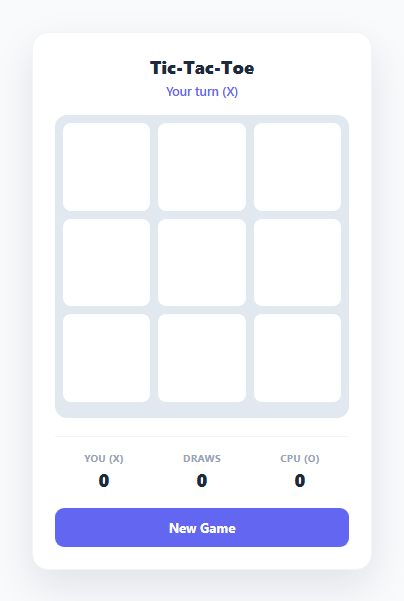
Tic-Tac-Toe is small enough to reason about completely, which makes it an ideal vehicle for teaching a genuinely useful pattern: a rule-based heuristic AI that plays competently without the complexity of a full minimax search. This snippet implements a real, playable game where the human is X and the computer is O, with a four-tier decision heuristic, accurate win/draw detection across all eight lines, and a running scoreboard that persists across rounds within the session.
Representing the board and detecting wins
The board state is a flat array of nine values, cellState, where each entry is 'X', 'O', or null. All eight possible winning lines — three rows, three columns, and two diagonals — are hardcoded as index triplets in the WIN_LINES array, e.g. [0,4,8] for the main diagonal. checkWinner() iterates every line and checks whether all three cells share the same non-null value; if so it returns the winning mark and the specific line indices so the UI can highlight exactly those three cells. If no line matches and every cell is filled, the function returns a draw result instead. This flat-array-plus-index-triplet approach avoids any 2D coordinate math entirely — the nine cells and eight lines are small enough that hardcoding is clearer than deriving them algorithmically.
The four-tier heuristic AI: win, block, center, corners, edges
Rather than implementing minimax or another exhaustive search, the computer opponent in computerMove() follows a well-known Tic-Tac-Toe heuristic that plays correctly (or draws) against any human opponent in the vast majority of real games, and is far easier to read and extend than a recursive search. The priority order is: (1) win now — findWinningMove('O') scans every line for one where the computer already has two marks and the third cell is empty, and takes it immediately; (2) block the human — if no winning move exists, the same function is called with 'X' instead of 'O' to find and occupy the cell that would let the human complete a line next turn; (3) take the center — cell index 4 is part of four different winning lines (one row, one column, both diagonals), making it statistically the most valuable opening cell; (4) take a corner — corners (indices 0, 2, 6, 8) are each part of three lines and are chosen randomly among the available ones; (5) take an edge — edges (1, 3, 5, 7) are each part of only two lines and are the last resort. This ordering is what makes the opponent feel "smart" without ever running a deep search: it always secures an immediate win or blocks an immediate loss, and otherwise falls back to positionally sound cells.
findWinningMove() as a shared building block
The same function powers both the "can I win" and "must I block" checks — the only difference is which mark is passed in. For each of the eight lines, it counts how many cells already hold the target mark and how many are still empty. A line with exactly two marks of the target and exactly one empty cell is a move that completes (or would complete) that line; the function returns that empty cell's index immediately. Reusing one function for both offense and defense keeps the AI logic compact and makes the priority order in computerMove() read almost like plain English: try to win, else try to block, else fall through the positional preferences.
Turn sequencing and the scoreboard
humanMove() places an X, checks for a winner, and — if the game continues — disables the board, updates the turn indicator to "Computer's turn...", and schedules computerMove() after a 450ms setTimeout so the computer's response feels like a deliberate move rather than an instant snap. Win detection happens through the same endTurnCheck() path after both human and computer moves, keeping the win/draw logic in exactly one place. The scores object ({ X, O, D }) accumulates across rounds and is rendered to the scoreboard on every completed game; calling newGame() resets the board and turn state but deliberately leaves scores untouched, so the tally persists across as many rounds as the player wants within the session, similar to the running win/loss tracking used in the Word Guess Game.
Build with AI
Build, Understand, Optimize, and Extend It With AI
Paste this snippet's HTML, CSS, and JS into an AI coding assistant like Claude and ask it to trace through computerMove() move by move against a specific board you describe, confirming exactly which tier of the win/block/center/corner/edge priority chain fires and why. It's also worth asking the assistant to construct a board position where a human fork would beat this heuristic, to make concrete why it is not a fully unbeatable minimax AI. Beyond understanding the current logic, use the assistant to extend the game: ask for a full minimax (with or without alpha-beta pruning) implementation as a selectable "Hard" difficulty, a local two-player pass-and-play mode, a persisted scoreboard using localStorage instead of in-memory state, or animated confetti on a human win. Treat the current heuristic as a deliberately simple, readable baseline rather than the ceiling of what the game can do.
Prompt to recreate it
Copy this into your AI assistant of choice to build the effect from scratch, or as a jumping-off point for your own variant:
Build a playable Tic-Tac-Toe game against a computer opponent in plain HTML, CSS, and JavaScript, with the human playing X and the computer playing O.

Requirements:
- A 3x3 clickable grid where clicking an empty cell places the human's X; clicking an already-filled cell or clicking while it is not the human's turn must do nothing.
- After the human's move, if the game has not ended, the computer must make a move using this exact priority order, checked in sequence: (1) if the computer can complete three-in-a-row this turn, take that winning move; (2) otherwise if the human would complete three-in-a-row on their next turn, take that cell to block it; (3) otherwise take the center cell if it is free; (4) otherwise take a random available corner cell; (5) otherwise take a random available edge cell.
- Detect a win by checking all 8 possible lines (3 rows, 3 columns, 2 diagonals) after every move, and when a line is completed, visually highlight the exact three winning cells distinctly from the rest of the board.
- Detect a draw when all 9 cells are filled with no winning line, and display a clear draw message.
- Clearly display whose turn it is at all times, including a brief "computer is thinking" state between the human's move and the computer's response (a short artificial delay before the computer plays is fine).
- Maintain and display a running scoreboard of X wins, O wins, and draws that persists and accumulates across multiple rounds played in the same session, only resetting when the page is reloaded.
- Provide a "New Game" button that resets the board and turn state for a fresh round without resetting the accumulated scoreboard.
Want to tighten it up first? Run this prompt through the AI Prompt Studio to score it across 8 quality dimensions, catch anti-patterns, and tune the wording for Claude, ChatGPT, or Gemini before you paste it in.
Source Code
<div class="game-card">
  <div class="header">
    <h2>Tic-Tac-Toe</h2>
    <p class="turn-indicator" id="turn-indicator">Your turn (X)</p>
  </div>

  <div class="board" id="board">
    <button class="cell" data-index="0" aria-label="Cell 1"></button>
    <button class="cell" data-index="1" aria-label="Cell 2"></button>
    <button class="cell" data-index="2" aria-label="Cell 3"></button>
    <button class="cell" data-index="3" aria-label="Cell 4"></button>
    <button class="cell" data-index="4" aria-label="Cell 5"></button>
    <button class="cell" data-index="5" aria-label="Cell 6"></button>
    <button class="cell" data-index="6" aria-label="Cell 7"></button>
    <button class="cell" data-index="7" aria-label="Cell 8"></button>
    <button class="cell" data-index="8" aria-label="Cell 9"></button>
    <div class="win-line hidden" id="win-line"></div>
  </div>

  <div class="scoreboard">
    <div class="score-item">
      <span class="score-label">You (X)</span>
      <span class="score-value" id="score-x">0</span>
    </div>
    <div class="score-item">
      <span class="score-label">Draws</span>
      <span class="score-value" id="score-d">0</span>
    </div>
    <div class="score-item">
      <span class="score-label">CPU (O)</span>
      <span class="score-value" id="score-o">0</span>
    </div>
  </div>

  <button class="btn-new" id="btn-new">New Game</button>
</div>
* { box-sizing: border-box; margin: 0; padding: 0; }
body { font-family: system-ui, sans-serif; background: #f8fafc; min-height: 100vh; display: flex; align-items: center; justify-content: center; padding: 24px; }
.game-card {
width: 100%; max-width: 340px;
background: #fff; border-radius: 16px;
padding: 22px; box-shadow: 0 16px 40px rgba(15,23,42,0.1);
border: 1px solid #f1f5f9;
}
.header { text-align: center; margin-bottom: 16px; }
.header h2 { font-size: 18px; font-weight: 800; color: #1e293b; margin-bottom: 4px; }
.turn-indicator { font-size: 12.5px; font-weight: 600; color: #6366f1; min-height: 16px; }
.turn-indicator.result { color: #059669; }
.board {
position: relative;
display: grid; grid-template-columns: repeat(3, 1fr); gap: 8px;
background: #e2e8f0; padding: 8px; border-radius: 12px;
}
.cell {
aspect-ratio: 1 / 1; border: none; border-radius: 8px;
background: #fff; cursor: pointer;
font-size: 34px; font-weight: 800;
display: flex; align-items: center; justify-content: center;
transition: background 0.15s, transform 0.1s;
}
.cell:hover:not(:disabled) { background: #f8fafc; }
.cell:disabled { cursor: default; }
.cell.x { color: #6366f1; }
.cell.o { color: #f97316; }
.cell.pop { animation: pop 0.2s ease; }
.cell.win-cell { background: #ecfdf5; }
@keyframes pop {
0% { transform: scale(0.5); opacity: 0; }
100% { transform: scale(1); opacity: 1; }
}
.scoreboard {
display: flex; justify-content: space-between;
margin-top: 18px; padding-top: 14px; border-top: 1px solid #f1f5f9;
}
.score-item { display: flex; flex-direction: column; align-items: center; gap: 3px; flex: 1; }
.score-label { font-size: 10px; font-weight: 700; letter-spacing: 0.03em; text-transform: uppercase; color: #94a3b8; }
.score-value { font-size: 18px; font-weight: 800; color: #1e293b; }
.btn-new {
width: 100%; margin-top: 16px;
background: #6366f1; color: #fff; border: none;
padding: 11px; border-radius: 9px;
font-size: 13px; font-weight: 700; cursor: pointer;
font-family: inherit; transition: background 0.15s;
}
.btn-new:hover { background: #4f46e5; }const WIN_LINES = [
[0,1,2], [3,4,5], [6,7,8], // rows
[0,3,6], [1,4,7], [2,5,8], // columns
[0,4,8], [2,4,6], // diagonals
];
const cells = Array.from(document.querySelectorAll('.cell'));
const board = document.getElementById('board');
const turnIndicator = document.getElementById('turn-indicator');
const scoreXEl = document.getElementById('score-x');
const scoreOEl = document.getElementById('score-o');
const scoreDEl = document.getElementById('score-d');
const btnNew = document.getElementById('btn-new');
let cellState = Array(9).fill(null); // 'X' | 'O' | null
let gameOver = false;
let humanTurn = true;
const scores = { X: 0, O: 0, D: 0 };
function checkWinner(state) {
for (const line of WIN_LINES) {
const [a, b, c] = line;
if (state[a] && state[a] === state[b] && state[a] === state[c]) {
return { winner: state[a], line };
}
}
if (state.every(v => v !== null)) return { winner: 'draw', line: null };
return null;
}
function render() {
cells.forEach((cell, i) => {
const value = cellState[i];
cell.textContent = value || '';
cell.classList.toggle('x', value === 'X');
cell.classList.toggle('o', value === 'O');
cell.disabled = !!value || gameOver || !humanTurn;
});
}
function placeMark(index, mark) {
cellState[index] = mark;
cells[index].classList.add('pop');
render();
}
function endTurnCheck() {
const result = checkWinner(cellState);
if (!result) return false;
gameOver = true;
if (result.winner === 'draw') {
scores.D++;
turnIndicator.textContent = "It's a draw!";
} else {
if (result.winner === 'X') scores.X++; else scores.O++;
result.line.forEach(i => cells[i].classList.add('win-cell'));
turnIndicator.textContent = result.winner === 'X' ? 'You win!' : 'Computer wins!';
}
turnIndicator.classList.add('result');
updateScoreboard();
render();
return true;
}
function updateScoreboard() {
scoreXEl.textContent = scores.X;
scoreOEl.textContent = scores.O;
scoreDEl.textContent = scores.D;
}
function humanMove(index) {
if (gameOver || !humanTurn || cellState[index]) return;
placeMark(index, 'X');
if (endTurnCheck()) return;
humanTurn = false;
turnIndicator.textContent = "Computer's turn...";
render();
setTimeout(computerMove, 450);
}
// --- Computer AI: win > block > center > corners > edges ---
function findWinningMove(mark) {
for (const line of WIN_LINES) {
const values = line.map(i => cellState[i]);
const marks = values.filter(v => v === mark).length;
const empties = line.filter(i => cellState[i] === null);
if (marks === 2 && empties.length === 1) return empties[0];
}
return null;
}
function computerMove() {
if (gameOver) return;
let move = findWinningMove('O');
if (move === null) move = findWinningMove('X'); // block human's winning move
if (move === null && cellState[4] === null) move = 4; // center
if (move === null) {
const corners = [0, 2, 6, 8].filter(i => cellState[i] === null);
if (corners.length) move = corners[Math.floor(Math.random() * corners.length)];
}
if (move === null) {
const edges = [1, 3, 5, 7].filter(i => cellState[i] === null);
if (edges.length) move = edges[Math.floor(Math.random() * edges.length)];
}
if (move === null) return; // board full, shouldn't happen
placeMark(move, 'O');
if (endTurnCheck()) return;
humanTurn = true;
turnIndicator.textContent = 'Your turn (X)';
render();
}
function newGame() {
cellState = Array(9).fill(null);
gameOver = false;
humanTurn = true;
turnIndicator.classList.remove('result');
turnIndicator.textContent = 'Your turn (X)';
cells.forEach(c => {
c.classList.remove('x', 'o', 'pop', 'win-cell');
});
render();
}
cells.forEach((cell, i) => {
cell.addEventListener('click', () => humanMove(i));
});
btnNew.addEventListener('click', newGame);
newGame();Step by step
How to Use
- 1Make your moveClick any empty cell to place an X. humanMove() rejects clicks on filled cells or while it is not the human's turn (cellState[index] or !humanTurn guards).
- 2Watch the computer respondAfter your move, the board disables and the turn indicator reads "Computer's turn..." for 450ms before computerMove() runs findWinningMove('O'), then findWinningMove('X') to block, then falls back to center, corners, and edges.
- 3Try to beat the heuristicBecause the AI always takes an immediate win or block, the only way to beat it is to create a "fork" — two simultaneous winning threats in one move — which this heuristic does not defend against, unlike a full minimax search.
- 4Read the win-line highlightOn a completed game, checkWinner() returns the exact three winning indices, and endTurnCheck() adds the .win-cell class to just those cells so the winning row, column, or diagonal is visually highlighted.
- 5Track the running scoreboardThe scores object accumulates X wins, O wins, and draws across every round played in the session. Clicking "New Game" resets the board via newGame() but intentionally does not reset scores, so the tally keeps growing.
- 6Export and extendClick HTML or JSX to export. Swap findWinningMove's priority order, add a difficulty toggle that occasionally skips the block step for an easier opponent, or replace the heuristic with a full minimax function for a genuinely unbeatable AI.
Real-world uses
Common Use Cases
Got questions?
Frequently Asked Questions
Yes, but only through a specific tactic called forking. The AI always takes an immediate winning move and always blocks an immediate loss, so it can never be beaten by a straightforward three-in-a-row attempt. However, because it does not look more than one move ahead, a human who creates two simultaneous winning threats in a single move (a fork) can win, since the heuristic can only block one of the two threats on its next turn. A full minimax search would close this gap entirely.
findWinningMove(mark) loops through all 8 win lines and, for each one, counts how many cells already contain the given mark and how many cells are still empty. A line with exactly 2 cells of that mark and exactly 1 empty cell means playing that empty cell would complete the line. Calling it with 'O' finds the computer's own winning move; calling it with 'X' finds the move that would let the human win, which the computer then takes instead to block it. The same function powers both checks — only the mark argument changes.
This ordering reflects how many of the 8 winning lines pass through each cell type. The center cell (index 4) belongs to 4 lines (its row, its column, and both diagonals), making it the single most valuable cell. Each corner belongs to 3 lines (its row, its column, and one diagonal). Each edge belongs to only 2 lines (its row or column, no diagonal). Taking cells with more line membership keeps more future winning paths open, which is why the fallback priority is center, then a random corner, then a random edge.
The scores object ({ X, O, D }) is declared outside of newGame() and is intentionally never reset by it — newGame() only resets cellState, gameOver, and humanTurn. This lets players track a running tally of wins, losses, and draws across as many rounds as they want to play in one sitting. Refreshing the page does reset the scoreboard since it is only held in memory, not persisted to localStorage.
Yes. To make the computer move first, call computerMove() once at the start of newGame() before rendering, and set humanTurn = false initially. To make it play randomly instead of with the heuristic, replace the body of computerMove() with a single line that picks a random index from the empty cells: the four-tier priority chain (win, block, center, corners, edges) can be bypassed entirely or made probabilistic for an adjustable difficulty setting.