Learn Coding Visually
Learn to code with interactive, live-preview playgrounds — HTML, CSS, JavaScript, React & more.
 HTML Playground42 lessons · Click-based · Live preview
 CSS PlaygroundLearn CSS with a live editor
 JavaScript Playground60 lessons · DOM · Async · Canvas
 React PlaygroundLearn React with a live code editor
 GSAP PlaygroundLearn GSAP animation interactively
 SVG Playground44 lessons · shapes · paths · animation
 SCSS Playground45 lessons · Sass modules · tokens
 Tailwind PlaygroundLearn Tailwind CSS with a live editor
 Bootstrap 5 Playground50 lessons · live preview
Whack-a-Mole Game — Free HTML CSS JS Snippet
Whack-a-Mole Game · Games · Plain HTML, CSS & JS · Live preview
What's included
Features
About this UI Snippet
Whack-a-Mole Game — Randomized Timers, Hit Detection, Countdown & Best-Score Persistence
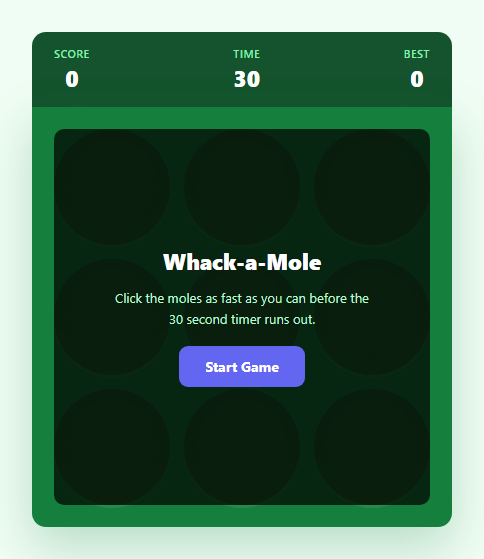
Whack-a-Mole is a classic reflex game, and building a working version teaches a genuinely useful pattern: coordinating randomized, self-rescheduling timers with real-time user input while keeping a single source of truth for "what is clickable right now." This snippet implements the full loop in vanilla JavaScript — a 3x3 grid of holes, a mole that pops up at unpredictable intervals, a squash-hit animation on a successful click, a 30-second countdown, and a best score persisted with localStorage.
The self-rescheduling timer pattern
Rather than using setInterval on a fixed cadence, the game uses a recursive setTimeout chain via popRandomMole(). Each time a mole appears, two timers are scheduled: a hideTimeout that retracts the mole after a random 650-950ms "up" duration if it isn't clicked, and a moleTimeout that calls popRandomMole() again after a random 800-1200ms delay to bring up the next mole. This recursive-timeout approach is deliberately chosen over setInterval because each call can pick a fresh random delay — producing the unpredictable, non-metronomic rhythm that makes whack-a-mole feel alive rather than mechanical. Every timer handle (moleTimeout, hideTimeout, timerInterval) is stored in module-level variables specifically so endGame() can call clearTimeout/clearInterval on all three and guarantee no stray callback fires a mole after the round has ended.
Tracking "the one clickable mole" with a single reference
The game keeps exactly one variable, activeHole, pointing at the DOM element of whichever hole currently has its mole up. This is the crux of correct hit detection: whack(hole) only awards a point if the clicked hole strictly equals activeHole and that hole still carries the up class. Clicking an empty hole, clicking a hole whose mole already retracted, or clicking a stale reference after a new mole has appeared all fail this check safely. Before showing a new mole, popRandomMole() first retracts whatever activeHole currently is, so at most one mole is ever visible at a time, keeping the difficulty consistent and the click target unambiguous.
CSS-driven pop and squash animations
Each hole is a circular button with overflow: hidden and a radial-gradient dirt texture drawn purely in CSS — no image assets. The mole itself is an emoji positioned absolutely at the bottom of the hole with transform: translate(-50%, 100%) (fully hidden below the rim) by default. Adding the .up class transitions it to translate(-50%, 8%) using a bouncy cubic-bezier(0.34, 1.56, 0.64, 1) easing curve, which overshoots slightly for a satisfying spring-pop feel. A successful whack adds a .whacked class that triggers a squash keyframe animation — the mole briefly scales wide and flat (scaleX(1.3) scaleY(0.7)) at its midpoint before retracting, mimicking a comic "squash" impact frame.
Countdown, scoring, and persistent best score
A single setInterval ticking once per second drives the 30-second countdown, decrementing timeLeft and updating the DOM directly. When timeLeft reaches zero, endGame() stops all timers, hides any visible mole, and reveals the end screen with the final score. The best score is read from and written to localStorage under the key whack-a-mole-best — getBest() parses the stored string with a fallback to 0, and endGame() compares the current run's score against it, writing a new value and flashing a "New best score!" message only when the record is actually broken. This mirrors the persistence pattern used in the Word Guess Game, where session state is layered on top of a small localStorage-backed record.
Build with AI
Build, Understand, Optimize, and Extend It With AI
Paste this snippet into an AI coding assistant like Claude and ask it to trace exactly how the three timers — timerInterval, moleTimeout, and hideTimeout — interact, and why each one gets explicitly cleared in both startGame() and endGame() rather than just left to fire naturally. It's also worth asking the assistant to explain why activeHole is used instead of just checking the .up class alone, since that distinction is what prevents a subtle double-scoring bug. Beyond understanding, use the assistant to extend the game: ask for a difficulty curve that narrows the random timing ranges as the score climbs, a combo/streak multiplier for consecutive hits without a miss, sound effects triggered via the Web Audio API on each successful whack, or a two-player local mode. Treat the current implementation as a solid, bug-free foundation rather than a finished product — there is plenty of room to extend the scoring and difficulty systems.
Prompt to recreate it
Copy this into your AI assistant of choice to build the effect from scratch, or as a jumping-off point for your own variant:
Build a playable whack-a-mole game in plain HTML, CSS, and JavaScript with a 3x3 grid of holes, randomized mole timing, and a countdown timer.

Requirements:
- A 3x3 grid of circular "holes"; each hole can independently show or hide a "mole" (an emoji or CSS shape) using a CSS transform-based slide-up animation, not a display toggle, so the motion is smoothly animated.
- Moles must appear at unpredictable, randomized intervals (not a fixed metronomic cadence) and each mole must automatically retract on its own after a randomized short duration if the player does not click it in time.
- Clicking a hole while its mole is visible must score a point and trigger a distinct "hit" animation (e.g. a squash/scale effect) before the mole retracts; clicking an empty hole, or a hole whose mole already retracted, must do nothing and must never score.
- At any given moment, exactly one mole should be poppable/clickable across the whole grid — showing a new mole must retract any mole that is still up elsewhere.
- Implement a 30-second visible countdown timer that starts when the player clicks "Start Game"; when it reaches zero, stop all mole spawning immediately, hide any visible mole, and show a game-over screen with the final score.
- Persist the player's best score across page reloads using localStorage, display it at all times, and clearly indicate when the just-finished round set a new best.
- Provide a "Play Again" action that fully resets score, timer, and all timers/animation state with no leftover scheduled callbacks from the previous round.
- Ensure all JavaScript timers are properly cleared when a round ends or restarts so no mole can pop up after the game has stopped.
Want to tighten it up first? Run this prompt through the AI Prompt Studio to score it across 8 quality dimensions, catch anti-patterns, and tune the wording for Claude, ChatGPT, or Gemini before you paste it in.
Source Code
<div class="game-wrap">
  <div class="topbar">
    <div class="stat">
      <span class="stat-label">Score</span>
      <span class="stat-value" id="score">0</span>
    </div>
    <div class="stat">
      <span class="stat-label">Time</span>
      <span class="stat-value" id="time">30</span>
    </div>
    <div class="stat">
      <span class="stat-label">Best</span>
      <span class="stat-value" id="best">0</span>
    </div>
  </div>

  <div class="board" id="board">
    <button class="hole" data-index="0" aria-label="Hole 1"><span class="mound"></span><span class="mole">🐹</span></button>
    <button class="hole" data-index="1" aria-label="Hole 2"><span class="mound"></span><span class="mole">🐹</span></button>
    <button class="hole" data-index="2" aria-label="Hole 3"><span class="mound"></span><span class="mole">🐹</span></button>
    <button class="hole" data-index="3" aria-label="Hole 4"><span class="mound"></span><span class="mole">🐹</span></button>
    <button class="hole" data-index="4" aria-label="Hole 5"><span class="mound"></span><span class="mole">🐹</span></button>
    <button class="hole" data-index="5" aria-label="Hole 6"><span class="mound"></span><span class="mole">🐹</span></button>
    <button class="hole" data-index="6" aria-label="Hole 7"><span class="mound"></span><span class="mole">🐹</span></button>
    <button class="hole" data-index="7" aria-label="Hole 8"><span class="mound"></span><span class="mole">🐹</span></button>
    <button class="hole" data-index="8" aria-label="Hole 9"><span class="mound"></span><span class="mole">🐹</span></button>

    <div class="overlay-screen" id="start-screen">
      <h2>Whack-a-Mole</h2>
      <p>Click the moles as fast as you can before the 30 second timer runs out.</p>
      <button class="btn-primary" id="btn-start">Start Game</button>
    </div>

    <div class="overlay-screen hidden" id="end-screen">
      <h2>Time's Up!</h2>
      <p>Final score: <span id="final-score">0</span></p>
      <p class="new-best hidden" id="new-best-msg">New best score!</p>
      <button class="btn-primary" id="btn-again">Play Again</button>
    </div>
  </div>
</div>
* { box-sizing: border-box; margin: 0; padding: 0; }
body { font-family: system-ui, sans-serif; background: #f0fdf4; min-height: 100vh; display: flex; align-items: center; justify-content: center; padding: 24px; }
.game-wrap { width: 100%; max-width: 420px; }
.topbar {
display: flex; justify-content: space-between;
background: #14532d; border-radius: 14px 14px 0 0;
padding: 14px 22px;
}
.stat { display: flex; flex-direction: column; align-items: center; gap: 2px; }
.stat-label { font-size: 11px; font-weight: 600; letter-spacing: 0.04em; text-transform: uppercase; color: #86efac; }
.stat-value { font-size: 22px; font-weight: 800; color: #fff; font-variant-numeric: tabular-nums; }
.board {
position: relative;
display: grid; grid-template-columns: repeat(3, 1fr); gap: 14px;
background: #15803d;
padding: 22px; border-radius: 0 0 14px 14px;
box-shadow: 0 20px 50px rgba(21,128,61,0.25);
}
.hole {
position: relative;
aspect-ratio: 1 / 1; width: 100%;
border: none; border-radius: 50%;
background: radial-gradient(circle at 50% 40%, #3f2412 0%, #291708 65%, #180d04 100%);
box-shadow: inset 0 6px 10px rgba(0,0,0,0.55), 0 3px 0 rgba(255,255,255,0.08);
overflow: hidden; cursor: pointer; padding: 0;
}
.mound {
position: absolute; inset: 0;
border-radius: 50%;
box-shadow: inset 0 -10px 14px rgba(70,40,15,0.5);
pointer-events: none;
}
.mole {
position: absolute; left: 50%; bottom: -10%;
transform: translate(-50%, 100%);
font-size: 44px; line-height: 1;
transition: transform 0.18s cubic-bezier(0.34, 1.56, 0.64, 1);
user-select: none;
will-change: transform;
}
.hole.up .mole { transform: translate(-50%, 8%); }
.hole.whacked .mole { animation: squash 0.28s ease; }
@keyframes squash {
0% { transform: translate(-50%, 8%) scale(1); }
40% { transform: translate(-50%, 35%) scaleX(1.3) scaleY(0.7); }
100% { transform: translate(-50%, 100%) scale(0.9); }
}
.overlay-screen {
position: absolute; inset: 22px;
background: rgba(6, 30, 14, 0.92);
border-radius: 10px;
display: flex; flex-direction: column; align-items: center; justify-content: center;
gap: 12px; text-align: center; padding: 24px;
z-index: 10;
transition: opacity 0.2s;
}
.overlay-screen.hidden { display: none; }
.overlay-screen h2 { color: #fff; font-size: 22px; font-weight: 800; }
.overlay-screen p { color: #bbf7d0; font-size: 13px; max-width: 260px; line-height: 1.6; }
.new-best { color: #fde047 !important; font-weight: 700; }
.btn-primary {
background: #6366f1; color: #fff; border: none;
padding: 11px 26px; border-radius: 9px;
font-size: 14px; font-weight: 700; cursor: pointer;
font-family: inherit; transition: background 0.15s, transform 0.1s;
margin-top: 4px;
}
.btn-primary:hover { background: #4f46e5; }
.btn-primary:active { transform: scale(0.96); }const GAME_DURATION = 30;
const BEST_KEY = 'whack-a-mole-best';
const holes = Array.from(document.querySelectorAll('.hole'));
const scoreEl = document.getElementById('score');
const timeEl = document.getElementById('time');
const bestEl = document.getElementById('best');
const startScreen = document.getElementById('start-screen');
const endScreen = document.getElementById('end-screen');
const finalScoreEl = document.getElementById('final-score');
const newBestMsg = document.getElementById('new-best-msg');
const btnStart = document.getElementById('btn-start');
const btnAgain = document.getElementById('btn-again');
let score = 0;
let timeLeft = GAME_DURATION;
let gameActive = false;
let timerInterval = null;
let moleTimeout = null;
let hideTimeout = null;
let activeHole = null;
function getBest() {
const raw = localStorage.getItem(BEST_KEY);
return raw ? parseInt(raw, 10) || 0 : 0;
}
function renderBest() {
bestEl.textContent = getBest();
}
function randomBetween(min, max) {
return Math.floor(Math.random() * (max - min + 1)) + min;
}
function popRandomMole() {
if (!gameActive) return;
// Retract any currently visible mole before showing a new one
if (activeHole) {
activeHole.classList.remove('up');
activeHole = null;
}
const hole = holes[randomBetween(0, holes.length - 1)];
hole.classList.add('up');
activeHole = hole;
const upDuration = randomBetween(650, 950);
hideTimeout = setTimeout(() => {
if (hole === activeHole) {
hole.classList.remove('up');
activeHole = null;
}
}, upDuration);
const nextDelay = randomBetween(800, 1200);
moleTimeout = setTimeout(popRandomMole, nextDelay);
}
function whack(hole) {
if (!gameActive) return;
if (hole !== activeHole || !hole.classList.contains('up')) return;
score++;
scoreEl.textContent = score;
hole.classList.remove('up');
hole.classList.add('whacked');
setTimeout(() => hole.classList.remove('whacked'), 280);
activeHole = null;
}
function tick() {
timeLeft--;
timeEl.textContent = Math.max(timeLeft, 0);
if (timeLeft <= 0) endGame();
}
function startGame() {
score = 0;
timeLeft = GAME_DURATION;
scoreEl.textContent = '0';
timeEl.textContent = String(GAME_DURATION);
gameActive = true;
activeHole = null;
holes.forEach(h => h.classList.remove('up', 'whacked'));
startScreen.classList.add('hidden');
endScreen.classList.add('hidden');
clearInterval(timerInterval);
clearTimeout(moleTimeout);
clearTimeout(hideTimeout);
timerInterval = setInterval(tick, 1000);
moleTimeout = setTimeout(popRandomMole, 500);
}
function endGame() {
gameActive = false;
clearInterval(timerInterval);
clearTimeout(moleTimeout);
clearTimeout(hideTimeout);
holes.forEach(h => h.classList.remove('up', 'whacked'));
activeHole = null;
const best = getBest();
const isNewBest = score > best;
if (isNewBest) localStorage.setItem(BEST_KEY, String(score));
finalScoreEl.textContent = score;
newBestMsg.classList.toggle('hidden', !isNewBest);
renderBest();
endScreen.classList.remove('hidden');
}
holes.forEach(hole => {
hole.addEventListener('click', () => whack(hole));
});
btnStart.addEventListener('click', startGame);
btnAgain.addEventListener('click', startGame);
renderBest();Step by step
How to Use
- 1Start the roundClick "Start Game" to reset the score to 0, set the countdown to 30, and call popRandomMole() for the first time. The overlay screens are toggled with the .hidden class rather than being removed from the DOM, so restarting is instant.
- 2Whack the molesClick a hole while its mole is up (the .up class is present) to score a point. The whack() function checks that the clicked hole strictly equals the activeHole reference before awarding points, so clicking an empty or already-retracted hole is a safe no-op.
- 3Watch the timing get unpredictableEach mole stays up for a random 650-950ms (hideTimeout) and the next mole appears after a random 800-1200ms delay (moleTimeout). Both durations are recomputed on every call to popRandomMole(), so no two rounds feel identical.
- 4React to the countdownThe topbar time value decrements once per second via setInterval(tick, 1000). When it hits zero, endGame() clears every timer, hides any visible mole, and shows the end screen automatically — no player action needed.
- 5Check your best scoreAfter each round, your score is compared against the value stored under the whack-a-mole-best localStorage key. If you beat it, a "New best score!" message appears on the end screen and the stored value updates immediately.
- 6Export and restyleClick HTML or JSX to export. Swap the dirt-hole radial-gradient colors or replace the 🐹 emoji with an SVG/sprite for a different theme (whack-a-frog, whack-a-gopher). Change GAME_DURATION in the JS panel to adjust round length.
Real-world uses
Common Use Cases
Got questions?
Frequently Asked Questions
A single module-level variable, activeHole, always points at the one hole element whose mole is currently up. Before showing a new mole, popRandomMole() first retracts whatever activeHole currently references. The whack() function only awards a point when the clicked hole is strictly equal to activeHole and still has the .up class, so clicks on any other hole — including one whose mole just retracted milliseconds earlier — are safely ignored.
setInterval fires at a fixed, unchanging cadence, which quickly becomes predictable and easy to game. This snippet instead has popRandomMole() schedule its own next call with setTimeout(popRandomMole, randomBetween(800, 1200)) — a fresh random delay is chosen every single time, so the rhythm never repeats. The same randomBetween() helper independently randomizes how long each mole stays up before auto-retracting.
The score is stored as a plain string in localStorage under the key whack-a-mole-best. getBest() reads and parses it (defaulting to 0 if nothing is stored yet), and endGame() compares the just-finished score against it, calling localStorage.setItem() only when the new score is strictly higher. Because localStorage is scoped per-origin and persists indefinitely, the best score survives page reloads and browser restarts on the same device and browser.
Yes. Change the GAME_DURATION constant at the top of the JS panel to lengthen or shorten the countdown. To increase difficulty, narrow the ranges passed to randomBetween() inside popRandomMole() — for example reducing the up-time range from 650-950ms to 400-600ms makes moles disappear faster, and reducing the spawn-delay range makes moles appear more frequently.
No. The moment whack() awards a point it immediately sets activeHole to null and removes the .up class from that hole, so a second click on the same hole in the same frame fails the equality check in whack() and is a no-op. Only one point can be scored per mole appearance.