Learn Coding Visually
Learn to code with interactive, live-preview playgrounds — HTML, CSS, JavaScript, React & more.
 HTML Playground42 lessons · Click-based · Live preview
 CSS PlaygroundLearn CSS with a live editor
 JavaScript Playground60 lessons · DOM · Async · Canvas
 React PlaygroundLearn React with a live code editor
 GSAP PlaygroundLearn GSAP animation interactively
 SVG Playground44 lessons · shapes · paths · animation
 SCSS Playground45 lessons · Sass modules · tokens
 Tailwind PlaygroundLearn Tailwind CSS with a live editor
 Bootstrap 5 Playground50 lessons · live preview
Click Speed Test (CPS Counter) — Free HTML CSS JS Snippet
Click Speed Test (CPS Counter) · Games · Plain HTML, CSS & JS · Live preview
What's included
Features
About this UI Snippet
Click Speed Test — Timed CPS Counter, Skill Tiers & Persisted Best Score
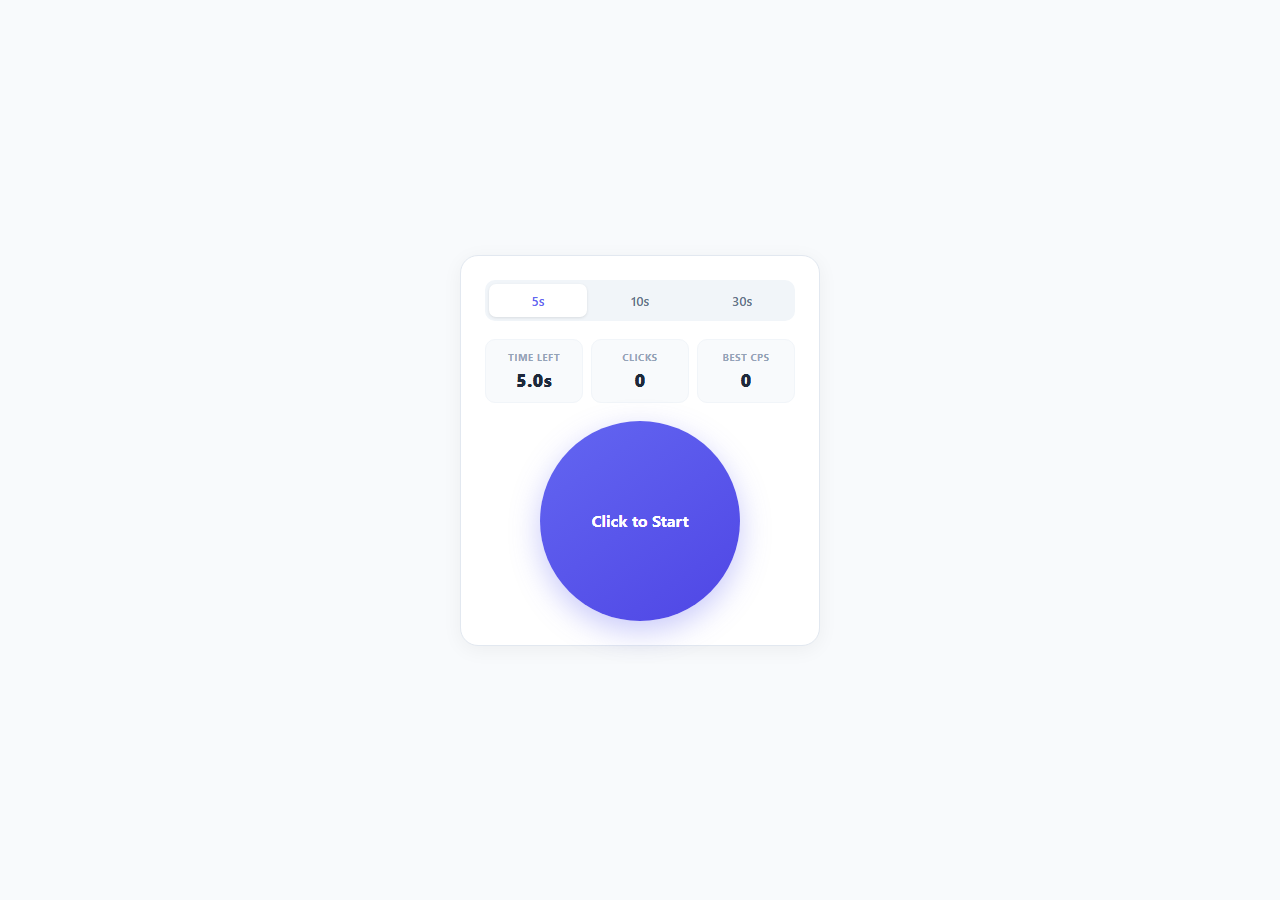
Click-speed tests (often searched as "CPS test" or "clicks per second test") are a small but genuinely popular novelty tool category, and building one correctly involves more timing precision than it first appears. This snippet implements a complete, accurate CPS counter in vanilla JavaScript: a selectable test duration, a live countdown, a running click tally, a calculated clicks-per-second result with a skill tier, and a persisted personal best stored in localStorage.
Accurate timing with performance.now(), not setInterval counting
A naive implementation might count down by decrementing a variable inside a one-second setInterval, but that approach drifts — setInterval is not guaranteed to fire at exactly the requested interval under load, and integer-second countdowns cannot express fractional time remaining. This snippet instead records a single startTime timestamp using performance.now() (a monotonic, sub-millisecond-precision clock unaffected by system clock adjustments) the instant the test begins, and every 50 milliseconds a lightweight tick() function recalculates remaining = duration - (performance.now() - startTime) / 1000 from scratch. Because the remaining time is always derived from the actual elapsed wall-clock time rather than accumulated by repeated subtraction, the countdown stays accurate even if a particular tick() call is delayed by the browser's event loop — the next tick simply recalculates correctly rather than compounding the drift.
Duration presets as a segmented control
Three duration presets (5, 10, and 30 seconds) are implemented as a segmented control of .dur-btn buttons sharing a single data-dur attribute convention. selectDuration() updates the shared duration variable, toggles the .active class based on a numeric comparison against data-dur, and calls resetPanel() to sync every dependent display (the countdown label, the stored best score for that specific duration) to the newly selected duration. Duration selection is locked out with b.disabled = true while a test is running, preventing a user from changing the test length mid-attempt and corrupting the result.
First-click-starts, then counts pattern
The single click target button does double duty: while idle, clicking it calls startTest(), which records the start timestamp and immediately counts that very click as click number one (clicks = 1, not zero) since the click that starts the timer is itself a genuine click within the test window. Every subsequent click while running is true simply increments the counter and updates the live display. Once the countdown reaches zero, finishTest() disables further clicks by adding a .disabled class (checked at the top of the click handler, guarding against a click landing in the tiny window between the timer expiring and the disabled class being applied) and calculates the final result.
CPS calculation and skill tiering
The final CPS figure is clicks / duration, rounded to two decimal places via Math.round(value * 100) / 100 to avoid floating-point noise in the display while retaining meaningful precision. tierFor() then buckets that number into one of four skill labels using simple threshold comparisons: under 4 CPS is "Average", 4 up to 7 is "Fast", 7 up to 10 is "Very Fast", and 10 or above is "Superhuman" — mirroring the informal tiers that click-speed-test sites commonly use, since human click rates rarely exceed roughly 10-14 clicks per second even with practiced techniques like jitter-clicking or butterfly-clicking.
Persisting a personal best per duration
Because CPS is duration-dependent (short bursts tend to score higher than sustained 30-second attempts), best scores are stored separately per duration using a composite key, cps-best-{duration}, in localStorage. setBest() only overwrites the stored value if the new score genuinely exceeds it, and getBest() parses the stored string back to a float for display — together these give each duration preset its own persistent, always-improving personal record across browser sessions.
Build with AI
Build, Understand, Optimize, and Extend It With AI
Paste this snippet's HTML, CSS and JS into an AI coding assistant like Claude and ask it to explain exactly why performance.now() plus delta recalculation avoids the countdown drift that a naive setInterval-decrement approach would introduce — it's a small but genuinely instructive timing pattern worth understanding well. You could also ask it to add a live CPS graph that plots your click rate over the test duration rather than only showing the final average, implement a "consistency score" that measures variance between successive click intervals rather than just raw count, or add keyboard-triggerable clicking (spacebar) as an alternate input method for accessibility testing. Each is a natural extension once the core timing and counting logic is already solid.
Prompt to recreate it
Copy this into your AI assistant of choice to build the effect from scratch, or as a jumping-off point for your own variant:
Build a click-speed test (CPS counter) in plain HTML, CSS, and JavaScript with accurate timing — no frameworks, no libraries.

Requirements:
- A segmented control offering at least three duration presets (e.g. 5s, 10s, 30s) that can only be changed while no test is currently running.
- A large clickable target area that, on its first click while idle, starts a fixed-duration timed test using a monotonic timestamp (performance.now()) rather than a naively decremented counter, so the countdown cannot drift under load.
- A live countdown display and a live running click counter, both updating smoothly (e.g. every 50ms) throughout the test.
- When the timer reaches zero, the target must become disabled immediately with no possibility of a late click still registering, and a results panel must appear showing total clicks, calculated CPS (clicks divided by duration in seconds), and a skill tier label derived from simple CPS thresholds (e.g. under 4 "Average", 4-7 "Fast", 7-10 "Very Fast", 10+ "Superhuman").
- Persist a best CPS score per duration preset (not a single combined best) using localStorage, updating it only when a new attempt genuinely exceeds the stored value.
- A "Try Again" action that fully resets click count, timer display, and target state for a new attempt at the currently selected duration.
- Ensure the very first click that starts the timer is itself counted as a click, not lost.
Want to tighten it up first? Run this prompt through the AI Prompt Studio to score it across 8 quality dimensions, catch anti-patterns, and tune the wording for Claude, ChatGPT, or Gemini before you paste it in.
Source Code
<div class="demo-wrap">
  <div class="test-panel">
    <div class="duration-select" id="duration-select">
      <button class="dur-btn active" data-dur="5">5s</button>
      <button class="dur-btn" data-dur="10">10s</button>
      <button class="dur-btn" data-dur="30">30s</button>
    </div>

    <div class="stat-row">
      <div class="stat-box">
        <span class="stat-label">Time Left</span>
        <span class="stat-value" id="stat-time">5.0s</span>
      </div>
      <div class="stat-box">
        <span class="stat-label">Clicks</span>
        <span class="stat-value" id="stat-clicks">0</span>
      </div>
      <div class="stat-box">
        <span class="stat-label">Best CPS</span>
        <span class="stat-value" id="stat-best">0</span>
      </div>
    </div>

    <button class="click-target" id="click-target">
      <span id="target-label">Click to Start</span>
    </button>

    <div class="results hidden" id="results">
      <p class="results-title">Results</p>
      <div class="results-grid">
        <div><span class="res-label">Total Clicks</span><span class="res-value" id="res-clicks">0</span></div>
        <div><span class="res-label">CPS</span><span class="res-value" id="res-cps">0</span></div>
        <div><span class="res-label">Tier</span><span class="res-value" id="res-tier">-</span></div>
      </div>
      <button class="btn-again" id="btn-again">Try Again</button>
    </div>
  </div>
</div>
* { box-sizing: border-box; margin: 0; padding: 0; }
body { font-family: system-ui, sans-serif; background: #f8fafc; min-height: 100vh; }
.demo-wrap { display: flex; align-items: center; justify-content: center; min-height: 100vh; padding: 32px 16px; }
.test-panel {
width: 100%; max-width: 360px; padding: 24px;
background: #fff; border-radius: 18px; border: 1px solid #e2e8f0;
box-shadow: 0 4px 20px rgba(0,0,0,0.05);
display: flex; flex-direction: column; gap: 18px; align-items: center;
}
.duration-select { display: flex; background: #f1f5f9; border-radius: 10px; padding: 4px; gap: 4px; width: 100%; }
.dur-btn {
flex: 1; padding: 8px; border: none; background: transparent; border-radius: 7px;
font-size: 13px; font-weight: 600; color: #64748b; cursor: pointer; font-family: inherit;
transition: all 0.15s;
}
.dur-btn.active { background: #fff; color: #6366f1; box-shadow: 0 1px 3px rgba(0,0,0,0.1); }
.dur-btn:disabled { cursor: not-allowed; opacity: 0.5; }
.stat-row { display: flex; gap: 8px; width: 100%; }
.stat-box { flex: 1; text-align: center; padding: 10px 6px; background: #f8fafc; border-radius: 10px; border: 1px solid #f1f5f9; }
.stat-label { display: block; font-size: 10px; font-weight: 700; color: #94a3b8; text-transform: uppercase; letter-spacing: 0.04em; margin-bottom: 4px; }
.stat-value { display: block; font-size: 18px; font-weight: 800; color: #1e293b; }
.click-target {
width: 200px; height: 200px; border-radius: 50%;
background: linear-gradient(145deg, #6366f1, #4f46e5);
color: #fff; border: none; cursor: pointer;
font-size: 16px; font-weight: 700; font-family: inherit;
display: flex; align-items: center; justify-content: center; text-align: center; padding: 20px;
box-shadow: 0 10px 30px rgba(99,102,241,0.35);
transition: transform 0.08s;
user-select: none;
}
.click-target:active { transform: scale(0.96); }
.click-target.disabled { background: #cbd5e1; box-shadow: none; cursor: not-allowed; }
.click-target.counting { animation: pulse 1s ease-in-out infinite; }
@keyframes pulse {
0%, 100% { box-shadow: 0 10px 30px rgba(99,102,241,0.35); }
50% { box-shadow: 0 10px 40px rgba(99,102,241,0.6); }
}
.results { width: 100%; display: flex; flex-direction: column; gap: 12px; align-items: center; }
.results-title { font-size: 13px; font-weight: 700; color: #94a3b8; text-transform: uppercase; letter-spacing: 0.05em; }
.results-grid { display: flex; gap: 10px; width: 100%; }
.results-grid > div { flex: 1; text-align: center; padding: 12px 6px; background: #eef2ff; border-radius: 10px; }
.res-label { display: block; font-size: 10px; font-weight: 700; color: #6366f1; text-transform: uppercase; margin-bottom: 4px; }
.res-value { display: block; font-size: 17px; font-weight: 800; color: #312e81; }
.btn-again { width: 100%; padding: 11px; border: none; border-radius: 9px; background: #6366f1; color: #fff; font-weight: 600; font-size: 14px; cursor: pointer; font-family: inherit; }
.btn-again:hover { background: #4f46e5; }
.hidden { display: none; }const STORAGE_PREFIX = 'cps-best-';
let duration = 5;
let clicks = 0;
let running = false;
let startTime = null;
let timerId = null;
function getBest(dur) {
const raw = localStorage.getItem(STORAGE_PREFIX + dur);
return raw ? parseFloat(raw) : 0;
}
function setBest(dur, cps) {
const current = getBest(dur);
if (cps > current) {
localStorage.setItem(STORAGE_PREFIX + dur, String(cps));
return cps;
}
return current;
}
function updateBestDisplay() {
document.getElementById('stat-best').textContent = getBest(duration).toFixed(1);
}
function tierFor(cps) {
if (cps < 4) return 'Average';
if (cps < 7) return 'Fast';
if (cps < 10) return 'Very Fast';
return 'Superhuman';
}
function resetPanel() {
clicks = 0;
running = false;
startTime = null;
clearInterval(timerId);
document.getElementById('stat-clicks').textContent = '0';
document.getElementById('stat-time').textContent = duration.toFixed(1) + 's';
document.getElementById('target-label').textContent = 'Click to Start';
document.getElementById('click-target').classList.remove('disabled', 'counting');
document.getElementById('results').classList.add('hidden');
document.querySelectorAll('.dur-btn').forEach(b => b.disabled = false);
updateBestDisplay();
}
function startTest() {
running = true;
clicks = 1; // this click counts as the first click
startTime = performance.now();
document.getElementById('stat-clicks').textContent = clicks;
document.getElementById('target-label').textContent = 'GO!';
document.getElementById('click-target').classList.add('counting');
document.querySelectorAll('.dur-btn').forEach(b => b.disabled = true);
timerId = setInterval(tick, 50);
}
function tick() {
const elapsed = (performance.now() - startTime) / 1000;
const remaining = Math.max(0, duration - elapsed);
document.getElementById('stat-time').textContent = remaining.toFixed(1) + 's';
if (remaining <= 0) {
finishTest();
}
}
function finishTest() {
clearInterval(timerId);
running = false;
document.getElementById('stat-time').textContent = '0.0s';
document.getElementById('click-target').classList.remove('counting');
document.getElementById('click-target').classList.add('disabled');
document.getElementById('target-label').textContent = 'Time\'s Up';
const cps = Math.round((clicks / duration) * 100) / 100;
const best = setBest(duration, cps);
document.getElementById('res-clicks').textContent = clicks;
document.getElementById('res-cps').textContent = cps.toFixed(2);
document.getElementById('res-tier').textContent = tierFor(cps);
document.getElementById('results').classList.remove('hidden');
document.getElementById('stat-best').textContent = best.toFixed(1);
}
function handleTargetClick() {
if (document.getElementById('click-target').classList.contains('disabled')) return;
if (!running) {
startTest();
return;
}
clicks++;
document.getElementById('stat-clicks').textContent = clicks;
}
function selectDuration(dur) {
if (running) return;
duration = dur;
document.querySelectorAll('.dur-btn').forEach(b => {
b.classList.toggle('active', Number(b.dataset.dur) === dur);
});
resetPanel();
}
document.getElementById('click-target').addEventListener('click', handleTargetClick);
document.getElementById('btn-again').addEventListener('click', resetPanel);
document.getElementById('duration-select').addEventListener('click', e => {
const btn = e.target.closest('.dur-btn');
if (btn) selectDuration(Number(btn.dataset.dur));
});
resetPanel();Step by step
How to Use
- 1Pick a test durationUse the 5s / 10s / 30s segmented control at the top to choose your test length before starting. Selecting a duration calls resetPanel() and updates the displayed Best CPS to that duration's stored personal record.
- 2Click the target to startThe large circular button reads "Click to Start" while idle. Your first click calls startTest(), records a performance.now() timestamp, and immediately counts as click number one — the timer and click counter both begin from that instant.
- 3Click as fast as you canEvery subsequent click while the test is running increments the live Clicks counter. The countdown in Time Left recalculates from the actual elapsed time every 50ms via performance.now(), so it stays accurate even under heavy click load.
- 4Read your resultsWhen the countdown hits zero, the target disables and a results panel shows Total Clicks, calculated CPS (clicks divided by duration in seconds), and a skill Tier label from tierFor() — Average, Fast, Very Fast, or Superhuman.
- 5Check your best scoresetBest() compares your new CPS against the localStorage-persisted record for that specific duration and updates it only if you beat it, so Best CPS always reflects your all-time high for the currently selected duration.
- 6Try againClick "Try Again" to call resetPanel(), which clears the click count, restores the idle target label, re-enables the duration buttons, and re-syncs the Best CPS display for another attempt at the same duration.
Real-world uses
Common Use Cases
Got questions?
Frequently Asked Questions
performance.now() returns a monotonic, sub-millisecond timestamp that is never affected by system clock changes (daylight saving adjustments, NTP corrections) the way Date.now() can be, and because tick() recalculates remaining time from the delta against a fixed startTime rather than decrementing a counter, the countdown cannot accumulate drift even if individual setInterval callbacks fire slightly late under browser load.
The click that starts the test counts as click number one — startTest() sets clicks = 1 rather than 0, because that click genuinely happened within the test window (at time zero). This matches how most click-speed-test tools behave and avoids under-counting a real click.
tierFor() uses four simple numeric bands: below 4 CPS is Average, 4 to under 7 is Fast, 7 to under 10 is Very Fast, and 10 or higher is Superhuman. These thresholds are editable constants in the function body — adjust them if you want stricter or more lenient tiers, for example to calibrate against a specific competitive benchmark.
CPS naturally trends higher on shorter bursts than sustained longer attempts, so comparing a 5-second best against a 30-second best would be misleading. Storing best scores under a duration-specific localStorage key (cps-best-5, cps-best-10, cps-best-30) keeps each duration's personal record meaningful and directly comparable only to attempts of the same length.
Yes. Add another .dur-btn element with its own data-dur value in the HTML, and the existing selectDuration() click delegation on #duration-select will handle it automatically with no JS changes needed. For a fully custom duration, replace the segmented control with a number input and call selectDuration(Number(input.value)) on change.