Source Code
<div class="lo-app">
  <div class="lo-header">
    <h2>Lights Out</h2>
    <div class="stats">
      <div class="stat"><span class="stat-label">Moves</span><span class="stat-val" id="lo-moves">0</span></div>
      <div class="stat"><span class="stat-label">Best</span><span class="stat-val" id="lo-best">--</span></div>
    </div>
  </div>

  <p class="lo-goal">Click a tile to toggle it and its neighbors. Turn every light off to win.</p>

  <div class="lo-grid" id="lo-grid"></div>

  <p class="lo-feedback" id="lo-feedback">Good luck.</p>

  <div class="lo-actions">
    <button class="ghost-btn" id="lo-reset">Reset puzzle</button>
    <button class="ghost-btn" id="lo-new">New puzzle</button>
  </div>
</div>
* { box-sizing: border-box; margin: 0; padding: 0; }
body { font-family: system-ui, sans-serif; background: #0f172a; min-height: 100vh; }
.lo-app { max-width: 380px; margin: 0 auto; padding: 32px 20px; display: flex; flex-direction: column; align-items: center; gap: 14px; }
.lo-header { width: 100%; display: flex; align-items: center; justify-content: space-between; }
.lo-header h2 { font-size: 19px; font-weight: 800; color: #f1f5f9; }
.stats { display: flex; gap: 10px; }
.stat { background: #1e293b; border: 1px solid #334155; border-radius: 12px; padding: 6px 14px; min-width: 56px; text-align: center; }
.stat-label { display: block; font-size: 9.5px; font-weight: 700; letter-spacing: 0.04em; text-transform: uppercase; color: #64748b; }
.stat-val { display: block; font-size: 15px; font-weight: 800; color: #facc15; }
.lo-goal { font-size: 13px; color: #94a3b8; text-align: center; line-height: 1.6; }
.lo-grid { display: grid; grid-template-columns: repeat(5, 1fr); gap: 6px; width: 100%; aspect-ratio: 1; }
.lo-cell {
border: none; border-radius: 8px; cursor: pointer;
background: #1e293b; box-shadow: inset 0 0 0 1px #334155;
transition: background 0.15s, box-shadow 0.15s, transform 0.1s;
}
.lo-cell:active { transform: scale(0.94); }
.lo-cell.on { background: #facc15; box-shadow: 0 0 18px rgba(250,204,21,0.55), inset 0 0 0 1px #eab308; }
.lo-feedback { font-size: 12.5px; font-weight: 600; color: #94a3b8; text-align: center; min-height: 16px; }
.lo-feedback.win { color: #4ade80; font-weight: 800; }
.lo-actions { display: flex; gap: 10px; }
.ghost-btn {
background: none; border: 1.5px solid #334155; border-radius: 10px;
padding: 8px 16px; font-size: 12px; font-weight: 700; color: #cbd5e1;
cursor: pointer; font-family: inherit; transition: border-color 0.15s, color 0.15s;
}
.ghost-btn:hover { border-color: #facc15; color: #facc15; }const SIZE = 5;
let board = new Array(SIZE * SIZE).fill(false);
let moves = 0;
let best = null;
let won = false;
let seed = [];
const gridEl = document.getElementById('lo-grid');
const movesEl = document.getElementById('lo-moves');
const bestEl = document.getElementById('lo-best');
const feedback = document.getElementById('lo-feedback');
function idx(r, c) { return r * SIZE + c; }
// Toggling a cell also toggles its orthogonal neighbors (the classic "plus" pattern).
function applyToggle(r, c, silent) {
const cells = [[r, c], [r - 1, c], [r + 1, c], [r, c - 1], [r, c + 1]];
cells.forEach(([rr, cc]) => {
if (rr >= 0 && rr < SIZE && cc >= 0 && cc < SIZE) {
board[idx(rr, cc)] = !board[idx(rr, cc)];
}
});
if (!silent) render();
}
function render() {
gridEl.querySelectorAll('.lo-cell').forEach((btn, i) => {
btn.classList.toggle('on', board[i]);
});
}
function buildGrid() {
gridEl.innerHTML = '';
for (let r = 0; r < SIZE; r++) {
for (let c = 0; c < SIZE; c++) {
const btn = document.createElement('button');
btn.className = 'lo-cell';
btn.type = 'button';
btn.addEventListener('click', () => onCellClick(r, c));
gridEl.appendChild(btn);
}
}
}
function onCellClick(r, c) {
if (won) return;
applyToggle(r, c, false);
moves++;
movesEl.textContent = String(moves);
checkWin();
}
function checkWin() {
if (board.every((v) => v === false)) {
won = true;
feedback.textContent = 'Solved in ' + moves + ' moves!';
feedback.className = 'lo-feedback win';
if (best === null || moves < best) {
best = moves;
bestEl.textContent = String(best);
}
} else {
feedback.textContent = 'Keep going.';
feedback.className = 'lo-feedback';
}
}
// Any sequence of toggles is its own inverse in this game, so generating a
// puzzle by applying N random toggles from the solved (all-off) state
// guarantees the result can always be solved again.
function generatePuzzle() {
board = new Array(SIZE * SIZE).fill(false);
seed = [];
const rounds = 12 + Math.floor(Math.random() * 6);
for (let i = 0; i < rounds; i++) {
const r = Math.floor(Math.random() * SIZE);
const c = Math.floor(Math.random() * SIZE);
seed.push([r, c]);
applyToggle(r, c, true);
}
if (board.every((v) => v === false)) {
// Extremely unlikely all-off shuffle landed back on solved — force one flip.
applyToggle(0, 0, true);
}
}
function startPuzzle(reuseSeed) {
won = false;
moves = 0;
movesEl.textContent = '0';
feedback.textContent = 'Good luck.';
feedback.className = 'lo-feedback';
if (reuseSeed) {
board = new Array(SIZE * SIZE).fill(false);
seed.forEach(([r, c]) => applyToggle(r, c, true));
} else {
generatePuzzle();
}
render();
}
document.getElementById('lo-reset').addEventListener('click', () => startPuzzle(true));
document.getElementById('lo-new').addEventListener('click', () => startPuzzle(false));
buildGrid();
startPuzzle(false);Learn Coding Visually
Learn to code with interactive, live-preview playgrounds — HTML, CSS, JavaScript, React & more.
 HTML Playground42 lessons · Click-based · Live preview
 CSS PlaygroundLearn CSS with a live editor
 JavaScript Playground60 lessons · DOM · Async · Canvas
 React PlaygroundLearn React with a live code editor
 GSAP PlaygroundLearn GSAP animation interactively
 SVG Playground44 lessons · shapes · paths · animation
 SCSS Playground45 lessons · Sass modules · tokens
 Tailwind PlaygroundLearn Tailwind CSS with a live editor
 Bootstrap 5 Playground50 lessons · live preview
What's included
Features
About this UI Snippet
Lights Out Puzzle Game — 5x5 Toggle Grid with Guaranteed-Solvable Generation
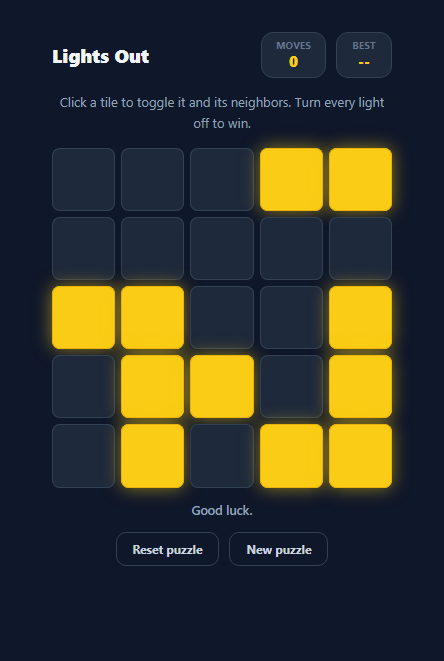
Lights Out is a classic electronic puzzle from the 1990s: a grid of lights where clicking one tile toggles it and its orthogonal neighbors, and the goal is to turn every light off. It is a pure logic puzzle rooted in linear algebra over GF(2) — every toggle is its own inverse, which makes it possible to generate a puzzle that is provably solvable without running any solver at all. This snippet implements a complete playable 5x5 board in vanilla JavaScript: click handling, the plus-shaped toggle rule, guaranteed-solvable puzzle generation, a move counter, and a best-score tracker.
The plus-shaped toggle rule
applyToggle(r, c) flips the clicked cell and its four orthogonal neighbors (up, down, left, right — never diagonals), skipping any neighbor that falls outside the SIZE x SIZE grid. This five-cell "plus" pattern is the entire rule set of the game. Every other mechanic — solvability, the win condition, puzzle generation — follows directly from how this one function behaves.
Why random toggles from the solved state always produce a solvable puzzle
Because every toggle operation is its own inverse (applying the same toggle twice returns a cell to its original state) and toggles commute with each other, any sequence of toggles applied to the solved, all-off board can be undone by applying the exact same sequence of toggles again, in any order. generatePuzzle() exploits this directly: it starts from an all-off board, records a random sequence of cell coordinates in seed, and applies each one silently. The resulting scrambled board is guaranteed solvable — no backtracking solver or brute-force search is needed to prove it, because the seed sequence itself is a valid solution.
Reset versus New Puzzle
The two action buttons expose this property directly. "Reset puzzle" replays the same seed array from a cleared board, restoring the identical starting position without re-randomizing it — useful if you want to retry a specific puzzle after a failed attempt. "New puzzle" calls generatePuzzle() again, producing a fresh random seed and therefore a fresh solvable puzzle.
Move counting and win detection
Every click that isn't ignored (input is locked once won is true) increments moves and re-renders the grid. checkWin() runs after every move and simply checks whether every entry in the board array is false — Lights Out has no partial-credit state, only fully off or not yet solved. When the board clears, the game locks input, shows the final move count, and updates best if this run beat the previous record for the session.
Rendering as toggled CSS classes, not redrawn DOM
buildGrid() creates the 25 button elements once, and every subsequent update only toggles the .on class via render() — the DOM nodes themselves are never rebuilt during play. This keeps the click handler wiring stable and avoids the flicker or lost focus state that full re-renders can introduce in a rapid-click puzzle game.
Build with AI
Build, Understand, Optimize, and Extend It With AI
Paste this snippet's HTML, CSS, and JS into an AI coding assistant like Claude and ask it to explain exactly why applying random toggles from the solved board guarantees the resulting puzzle is solvable, and how that connects to Lights Out being a linear system over GF(2). It's also a great candidate for extension — ask the assistant to add a "shortest solution" solver using Gaussian elimination over GF(2) so you can display the true minimum move count, add a hint button that reveals one correct next move toward that optimal solution, or persist the best score per grid size in localStorage.
Prompt to recreate it
Copy this into your AI assistant of choice to build the effect from scratch, or as a jumping-off point for your own variant:
Build a Lights Out puzzle game in plain HTML, CSS, and JavaScript — no libraries, no backend.

Requirements:
- Render a 5x5 grid of tile buttons, each either "on" (lit) or "off", built once and updated only by toggling a CSS class afterward.
- Clicking a tile must toggle that tile and its orthogonal (up, down, left, right — never diagonal) neighbors that exist within the grid bounds, using one shared toggle function.
- Generate a new puzzle by starting from the fully-off solved board and applying a random sequence of toggles to it, storing that exact sequence so it can be replayed later — explain in a comment why this guarantees the resulting puzzle is always solvable without needing a separate solver.
- Add a "Reset puzzle" button that restores the exact same scrambled starting position by replaying the stored random sequence from a cleared board, and a separate "New puzzle" button that generates a brand-new random sequence.
- Track and display a live move counter that increments on every accepted click, and detect a win the moment every tile in the grid is off, at which point further clicks should be ignored and the final move count shown.
- Track a best (lowest) moves-to-solve value across puzzles played in the current session and display it alongside the live counter.
Want to tighten it up first? Run this prompt through the AI Prompt Studio to score it across 8 quality dimensions, catch anti-patterns, and tune the wording for Claude, ChatGPT, or Gemini before you paste it in.
Step by step
How to Use
- 1Click any lit tileClicking a tile calls applyToggle(r, c), which flips that cell and its up/down/left/right neighbors — never diagonals.
- 2Watch the move counterEvery accepted click increments the moves stat shown in the header, live.
- 3Turn every light off to wincheckWin() runs after each move and checks board.every(v => v === false). Clearing the board locks the grid and shows your final move count.
- 4Reset to retry the same puzzleClick "Reset puzzle" to replay the same random seed array from a cleared board — useful for re-attempting a puzzle you scrambled up.
- 5Generate a new puzzleClick "New puzzle" to call generatePuzzle() again, which applies a fresh set of random toggles from the solved state.
- 6Tune the grid sizeChange the SIZE constant in the JS panel to build a 3x3, 4x4, or larger board — the toggle and win logic scale automatically.
Real-world uses
Common Use Cases
Got questions?
Frequently Asked Questions
applyToggle(r, c) flips the clicked cell and its up, down, left, and right neighbors (never diagonals), skipping any neighbor that falls outside the grid boundary. This five-cell plus pattern is the entire rule set of the game.
Every toggle in Lights Out is its own inverse and toggles commute, so any sequence of random toggles applied to the all-off solved board can always be undone by applying that exact same sequence again. generatePuzzle() records the random sequence it applies as seed, which doubles as a guaranteed valid solution.
Reset puzzle replays the stored seed array from a cleared board, restoring the exact same starting position. New Puzzle calls generatePuzzle() again to produce a brand-new random seed and a different scrambled board.
Yes. Change the SIZE constant in the JS panel. The board array, toggle logic, win check, and CSS grid-template-columns all reference SIZE, so a 3x3, 4x4, or 7x7 board works without further changes.
No, best is held in a plain JavaScript variable for the current session only. To persist it across visits, read and write the value to localStorage inside startPuzzle() and checkWin().
Yes, but this snippet does not compute it — it only verifies the seed sequence itself is a valid solution. Finding the minimum-move solution requires solving the underlying linear system over GF(2), which is a good extension exercise but outside the scope of the base game.