Source Code
<div class="mm-app">
  <div class="mm-header">
    <h2>Code Breaker</h2>
    <div class="stats">
      <div class="stat"><span class="stat-label">Guess</span><span class="stat-val" id="mm-turn">1/10</span></div>
    </div>
  </div>

  <p class="mm-goal">Crack the 4-peg secret code. Black pegs mean right color, right spot. White pegs mean right color, wrong spot.</p>

  <div class="mm-current" id="mm-current"></div>

  <div class="mm-palette" id="mm-palette"></div>

  <div class="mm-row-actions">
    <button class="ghost-btn" id="mm-clear">Clear</button>
    <button class="solid-btn" id="mm-submit">Submit guess</button>
  </div>

  <p class="mm-feedback" id="mm-feedback">Pick 4 colors, then submit.</p>

  <div class="mm-board" id="mm-board"></div>

  <div class="mm-actions">
    <button class="ghost-btn" id="mm-new">New code</button>
  </div>
</div>
* { box-sizing: border-box; margin: 0; padding: 0; }
body { font-family: system-ui, sans-serif; background: #f8fafc; min-height: 100vh; }
.mm-app { max-width: 420px; margin: 0 auto; padding: 32px 20px; display: flex; flex-direction: column; align-items: center; gap: 12px; }
.mm-header { width: 100%; display: flex; align-items: center; justify-content: space-between; }
.mm-header h2 { font-size: 19px; font-weight: 800; color: #1e293b; }
.stats { display: flex; gap: 10px; }
.stat { background: #fff; border: 1px solid #e2e8f0; border-radius: 12px; padding: 6px 14px; min-width: 56px; text-align: center; }
.stat-label { display: block; font-size: 9.5px; font-weight: 700; letter-spacing: 0.04em; text-transform: uppercase; color: #94a3b8; }
.stat-val { display: block; font-size: 14px; font-weight: 800; color: #6366f1; }
.mm-goal { font-size: 12.5px; color: #475569; text-align: center; line-height: 1.6; }
.mm-current { display: flex; gap: 8px; }
.mm-slot { width: 40px; height: 40px; border-radius: 50%; background: #e2e8f0; border: 2px dashed #cbd5e1; }
.mm-slot.filled { border-style: solid; }
.mm-palette { display: flex; gap: 8px; flex-wrap: wrap; justify-content: center; }
.mm-swatch { width: 32px; height: 32px; border-radius: 50%; border: 2px solid rgba(0,0,0,0.08); cursor: pointer; transition: transform 0.1s; }
.mm-swatch:hover { transform: scale(1.12); }
.mm-row-actions { display: flex; gap: 8px; }
.solid-btn {
background: #1e293b; color: #f1f5f9; border: none; border-radius: 10px;
padding: 9px 18px; font-size: 12.5px; font-weight: 700; cursor: pointer; font-family: inherit;
}
.solid-btn:hover { background: #334155; }
.solid-btn:disabled { opacity: 0.45; cursor: not-allowed; }
.mm-feedback { font-size: 12.5px; font-weight: 600; color: #64748b; text-align: center; min-height: 16px; }
.mm-feedback.win { color: #16a34a; font-weight: 800; }
.mm-feedback.lose { color: #dc2626; font-weight: 800; }
.mm-board { width: 100%; display: flex; flex-direction: column-reverse; gap: 6px; max-height: 260px; overflow-y: auto; }
.mm-guess-row { display: flex; align-items: center; justify-content: space-between; background: #fff; border: 1px solid #e2e8f0; border-radius: 10px; padding: 8px 12px; }
.mm-guess-pegs { display: flex; gap: 6px; }
.mm-peg { width: 20px; height: 20px; border-radius: 50%; border: 1px solid rgba(0,0,0,0.08); }
.mm-feedback-pegs { display: grid; grid-template-columns: repeat(2, 8px); gap: 4px; }
.mm-fpeg { width: 8px; height: 8px; border-radius: 50%; }
.mm-fpeg.black { background: #1e293b; }
.mm-fpeg.white { background: #fff; border: 1px solid #94a3b8; }
.mm-fpeg.none { background: transparent; }
.mm-actions { display: flex; gap: 10px; }
.ghost-btn {
background: none; border: 1.5px solid #e2e8f0; border-radius: 10px;
padding: 8px 16px; font-size: 12px; font-weight: 700; color: #475569;
cursor: pointer; font-family: inherit; transition: border-color 0.15s, color 0.15s;
}
.ghost-btn:hover { border-color: #6366f1; color: #6366f1; }const COLORS = ['#ef4444', '#f59e0b', '#eab308', '#22c55e', '#3b82f6', '#a855f7'];
const CODE_LENGTH = 4;
const MAX_TURNS = 10;
let secret = [];
let currentGuess = [];
let turn = 1;
let over = false;
const currentEl = document.getElementById('mm-current');
const paletteEl = document.getElementById('mm-palette');
const boardEl = document.getElementById('mm-board');
const feedback = document.getElementById('mm-feedback');
const turnEl = document.getElementById('mm-turn');
const submitBtn = document.getElementById('mm-submit');
function randomSecret() {
const code = [];
for (let i = 0; i < CODE_LENGTH; i++) {
code.push(COLORS[Math.floor(Math.random() * COLORS.length)]);
}
return code;
}
function buildPalette() {
paletteEl.innerHTML = '';
COLORS.forEach((color) => {
const sw = document.createElement('button');
sw.type = 'button';
sw.className = 'mm-swatch';
sw.style.background = color;
sw.addEventListener('click', () => addPeg(color));
paletteEl.appendChild(sw);
});
}
function renderCurrent() {
currentEl.innerHTML = '';
for (let i = 0; i < CODE_LENGTH; i++) {
const slot = document.createElement('div');
slot.className = 'mm-slot';
if (currentGuess[i]) {
slot.classList.add('filled');
slot.style.background = currentGuess[i];
}
currentEl.appendChild(slot);
}
submitBtn.disabled = currentGuess.length !== CODE_LENGTH || over;
}
function addPeg(color) {
if (over || currentGuess.length >= CODE_LENGTH) return;
currentGuess.push(color);
renderCurrent();
}
// Black pegs: correct color in the correct position.
// White pegs: correct color present elsewhere, matched one-for-one so a color
// already accounted for by a black or white peg cannot be reused.
function scoreGuess(guess) {
const secretLeft = [];
const guessLeft = [];
let black = 0;
for (let i = 0; i < CODE_LENGTH; i++) {
if (guess[i] === secret[i]) {
black++;
} else {
secretLeft.push(secret[i]);
guessLeft.push(guess[i]);
}
}
let white = 0;
guessLeft.forEach((color) => {
const pos = secretLeft.indexOf(color);
if (pos !== -1) {
white++;
secretLeft.splice(pos, 1);
}
});
return { black, white };
}
function renderRow(guess, score) {
const row = document.createElement('div');
row.className = 'mm-guess-row';
const pegs = document.createElement('div');
pegs.className = 'mm-guess-pegs';
guess.forEach((color) => {
const peg = document.createElement('span');
peg.className = 'mm-peg';
peg.style.background = color;
pegs.appendChild(peg);
});
const fpegs = document.createElement('div');
fpegs.className = 'mm-feedback-pegs';
const total = [];
for (let i = 0; i < score.black; i++) total.push('black');
for (let i = 0; i < score.white; i++) total.push('white');
while (total.length < CODE_LENGTH) total.push('none');
total.forEach((kind) => {
const f = document.createElement('span');
f.className = 'mm-fpeg ' + kind;
fpegs.appendChild(f);
});
row.appendChild(pegs);
row.appendChild(fpegs);
boardEl.appendChild(row);
}
function submitGuess() {
if (over || currentGuess.length !== CODE_LENGTH) return;
const score = scoreGuess(currentGuess);
renderRow(currentGuess, score);
if (score.black === CODE_LENGTH) {
over = true;
feedback.textContent = 'Code broken in ' + turn + ' guess' + (turn === 1 ? '' : 'es') + '!';
feedback.className = 'mm-feedback win';
} else if (turn >= MAX_TURNS) {
over = true;
feedback.textContent = 'Out of guesses. Click "New code" to try again.';
feedback.className = 'mm-feedback lose';
} else {
turn++;
turnEl.textContent = turn + '/' + MAX_TURNS;
feedback.textContent = score.black + ' black, ' + score.white + ' white. Keep guessing.';
feedback.className = 'mm-feedback';
}
currentGuess = [];
renderCurrent();
}
function newGame() {
secret = randomSecret();
currentGuess = [];
turn = 1;
over = false;
turnEl.textContent = turn + '/' + MAX_TURNS;
feedback.textContent = 'Pick 4 colors, then submit.';
feedback.className = 'mm-feedback';
boardEl.innerHTML = '';
renderCurrent();
}
document.getElementById('mm-submit').addEventListener('click', submitGuess);
document.getElementById('mm-clear').addEventListener('click', () => { currentGuess = []; renderCurrent(); });
document.getElementById('mm-new').addEventListener('click', newGame);
buildPalette();
newGame();Learn Coding Visually
Learn to code with interactive, live-preview playgrounds — HTML, CSS, JavaScript, React & more.
 HTML Playground42 lessons · Click-based · Live preview
 CSS PlaygroundLearn CSS with a live editor
 JavaScript Playground60 lessons · DOM · Async · Canvas
 React PlaygroundLearn React with a live code editor
 GSAP PlaygroundLearn GSAP animation interactively
 SVG Playground44 lessons · shapes · paths · animation
 SCSS Playground45 lessons · Sass modules · tokens
 Tailwind PlaygroundLearn Tailwind CSS with a live editor
 Bootstrap 5 Playground50 lessons · live preview
Mastermind Code Breaker Game — Free HTML CSS JS Snippet
Mastermind Code Breaker Game · Games · Plain HTML, CSS & JS · Live preview
What's included
Features
About this UI Snippet
Mastermind Code Breaker Game — Black/White Peg Deduction Logic in Vanilla JS
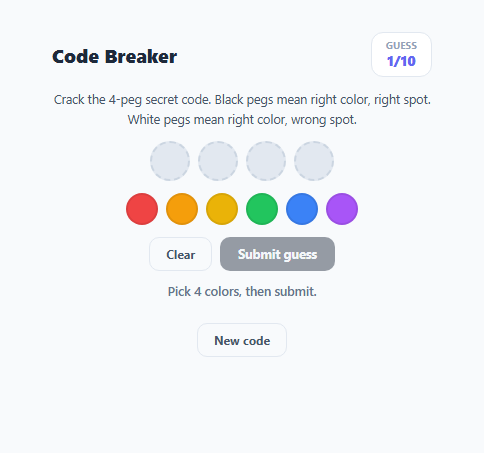
Mastermind is a classic code-breaking deduction game: the computer picks a hidden sequence of colored pegs, and the player tries to guess it within a limited number of attempts, receiving black and white peg feedback after every guess. Black means a color is in the exact right position; white means a color exists in the code but in the wrong position. This snippet implements the complete game loop — secret generation, guess building from a color palette, correct peg-counting logic (the trickiest part to get right), a scrollable guess history, and win/lose states — entirely in vanilla JavaScript.
Generating the secret code
randomSecret() picks CODE_LENGTH (4) colors independently at random from the COLORS palette, with repeats allowed — a real Mastermind code can and often does repeat a color, which is part of what makes deduction interesting. The secret is stored in a closured secret array and never rendered to the DOM, so it can't be read from the page source while playing.
The peg-counting algorithm: why a naive comparison is wrong
The subtle part of Mastermind is scoring white pegs correctly when colors repeat. A naive approach that just checks "does this guessed color exist anywhere in the secret" over-counts: if the secret has one red and the guess has three reds, only one white or black peg should be awarded for red, not three. scoreGuess() solves this with a two-pass approach. The first pass counts black pegs (exact position matches) and, for everything else, pushes the *unmatched* secret and guess colors into secretLeft and guessLeft arrays — removing already-matched positions from consideration entirely. The second pass walks guessLeft and, for each color, looks it up in secretLeft with indexOf; if found, it counts a white peg and splices that specific slot out of secretLeft so the same secret peg can never be claimed twice. This splice-on-match step is exactly what keeps repeated colors from being over-counted.
Building a guess from a palette, not a text input
Instead of typing colors, the player clicks swatches in .mm-palette to push colors onto a currentGuess array, rendered live into four .mm-slot circles. This keeps the interaction fast and mirrors the physical board-game experience of placing pegs, and it structurally prevents invalid input (typos, wrong color names) since only real palette colors can ever enter currentGuess.
Feedback pegs and turn limits
After each submitted guess, renderRow() appends a row to the guess history containing the guessed colors and up to four small feedback pegs — black pegs first, then white, then empty placeholders — matching the classic physical presentation. turn increments on every non-winning guess and the game ends in a loss once it reaches MAX_TURNS (10) without four black pegs, or ends in a win the instant score.black === CODE_LENGTH.
Build with AI
Build, Understand, Optimize, and Extend It With AI
Paste this snippet's HTML, CSS, and JS into an AI coding assistant like Claude and ask it to trace through scoreGuess() with a guess and secret that share a repeated color, to see exactly why the splice-based two-pass approach avoids over-counting white pegs. It is also a strong candidate for extension — ask the assistant to add a computer-opponent mode using the classic Knuth five-guess minimax algorithm, add difficulty presets that change CODE_LENGTH and the palette size together, or persist win/loss statistics across sessions with localStorage.
Prompt to recreate it
Copy this into your AI assistant of choice to build the effect from scratch, or as a jumping-off point for your own variant:
Build a Mastermind-style code breaker game in plain HTML, CSS, and JavaScript — no libraries, no backend.

Requirements:
- Generate a hidden secret sequence of 4 colors chosen independently at random from a palette of 6 colors, allowing repeats, and never expose it in the rendered DOM.
- Let the player build a guess by clicking color swatches, filling four visible guess slots one at a time, with a way to clear the current guess before submitting.
- On submit, score the guess against the secret using correct Mastermind rules: count a black peg for every position where the guessed color exactly matches the secret color at that position, and count a white peg for every remaining guessed color that exists somewhere else in the remaining (non-black-matched) secret positions — making sure a single secret peg can never be counted toward more than one feedback peg, even when colors repeat.
- Append each submitted guess and its resulting black/white feedback pegs to a scrollable guess history list, most recent guess at the top.
- Limit the game to 10 total guesses. Detect a win the instant a guess scores 4 black pegs, and detect a loss if the guess limit is reached without a win, disabling further input in both cases.
- Add a "New code" button that generates a fresh random secret and resets the turn counter and guess history.
Want to tighten it up first? Run this prompt through the AI Prompt Studio to score it across 8 quality dimensions, catch anti-patterns, and tune the wording for Claude, ChatGPT, or Gemini before you paste it in.
Step by step
How to Use
- 1Click colors to build a guessClick swatches in the palette to fill the four current-guess slots. Click Clear to start the row over.
- 2Submit the guessOnce all four slots are filled, click "Submit guess" to score it against the hidden secret via scoreGuess().
- 3Read the feedback pegsBlack pegs mean a color is in the exact right position; white pegs mean a color is in the code but the wrong position. Each color can only be claimed once per row.
- 4Keep guessing until solved or out of turnsYou get 10 guesses (MAX_TURNS). Getting four black pegs wins immediately; running out of turns ends the round.
- 5Review the guess historyThe scrollable board below the input keeps every previous guess and its feedback pegs visible, newest at the top.
- 6Start a new codeClick "New code" at any time to generate a fresh random secret via randomSecret() and reset the turn counter.
Real-world uses
Common Use Cases
Got questions?
Frequently Asked Questions
scoreGuess() first counts exact-position matches as black pegs and removes those positions from consideration. It then matches remaining guessed colors against remaining secret colors one at a time using indexOf, and splices each matched secret color out immediately so it cannot be claimed by a second white peg.
Yes. randomSecret() picks each of the four positions independently, so repeats are allowed, exactly like the physical Mastermind board game.
MAX_TURNS is set to 10. If you have not scored a full row of black pegs by your tenth submitted guess, the round ends in a loss and you can start a new code.
No, the secret array is not rendered into the DOM at any point during play, so it cannot be read from the rendered HTML — only from the JavaScript source itself if you inspect the code (as with any client-side game).
Increase CODE_LENGTH for a longer secret, add more entries to the COLORS array for more possible colors per slot, or lower MAX_TURNS to reduce the number of allowed guesses.
No. Each guessed position is classified as black, white, or neither exactly once. A position that scores black is removed from both the secret-left and guess-left pools before white pegs are counted, so it can never also contribute a white peg.