

Learn Coding Visually
Learn to code with interactive, live-preview playgrounds — HTML, CSS, JavaScript, React & more.
 HTML Playground42 lessons · Click-based · Live preview
 CSS PlaygroundLearn CSS with a live editor
 JavaScript Playground60 lessons · DOM · Async · Canvas
 React PlaygroundLearn React with a live code editor
 GSAP PlaygroundLearn GSAP animation interactively
 SVG Playground44 lessons · shapes · paths · animation
 SCSS Playground45 lessons · Sass modules · tokens
 Tailwind PlaygroundLearn Tailwind CSS with a live editor
 Bootstrap 5 Playground50 lessons · live preview
Simon Says Color Sequence Game — HTML CSS JS Snippet
Simon Says Color Sequence Game · Games · Plain HTML, CSS & JS · Live preview
What's included
Features
About this UI Snippet
Simon Says Color Sequence Game — Async Sequence Playback, Growing Memory Pattern & localStorage High Score
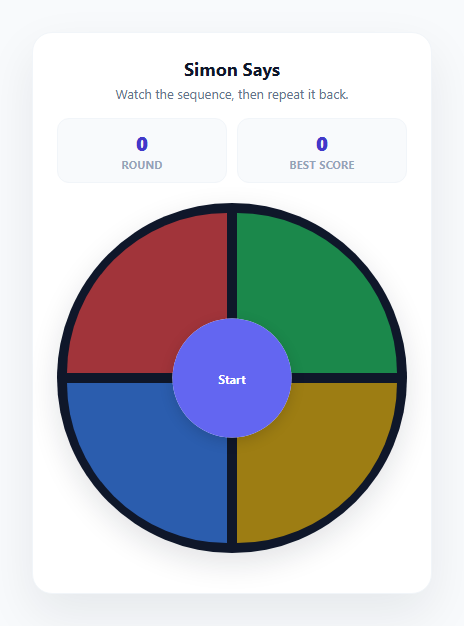
Simon is one of the most enduring memory-game formats in consumer electronics history, and rebuilding it in the browser is a genuinely useful exercise in managing asynchronous timing, game state, and user input validation together. This snippet implements the complete classic loop with four colored quadrant pads: the game plays back a growing sequence of color flashes, the player must repeat it back exactly, a correct repeat extends the sequence by one more random color, and a wrong input ends the game immediately with a final score. The best score persists across browser sessions using localStorage, so returning players always see their personal record.
Modeling the sequence as an array and driving playback with async/await
The entire game state lives in one growing array, sequence, which starts empty and gains one new random color (chosen from COLORS = ['red', 'green', 'blue', 'yellow'] via Math.floor(Math.random() * COLORS.length)) every round. Rather than chaining setTimeout callbacks — which quickly becomes unreadable once you need to flash four, five, or ten pads in order — the snippet wraps each pad flash in a Promise-returning helper, lightPad(color, duration), and awaits them one at a time inside an async function playSequence(). This means the playback logic reads top-to-bottom like synchronous code (for (let i = 0; i < sequence.length; i++) { await lightPad(sequence[i], 480); }) while still being fully non-blocking, and it is trivial to insert a pause between flashes or before the sequence starts by awaiting a small wait(ms) promise-timeout helper.
Locking input during playback
A critical correctness detail is that the four pad buttons must be genuinely unclickable while the sequence is animating — otherwise a fast or accidental click during playback could be misread as the player's first move. The snippet handles this with a combination of a playingBack boolean guard checked at the top of handlePadClick() and setting the actual disabled attribute on every pad button via setPadsEnabled(false) for the duration of playSequence(). Only after the full sequence has finished flashing does acceptingInput flip to true, playerIndex reset to 0, and the pads re-enable, ensuring player input can only ever be interpreted against a sequence that has fully finished displaying.
Validating player input against the sequence
As the player clicks pads, handlePadClick(color) compares the clicked color against sequence[playerIndex] — the expected next color in the sequence. A match increments playerIndex; a mismatch immediately calls endGame(), ending the round on the very first wrong click rather than waiting for the player to finish an incorrect attempt. If playerIndex reaches sequence.length, the player has correctly repeated the entire sequence, so the pads disable again and, after a brief pause, nextRound() pushes one more random color onto the sequence and replays the whole extended sequence from the beginning — the defining "growing memory pattern" mechanic that makes Simon progressively harder.
Best score persistence with localStorage
On page load, loadBest() reads a stored value from localStorage.getItem('simon-best-score'), parses it as an integer (defaulting to 0 if nothing is stored or the value is invalid), and displays it in the Best Score stat tile. Whenever a game ends with a score higher than the currently stored best, saveBest() writes the new value back to localStorage immediately, so the record persists across page refreshes and future browser sessions without needing any backend. The score itself is calculated as sequence.length - 1, since a wrong click on round N means the player successfully completed N-1 full rounds before failing.
Visual feedback: quadrant layout and lit-pad glow
The four pads are arranged as CSS-rounded quadrants of a circle using border-radius set independently on each corner (100% 0 0 0 for the top-left pad, and so on), recreating the classic circular Simon console shape entirely with CSS, no image assets required. A center circle houses the Start button. When a pad is part of an active flash — whether during automated playback or as instant feedback on a player click — it gains a .lit class that boosts opacity, applies a filter: brightness(1.35) saturate(1.2), and adds an inset glow using box-shadow: 0 0 24px currentColor inset, giving each color pad a distinct colored glow that matches its own hue.
Build with AI
Build, Understand, Optimize, and Extend It With AI
Paste this snippet's HTML, CSS, and JS into an AI coding assistant like Claude and ask it to explain how the playingBack and acceptingInput flags together prevent race conditions between the automated sequence playback and player clicks, and how the async/await pattern in playSequence() replaces what would otherwise be deeply nested setTimeout callbacks. It's also a good snippet to extend with an assistant's help — ask for a difficulty setting that speeds up the flash duration as rounds increase, a strict mode where a single mistake resets the whole game rather than just ending the current run, or a sound-based version using the Web Audio API to play a distinct tone per color alongside the visual flash, closer to the original electronic toy. Because the game state is fully contained in a handful of well-named variables, it is also straightforward to ask for a version refactored into a reusable class or React hook.
Prompt to recreate it
Copy this into your AI assistant of choice to build the effect from scratch, or as a jumping-off point for your own variant:
Build a Simon Says style color sequence memory game in plain HTML, CSS, and JavaScript with four colored pads, growing sequences, and a persisted best score — no external libraries or sound files required.

Requirements:
- Four distinct colored pad buttons arranged as quadrants (for example in a circle or 2x2 grid), plus a Start control that begins a new game.
- On starting a game, generate a sequence of one random color, then play it back by visually lighting each pad in order (using a class toggle or similar, not opacity 0 tricks that break click targets) with a brief pause between each flash, during which all pads must be genuinely unclickable/disabled.
- After playback finishes, allow the player to click the pads to repeat the sequence; each click must be checked immediately against the expected next color, ending the game right away on the first incorrect click rather than waiting for the full attempt to finish.
- On a fully correct repeat of the current sequence, append one additional random color to the sequence and replay the entire new, longer sequence from the beginning, so each round is strictly one step harder than the last.
- Track and display the current round or score during play, and on game over show a clear "Game Over — Score: N" message along with a way to immediately start a new game.
- Persist the best score achieved across sessions using localStorage, loading it on page start and updating it only when a new run's score exceeds the previously stored best.
- Ensure rapid or mistimed clicks never cause the game state (sequence position, playback lock) to desync, even if the player clicks a pad the instant before or after playback finishes.
Want to tighten it up first? Run this prompt through the AI Prompt Studio to score it across 8 quality dimensions, catch anti-patterns, and tune the wording for Claude, ChatGPT, or Gemini before you paste it in.
Source Code
<div class="simon-card">
  <div class="card-header">
    <h2 class="card-title">Simon Says</h2>
    <p class="card-sub" id="card-sub">Watch the sequence, then repeat it back.</p>
  </div>

  <div class="stat-row">
    <div class="stat">
      <span class="stat-value" id="stat-round">0</span>
      <span class="stat-label">Round</span>
    </div>
    <div class="stat">
      <span class="stat-value" id="stat-best">0</span>
      <span class="stat-label">Best Score</span>
    </div>
  </div>

  <div class="simon-board">
    <button class="pad pad-red" id="pad-red" data-color="red" aria-label="Red"></button>
    <button class="pad pad-green" id="pad-green" data-color="green" aria-label="Green"></button>
    <button class="pad pad-blue" id="pad-blue" data-color="blue" aria-label="Blue"></button>
    <button class="pad pad-yellow" id="pad-yellow" data-color="yellow" aria-label="Yellow"></button>
    <div class="simon-center">
      <button class="btn-start" id="btn-start">Start</button>
    </div>
  </div>

  <div class="game-over-banner" id="game-over-banner">
    <p class="banner-title" id="banner-title">Game Over — Score: 0</p>
    <button class="btn-restart" id="btn-restart">Play Again</button>
  </div>
</div>
* { box-sizing: border-box; margin: 0; padding: 0; }
body { font-family: system-ui, sans-serif; background: #f8fafc; min-height: 100vh; display: flex; align-items: center; justify-content: center; padding: 24px; }
.simon-card {
width: 400px; max-width: 100%;
background: #ffffff; border-radius: 20px;
padding: 24px; box-shadow: 0 20px 50px rgba(15, 23, 42, 0.08);
border: 1px solid #f1f5f9;
}
.card-header { text-align: center; margin-bottom: 16px; }
.card-title { font-size: 18px; font-weight: 700; color: #0f172a; margin-bottom: 4px; }
.card-sub { font-size: 13px; color: #64748b; }
.stat-row { display: flex; gap: 10px; margin-bottom: 20px; }
.stat { flex: 1; background: #f8fafc; border-radius: 12px; padding: 10px; text-align: center; border: 1px solid #f1f5f9; }
.stat-value { display: block; font-size: 20px; font-weight: 800; color: #4338ca; font-variant-numeric: tabular-nums; }
.stat-label { display: block; font-size: 10.5px; font-weight: 700; letter-spacing: 0.05em; text-transform: uppercase; color: #94a3b8; margin-top: 2px; }
.simon-board {
position: relative;
display: grid; grid-template-columns: 1fr 1fr; grid-template-rows: 1fr 1fr;
gap: 10px; aspect-ratio: 1; border-radius: 50%;
overflow: hidden; box-shadow: 0 10px 30px rgba(15, 23, 42, 0.12);
padding: 10px; background: #0f172a;
}
.pad { border: none; cursor: pointer; opacity: 0.65; transition: opacity 0.1s, filter 0.1s; }
.pad-red { background: #ef4444; border-radius: 100% 0 0 0; }
.pad-green { background: #22c55e; border-radius: 0 100% 0 0; }
.pad-blue { background: #3b82f6; border-radius: 0 0 0 100%; }
.pad-yellow { background: #eab308; border-radius: 0 0 100% 0; }
.pad.lit { opacity: 1; filter: brightness(1.35) saturate(1.2); box-shadow: 0 0 24px currentColor inset; }
.pad-red.lit { color: #ef4444; }
.pad-green.lit { color: #22c55e; }
.pad-blue.lit { color: #3b82f6; }
.pad-yellow.lit { color: #eab308; }
.pad:disabled { cursor: default; }
.simon-center {
position: absolute; top: 50%; left: 50%; transform: translate(-50%, -50%);
width: 34%; aspect-ratio: 1; border-radius: 50%;
background: #ffffff; box-shadow: 0 4px 14px rgba(0,0,0,0.15);
display: flex; align-items: center; justify-content: center;
}
.btn-start {
width: 100%; height: 100%; border-radius: 50%; border: none;
background: #6366f1; color: #fff; font-weight: 700; font-size: 12px;
cursor: pointer; font-family: inherit; transition: background 0.15s;
}
.btn-start:hover { background: #4f46e5; }
.btn-start:disabled { background: #cbd5e1; cursor: default; }
.game-over-banner {
margin-top: 16px; text-align: center;
max-height: 0; overflow: hidden; opacity: 0;
transition: max-height 0.25s ease, opacity 0.25s ease;
}
.game-over-banner.show { max-height: 100px; opacity: 1; margin-top: 16px; }
.banner-title { font-size: 14px; font-weight: 700; color: #ef4444; margin-bottom: 10px; }
.btn-restart {
background: #6366f1; color: #fff; border: none; border-radius: 9px;
padding: 9px 18px; font-size: 12.5px; font-weight: 600; font-family: inherit;
cursor: pointer; transition: background 0.15s;
}
.btn-restart:hover { background: #4f46e5; }const COLORS = ['red', 'green', 'blue', 'yellow'];
const BEST_KEY = 'simon-best-score';
const pads = {
red: document.getElementById('pad-red'),
green: document.getElementById('pad-green'),
blue: document.getElementById('pad-blue'),
yellow: document.getElementById('pad-yellow'),
};
const startBtn = document.getElementById('btn-start');
const restartBtn = document.getElementById('btn-restart');
const cardSub = document.getElementById('card-sub');
const statRound = document.getElementById('stat-round');
const statBest = document.getElementById('stat-best');
const gameOverBanner = document.getElementById('game-over-banner');
const bannerTitle = document.getElementById('banner-title');
let sequence = [];
let playerIndex = 0;
let round = 0;
let bestScore = 0;
let acceptingInput = false;
let playingBack = false;
function loadBest() {
// localStorage throws (not just fails) in a sandboxed iframe without
// allow-same-origin, in Safari private browsing, and under some strict
// CSPs -- catch it so the game still runs, just without persistence there.
try {
const stored = localStorage.getItem(BEST_KEY);
bestScore = stored ? parseInt(stored, 10) || 0 : 0;
} catch (e) {
bestScore = 0;
}
statBest.textContent = bestScore;
}
function saveBest() {
try {
localStorage.setItem(BEST_KEY, String(bestScore));
} catch (e) {
// Storage unavailable -- bestScore still updates for this session below.
}
statBest.textContent = bestScore;
}
function lightPad(color, duration) {
return new Promise(resolve => {
const pad = pads[color];
pad.classList.add('lit');
setTimeout(() => {
pad.classList.remove('lit');
setTimeout(resolve, 150);
}, duration);
});
}
async function playSequence() {
playingBack = true;
acceptingInput = false;
setPadsEnabled(false);
cardSub.textContent = 'Watch carefully...';
await wait(500);
for (let i = 0; i < sequence.length; i++) {
await lightPad(sequence[i], 480);
}
playingBack = false;
acceptingInput = true;
playerIndex = 0;
setPadsEnabled(true);
cardSub.textContent = 'Your turn — repeat the sequence';
}
function wait(ms) {
return new Promise(resolve => setTimeout(resolve, ms));
}
function setPadsEnabled(enabled) {
Object.values(pads).forEach(pad => { pad.disabled = !enabled; });
}
function nextRound() {
round += 1;
statRound.textContent = round;
sequence.push(COLORS[Math.floor(Math.random() * COLORS.length)]);
playSequence();
}
function handlePadClick(color) {
if (!acceptingInput || playingBack) return;
const pad = pads[color];
pad.classList.add('lit');
setTimeout(() => pad.classList.remove('lit'), 220);
if (color !== sequence[playerIndex]) {
endGame();
return;
}
playerIndex += 1;
if (playerIndex === sequence.length) {
acceptingInput = false;
setPadsEnabled(false);
setTimeout(nextRound, 700);
}
}
function endGame() {
acceptingInput = false;
setPadsEnabled(false);
const score = Math.max(0, sequence.length - 1);
if (score > bestScore) {
bestScore = score;
saveBest();
}
bannerTitle.textContent = 'Game Over — Score: ' + score;
gameOverBanner.classList.add('show');
cardSub.textContent = 'Watch the sequence, then repeat it back.';
startBtn.disabled = false;
startBtn.textContent = 'Start';
}
function startGame() {
sequence = [];
round = 0;
playerIndex = 0;
gameOverBanner.classList.remove('show');
statRound.textContent = '0';
startBtn.disabled = true;
startBtn.textContent = '...';
nextRound();
}
Object.entries(pads).forEach(([color, pad]) => {
pad.addEventListener('click', () => handlePadClick(color));
});
startBtn.addEventListener('click', startGame);
restartBtn.addEventListener('click', startGame);
setPadsEnabled(false);
loadBest();Step by step
How to Use
- 1Click Start to beginClicking the center Start button calls startGame(), which resets the sequence array, round counter, and player index, then immediately calls nextRound() to add the first random color and begin playback.
- 2Watch the sequence playplaySequence() disables all pads and lights each color in sequence order using async/await over the lightPad() promise helper, with a short pause between flashes so each color is clearly distinguishable before the next one lights up.
- 3Repeat the sequence backOnce playback finishes, the pads re-enable and cardSub changes to "Your turn". Click the pads in the same order they flashed — handlePadClick() checks each click against sequence[playerIndex] and advances only on a correct match.
- 4Advance to the next roundCompleting the full sequence correctly triggers nextRound() after a short delay, which appends one more random color and replays the entire extended sequence from the start — this is what makes each round strictly harder than the last.
- 5See your score on a wrong clickClicking the wrong pad at any point immediately ends the game via endGame(), which shows a "Game Over — Score: N" banner where N is the number of rounds successfully completed, and updates the Best Score tile if this run set a new personal record.
- 6Restart and check your persisted best scoreClick "Play Again" on the game-over banner to call startGame() again. The Best Score tile is read from localStorage on page load via loadBest(), so your personal record survives page refreshes and future visits to the page.
Real-world uses
Common Use Cases
Got questions?
Frequently Asked Questions
Two mechanisms work together: a playingBack boolean is checked at the very start of handlePadClick() and immediately exits if true, and every pad button also has its disabled attribute set to true via setPadsEnabled(false) for the full duration of playSequence(). Because the pads are genuinely disabled at the DOM level, even rapid or accidental clicks during playback produce no click event at all, not just an ignored one.
Chaining multiple setTimeout calls to flash colors in order quickly becomes deeply nested and hard to follow, especially once you want to insert consistent pauses between each flash. By wrapping a single flash in a function that returns a Promise (lightPad()), the playback loop can use a normal for loop with await, so the code reads sequentially top to bottom while still remaining fully non-blocking for the rest of the page.
The score equals sequence.length - 1 at the moment of a wrong click. This is because sequence.length reflects the round currently being attempted (including the new color just added for that round), and the player failed to complete it, so they successfully finished sequence.length - 1 full rounds before the mistake. This value is what appears in the "Game Over — Score: N" banner and is compared against the stored best score.
No. The best score is stored using localStorage, which is scoped to the specific browser and device it was set in — it does not sync across devices or browsers automatically. To share a best score across devices, you would need to sync the value to a backend database keyed to a logged-in user account instead of relying solely on localStorage.
Yes. Add a new entry to the COLORS array, a corresponding pad button in the HTML with a matching id and data-color attribute, an entry in the pads object in the JS panel, and CSS rules for its background color and quadrant border-radius shape. You will likely also want to adjust the CSS grid layout from a 2x2 arrangement to accommodate additional pads, for example a hexagonal or circular arrangement for six colors.