You Might Also Like
Learn Coding Visually
Learn to code with interactive, live-preview playgrounds — HTML, CSS, JavaScript, React & more.
 HTML Playground42 lessons · Click-based · Live preview
 CSS PlaygroundLearn CSS with a live editor
 JavaScript Playground60 lessons · DOM · Async · Canvas
 React PlaygroundLearn React with a live code editor
 GSAP PlaygroundLearn GSAP animation interactively
 SVG Playground44 lessons · shapes · paths · animation
 SCSS Playground45 lessons · Sass modules · tokens
 Tailwind PlaygroundLearn Tailwind CSS with a live editor
 Bootstrap 5 Playground50 lessons · live preview
Terminal Command Game — Free HTML CSS JS Snippet
Terminal Command Game · Games · Plain HTML, CSS & JS · Live preview
What's included
Features
About this UI Snippet
Terminal Command Game — Regex-Graded Shell Tasks, Simulated Output & An Explanation After Every Solve
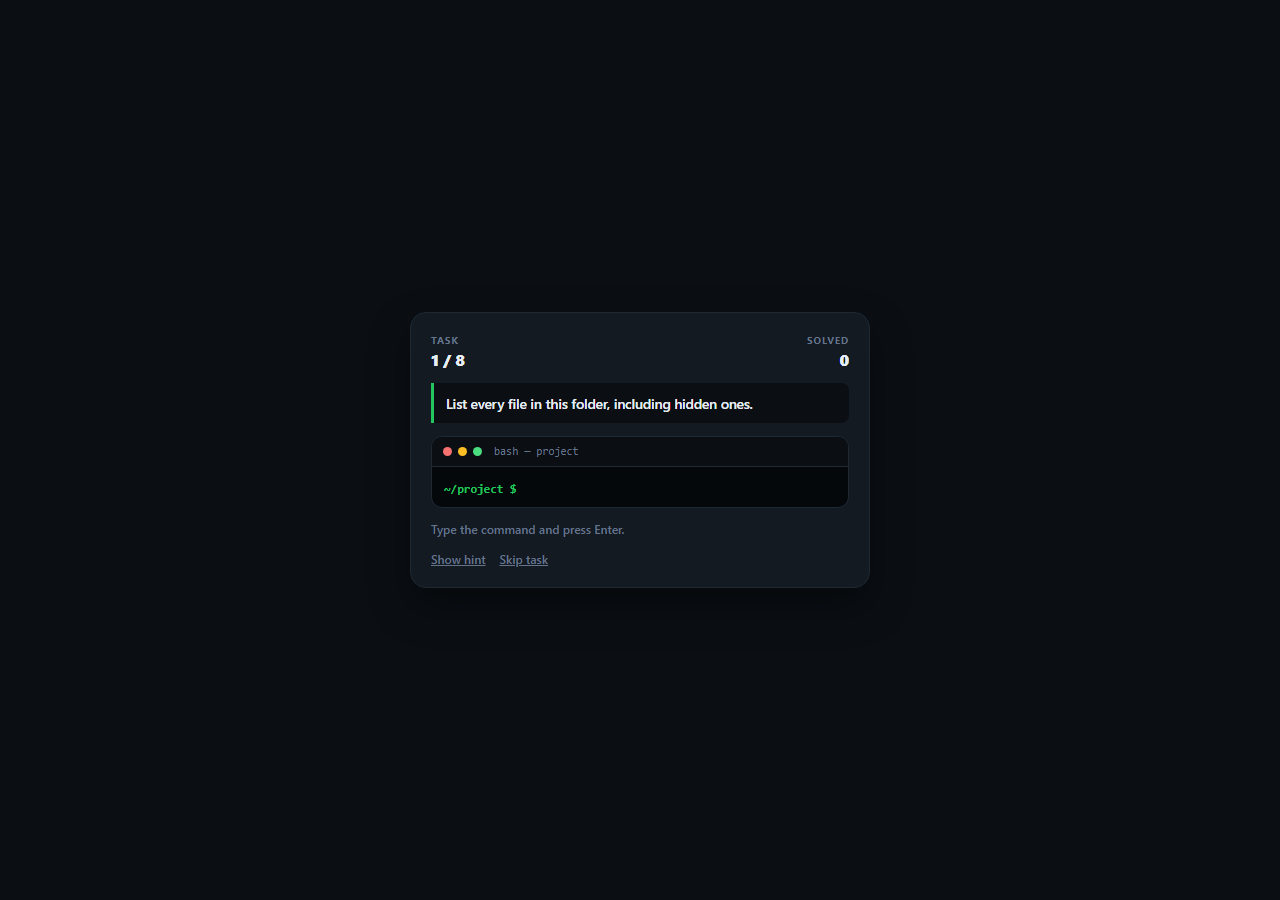
Command-line fluency is built from a few dozen commands used often enough to become muscle memory, and the fastest way to build it is to be given a goal rather than a command to copy. This snippet is a playable terminal trainer: each task states an outcome in plain English — list hidden files, search a tree for TODO, make a script executable — and the player types the command they think does it into a working terminal UI, which echoes the input, prints plausible output, and explains what the command actually did.
Grading with regular expressions, not string equality
Real shell usage does not have one canonical spelling. ls -a and ls -la both list hidden files; tail -n 20 app.log and tail -20 app.log are equivalent; grep -rn "TODO" . is as valid as grep -r TODO .. Each task therefore carries an accept array of regex patterns rather than a literal answer, and the patterns are written to tolerate flag order, combined short flags, optional quoting, and trailing slashes on directory names. A lookahead such as -(?=[al]*a)[al]+ accepts any combination of a and l flags as long as a is present, which is exactly the rule the task actually cares about.
Normalising before matching
normalise() trims the input and collapses every run of whitespace to a single space before any pattern runs, so ls -a with stray spacing grades identically to ls -a. Doing this once, in one place, keeps every regex simpler — no pattern needs to litter itself with \s+ alternatives for spacing the player might have typed. It is also the correct order of operations: normalise the input, then test it, rather than trying to write patterns tolerant of arbitrary formatting.
A terminal that behaves like a terminal
Submitted commands are echoed after the prompt exactly as typed, output lines print beneath, and the scroll container is pinned to the bottom on every write so the newest line is always visible. Clicking anywhere in the terminal focuses the input, which is the small affordance that makes a simulated terminal feel real rather than like a form field with a monospace font. Output is written with textContent on generated elements rather than by concatenating HTML, so a player who types something containing angle brackets sees their own text rather than injecting markup.
Explanations that generalise past the answer
Every solved task prints a why line explaining not just what the command did but the rule behind it — that -a reveals dot-prefixed entries because that is how hidden files are marked on Unix, that cp refuses directories without -r, that quoting "*.log" stops the shell expanding the glob before find ever receives it. That last one is the kind of detail that turns a command someone copied into a command they understand, and it is the reason the same command sometimes behaves differently in a different folder.
Task data drives everything
Each task is a single object with the plain-English goal, the accept patterns, the simulated output lines, a hint, and the explanation. Adding a task is one array entry — the counter in the header, the end-of-round reset, and the skip and hint buttons all derive from the array — and no command is ever executed anywhere, since the "output" is authored text chosen to look like the real thing.
Build with AI
Build, Understand, Optimize, and Extend It With AI
Paste this snippet into an AI assistant like Claude and ask it to add command history navigation with the up and down arrow keys plus a simple tab-completion for the file names mentioned in the current task — both are things a real shell does that players immediately reach for, and both are small, self-contained state problems. Other good extensions: add a simulated filesystem object that commands actually mutate so mkdir and cp change what a later ls prints, add a piping task set (grep piped into wc -l) with patterns that accept either order of equivalent pipelines, track per-command accuracy in localStorage to surface which commands need practice, or fork the task list into a git edition covering branch, rebase and reset.
Prompt to recreate it
Copy this into your AI assistant of choice to build the effect from scratch, or as a jumping-off point for your own variant:
Build a playable terminal command training game in plain HTML, CSS, and JavaScript — no frameworks or libraries, and without executing anything.

Requirements:
- A TASKS array where each entry has a plain-English goal (state the OUTCOME, never the command), an accept array of regex source strings, an array of authored output lines to print on success, a hint, and an explanation of the rule behind the command.
- Cover the core of everyday shell work: listing hidden files, printing the working directory, creating a directory, recursively searching for text, tailing the last N lines of a log, making a script executable, recursively copying a folder, and finding files by glob.
- Grade with regular expressions rather than string equality so every valid form passes — ls -a and ls -la, tail -n 20 and tail -20, quoted and unquoted globs, optional trailing slashes on directory arguments, and any order of combined short flags.
- Normalise the input once before matching (trim, collapse runs of whitespace to a single space) so no accept pattern has to handle arbitrary spacing.
- Render a terminal window with title-bar chrome, a prompt line with an inline input, an output stream that echoes the raw typed command, auto-scroll to the newest line, and click-anywhere-in-the-terminal to focus the input.
- Write all output with textContent on generated elements so typed angle brackets cannot inject markup.
- After a correct answer, print the simulated output followed by an explanation of the underlying rule — why cp needs -r, why a find glob should be quoted, what -a means on a Unix filesystem — then advance. Include hint and skip actions that print into the terminal stream rather than into a popup, plus task and solved counters.
Want to tighten it up first? Run this prompt through the AI Prompt Studio to score it across 8 quality dimensions, catch anti-patterns, and tune the wording for Claude, ChatGPT, or Gemini before you paste it in.
Step by step
How to Use
- 1Read the task, not a commandEach task states an outcome in plain English — list hidden files, show the last 20 lines of a log, make a script executable — so you have to recall the command rather than copy one.
- 2Type into the terminal and press EnterClicking anywhere in the terminal window focuses the input. Your command is echoed after the prompt exactly as typed, the way a real shell does.
- 3Get credit for any valid formAnswers are graded with regular expressions, so ls -a and ls -la both pass, tail -n 20 and tail -20 are equivalent, and quoting or a trailing slash on a directory name does not matter.
- 4Read the explanation after a solveA correct command prints plausible output followed by a green explanation of the rule behind it — why cp needs -r for directories, why the glob in find should be quoted, what -a actually means on a Unix filesystem.
- 5Take a hint if you are stuckShow hint prints a nudge into the terminal itself rather than a popup, describing the command's purpose without giving the exact syntax away.
- 6Work through all eight tasksTasks cover ls, pwd, mkdir, grep, tail, chmod, cp and find — the core of everyday shell work. Completing the last one resets the terminal for another pass.
Real-world uses
Common Use Cases
Got questions?
Frequently Asked Questions
No. Nothing is executed anywhere — each task carries authored output lines chosen to look like real shell output, and grading is a regex test against the typed string. That is what makes it safe to practise commands you would not want a learner running against a real filesystem.
Because most shell tasks have several correct spellings. ls -a and ls -la both list hidden files, tail -n 20 and tail -20 are the same request, and quoting a glob is optional in some shells. Each task holds an array of accept patterns written to tolerate flag order, combined short flags, optional quotes and trailing slashes, so a valid command is not rejected on formatting.
It trims the input and collapses every run of whitespace to a single space, so "ls -a" grades identically to "ls -a". Doing that once means no accept pattern has to account for arbitrary spacing, which keeps the patterns readable and stops them from quietly disagreeing with each other about whitespace.
Push an object onto TASKS with five keys: task (the plain-English goal), accept (an array of regex source strings), output (an array of lines to print on success), hint (a nudge that stops short of the syntax), and why (the explanation printed after a solve). Write accept patterns anchored with ^ and $, and remember the input has already been whitespace-normalised.
Yes. Keep TASKS and the normalise/matches helpers in a plain module, hold the line history and current task index in component state, and render history lines from that array instead of appending DOM nodes — that also removes the manual scroll management if you keep a ref and scroll to the bottom in an effect after each append. The post-solve setTimeout should be cleared on unmount (useEffect cleanup, onUnmounted, ngOnDestroy) so a task advance cannot fire after the component is gone.